
Mcpsnoop Open Source: Create a Wireshark for the MCP Protocol
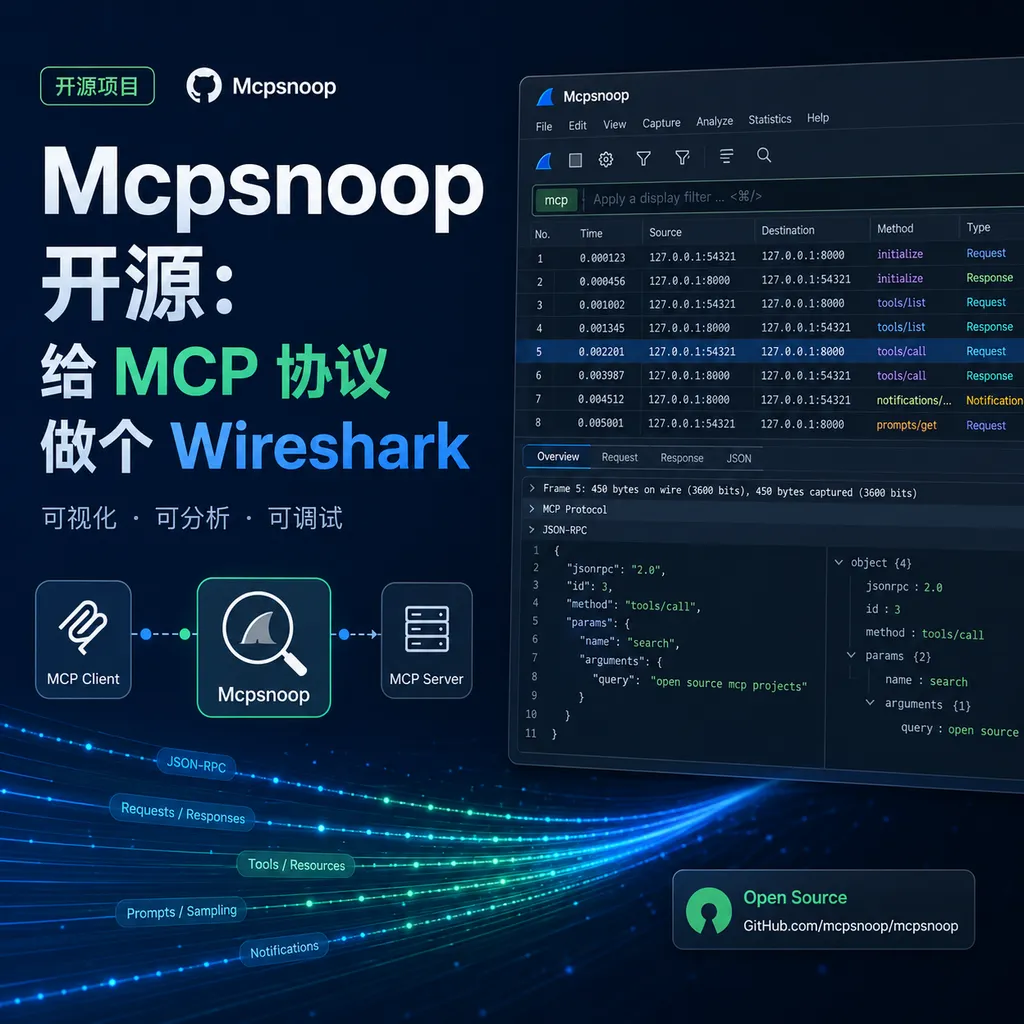
Developer kerlenton posted Mcpsnoop on Hacker News — a transparent proxy and real-time TUI packet capture tool for the MCP protocol that lays every JSON-RPC communication from Agent tool calls out in the open.
What Exactly Does the Agent Debugging Tool Tune? Finally, There's a Tool to Watch It in Action
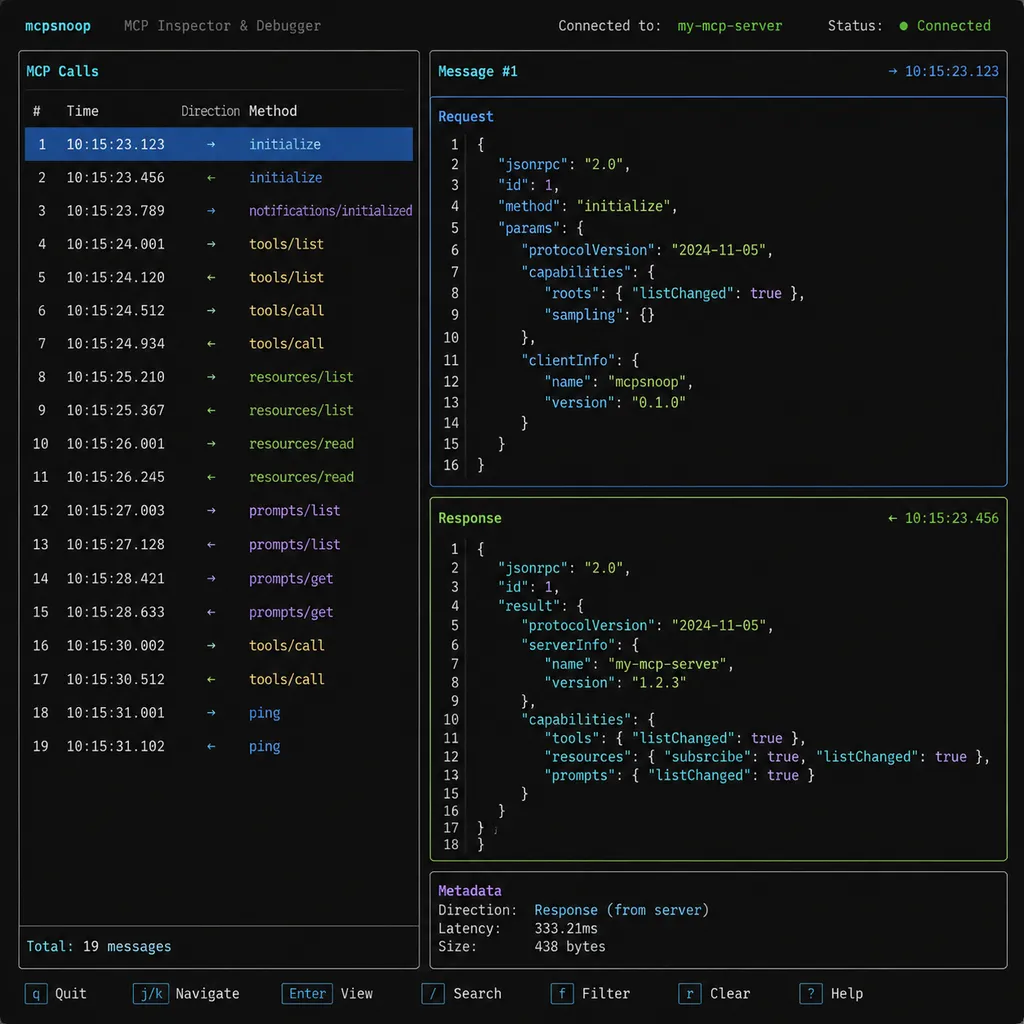
On the evening of July 3rd, a developer named kerlenton posted Mcpsnoop on Hacker News’ Show HN. The project describes itself very straightforwardly: “Wireshark for MCP.” It’s a transparent proxy that sits between an MCP Client and Server, streaming all JSON-RPC messages between them into a TUI interface in real time. You can instantly see which tool was called, what parameters were passed, and how much content was returned.
The project arrived at an interesting moment. It’s been almost two years since Anthropic open-sourced the MCP protocol in November 2024, and the ecosystem has grown from a handful of official servers to a swarm of third-party ones. Clients like Claude Desktop, Cursor, Codex, Cline, and Continue all use it, and even internal company Agents are built around MCP. But one long-standing problem has never really been solved—when your Agent behaves strangely, you have no idea what it’s saying to the MCP Server.
A Transparent Proxy in the Middle That Changes Nothing
First, let’s clarify how it works. MCP currently uses two mainstream transport modes: local stdio (inter-process pipes) and remote HTTP+SSE (or the newer Streamable HTTP). Mcpsnoop handles these two situations differently, but the principle is always “transparency”—no protocol changes, no modification to client configuration logic, and no adaptation needed on the server side.
For stdio, Mcpsnoop plays the role of the server process and is launched by the client. After starting, it forks the real server and places itself in between their stdin/stdout streams, forwarding data both ways. Every byte passing through the pipe is copied to the TUI parser. It’s the same approach mitmproxy uses for HTTPS—just at a different transport layer.
For HTTP, it’s even simpler: spin up a reverse proxy, point the client’s server URL to Mcpsnoop instead, and it intercepts the traffic in between. SSE long connections are also supported with streaming forwarding and logging.
Configuration cost is almost zero. If your original claude_desktop_config.json looked like this:
{
  "mcpServers": {
    "filesystem": {
      "command": "npx",
      "args": ["-y", "@modelcontextprotocol/server-filesystem", "/tmp"]
    }
  }
}
After wrapping it with Mcpsnoop:
{
  "mcpServers": {
    "filesystem": {
      "command": "mcpsnoop",
      "args": ["--", "npx", "-y", "@modelcontextprotocol/server-filesystem", "/tmp"]
    }
  }
}
That’s it. The client won’t even notice something’s sitting in between.
What You Can See in the TUI
The interface itself is written in Rust (the author is likely a Ratatui user) and cold-starts almost instantly. The main view shows a message timeline on the left—each JSON-RPC request/response/notification is a line, with red/green color-coding for direction; the right panel shows details of the selected message. JSON can be expanded or collapsed, and long texts are truncated as needed—an important detail, since MCP often returns tools/call results containing tens of kilobytes of content that would otherwise blow up the screen.
Some practical features include:
- Method filtering: filter by methods like
initialize,tools/list,tools/call,resources/read, etc. - Latency statistics: wall-clock duration from each
tools/callrequest to response is shown inline—instantly revealing slow tools. - Session export: export the whole exchange to a
.jsonlfile for analysis or to attach to an issue. - Search: press
/to trigger full-text search inside the TUI.
The author writes in the README something very apt: MCP looks like a protocol, but to most developers, it’s a black box—your Agent framework wraps it up, and server logs are scattered. When something breaks, you’re left guessing. Mcpsnoop’s goal is to pry open that black box.
Totally Different from Wireshark MCP or pcap-mcp
The names can be confusing. Over the past half year, several “Wireshark”-related MCP projects have popped up, but they actually go in the opposite direction:
- Wireshark MCP / pcap-mcp: wrap
tsharkand expose it as an MCP server, so AI Agents can read.pcapfiles and analyze network traffic — letting AI use Wireshark. - Mcpsnoop: captures MCP protocol messages themselves to observe what your AI Agent is doing — using Wireshark to watch AI.
One turns Wireshark into a tool for AI; the other turns AI into Wireshark’s subject. Just switching the preposition completely changes the purpose.
Why This Should Have Existed Already
Honestly, what the MCP ecosystem has always lacked isn’t servers, but observability tools. Over the past year, the number of “awesome-mcp-servers” lists has exploded, but debugging, monitoring, and auditing tools are practically nonexistent. Anthropic provided an mcp inspector—a web UI for manually testing server endpoints—but that’s a testing tool, not an observability tool—there’s a difference.
In real development, you run into pain points like these:
- Multi-server conflicts: you have filesystem, git, playwright, and fetch servers all connected; when your Agent behaves oddly, you don’t know whether it picked the wrong tool, mis-passed parameters, or got dirty data back from a server.
- Nested tool calls: an Agent might invoke 20–30 tools during a single task, their contexts and results affecting one another. Without a timeline view, you can’t trace the chain.
- Cost auditing: everything returned from
tools/callgoes back into the model’s context. If a tool spits out a 200KB document, your token bill explodes. You need visibility into “which call caused how much payload.” - Security auditing: in enterprise environments, compliance requires tracking which files the Agent accessed or which external requests it sent.
Mcpsnoop solves the first two, and through its log export capability, can indirectly address the latter two. The author mentioned in HN comments that token estimation (using something like tiktoken to approximate message size) is coming next—if that arrives, it will cover the first three pain points completely.
Can a Transparent Proxy in Rust Hold Up?
Judging by code quality: the repo currently has around 3,000 lines of Rust, with light dependencies—tokio, ratatui, serde_json, crossterm, etc. The protocol parsing uses a hand-written minimal JSON-RPC 2.0 handler rather than a full MCP SDK—a good choice, since Mcpsnoop’s goal is pass-through + observation, not meaning extraction. Using an SDK would only add maintenance overhead as versions evolve.
Current limitations are also clear:
- Only supports stdio and HTTP—WebSocket isn’t implemented yet (though MCP rarely uses it anyway).
- TUI is keyboard-only, no mouse support—steep learning curve for users unfamiliar with vim-like shortcuts.
- No GUI version—it’s command-line only. Despite the “Wireshark for MCP” tagline, Wireshark’s hallmark is its GUI packet view. The TUI is a workaround; a true mainstream tool will eventually need an Electron or Tauri front-end.
- No filter language yet. Wireshark’s power lies largely in its filter DSL (
http.request.method == "POST"). Mcpsnoop currently only filters by method name—no complex logical combinations.
Bigger Picture: MCP Has Reached the “Engineering” Stage
When MCP first launched at the end of 2024, the conversation was “Is this protocol good?” or “Can it replace Function Calling?” In early 2025, attention shifted to “Which servers are handy to install?” By mid-2026, discussion has turned to debugging, monitoring, auditing, and performance—in short, engineering.
Mcpsnoop is evidence of this shift. It doesn’t solve “what AI can do,” it solves “how you know what AI did.” The first is capability expansion; the second is controllability. For Agents in enterprise settings, controllability is far more critical than sheer capability.
As a side note, many OpenAI Hub Agent setups also rely on MCP—Claude 3.7, GPT-5, Gemini 2.5 models can all be invoked through a unified key. Teams in China often combine OpenAI Hub for models with MCP for their Agent layer. Tools like Mcpsnoop sit perfectly in that middle layer—model-agnostic and universally useful.
Should You Install It Now?
If you’re developing an MCP Server or your Agent application heavily depends on the MCP toolchain, install it now. This isn’t “nice to have”—it’s something you should’ve had already. It fills a clear gap in the MCP ecosystem.
If you only use MCP lightly in Claude Desktop with a couple of toy servers, there’s no rush—Mcpsnoop’s main value lies in development and troubleshooting.
The project’s star count has climbed rapidly since launch, and the author is actively responding to issues. It’s MIT-licensed and installable via cargo install. It’s clearly a serious project—not a throwaway demo.
References
- Mcpsnoop GitHub Repository – Project homepage with installation instructions, TUI demo, and config samples
- Model Context Protocol Official Repo – MCP protocol specs and official SDKs
- awesome-mcp-servers – Community-maintained MCP server collection, great for multi-server testing with Mcpsnoop
- modelcontextprotocol/servers – Official reference server implementations, including filesystem, gdrive, and other common components


