
OfficeCLI Open Source: AI Agents Can Finally Edit Word/Excel/PPT Directly

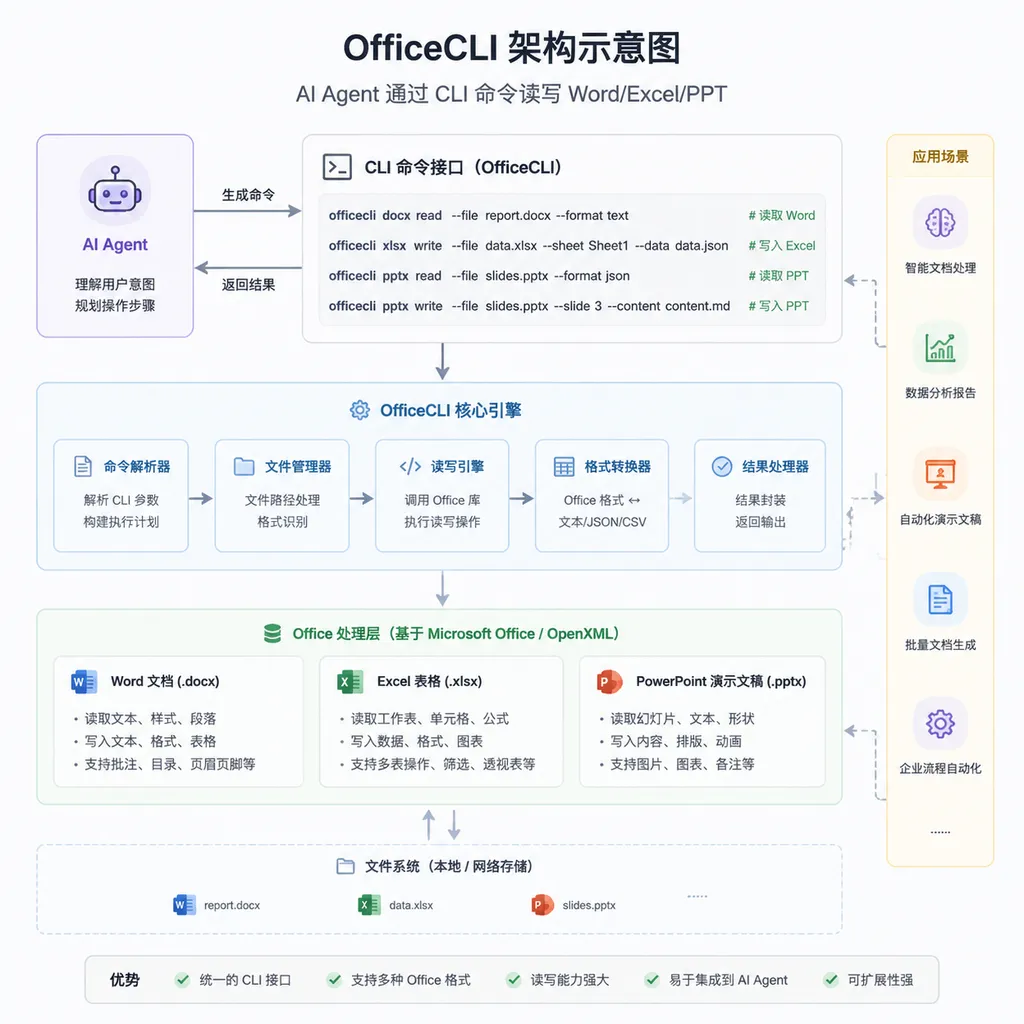
The iOfficeAI team has open-sourced OfficeCLI, an Office command-line tool designed specifically for AI Agents. With a single binary and zero dependencies, it enables Agents to read and write Word, Excel, and PowerPoint files as precisely as operating a database—completely leaving behind the blind-generation era of python-pptx.
Someone Finally Got AI Agents Operating Office Right
Over the past year, almost every developer who has worked on Agent projects has run into the same problem: getting AI to generate a PPT or Word report sounds simple, but in practice it’s full of messy work. Either you wire together python-pptx, openpyxl, and python-docx with dozens or even hundreds of lines of glue code, or you let the model spit out XML directly and risk corrupting the entire .docx structure. Even worse, after the Agent generates the document, it usually can’t actually see the result. Titles overflow their boundaries, shapes overlap each other, and the Agent has no idea—it’s effectively editing blind.
Recently, an open-source project called OfficeCLI finally addressed this problem. Maintained by the iOfficeAI team, the GitHub repository quietly launched in May and quickly gained traction, with many Agent developers calling it “one of the most practical toolchain updates of the year.” Its positioning is straightforward: the world’s first Office suite designed specifically for AI Agents.
What Problem Does It Actually Solve?
Here’s the core idea: OfficeCLI essentially turns Office documents into an addressable tree structure, allowing Agents to precisely locate every element using XPath-like paths, then perform CRUD operations on them. The concept is similar to manipulating the DOM or operating on a database — instead of regenerating the document, it edits in place.
For example, imagine asking AI to change the color of the first run in the second paragraph of a Word report. Traditionally, you’d need to load the document, traverse paragraphs, locate the run object, modify XML attributes, and save the file. The code is verbose, and the Agent also has to understand a pile of library APIs. With OfficeCLI, it looks like this:
officecli set report.docx /body/p[2]/r[1] --prop color=FF0000
Done in one line. The path semantics are clear, and generating this command is far easier for an Agent than generating 20 lines of Python.
PowerPoint follows the same logic:
# Create a new slide
officecli add deck.pptx / --type slide --prop title=\"Q4 Report\"

# Cover slide with background color
officecli add deck.pptx / --type slide --prop title=\"Q4 Report\" --prop background=1A1A2E

# Add a shape to the first slide
officecli add deck.pptx '/slide[1]' --type shape ...
Every element can be addressed through paths. The Agent can modify anything it wants while preserving all existing formatting. This is simply not the kind of experience python-pptx workflows can provide.
More Importantly: It Gives Agents “Eyes”
If OfficeCLI were only a prettier command-line wrapper, it wouldn’t have generated this much excitement. What really stands out is the view command family — tools that render documents into forms Agents can actually “understand.”
# Output document outline
officecli view deck.pptx outline

# Render as HTML readable by Agents
officecli view deck.pptx html

# Get raw JSON for a node
officecli get deck.pptx '/slide[1]/shape[1]' --json

# View raw XML for a slide
officecli raw deck.pptx '/slide[1]'
Combined together, these commands complete the Agent workflow loop:
modify → render → self-check → modify again
Title overflow? Immediately visible in HTML. Overlapping shapes? Clearly reflected in the outline structure. This has long been the missing piece in Office automation for Agents: a proper feedback loop.
Without feedback, an Agent can only attempt one-shot generation; if something is wrong, it rewrites the whole document. With feedback, it can iteratively refine output like a human. In real production tasks, that difference is enormous.
Tradeoffs in the Tech Stack
OfficeCLI is written in Go and compiled into a single binary that runs on Windows, macOS, and Linux. It has zero dependencies: no Microsoft Office, no LibreOffice, and no Python environment required. This matters especially in containerized deployments and Serverless Agent scenarios — you can’t realistically bundle a full Office runtime into every Lambda function.
Under the hood, it directly parses the OOXML specification (.docx, .xlsx, and .pptx are essentially compressed XML packages) instead of relying on COM automation tied to Office itself. That means:
- Fast: no need to launch Office processes, commands return in milliseconds
- No licensing issues: it doesn’t touch Microsoft Office binaries, fully open-source implementation
- Embeddable: usable anywhere shell commands can run
Of course, there are tradeoffs. The OOXML spec is extremely large, and OfficeCLI currently focuses on common elements — text, paragraphs, tables, shapes, images, and styles. More advanced features (such as sophisticated PowerPoint animations or deep Excel pivot-table configuration) are still being implemented. The project’s issue tracker already outlines the roadmap.
A Natural Fit for MCP
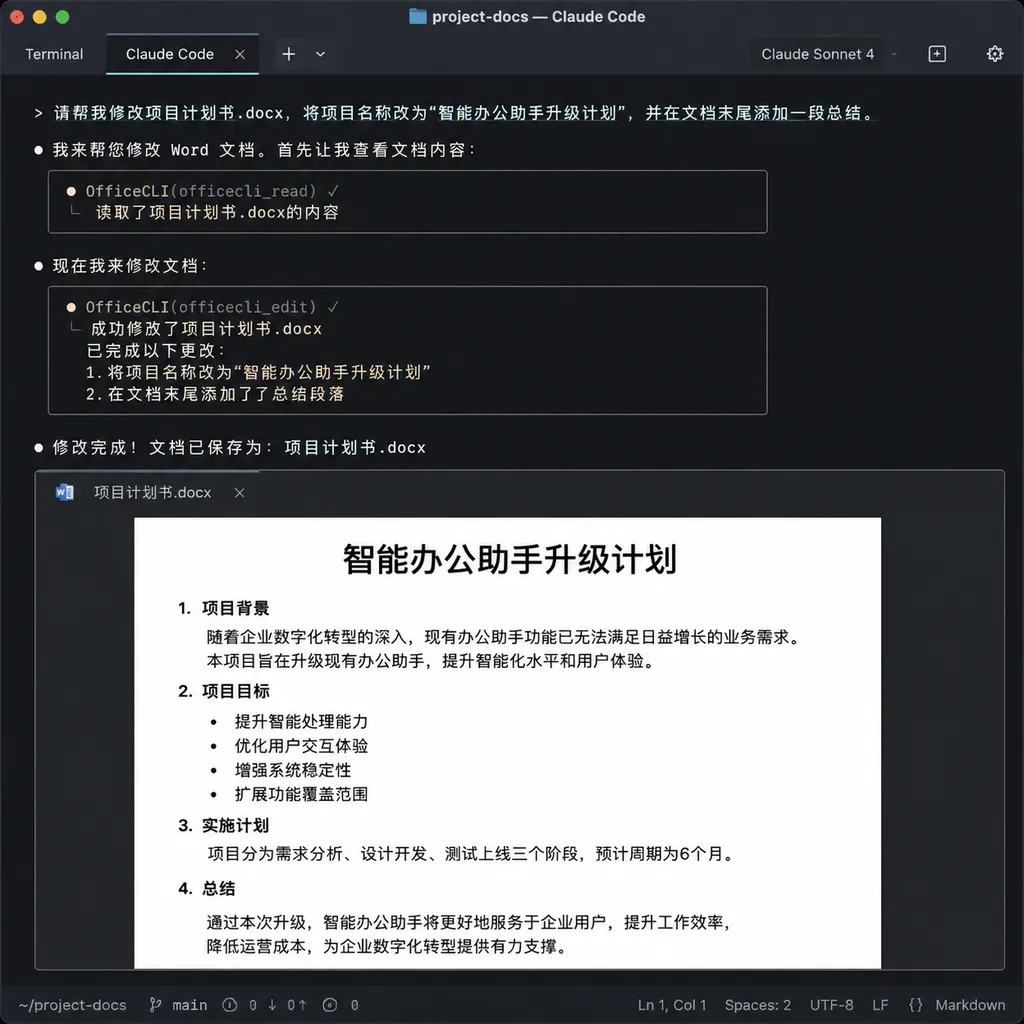
The documentation explicitly mentions support for MCP (Model Context Protocol). This is particularly interesting because Anthropic’s MCP ecosystem exploded in growth during the first half of the year, with Claude Desktop, Cursor, and Cline all supporting MCP Servers. Since OfficeCLI is inherently a CLI tool, packaging it as an MCP Server is almost effortless: simply expose a set of tools for Claude or GPT to invoke.
Some developers have already integrated it with Claude Code. A prompt like:
“Replace every occurrence of ‘Party A’ in this contract with ‘Principal’ and highlight key clauses in red”
gets decomposed by the Agent into a sequence of officecli set commands executed automatically. In this workflow, the model focuses solely on planning and decision-making, while the dirty work is delegated entirely to the CLI. That’s a healthy division of labor.
Where Does It Fit Compared to Existing Solutions?
A quick comparison:
- python-office / python-pptx ecosystem: established solutions with flexibility, but large codebases, poor Agent usability, and no rendering feedback
- UnoConv / LibreOffice headless: capable of conversion and manipulation, but heavy dependencies and slow startup make them unsuitable for high-concurrency Agents
- Microsoft Graph API: requires O365 accounts and network connectivity, unusable in privacy-sensitive environments
- OfficeCLI: lightweight, fast, Agent-friendly, though feature coverage is still expanding
For enterprise internal Agents, automated reporting, AI-generated presentations, and similar use cases, OfficeCLI is currently one of the smoothest options available. For teams running Agents in offline or private deployment environments, there are barely any real alternatives.
A Bigger Signal
Looking further ahead, OfficeCLI reflects the fact that Agent tooling is entering its “second phase.” In the first phase, everyone focused on enabling models to call tools (Function Calling, Tool Use), but the tools themselves were still designed for humans, making them awkward for Agents to use.
In the second phase, we’re beginning to see tools built specifically for Agents: model-friendly command semantics, structured outputs, self-checking mechanisms, and composability.
OfficeCLI is one of the earlier and more representative examples of this category. Similar ideas are emerging in Agent-oriented browser control, database clients, and code editors. Over the next one or two years, we can expect a wave of “Agent-native” tools that redefine what Agents can do and how effectively they can do it.
For developers building Agent applications, one recommendation stands out: stop letting models generate python-pptx code themselves. Outsource this kind of low-level work to specialized CLIs, and let the model focus on planning and reasoning. It simplifies engineering and usually produces better results.
The project is currently MIT licensed, with complete code, documentation, and examples available on GitHub. It’s worth trying directly. If you’re working on AI-generated office document workflows, the integration cost is almost zero, while the gains are substantial.
References
- OfficeCLI GitHub Repository - Official project homepage with full command documentation, examples, and MCP integration guides
- Zhihu: Goodbye Office! This Open-Source CLI Tool Lets AI Directly Read and Write Word/PPT/Excel - Community testing and usage experience sharing for OfficeCLI in Chinese tech circles


