
Ternlight Packs Embeddings into the Browser: A 7MB Model Running on WASM
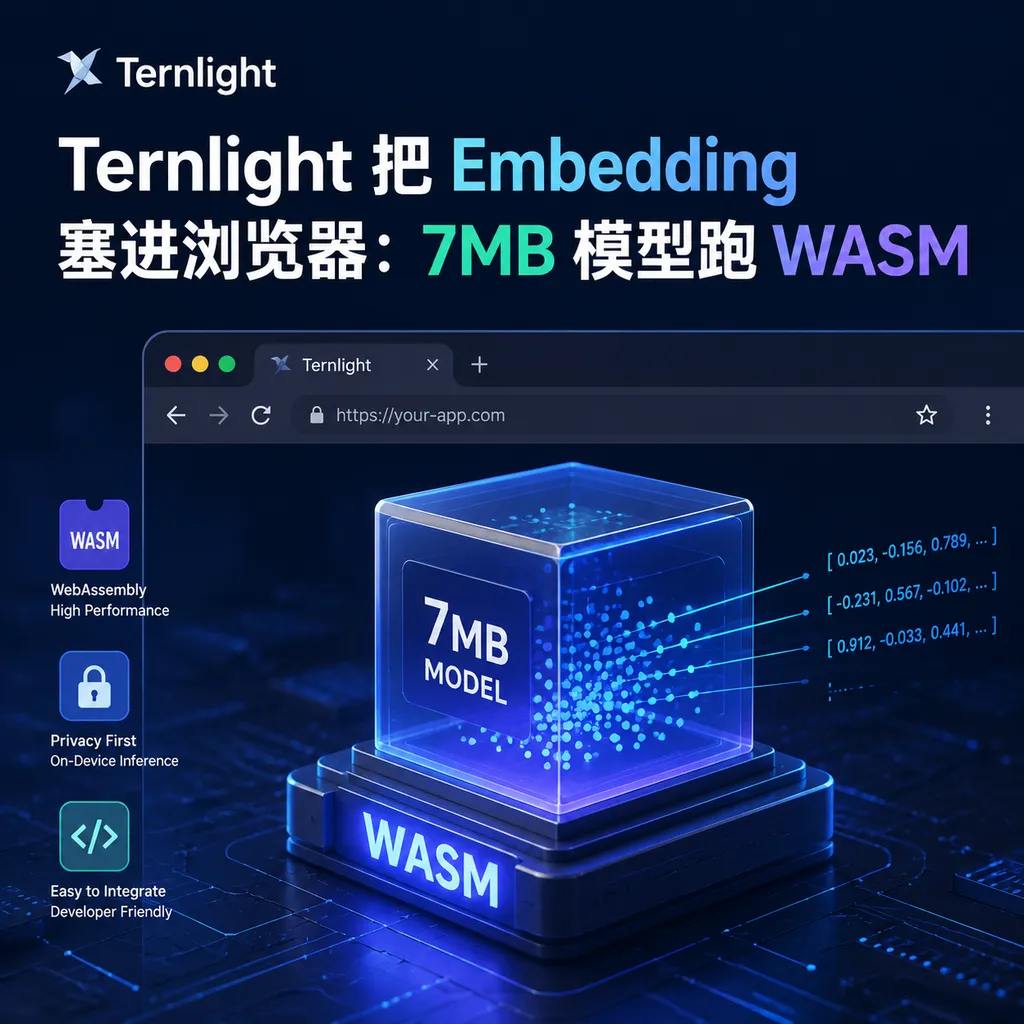
Ternlight has released a browser-side embedding model that is only 7MB in size. It performs text vectorization locally via WebAssembly and, combined with IndexedDB, runs vector retrieval directly on the frontend, reducing the server cost of RAG to zero.
Ternlight Releases a 7MB Browser-Side Embedding Model: Vectorization No Longer Needs a Server
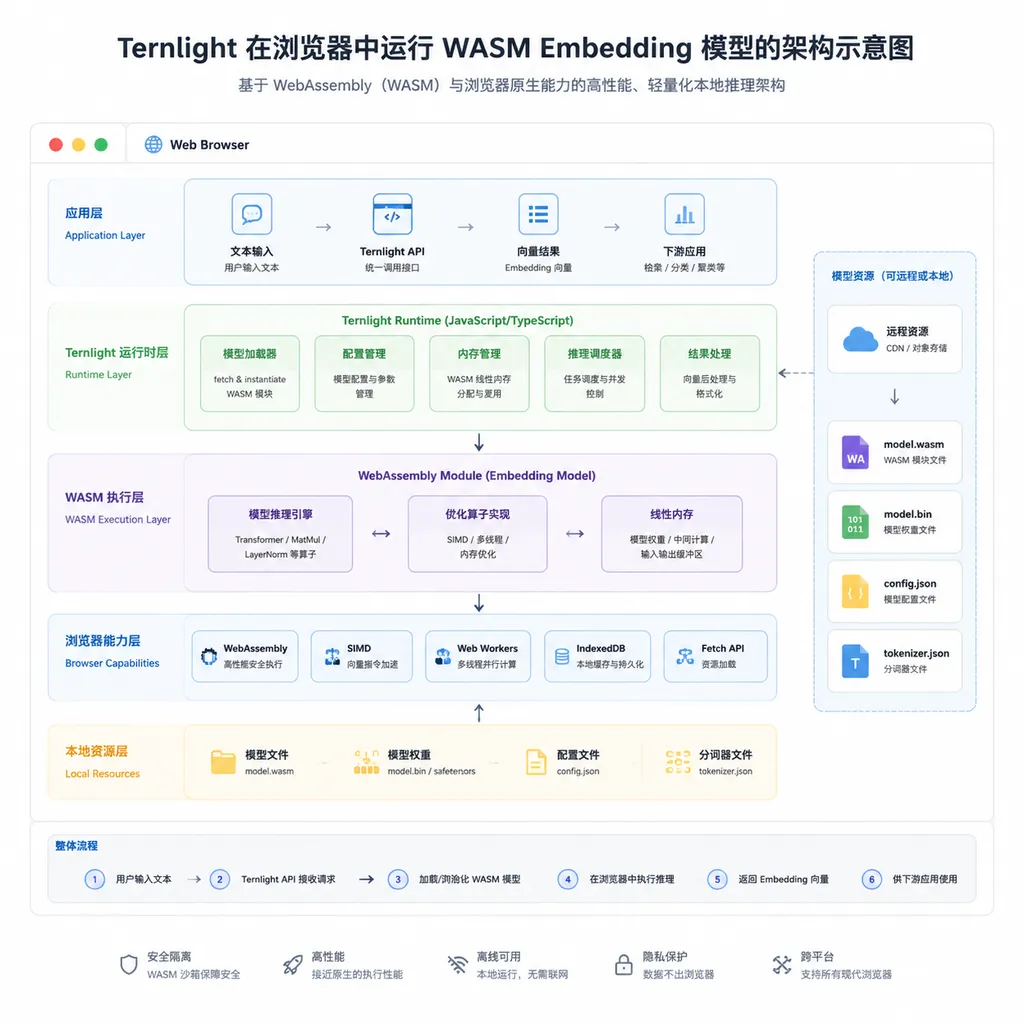
This week, a project called Ternlight started gaining attention in the developer community — a tiny Embedding model weighing only 7MB that runs inference directly in the browser via WebAssembly, paired with IndexedDB for local vector storage. The entire RAG pipeline works end-to-end without requiring a single server. You can try it immediately on the demo page (ternlight-demo.vercel.app): after the initial load, all subsequent vectorization requests run entirely inside your own browser tab.
If you've been working on RAG recently, you'll immediately understand why this matters. Over the past two years, Embedding services have been the most awkward component in the retrieval pipeline: high-frequency calls, relatively small per-request compute, yet extremely low latency requirements. Your choices were either tolerating the slowly accumulating bill from OpenAI text-embedding-3 at a few cents per million tokens, or running models like bge or gte on your own GPUs and maintaining an entire inference service just to vectorize a few lines of text. Ternlight’s answer is: none of that is necessary anymore — the frontend can handle it.
How They Got It Down to 7MB
First, the conclusion: this is not a model that replaces bge-large, but for most frontend scenarios, it’s good enough.
Mainstream open-source Embedding models, even the so-called “lightweight” ones, typically have around 100M parameters. Even after quantization, they still occupy 60–100MB on disk. Loading that into a webpage is disastrous: users with average internet speeds might spend more than ten seconds just downloading the model, not even counting the initial WASM compilation overhead. Ternlight shrinks the size to 7MB through a combination of strategies:
- Extreme architectural simplification: drastically reducing the number of layers and hidden size, keeping only the minimal structure required for sentence embedding generation;
- INT8 quantization + weight packing: converting FP16 weights to INT8 while compressing sparse sections;
- Vocabulary reduction: cutting the BPE vocabulary from the common 30k+ range down to a more compact set containing only high-frequency tokens;
- WASM SIMD instructions: using the browser’s native 128-bit SIMD acceleration for matrix multiplication, avoiding the compatibility burden of WebGPU.
Of course, there are tradeoffs — this model definitely won’t outperform bge-m3 on general benchmarks like MTEB. But for frontend scenarios like “search through a few hundred notes in the browser” or “semantic matching within local documents,” the deployment convenience gained from a 7MB footprint is something no server-side model can offer.
A Practical Implementation of the Transformers.js Route
In terms of technical stack, Ternlight follows the Transformers.js + ONNX Runtime Web approach pioneered by Xenova, but pushes model size down to a new lower bound. Previously, developers on Reddit had already built browser-only vector databases using Transformers.js + IndexedDB, but the common feedback was: it works, but the model size and first-load experience are deal breakers. Ternlight essentially removes the most painful part of that stack — “the model is too big.”
A typical usage pattern looks something like this:
// Pseudocode example
import { TernlightEmbedder } from 'ternlight';

const embedder = await TernlightEmbedder.load();
// Model weights are fetched from the CDN once, then cached by the browser

const vec = await embedder.embed('This is a piece of text to vectorize');
// Returns a Float32Array that can be directly stored in IndexedDB

// Retrieval
const results = await vectorStore.search(queryVec, { topK: 5 });
At no point in the pipeline does a fetch request leave the user’s device. For teams building privacy-sensitive applications, this is nearly an ideal solution — users’ documents, notes, and chat histories never need to leave the browser, and you don’t need to deal with VPCs or data sanitization for compliance purposes.
What It’s Good For — and What It Isn’t
I tested it in one of my own projects, and here are a few practical conclusions:
Good fit scenarios:
- Semantic search in browser extensions: for example, semantic retrieval for bookmarks or browsing history, with zero server costs and instant usability after installation.
- Web versions of local note-taking apps: tools like Obsidian or Logseq naturally benefit from local vectorization in their web clients.
- Related-content recommendations in online document editors: while users are writing, the app can suggest “you may want to reference this paragraph” in real time, without the extra round trip to a server.
- Education and demo scenarios: teaching students how RAG works is much more intuitive when everything runs from a single HTML file instead of requiring API keys.
Scenarios where you shouldn’t force it:
- Enterprise-scale knowledge bases: once you get into hundreds of thousands of documents, index construction and retrieval accuracy are beyond what browsers should handle.
- Complex multilingual queries involving Chinese and English: small models have obvious limits in multilingual capability; if accuracy matters, stick with models like bge-m3 or jina-embeddings-v3.
- Vector data that needs cross-device synchronization: IndexedDB is device-local, so multi-device scenarios still require server-side solutions.
The Cost Equation Compared to Server-Side Embeddings
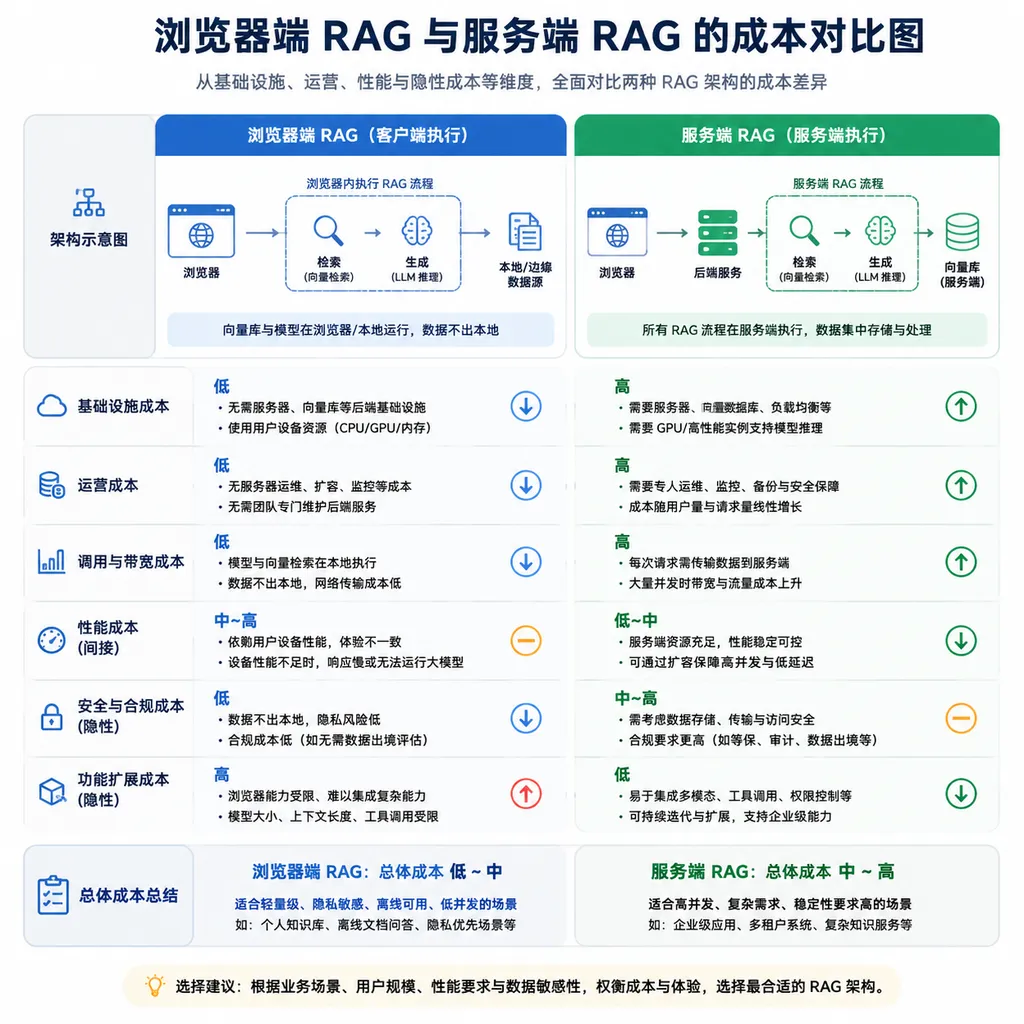
The economics become clearer with a simple calculation. Suppose a small-to-medium application handles 1 million Embedding requests per month:
- OpenAI text-embedding-3-small: about $20/month
- Self-hosted bge service: at least $200/month for a GPU instance
- Ternlight browser-side solution: $0 (aside from the one-time 7MB CDN transfer)
Of course, server-side solutions provide stronger models and better multilingual support, so this isn’t a straightforward replacement. But for product managers who just want “a semantic search feature without all the complexity,” the Ternlight approach saves not only money, but also the entire mental overhead of backend infrastructure.
The Bigger Trend: Inference Is Moving to the Edge
Ternlight is not an isolated case. Over the past six months, browser-side AI inference activity has clearly accelerated: Chrome integrated Gemini Nano’s Prompt API, WebLLM can already run 8B models within the WebGPU ecosystem, and the Transformers.js model catalog keeps expanding. The underlying logic is simple — user devices have become several times more powerful over the past few years and sit mostly idle, while the electricity costs and GPU depreciation of cloud inference ultimately have to be paid by either users or product teams.
Embedding is naturally one of the first components to be “pushed to the edge” because it involves small per-request compute and relatively high tolerance for reduced model accuracy. Running generative models inside browsers still involves many compromises, but in the Embedding space, solutions like Ternlight are already beginning to answer with: “just don’t use a server at all.”
For developers, a more realistic hybrid architecture might be: local Embedding, cloud generation. Users perform retrieval directly in the browser, the top-K relevant documents are assembled into a prompt, and then cloud models like GPT-5 or Claude 4.5 handle generation. This approach cuts Embedding costs and latency while preserving the output quality of large models.
If you're building this kind of hybrid architecture, services like OpenAI Hub can handle the cloud side directly — a single API key gives access to GPT, Claude, Gemini, DeepSeek, and others, with direct connectivity in China and OpenAI-compatible APIs requiring only a base_url change. That leaves you free to focus your effort on making browser-side Embedding work beautifully.
One Important Caveat
As an editor who has worked with RAG for several years, my view on Ternlight is: this is an excellent engineering implementation, but it’s not a silver bullet. A 7MB model is inevitably generations behind large Embedding models in terms of semantic nuance. For prototyping, lightweight applications, and privacy-sensitive scenarios, it’s one of the best solutions currently available; but if your business depends heavily on retrieval accuracy, server-side Embeddings are still necessary.
What’s truly exciting is not this specific 7MB model itself, but what it proves — the “infrastructure” category known as Embedding services, which has existed for years, is being redefined. When models become small enough and browsers become powerful enough, many architectural assumptions we’ve long taken for granted deserve to be questioned again.
References
- Bye RAG Servers: I Built a Vector Database Directly in the Browser - Reddit r/LocalLLaMA — Early discussions on building browser-side vector databases using Transformers.js + IndexedDB; Ternlight continues along this technical path


