
One-Click Jump from Hugging Face to SageMaker Studio, Fewer Steps to Bring Open-Source Models to the Cloud

Hugging Face and AWS have jointly launched a one-click deployment entry point. Developers can go directly to the Studio workflow by selecting Customize or Deploy on SageMaker AI on the model page, eliminating all the intermediate steps previously required for manually configuring environments, pulling containers, and writing SDK code.
From Hugging Face to SageMaker Studio, Minus Those Dozens of Middle Steps
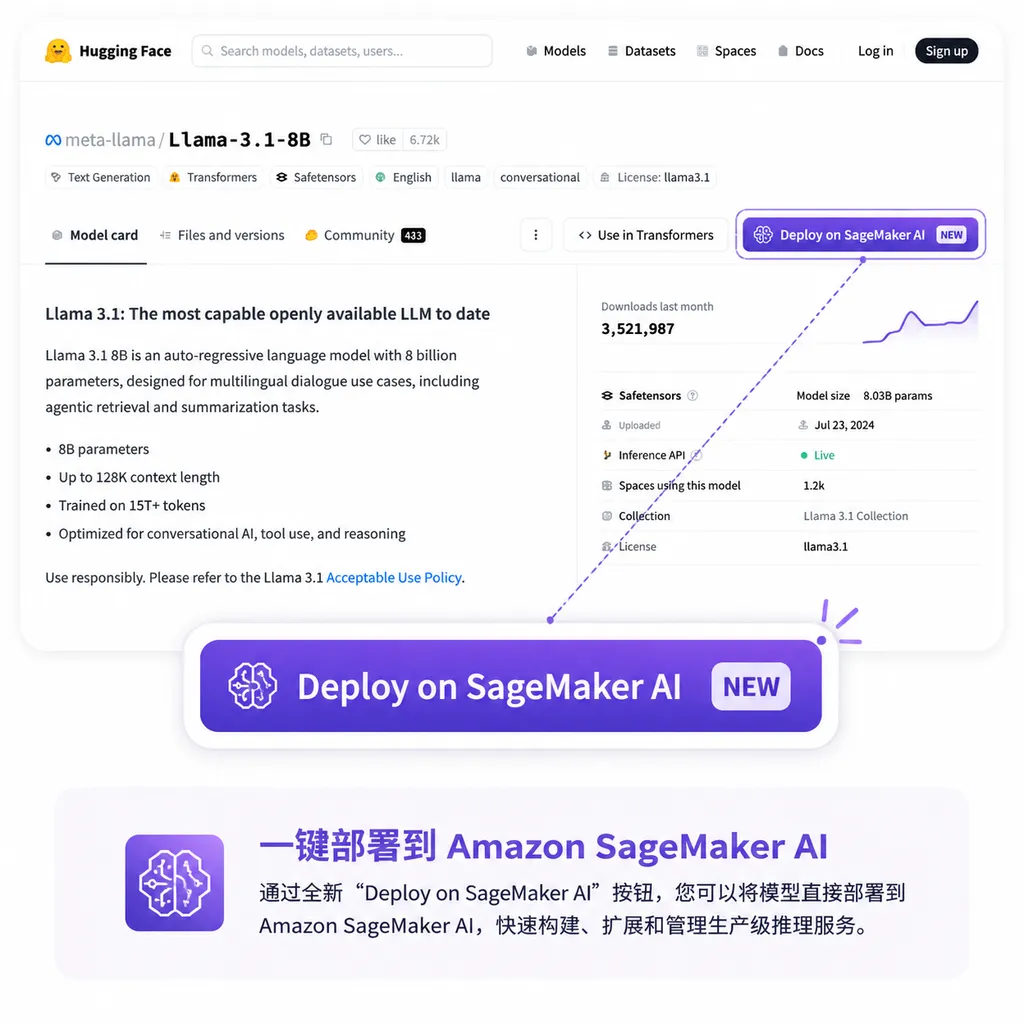
Yesterday, Hugging Face announced an update on its official blog that may not be earth-shattering, but genuinely saves time: model pages now include two new buttons — Customize on SageMaker AI and Deploy on SageMaker AI. Click either one and you land directly in the corresponding workflow inside Amazon SageMaker Studio, with model info, container versions, and inference endpoint settings already prefilled.
It may not sound like a big deal, but if you’ve actually run Hugging Face models on AWS over the past two years, you probably understand the significance of this change. What it removes is the huge gap between “I just want to try this checkpoint” and “I spent an entire afternoon configuring IAM, pulling DLC images, and writing estimators just to try this checkpoint.”
How Complicated the Old Workflow Was
To recap the standard workflow after the 2021 “strategic partnership”:
- Find a model on Hugging Face and copy the model ID;
- Open a SageMaker Notebook or local IDE and install the
sagemakerSDK; - Manually write a
HuggingFaceModelorHuggingFaceestimator, specifyingtransformers_version,pytorch_version, andpy_version— get even one version number wrong and you’re spending minutes digging through CloudWatch logs; - Configure roles, instance types, and endpoint names;
- After
.deploy(), pray that the transformers version inside the DLC image doesn’t conflict with your tokenizer.
This workflow wasn’t particularly difficult for AWS veterans, but it naturally separated “exploration” from “deployment” into two different activities. It was hard to maintain the smooth experience of “discover a new model → immediately try it in production,” even though that seamlessness is exactly what the Hugging Face ecosystem excels at.
Where Does the One-Click Jump Actually Lead?
According to the official description, supported model pages now show two entry points:
- Customize on SageMaker AI: takes you to the JumpStart fine-tuning page in Studio, with the model and recommended hyperparameters already configured — you only need to choose the dataset and instance specs;
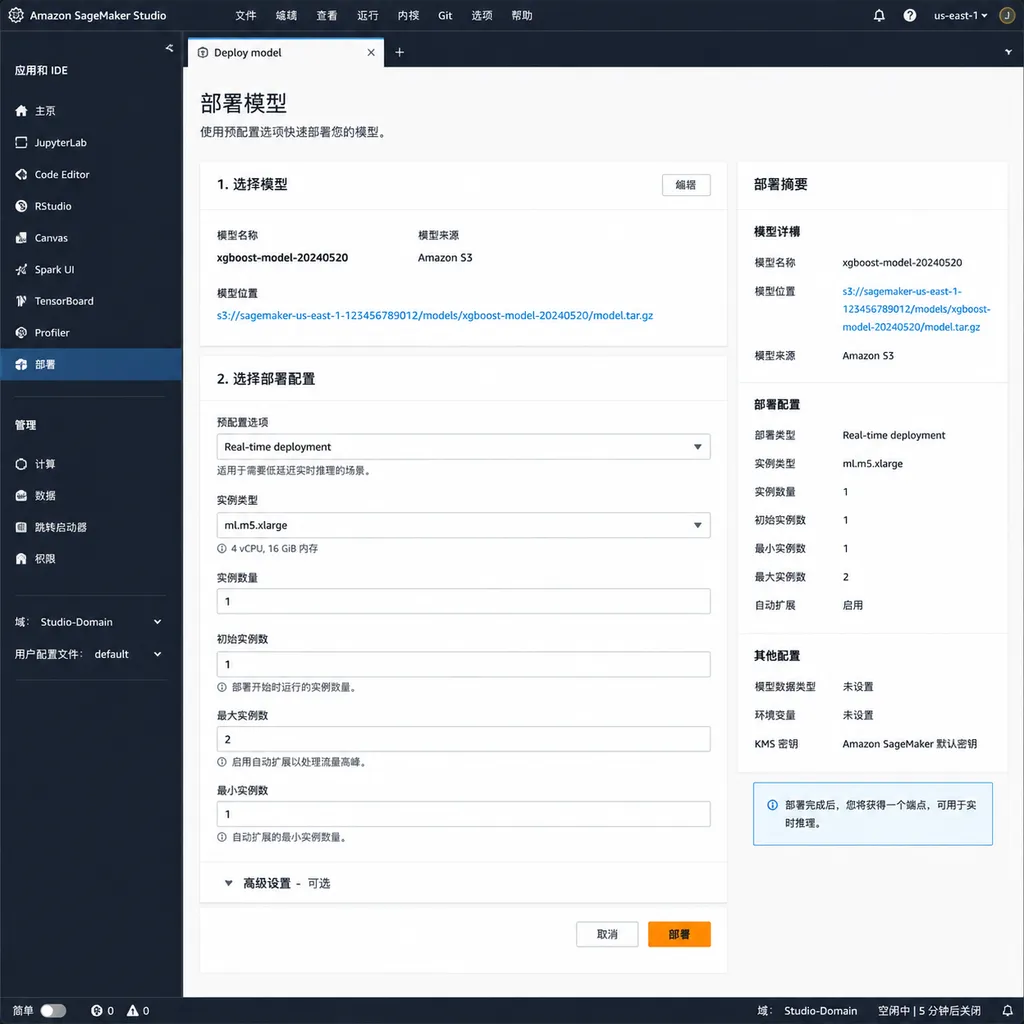
- Deploy on SageMaker AI: takes you to Studio’s Deployment page, with endpoint configuration, instance type, and container image already filled in. Click Deploy and you’re done.
The key point is that everything lands inside “your own AWS environment.” This is not a hosted playground. The model runs in your own account, inside your own VPC, under your own IAM permission system, and the costs are billed to your own account. For enterprise users, that distinction determines whether something can go into production.
A Subtle but Important Signal
What’s worth noting is that this feature is built around the SageMaker JumpStart path rather than pure Inference Endpoints. In other words, AWS is treating the Hugging Face model library as an “external front-end catalog” for JumpStart — users discover models on Hugging Face, but once they commit, the entire workflow moves onto AWS infrastructure.
This is very similar to how Azure ML collaborates with Hugging Face, but AWS has gone further this time. Instead of adding a Hugging Face panel inside its own console, AWS has effectively turned the Hugging Face website itself into an entry point for SageMaker. For Hugging Face, this means the value of its traffic funnel is being recognized; for AWS, it means avoiding the thankless job of maintaining its own model catalog — the world’s most active open-source community already keeps that updated upstream.
Which Models Are Supported, and Which Aren’t
The current “supported list” does not cover all 1M+ repositories on Hugging Face. Instead, it’s limited to the foundational models already adapted for JumpStart — Llama, Mistral, Falcon, Flan-T5, Stable Diffusion, and other mainstream options. That makes sense: JumpStart requires prebuilt inference containers and fine-tuning scripts, and onboarding a new model isn’t free.
So if you want to try some fine-tuned community variant released three days ago, chances are you still won’t see those two buttons. This is the classic tradeoff between productization and long-tail coverage, and AWS has chosen the former.
Practical recommendations for developers:
- Mainstream foundation models: use the one-click entry point and save time;
- Niche models or your own checkpoints: stick with the
sagemakerSDK or manually pull DLCs; - If you just want to quickly validate results without spinning up an endpoint: Hugging Face Inference API or third-party aggregation platforms are more cost-effective.
How Does This Relate to Bedrock?
Some people might ask: doesn’t AWS already have Bedrock? Why bother with this SageMaker + Hugging Face setup?
These two approaches serve different audiences. Bedrock sells a managed API experience for people who “don’t want to care how models run,” with model choices curated by AWS. SageMaker + Hugging Face sells deep customization for people who “want full control, including fine-tuning, quantization, and deployment topology.” The former competes with the OpenAI API; the latter competes with running your own GPU cluster.
This one-click deployment update is essentially fixing the UX weakness of the SageMaker route — previously it was too heavy and too engineering-focused. Now it’s at least a bit lighter.
Speaking of Multi-Model Access
This update solves the pipeline problem from “model hub to private cloud.” But for many developers, another everyday pain point is having to integrate simultaneously with GPT, Claude, Gemini, DeepSeek, open-source Llama variants, and more — each with different SDKs, authentication methods, and billing systems. Even switching between them for testing is exhausting.
OpenAI Hub (openai-hub.com) addresses a different problem — it uses a single OpenAI-compatible API key to connect mainstream proprietary and open-source models, with direct access from China. It doesn’t conflict with SageMaker’s “deep deployment” approach; one focuses on production hosting, the other on API aggregation, and using both together is quite common.
A Final Take
This update won’t make major headlines, but it’s the kind of change that’s hard to go back from once you’ve used it. Since Hugging Face and AWS began collaborating in 2021, the partnership mostly stayed at the level of “you provide the DLCs, I provide the estimators” — too engineering-heavy. By moving the entry point directly onto model pages, they’ve finally brought the developer experience up to where it should be in 2026, especially considering that newer inference platforms like Replicate and Modal already offer deployment experiences that start with just a few lines of code.
Overall, this is good for the open-source model ecosystem. The more frictionless deployment becomes, the smaller the practical usability gap between open-source models and proprietary APIs. That’s probably the core narrative Hugging Face has been betting on all along: if the tooling is smooth enough, developers will naturally gravitate toward open source.
What remains to be seen are the execution details: how quickly the supported model list gets updated, cross-region availability, spot instance support during fine-tuning, and most importantly — whether the prefilled instance types on the Deployment page can default to something a little cheaper instead of immediately suggesting ml.g5.12xlarge.
References
- Hugging Face Official Blog: From Hugging Face to Amazon SageMaker Studio in one click — The primary announcement for this update, including supported model lists and workflow screenshots
- Background on the Hugging Face × Amazon SageMaker Partnership — The starting point of the 2021 strategic partnership and useful context for understanding the DLC ecosystem


