
The final piece of the puzzle for image translation has been filled in by multimodal large models.

A developer used a multimodal model API to build a Chrome image translation extension, filling the gap in image translation for tools like Immersive Translate. It supports multiple model backends such as Qwen, Grok, and Seedream, and the translation quality is surprisingly good.
A Chrome extension coded by a developer with weekend vibes might be more useful than you think.
Recently released on the Linux.do community, this browser extension—called “Image Translation Assistant”—does something very direct: it calls a multimodal large model API to recognize text in webpage images, translate it, and fill the translated text back into the original image position. It sounds simple, but it hits a long-standing pain point—mainstream tools like Immersive Translate or Read Frog still can’t handle text embedded in images.
A gap long overlooked
Developers who’ve used Immersive Translate know it’s brilliant at handling webpage text; its bilingual reading experience is nearly perfect. But once it encounters text inside images—architecture diagrams in tech blogs, screenshots from English tutorials, or charts in academic papers—it just skips them. Read Frog has the same limitation.
That’s not because they don’t want to do it; rather, image translation is a different dimension of problem-solving. The traditional pipeline goes: OCR text recognition → translation → layout rendering. Each step can fail, especially the “refill” step, which involves fonts, layout, and background reconstruction—a considerable engineering workload.
Multimodal large models change the feasibility of this task.
Killing a chicken with a butcher’s knife, but skillfully done
This extension’s approach is both brute-force and clever: feed the entire image into a multimodal model, let it interpret the content and text, then directly generate and reinsert the translated result. The developer admits that “using a large model for this is overkill,” but the results are impressive.
Why does it work so well? Because multimodal models have inherent contextual understanding. They’re not doing isolated OCR + translation—they “understand” the entire image and translate based on that comprehension. In a technical architecture diagram, “Load Balancer” might be misrecognized by traditional OCR as “Load Ba1ancer,” but a multimodal model knows it’s an architecture diagram and understands the correct term in this context.
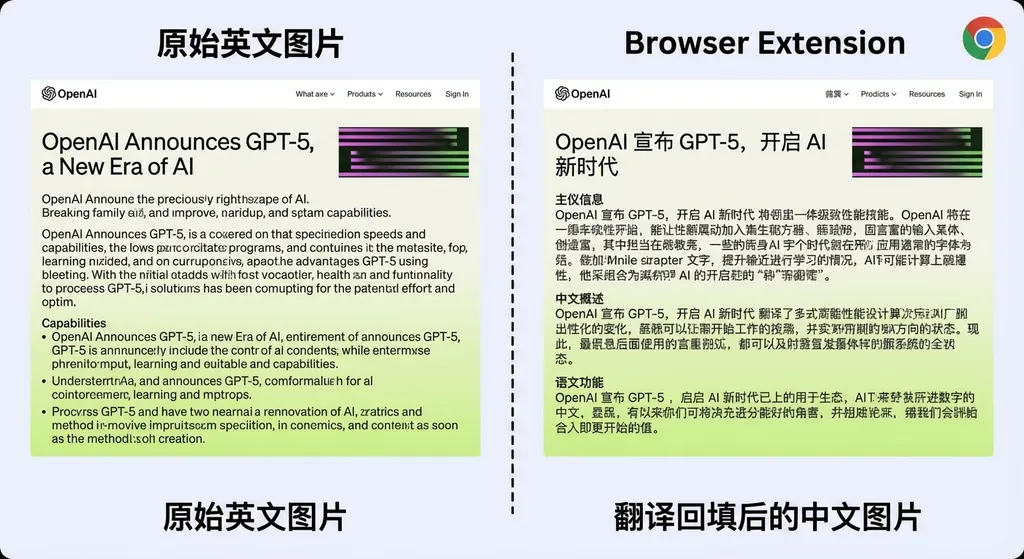
After testing multiple model backends, the developer shared a practical list:
- Qwen Image 2 Official API: Alibaba’s visual model; high-quality Chinese translation, unsurprising as it’s their strong suit.
- xAI Official API (Grok): Works, though older versions render text less effectively.
- Grok2API: Third-party interface; tested and functional.
- Seedream 5 Official API: ByteDance’s image generation model; good results.
- Anti-Gravity Banana 2: Community model; usable.
Interestingly, the developer mentioned, “Doubao works well but can't be converted to an API,” reflecting a common issue: many domestic models have strong capabilities but uneven API accessibility—developers want to use them but can’t hook in.
Technical implementation: easier than you think, yet harder too
Technically, the extension’s core workflow looks like this:
- Listen for image elements on the webpage (or manual selection)
- Encode the image as base64
- Construct a multimodal request and send it to the model API
- Parse the returned translation result
- Render the translated content back onto the original image
Step 3 is key. Using the OpenAI-compatible format as an example, a typical image translation request looks like:
import requests
import base64

# Read image and encode
with open("screenshot.png", "rb") as f:
    image_base64 = base64.b64encode(f.read()).decode("utf-8")

# Call the multimodal model via OpenAI Hub
response = requests.post(
    "https://api.openai-hub.net/v1/chat/completions",
    headers={
        "Authorization": "Bearer YOUR_API_KEY",
        "Content-Type": "application/json"
    },
    json={
        "model": "qwen-vl-max",  # Can be substituted with gpt-4o, claude-sonnet, etc.
        "messages": [
            {
                "role": "user",
                "content": [
                    {
                        "type": "text",
                        "text": "Please recognize all text in this image, translate it into Chinese, and return it with original layout preservation."
                    },
                    {
                        "type": "image_url",
                        "image_url": {
                            "url": f"data:image/png;base64,{image_base64}"
                        }
                    }
                ]
            }
        ],
        "max_tokens": 2048
    }
)

print(response.json()["choices"][0]["message"]["content"])
This uses the OpenAI-compatible format. Through aggregation platforms like OpenAI Hub, one API key can swap between Qwen, GPT-4o, Claude, etc., making it easy for developers to compare model performance in image translation scenarios.
In the Chrome extension, a similar JavaScript implementation works like this:
// In the Chrome extension's background script
async function translateImage(imageBase64) {
  const response = await fetch('https://api.openai-hub.net/v1/chat/completions', {
    method: 'POST',
    headers: {
      'Authorization': 'Bearer YOUR_API_KEY',
      'Content-Type': 'application/json'
    },
    body: JSON.stringify({
      model: 'qwen-vl-max',
      messages: [{
        role: 'user',
        content: [
          { type: 'text', text: 'Recognize text in the image, translate it into Chinese, and preserve the layout structure.' },
          { type: 'image_url', image_url: { url: `data:image/png;base64,${imageBase64}` } }
        ]
      }],
      max_tokens: 2048
    })
  });
  const data = await response.json();
  return data.choices[0].message.content;
}
Simple and direct.
But the hardest step is #5—refilling.
The model outputs text; how do you “paste” it back onto the image so it looks natural? This involves font matching, text region detection, and background reconstruction. Based on the developer’s shared results, for structured images (technical documents, UI screenshots, infographics), the refill effect looks impressive. For comics, however, the developer admits “none look quite right yet—they’re mostly literal translations.”
That’s hardly surprising. Speech bubbles, sound effects, and handwritten fonts in comics pose higher-dimensional challenges for model interpretation and generation.
“Unexpected” use cases for multimodal models
What’s interesting about this extension is that it showcases an underrated application of multimodal models—not generating images, but understanding and rewriting them.
Over the past year, focus has largely been on image generation (text-to-image) and image understanding (visual captioning). But “reading the text in an image → translating → refilling” is essentially image editing with semantic comprehension.
This direction offers a lot of room for imagination:
- Technical documentation localization — translate English blog screenshots and architecture diagrams in bulk.
- Product internationalization — auto-generate multilingual versions of app screenshots and marketing visuals.
- Academic reading — real-time translation for charts and figures in papers.
- Accessibility aids — provide multilingual textual descriptions for visual content.
Of course, the extension is still in its early stage—released as a ZIP file requiring manual unpacked loading, not yet on the Chrome Web Store—but it demonstrates the direction’s feasibility.
Model selection: a cost-effectiveness equation
For developers wanting to try or build upon this, model selection is practical.
Different models perform distinctly on image translation tasks. Based on developer feedback and community testing, here’s a summary:
| Dimension | Recommended Model | Notes | |-----------|------------------|-------| | Chinese translation quality | Qwen-VL-Max | Strong Chinese corpus advantage | | Overall comprehension ability | GPT-4o / Claude Sonnet | Better at complex image semantics | | Cost efficiency | Qwen-VL-Plus | Cheap and sufficient | | Image refill quality | Seedream 5 | ByteDance’s image generation excels here |
A real concern is cost: each translation requires a multimodal API call, with hefty image token consumption. For example, GPT-4o uses about 1000–2000 image tokens for a medium-resolution screenshot—plus text output—costing around $0.01–0.03 per call. If a webpage contains many images, expenses pile up fast.
A smarter approach: only translate when users click or hover—this is exactly how the current extension operates.
Comparison with Chrome’s native translation API
It’s worth noting Chrome’s own in-browser translation evolution. Google has embedded a Translator API in Chrome using custom-trained translation models supporting multiple languages; models are downloaded locally on first use.
However, Chrome’s native Translator API only handles text, not image content. And it takes the traditional model approach without multimodal understanding. The two solve different problems and complement each other: Chrome’s API handles page text, multimodal extensions handle text within images.
Additionally, Google is experimenting with Gemini Nano running locally on Chrome Canary. If browsers can someday run multimodal models locally, latency and cost issues for image translation could drastically improve—but that’s still some time away.
Insights for developers
Though small, this project offers several takeaways:
-
Multimodal APIs have far broader applications than we imagine. Everyone is chasing agents and RAGs, yet a simple “image translation” problem handled by a multimodal model yields visibly better user experience. Sometimes the best product ideas aren’t in cutting-edge papers—they’re in the frustrations you encounter daily.
-
API compatibility and aggregation really matter in these scenarios. Developers need to test multiple models to find the best fit; if each required separate registration and integration, productivity would plummet. Aggregation platforms like OpenAI Hub—compatible with the OpenAI format—let developers swap backends by changing one model parameter, invaluable during rapid prototyping.
-
Domestic models are becoming highly competitive in vertical use cases. Qwen’s visual model rivals GPT-4o in Chinese image translation, and Seedream shines in image refill quality. But capability and accessibility remain a gap—the developer noted Doubao performs well but lacks an API, an issue still common in the local ecosystem.
Final thoughts
A small weekend side project, yet it resolves a genuine pain point. It’s not perfect—comics remain tough, layout sometimes misaligns, and cost isn’t negligible—but it proves the practical value of multimodal models in browser contexts and points mainstream tools like Immersive Translate toward a worthwhile next step.
If you often read English technical content and get stuck on image text, give it a try. The code is open-source—just unzip and load.
References
- Image Translation Assistant release thread - Linux.do: Original post with download link and usage instructions


