
GitHub Has Handed Documentation PRs Over to Agents Too

The official GitHub blog revealed that the Aspire team used Agentic Workflows to automate cross-repository documentation synchronization — after a PR is merged in the product repository, an agent automatically generates a corresponding update PR in the documentation repository for SME review. Documentation has shifted from being "patched in afterward" to becoming part of the delivery pipeline.
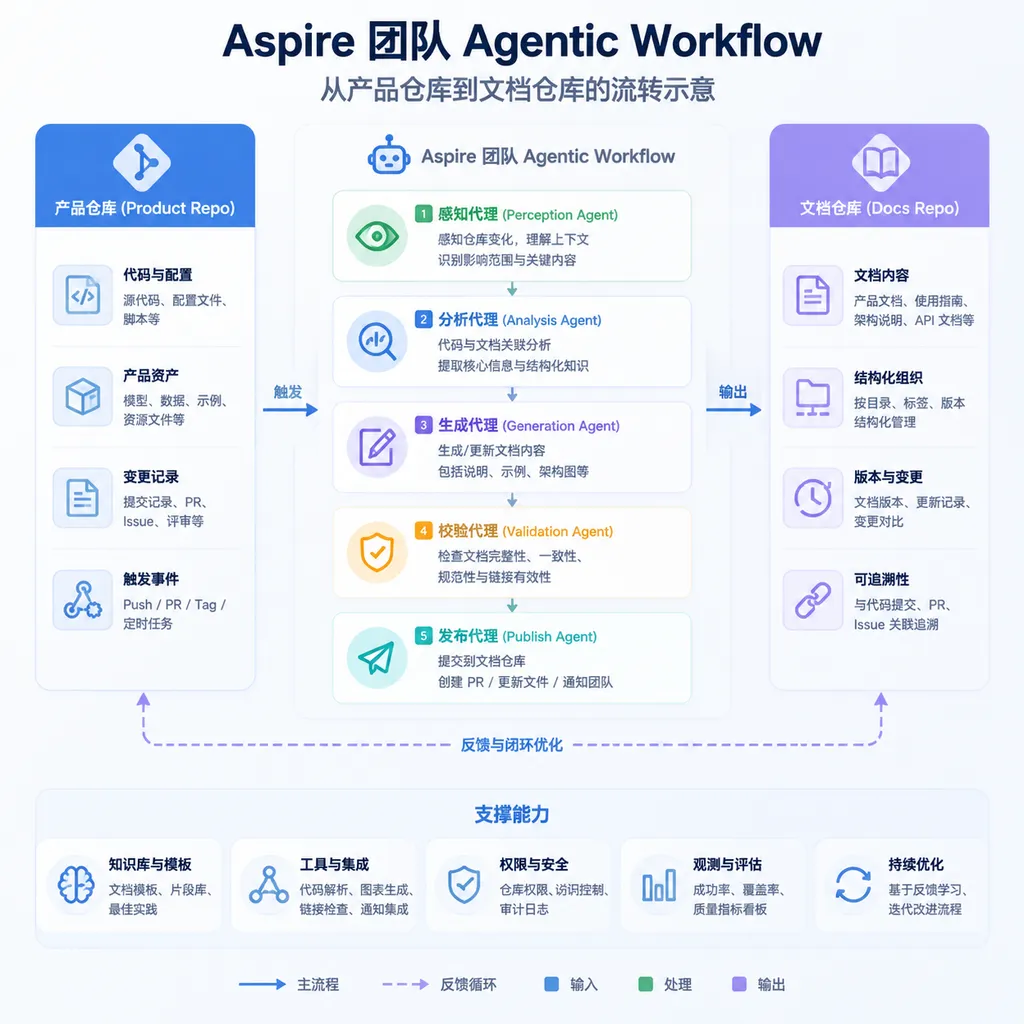
The official GitHub blog published a practice retrospective over the past couple of days that’s well worth examining: the .NET Aspire team has wired up a cross-repository documentation update workflow using Agentic Workflows. When a feature PR in the product repository gets merged, a corresponding documentation update PR automatically appears in another docs repository. The author is an Agent, while review is handled by subject matter experts (SMEs). The entire chain no longer requires engineers to manually open issues to remind the docs team, nor does it require docs writers to crawl changelogs afterward trying to figure out what changed this week.
On the surface, this isn’t huge news by itself — GitHub Agentic Workflows (internally codenamed gh-aw) has been running for nearly half a year since its official introduction on the Checkout channel back in March, and plenty of people in the community already call it “super Dependabot.” But the significance of the Aspire case is that it’s the first time Agentic Workflows has been applied to a problem every engineering team struggles with, yet few have seriously solved over the long term: the time gap between product changes and documentation updates.
Why documentation lag has never really been fixed
Any team that has worked on a moderately large open-source or commercial product knows that the gap between code merges and documentation synchronization never fully closes. The reasons aren’t mysterious:
- The people writing code aren’t necessarily the best at writing docs, and vice versa;
- Documentation often lives in a separate repository (a docs repo), decoupled from the product repo, so PR authors lack motivation to open a second PR across repositories;
- Release notes exist, but translating release notes into “how users should use this new API” is an entirely different task;
- Even if the process requires “code + docs in the same PR,” execution often collapses under deadline pressure.
The result is that documentation is always one step behind. Users read docs from the previous version, and half the issues in the tracker become “why does parameter X mentioned in the docs no longer exist?”
The Aspire team’s approach was to turn this into a pipeline and let the Agent handle the middle translation work nobody wants to do.
How Aspire wired it all together
According to the blog post, the workflow roughly looks like this:
- Trigger: In the
dotnet/aspireproduct repository, a PR tagged withdocs-neededis merged intomain. - Agent startup: An agentic workflow described in Markdown is launched by GitHub Actions, tasked with “understanding the changes in this merge and determining which documentation needs updating.”
- Cross-repository read/write: Using a restricted token, the Agent searches the
dotnet/docs-aspirerepository for related docs, reads the existing content, and generates diffs. - PR generation: The Agent opens a new PR in the docs repository, including links to the original PR, a change summary, and the reasoning behind the modifications in the PR body.
- Human review: SMEs receive notifications, review the PR, adjust wording, add context, and merge it.
The key point is that this Agent isn’t the kind of shallow script that simply “reads a diff and generates a paragraph.” Its inputs include the original PR title, description, diff, modified code files, XML doc comments in the code, and the relevant existing sections in the docs repository. It needs to determine “which user-visible behaviors are affected by this change,” and then decide “what should be modified and where in the documentation.” This is closer to assigning work to a junior technical writer than running a template-based script.
What exactly is Agentic Workflows?
For readers unfamiliar with the background, GitHub Agentic Workflows (gh-aw) is something incubated by GitHub Next. In simple terms, it’s “writing GitHub Actions in natural language.” Instead of placing pure YAML files in .github/workflows/, you place a Markdown file — with frontmatter at the top declaring triggers, permissions, and tools, while the body explains in English (or Chinese) what you want the Agent to do. gh-aw compiles this Markdown into YAML with built-in safety guardrails, runs it on standard GitHub Actions runners, and executes it using the underlying Copilot coding Agent.
A typical agentic workflow skeleton looks like this:
---
on:
  pull_request:
    types: [closed]
    branches: [main]
permissions:
  contents: read
  pull-requests: write
safe-outputs:
  create-pull-request:
    target-repo: dotnet/docs-aspire
timeout_minutes: 20
---

# Sync docs for merged Aspire PR

When a PR is merged into `dotnet/aspire` with the `docs-needed` label:

1. Read the PR diff and identify user-facing API changes.
2. Locate the corresponding pages in `dotnet/docs-aspire`.
3. Draft updates that reflect the new behavior.
4. Open a pull request against `dotnet/docs-aspire` and
   assign the docs SME as reviewer.
Pay attention to safe-outputs. This is one of gh-aw’s core design ideas: the Agent itself runs in a restricted environment. It cannot directly push code, merge changes, or call external APIs. Any “side effects” it produces must be declared through safe-outputs and executed by the framework on its behalf. Want to open a PR? You can only open it against an explicitly allowed target repository. Want to comment on an issue? The comment content goes through a filtering layer. Want to invoke an MCP tool? The tool whitelist is determined at compile time and cannot be changed at runtime.
This guardrail mechanism addresses one of the easiest ways Agent deployments can go wrong: uncontrolled permissions. In traditional GitHub Actions, if you grant a workflow a write token, a prompt injection incident effectively leaves you defenseless. gh-aw’s solution is to separate the Agent’s execution domain from its side-effect domain. Whatever the Agent wants to do must pass through a declarative exit point, and the exit itself is executed by trusted GitHub-hosted steps.
Can this really replace humans?
The short answer: it can’t replace SMEs, but it can replace the work nobody wants to do before the SME steps in.
The data shared by the Aspire team makes this clear: Agent-generated PRs are not merged directly. SMEs typically make several rounds of revisions per PR — adjusting tone, adding background context, correcting misunderstandings about API intent. This aligns with everyone’s general experience with LLM-generated content: it gives you a “70-point first draft” that saves you from starting cold, but it still needs work before publication.
But the value of that 70-point draft is precisely that it completes the hardest part to begin. The painful part of writing documentation has never been typing text — it’s recalling “what changed this time, which pages are affected, and whether example code needs updating.” The Agent handles this preparatory work, so when SMEs open the PR they see a draft already linked to specific sections and associated diffs. The cognitive burden of editing that is completely different from starting from scratch.
Another point worth noting is the redistribution of review responsibility. Previously, when “the code was merged but the docs weren’t updated,” nobody really owned the problem — engineers felt it wasn’t their job, while the docs team felt nobody informed them. Now the workflow becomes “the Agent drafts, the SME reviews,” making responsibility explicit. It may look like more work for the SME, but because the draft already exists, the SME’s role shifts from “actively discovering + writing” to “reviewing + fine-tuning,” which actually reduces the overall workload.
Compared to traditional approaches, what’s different?
Some might say this could also be done with traditional scripts and templates. Trigger a job after a PR merge, copy the PR description into an issue in the docs repo as a reminder — technically, that’s entirely feasible. But the difference lies in the depth of understanding.
Template-driven approaches can only “remind”; they cannot “draft.” They can’t understand diffs, determine which changes are breaking changes, or locate the exact sections in documentation that need updating. The SME still receives an empty issue, and the workload remains the same.
The value of Agentic Workflows is that they hand off the understanding-heavy tasks — “understanding code changes” and “locating documentation sections” — to the LLM, while leaving deterministic concerns like “when to trigger, where writing is allowed, and what to do on timeout” to GitHub Actions. This division of labor is more sensible than either “letting the Agent handle everything” or “making everything script-based.”
A broader trend worth mentioning
Viewed in a larger context, this is really about the continued AI-ification of software delivery pipelines. Over the past two years, we’ve seen AI-assisted stages gradually appear throughout CI/CD — AI-generated PR descriptions, AI code reviews, AI issue classification, AI dependency upgrades (new versions of Dependabot already use Copilot to handle breaking changes). Documentation synchronization was one of the last stages still heavily dependent on manual labor, and now that’s beginning to be automated as well.
For development teams, the key question worth considering is: which workflow stages are fundamentally “translation” tasks? That is, translating information from system A into the format needed by system B. These stages are almost all candidates for Agentic Workflows. Translating product changes into documentation, issues into changelogs, bug reports into reproduction steps, user feedback into backlog items — every one of these can adopt the Aspire pattern.
Another thing is that once these Agents are running, demand for API calls becomes continuous. A medium-sized open-source project may process dozens or hundreds of PRs per week, and each PR requires multiple rounds of tool invocation. Token consumption is significant. Teams in China looking to implement similar systems need to think ahead about model selection and API routing stability. The value of aggregation platforms like OpenAI Hub becomes obvious in these scenarios — a single key embedded in the workflow can switch between Claude, GPT, or DeepSeek underneath without rewriting authentication logic just to compare outputs.
A few reservations
Finally, a bit of cold water. The cases where this works well today are almost all well-structured products. .NET Aspire has clear API boundaries, and its documentation is organized into well-defined sections. Apply this to a legacy project with chaotic APIs and scattered documentation, and the Agent will likely open a pile of PRs modifying the wrong places or missing critical context, forcing SMEs to spend even more time cleaning things up.
So this shouldn’t be treated as a universal cure. It’s more like a force multiplier for teams that already have solid engineering discipline, rather than a rescue plan for chaotic projects. Documentation synchronization can only be automated if the documentation itself has structure, and code changes can only be understood by an Agent if the code itself has clear intent. No matter how powerful the tools are, they can’t lay the foundation for you.
But the direction is right. The connection between product changes and documentation — previously maintained manually — is finally starting to gain viable automation solutions. Which stage gets automated next is worth watching.
References
- Creating GitHub Agentic Workflows - Official GitHub Documentation: Official explanation of how to write agentic workflows and configure them at the organization level.
- Tech Briefing | Automating Repository Tasks with GitHub Agentic Workflows: A Chinese-language introduction on Zhihu covering the basic concepts and runtime mechanisms of gh-aw.


