
Claude Code Desktop Built-In Browser: AI Starts Manipulating Web Pages on Its Own

Anthropic has added a built-in browser panel to the desktop version of Claude Code. The AI agent can directly read, click, and test web pages, running in an isolated profile separate from the user’s browser. This marks a step for Claude Code from “writing code” to “watching the code it wrote run in real time.”
On July 11, Anthropic’s official developer account @ClaudeDevs posted on X: the desktop version of Claude Code now includes a built-in browser pane. AI can directly open webpages inside the app, click around, read the DOM, and interact with websites.
The announcement was short, but for frontend developers, it matters a lot — Claude Code can finally see what the pages it writes actually look like.
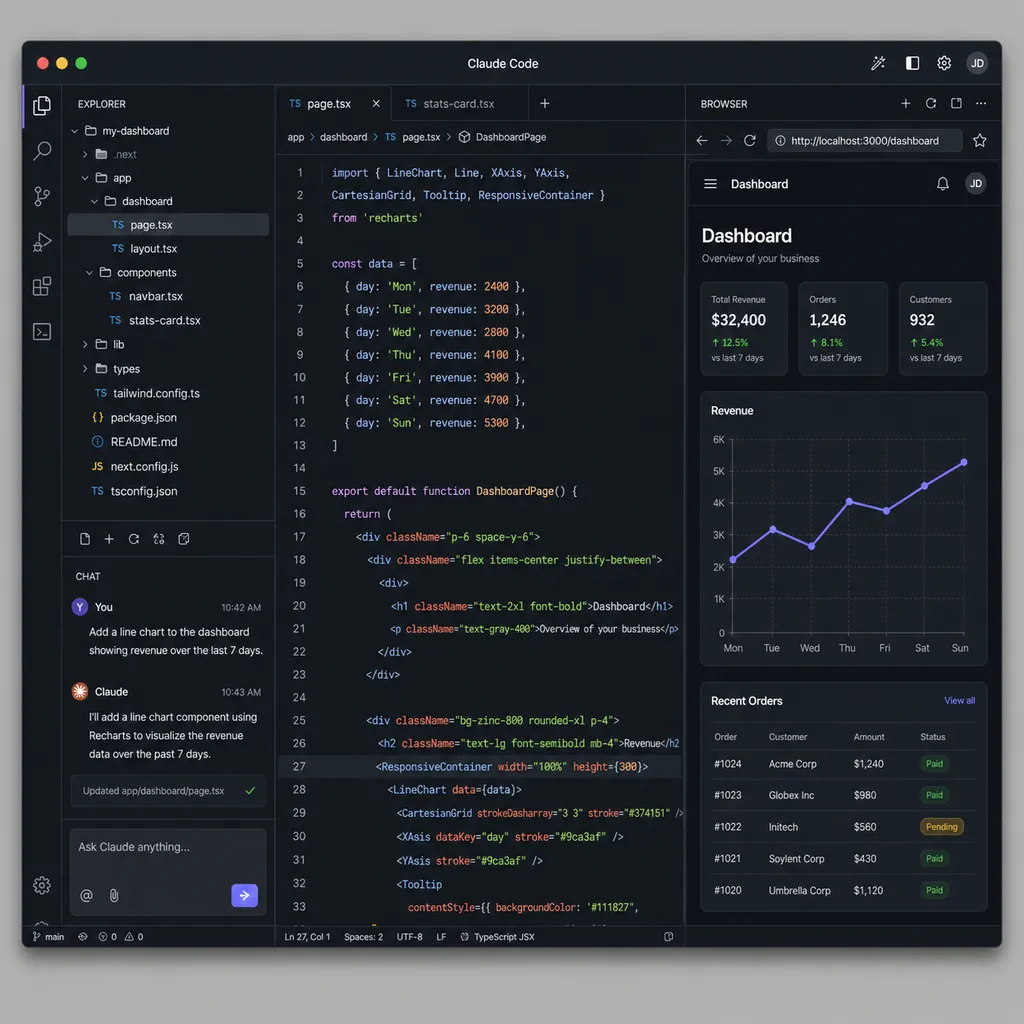
From “finished writing but no idea if it works” to “finished writing and testing it itself”
Developers familiar with Claude Code know its previous weakness was obvious: it could read code, modify code, and run tests, but once the task involved “what does the page actually look like?” or “does the button respond when clicked?”, humans still had to manually verify things in a browser, or resort to Playwright/Puppeteer scripts.
Anthropic previously offered two compromise solutions. One was a Chrome extension that hooked Claude Code into the user’s own browser. The advantage was access to existing login sessions; the downside was broad permissions and weak isolation. The other was connecting MCP to Playwright, but the setup barrier was relatively high for ordinary users.
This built-in browser takes a third approach — embedding a browser instance directly inside the Claude Code app with an isolated profile. The official documentation makes it very clear:
- No sharing cookies or login sessions with the user’s main browser
- No shared browsing history
- A completely clean profile, with a fresh environment every launch
This design tradeoff is very typical: sacrificing the ability to “log into your accounts and operate directly” in exchange for stronger security boundaries. Anthropic explicitly states in the documentation that if you want AI to deeply operate logged-in web apps (such as automating Gmail or admin systems), you should still use the Chrome extension. The built-in browser is positioned for development scenarios: debugging local services, accessing public documentation, reviewing design drafts, and running E2E smoke tests.
What problem does this actually solve?
Take a frontend scenario developers face every day. You ask Claude Code to modify a React component — for example, changing a button into a loading state. The traditional workflow looks like this:
- Claude edits the code
- You switch to the browser
- Refresh and check the result
- Notice styling issues and go back to tell Claude
- Claude edits again
- Switch back to the browser
- ...repeat
With the built-in browser pane, this loop can theoretically close entirely within Claude Code: Claude edits the code → opens localhost:3000 itself → takes a screenshot → notices the loading spinner is misaligned → fixes the CSS → takes another screenshot to verify. No window switching required.
This is the core of the so-called agentic loop — giving AI the ability to verify its own work. Previously, Claude Code could read code, write code, and run commands, but it lacked the “see the result” step, especially for visual output. Now that gap has been filled.
It’s worth noting that earlier this year, the Chrome team launched Chrome DevTools for Agents, already laying groundwork for this direction by giving AI agents structured access to performance panels, network requests, and console errors. Anthropic has essentially turned that concept into a native integration: no DevTools extension installation, no CDP configuration, just works out of the box.
Technical details: what can it actually do?
According to the official docs and demo videos, the built-in browser pane currently supports:
- Reading page content: DOM structure, text, visible elements
- Interactions: clicking, typing, scrolling, navigation
- Screenshots: allowing Claude to see the rendered result
- Console access: reading JavaScript errors and network requests
Combined with Claude Code’s existing file read/write and terminal command capabilities, a typical debugging workflow looks like this:
You: Help me figure out why this login form doesn’t respond after submission

Claude Code:
1. Read LoginForm.tsx (inspect submit logic)
2. Open built-in browser → localhost:3000/login
3. Enter test credentials and click submit
4. Check console → discover POST /api/login returns 500
5. Read backend route code
6. Discover body parser is missing
7. Modify server.ts, add express.json()
8. Restart service and test again in browser
9. Submission succeeds, redirect works normally
Previously, you had to bounce between three or four windows for this workflow. Now Claude can complete it itself. Of course, that assumes it doesn’t go off track at step 4 — the biggest problem with current agents is still error accumulation across multi-step tasks. If one judgment is wrong, everything afterward follows the wrong path.
Compared with competitors, what weakness did Anthropic address?
Looking at the bigger picture, from the second half of 2025 into 2026, the battlefield for AI coding agents has already shifted from “whose model writes better code” to “whose agent can actually complete end-to-end tasks.”
- Cursor / Windsurf: deeply integrated IDE approach with the best editor experience, but browser interaction still relies on external tools
- GitHub Copilot Workspace: more PR-driven, with tests running in cloud sandboxes
- Cline / Aider: open-source ecosystem built around MCP extensions
- Claude Code: started as a CLI, then added a web version (claude.ai/code), iOS preview, VS Code extension, and Chrome extension
Anthropic’s strategy is becoming very clear — Claude Code is not an “editor,” but a coding agent that can appear through multiple entry points. The CLI serves terminal-heavy users, the web version handles temporary project takeovers, the desktop version targets heavy local development, and the Chrome extension focuses on browser automation.
The built-in browser addresses a key weakness of the desktop version: enabling frontend debugging loops without relying on external tools. After this step, desktop Claude Code can basically be described as “a full development environment built into one app” — terminal, editor, and browser all integrated together.
Some more grounded observations
Is this feature useful? The demos look impressive, but there are several things developers should keep in mind:
First, isolated profiles are a double-edged sword. The upside is security; the downside is repeatedly logging in, handling cookie popups, and solving captchas. For authenticated internal systems, you’ll still need the Chrome extension or manual configuration.
Second, visual understanding remains a bottleneck. Claude can “see” screenshots, but its accuracy on complex UI layouts and subtle styling issues is still limited. Asking it to “center the button” is fine; asking it to “make this animation feel smoother” is much harder.
Third, token consumption in long tasks. Browser interaction generates huge amounts of screenshots and DOM snapshots, all of which must fit into context. Even moderately complex debugging tasks can burn through tokens very quickly, which translates directly into cost for developers paying via API usage.
Fourth, the same old issue — agent autonomy vs. controllability. If AI is opening browsers and clicking around on its own, how do you roll back mistakes? What happens if it clicks the wrong delete button? Human confirmation is still required at critical steps.
OpenAI Hub support status
For developers wanting to integrate Claude models into their own agent systems, OpenAI Hub already supports API access for the full Claude model lineup (including Sonnet and Opus), using OpenAI-compatible formats with a single key and direct domestic access without proxies. For recreating Claude Code-style agentic workflows like “read code → modify code → verify,” the model capabilities are already sufficient.
Final thoughts
From the initial CLI release to today’s built-in browser integration, Claude Code took less than a year to evolve from “a conversational programming assistant in the terminal” into “a coding agent with a full development environment.” In the broader AI programming tools market, that’s actually a very fast pace.
More importantly, the underlying trend is becoming clear — AI coding tools are evolving from “helping you write code” into “completing tasks on your behalf.” Writing code is only one step in the process; before and after it come requirement understanding, environment setup, validation testing, and deployment. Whoever can integrate every link in that chain has a chance to become the default tool for the next generation of developers.
The browser integration may not have arrived early, but it was an important missing piece.
References
- Claude Code desktop adds in-app browser for AI webpage debugging and more - IT Home: IT Home’s initial report on this feature update
- Claude Code Best Practices Guide - Zhihu: Community summary of frontend debugging practices for Claude Code


