
Mindwalk Open Source: Equipping AI Agents with a Code Map Replay System

The open-source tool Mindwalk renders the execution traces of AI Coding Agents into a replayable 3D code map, allowing every jump, file read, and tool invocation by the Agent to replay before your eyes — this may be the most intuitive attempt yet to solve the problem of Agents “drifting.”
Someone Turned the Execution Process of AI Agents into a “Replay on a Code Map”
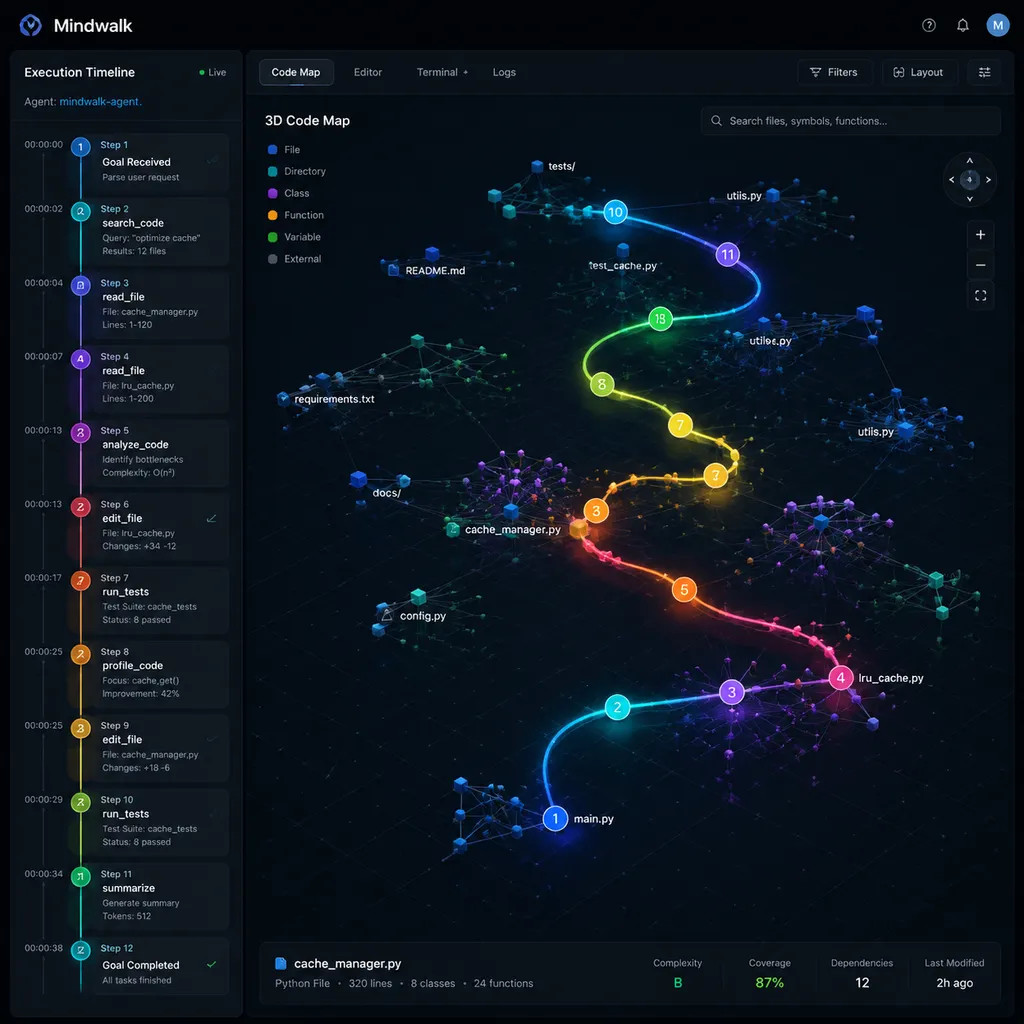
Yesterday, a somewhat unusual project hit the front page of Hacker News — cosmtrek/mindwalk. The name sounds a bit abstract, but the functionality is easy to explain in one sentence: it takes the full execution process of AI coding agents like Claude Code, Cursor, and Codex, maps it onto a 3D spatial map of your codebase, and lets you replay it from start to finish like a recording.
It sounds a bit like a flame graph for agents, but far more intuitive. Instead of staring at stacked call graph bars, you watch how the agent moves through the “city” of your codebase: first it visits the building called auth/middleware.ts, searches through three floors, then jumps to db/session.ts, gets stuck for a while failing to find a function, goes back to query types/, and finally edits two lines in handlers/login.ts. The whole process comes with a timeline, can be paused, rewound, zoomed in, and lets you inspect the parameters of every tool call step-by-step.
The creator, cosmtrek, previously built air (the Go hot-reload tool with 20k stars), so this is clearly an experienced indie developer. This isn’t a massive project, but I think its angle is one of the most interesting ideas in the AI agent tooling ecosystem over the past six months.
Why This Only Appeared Now
First, some broader context. Over the past year, AI coding agents have gone from demos to daily production use, but nearly everyone has complained about the same issue: agents “drift.”
Last month, that heavily circulated V2EX article, “Deep Experiences Using Claude Code,” explained this very clearly — agents gradually drift away from the original goal, do unnecessary work, take detours, or even introduce new problems. The reasons are well understood: limited context windows, incomplete tool feedback, accumulated errors, and lack of intermediate verification.
But knowing an agent drifted is one thing. Being able to see how it drifted is another.
Right now, mainstream agent clients give you observability that basically looks like this: a pile of chat logs plus a pile of tool-call JSON. If you want to analyze a failed task afterward, you have to scroll from the top of the chat history and inspect line-by-line what it grepped, which file it read, and what lines it modified. For a 3,000-step task, that becomes unreadable.
That’s exactly the problem Mindwalk is trying to solve. It transforms the time-series problem of “what the agent did” into the spatial problem of “what path the agent walked through code space.” Humans are much better at perceiving spatial relationships than pure sequences — that’s the core reason it chose a 3D map, not just for visual flair.
How It Actually Works
After looking through the repo, the architecture isn’t complicated, but the design is smart. It has three layers:
1. Code Map Generation
It uses tree-sitter to parse the codebase, breaking files, modules, functions, and classes into nodes, then arranges them in 3D space according to dependency and call relationships. This is similar to what visualization tools like CodeSee or Sourcetrail do — mature technology.
The map is organized like urban planning: directories are districts, files are buildings, functions are floors, and symbols are rooms. Distance is determined by dependency strength — if A frequently imports B, they’re placed close together; unrelated modules are pushed to opposite ends of the map.
2. Agent Trajectory Collection
This is the key part of Mindwalk. It hooks into log streams from mainstream agent frameworks or MCP protocols to capture every tool call event — read_file, grep, edit, bash, and so on — along with timestamps, parameters, and return results.
Currently confirmed supported platforms include Claude Code, Cursor Composer, OpenAI Codex CLI, and any agent connected via the standard MCP interface. The README mentions adapters for Cline and Aider are still in progress.
Each tool-call event gets mapped to a coordinate point on the map. For example, read_file('src/auth/login.ts') briefly lights up the building representing login.ts.
3. Replay Engine
This is the most impressive part. It renders the entire trajectory as a path flying across the 3D map over time, with features like:
- Speed controls from 0.5x to 16x — a 1,200-step session can be reviewed in 30 seconds
- Heatmap highlighting — files repeatedly visited by the agent gradually heat up, making loops immediately obvious
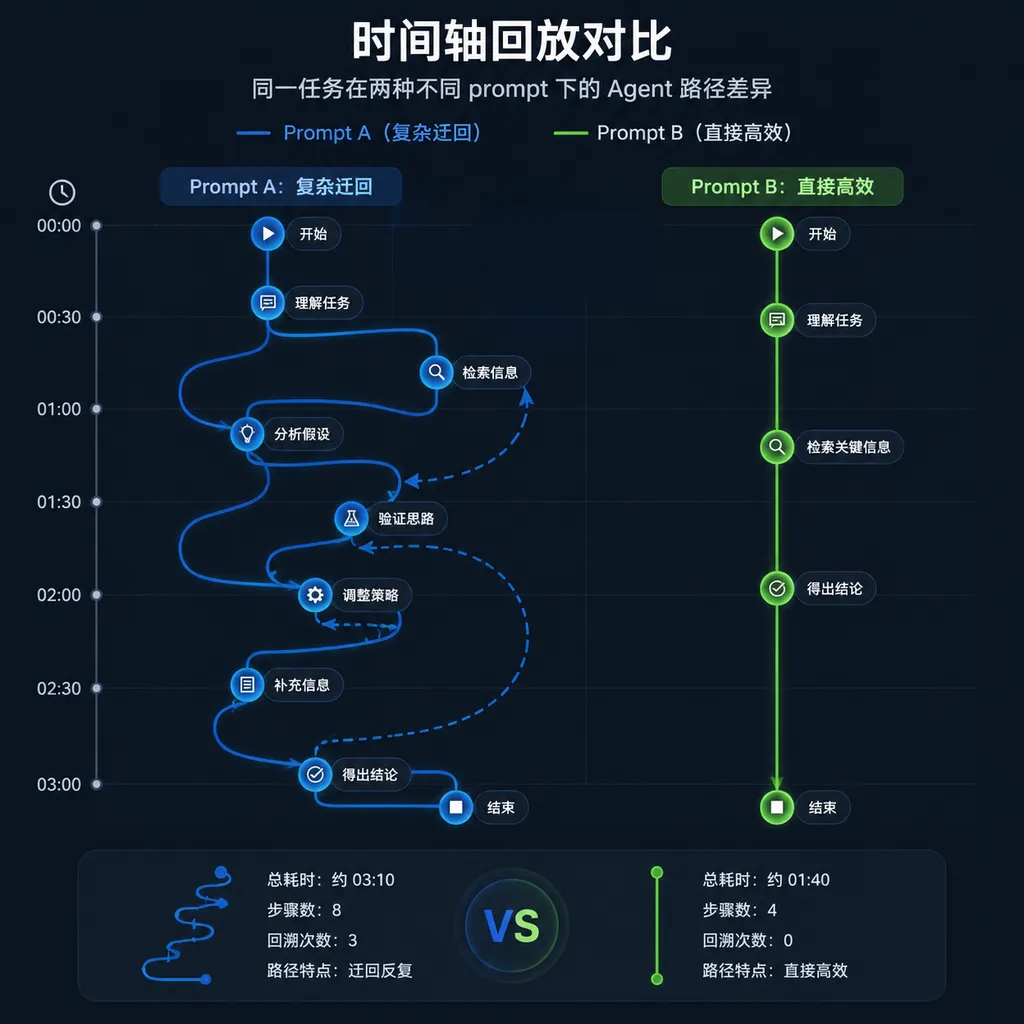
- Branch comparison — if the agent tried two different approaches at some step (for example, made a wrong edit, rolled it back, then tried again), the replay shows two differently colored trajectories
- Diagnostic tags — several built-in “anomaly patterns” are automatically detected, such as “the same file was read 8 times within 5 minutes” or “grep occurred without any corresponding edit,” and these are highlighted in red on the timeline
Why I Think This Direction Makes Sense
The difference becomes obvious when compared to similar tools.
The observability space for agents is already fairly large: LangSmith, Langfuse, Braintrust, Helicone, and others focused on LLM application monitoring are all moving toward agent tracing. But nearly all of them present information as flat tree-shaped call graphs — tool calls expanded into a tree where you click nodes to inspect details.
That works well for general-purpose agents like customer support bots or data analysis agents. But for coding agents, it wastes a critical dimension: code itself has topology. Whether your agent is looping around auth/ or looping around db/ means very different things. The former may indicate it doesn’t fully understand authorization logic; the latter may mean it can’t locate the right schema. Flat call trees discard that spatial information.
Mindwalk restores that missing dimension. That’s the additional value it provides compared to existing tools.
Of course, it’s not without drawbacks. Right now it’s purely a local tool with no collaboration capabilities — after reviewing a session, only you can view it. You can’t instantly share it with teammates and say, “Look here, the model wandered around the handlers section for 20 steps.” The author mentioned web sharing in the issues, but it doesn’t exist yet.
Also, 3D rendering is a challenge for large repositories. I tested it on a medium-sized repo with 15,000 files, and loading the map took about 40 seconds, though playback itself was smooth. But if your monorepo has millions of files, incremental loading will probably become necessary.
A Concrete Example
Here’s one example I tried myself. I asked Claude Code to perform a bulk task: replace all console.log calls in the project with logger.debug and add tags. In theory, it’s purely mechanical work.
Afterward, I reviewed the replay in Mindwalk and noticed something interesting: the agent read the file packages/utils/logger.ts 11 times, and 7 of those reads were completely identical. Why? Because every time it entered a new directory, it “re-confirmed the logger signature” instead of caching that information in context.
This pattern is nearly impossible to notice in plain chat logs — each read is buried among dozens of unrelated operations, making the repetition hard to spot. But on the 3D map, that building lit up 11 separate times, making the issue instantly obvious.
These kinds of insights are extremely valuable for people designing agent prompts and workflows. You can directly see where your model or prompt is inefficient, then optimize with caching, planning steps, or better context management.
It Aligns with Several Recent Trends
Viewed in the context of the agent tooling ecosystem over the past six months, Mindwalk fits into a fairly clear pattern:
- In June, Anthropic updated Claude Design to connect bidirectional workflows between design and code
- Last month, open-source local desensitization tools like Leakproof emerged to address data privacy concerns for agents
- Zhipu open-sourced GLM-5.2 with a strong focus on “long-horizon coding tasks,” specifically aiming to reduce agent drift
- Agent-native browsers like Vessel Browser have appeared, designed specifically for agent usage
A pattern is emerging: AI coding agents are moving from merely “being able to run” into a phase of running well, running reliably, and being observable. Mindwalk belongs to this observability layer, and it’s one of the few products in this category built specifically for coding scenarios.
Some Practical Advice
If your team uses coding agents for substantial work — not just completing a few lines of code, but handling multi-step tasks — Mindwalk is worth trying, especially in these cases:
- You’re responsible for tuning agent prompts or workflows — seeing actual execution paths helps identify optimization opportunities
- You’re comparing models — running the same task through Claude, GPT, and DeepSeek reveals differences in their reasoning patterns through trajectory comparison
- You’re teaching or presenting agent-related workflows — it’s far more intuitive than showing dozens of screens of chat logs
Cases where it’s less suitable:
- You only use agents for short code completions or a few quick steps — this setup is probably overkill
- Your repository structure is extremely flat (for example, mostly standalone scripts under 100 lines) where a 3D map adds little spatial value
The project is currently MIT licensed, with a Go core and an Electron client (the author says a web version is planned for the future). Once installed, connecting Claude Code or Cursor only requires a single configuration line.
One More Thing
If you’re building agent-related systems and need to switch between multiple models in the same codebase — for example, comparing paths generated by different models on the same task as Mindwalk enables — then the unified multi-model access provided by OpenAI Hub can make things more convenient. A single API key works across GPT, Claude, Gemini, and DeepSeek, using an OpenAI-compatible format. Switching models only requires changing the model parameter, without dealing with differences between vendors’ SDKs. It saves a lot of integration work during agent evaluations.
References
- cosmtrek/mindwalk - GitHub — Project repository containing installation instructions, supported agent client lists, and the author’s design documentation
- cosmtrek/air - GitHub — The author’s previous Go hot-reload tool, included as background reference for the developer’s experience


