
AI CLI key leak — finally, someone is taking action.
The open-source tool **ai-cli-scanner** can scan command execution logs from tools such as Claude Code, Codex, and Gemini CLI to detect whether sensitive credentials (e.g., SSH keys, GitHub tokens) have been accidentally exposed during AI-assisted programming. At a time when AI Agent security incidents are occurring frequently, this tool addresses a severely neglected area of risk.
When you ask Claude Code to configure SSH for you, Codex to run deployment scripts, or Gemini CLI to debug environment variables, have you ever thought about one issue: every command these AI tools execute leaves behind logs. And in those logs may lie your SSH private key, GitHub token, AWS credentials.
Recently, an open-source tool called ai-cli-scanner appeared in the LINUX DO community. What it does is simple — it scans the command execution logs of AI CLI tools to check for leaked sensitive credentials. It supports Claude Code, Codex, and Gemini CLI, detects patterns based on built‑in rules, and outputs reports in both text and JSON formats.
It doesn’t sound complicated, but the problem it addresses is very real.
A Neglected Attack Surface
In the past year, the penetration speed of AI CLI tools has far exceeded everyone’s expectations. Claude Code, Codex CLI, and Gemini CLI have already become daily tools for many developers. At the end of March, Feishu and WeCom each open-sourced their own command-line tools, allowing AI Agents to directly operate office platforms. The tools are getting more powerful and the permissions granted are growing—but security awareness has not caught up.
Where does the problem lie? The way AI CLI tools work means they naturally come into contact with sensitive information. When you ask it to configure Git, it may need to read the ~/.ssh/ directory; when you ask it to deploy a service, it may access API keys in environment variables; when you ask it to debug an authentication issue, it might print tokens to the terminal. All these operations are recorded in the CLI’s execution logs.
And these logs often just quietly sit on your local disk — unencrypted, unmasked, and unprotected.
Even worse is the risk of “relay injection.” The author of ai-cli-scanner mentioned in a post that the direct motivation for developing this tool was seeing reported cases where a relay service injected malicious code. If you call a model through a third-party API relay and that relay injects malicious commands in the response, your AI Agent could unknowingly execute unauthorized actions — such as reading and uploading your key files. In that case, post-event auditing becomes critically important.
This isn’t hypothetical. In March, Security Insider disclosed a string of security incidents involving OpenClaw: 270,000 instances exposed to the internet; one in eight plugins on the ClawHub marketplace being malicious; and CVE‑2026‑25253 enabling attackers to perform one-click remote code execution via a link. One key attack vector was “log pollution” — attackers injecting malicious instructions into log files, which the Agent might execute when reading logs during troubleshooting.
Claude Code itself has in fact noticed this issue. Earlier this year, the leaked source code of Claude Code (over 510,000 lines of TypeScript accidentally published to npm) showed that Anthropic had built in credential‑scanning functionality in the client capable of detecting over 20 credential patterns, including AWS tokens, GCP API keys, Stripe keys, and RSA private keys. The logic is clear: developers often paste sensitive data into terminals, so the client needs to scan and block it in advance.
But that’s just Claude Code’s own protection. What about Codex CLI? Gemini CLI? Or developers using OpenCode or other open-source CLI tools? Each tool handles its own logs, but there’s no unified post‑incident auditing solution across all tools.
That’s the gap ai-cli-scanner tries to fill.
How It Works
Usage is straightforward — four commands do the job:
git clone https://github.com/qiye45/ai-cli-scanner
cd ai-cli-scanner
pip install -e .
ai-scan
After running, it performs two actions:
- Extracts command execution logs from supported AI CLI tools and saves them into a unified JSONL file.
- Runs pattern-matching scans on these records based on built‑in rules to identify potential credential leaks.
By default, output is saved to the scan_output/ directory, containing three files:
execution_log.jsonl: extracted raw execution recordsscan_report.txt: human-readable text reportscan_report.json: structured JSON report for programmatic use
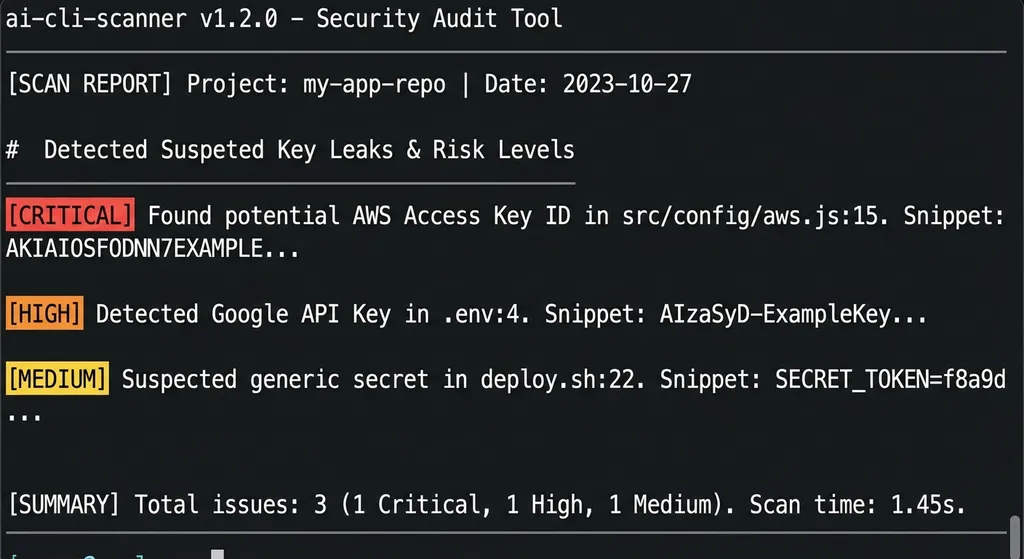
By design, this is a completely local tool. The scanning process does not connect to the internet or upload any data — all analysis happens locally. For a security tool handling sensitive credentials, that’s the right choice.
Currently supported CLI tools include Claude Code, Codex CLI, and Gemini CLI. Some in the community have already asked about OpenCode support — showing real demand. The author said the built‑in rules are still being refined and contributions via issues or PRs are welcome.
Frankly, the tool is still in its early stage. The rule coverage, false positives, and compatibility with different CLI log formats all need real-world testing to refine. But the direction is correct, and the focus well chosen — rather than doing real‑time interception during Agent execution (which each CLI should handle itself), it provides post‑event auditing. Like how you can’t prevent every traffic accident, but you can install a dashcam.
The Bigger Picture: AI Agent Security Becomes a Necessity
Seen in a broader context, ai-cli-scanner is a small but vital component in the AI Agent security toolchain.
Over the past six months, AI Agent security issues have rapidly shifted from “theoretical discussion” to “real threat.” In early April, Google DeepMind published a paper introducing the first systematic classification framework for AI Agent network attacks, dividing them into six major categories. Anthropic’s new Mythos model preview demonstrated the ability to autonomously discover zero-day vulnerabilities at scale — directly challenging traditional patch-based defense models.
On the tooling side, Google open-sourced the Gemini CLI Security Extension last September, using AI to perform code security reviews. GitHub’s Copilot continues to strengthen key detection capabilities. But these are “vendor‑specific solutions” — covering only their own ecosystems.
For developers who simultaneously use multiple AI CLI tools — as is common in real work (using Claude Code for coding, Codex for review, and Gemini CLI for documentation lookup) — what’s needed is a cross‑tool, unified security auditing solution. ai-cli-scanner, though still basic, points in exactly that direction.
What Developers Should Do Now
Whether or not you use ai-cli-scanner, there are several things worth doing now:
- Check your AI CLI tool logs. Claude Code logs are usually under
~/.claude/, Codex under~/.codex/. Open them — you might be shocked by the amount of data recorded. - Never paste or type real keys, tokens, or passwords directly into AI CLI tools. If an AI needs access to a service, pass it through environment variables, not plaintext in a chat.
- Use trusted relay APIs if you invoke models through third-party services. Platforms like OpenAI Hub let you call GPT, Claude, Gemini, DeepSeek, etc., with a single key, using the OpenAI-compatible format, avoiding multiple exposed keys and reducing the attack surface.
- Rotate your keys regularly. GitHub tokens, SSH keys, API keys — set reminders to update them at least quarterly. If you suspect leakage, rotate immediately.
- Pay attention to permission configurations of your AI CLI tools. Claude Code has a flag like
--dangerously-skip-permissions; Codex has sandbox mode. Understand the security controls available and actually enable them.
If You Want to Use AI for Security Auditing
Currently, ai-cli-scanner mainly relies on built‑in rule-based pattern matching. But if you want to go further, you can send suspicious items detected to a large model for secondary analysis — since rule matching can easily yield false positives, and LLMs excel at contextual understanding.
For example, you can feed entries from scan_report.json to a model to determine whether a leak is real or a false positive that just looks like a key sample. Using the OpenAI Hub–compatible API format, it’s straightforward:
import openai
import json

client = openai.OpenAI(
    api_key="your-openai-hub-key",
    base_url="https://api.openai-hub.net/v1"
)

# Read ai-cli-scanner's scan report
with open("scan_output/scan_report.json", "r") as f:
    scan_results = json.load(f)

# Extract suspicious entries
suspicious_items = [item for item in scan_results if item.get("risk_level") in ["high", "critical"]]

response = client.chat.completions.create(
    model="claude-sonnet-4-20250514",  # or gpt-4o, gemini-2.5-pro, etc.
    messages=[
        {
            "role": "system",
            "content": "You are a security audit expert. Analyze the following AI CLI command execution records and determine whether there is a real credential leak risk. For each record, output: true_positive (confirmed leak), false_positive (false alarm), or needs_review (requires manual review), and explain why."
        },
        {
            "role": "user",
            "content": json.dumps(suspicious_items, ensure_ascii=False, indent=2)
        }
    ],
    temperature=0.1  # low temperature for audit tasks to reduce hallucination
)

print(response.choices[0].message.content)
This “rule-scanning + LLM evaluation” two-stage approach achieves better results than pure pattern matching in practice. Rules provide a high‑recall first filter; LLMs deliver precision refinement by reducing false positives. Also, using OpenAI Hub’s aggregation capability, you can easily switch between models — for example, Claude for security analysis, GPT‑4o for report generation, DeepSeek for Chinese‑language validation — all with a single API key.
Final Thoughts
ai-cli-scanner isn’t a revolutionary tool. What it does is rather modest: read logs, run regexes, produce reports. But in today’s climate of growing AI Agent security concerns, it reminds us of an often-overlooked fact — the more access you grant your AI, the stronger your auditing capability must be.
When AI can write code, run commands, and operate file systems for you, “trust but verify” stops being a slogan and becomes an engineering practice. ai-cli-scanner marks the beginning of that practice — rough, but on the right track.
If you use AI CLI tools every day, spending five minutes running a scan may save you five days of cleanup from a key leak incident.
References:
- ai-cli-scanner GitHub repository — source code and usage documentation
- LINUX DO community thread — author’s project introduction and community feedback
- Weekly AI Brief: CLI Tool Open-Source Wave, Source Code Leak, and Three Major Model Releases – Juejin — Claude Code source leak and AI CLI tool ecosystem updates


