
skl2onnx Conversion Failure Case Study: Random Forest Accuracy Plunges by 41%

A developer exported sklearn’s `RandomForestClassifier` to ONNX, and the accuracy dropped from 90% to 49%. The problem wasn’t the model, but that the ONNX output was mistakenly treated as labels. Quite a few people have fallen into this trap.
A 41% Accuracy Gap
There was an interesting post on Stack Overflow these past couple of days: a developer trained a RandomForestClassifier that steadily achieved 90% accuracy on the test set. Excitedly, they exported it to ONNX using skl2onnx for deployment — only to see inference accuracy plunge straight to 49%, a full 41 percentage points lower.
If you've worked on model deployment before, your first reaction to that number is probably: quantization issue? Operator precision loss? Opset incompatibility?
None of the above. The reason this failed was much dumber than expected — and much more common than you'd think.
The Real Problem: You Treated Probabilities as Labels
Here's the conclusion first: after converting a RandomForestClassifier with skl2onnx, the ONNX model has two outputs — the first is the predicted label, and the second is the prediction probabilities for each class.
The developer's code used session.run(None, {...})[0], which looks fine at first glance — just taking the first output. But their downstream logic handled it as if it were a probability array. In other words, they effectively treated labels as probabilities, or vice versa. The exact details depend on the implementation, but the root cause was simply that they misunderstood the output order and semantics.
What's even more annoying is that the probability output of RandomForestClassifier in ONNX is not a clean 2D array shaped like [n_samples, n_classes]. Instead, it's a ZipMap structure — a sequence of dictionaries like {class: probability} for each sample. You can't just call np.argmax on it; the types don't even match.
And that's how you end up with bizarre behavior: the code runs without errors, produces outputs, but the results are basically equivalent to random guessing.
Reproducing the Pitfall
To make this more concrete, here's a reproduction of the scenario:
from sklearn.datasets import load_iris
from sklearn.ensemble import RandomForestClassifier
from sklearn.model_selection import train_test_split
from skl2onnx import convert_sklearn
from skl2onnx.common.data_types import FloatTensorType
import onnxruntime as rt
import numpy as np

# Train a basic model
X, y = load_iris(return_X_y=True)
X_train, X_test, y_train, y_test = train_test_split(X, y, random_state=42)

clf = RandomForestClassifier(n_estimators=50, random_state=42)
clf.fit(X_train, y_train)

print("sklearn accuracy:", clf.score(X_test, y_test))

# Convert to ONNX
initial_type = [('float_input', FloatTensorType([None, 4]))]
onx = convert_sklearn(clf, initial_types=initial_type)
with open("rf.onnx", "wb") as f:
    f.write(onx.SerializeToString())

# Load and run inference
sess = rt.InferenceSession("rf.onnx")
input_name = sess.get_inputs()[0].name
label_name = sess.get_outputs()[0].name
proba_name = sess.get_outputs()[1].name

print("Output nodes:", [o.name for o in sess.get_outputs()])
# You'll see: ['output_label', 'output_probability']
Notice the final printed output nodes: output_label and output_probability are sitting there in plain sight. But many tutorial examples use code like this:
pred_onx = sess.run(None, {input_name: X_test.astype(np.float32)})
# Some people use pred_onx[0], others use pred_onx[1]
# Then pass it to accuracy_score — and things break
If you compare pred_onx[1] (the ZipMap probability output) directly against y_test as if it were a label array, the result is catastrophic.
The Correct Approach
If you want labels, explicitly fetch labels:
pred_label = sess.run([label_name], {input_name: X_test.astype(np.float32)})[0]
print("ONNX accuracy:", np.mean(pred_label == y_test))
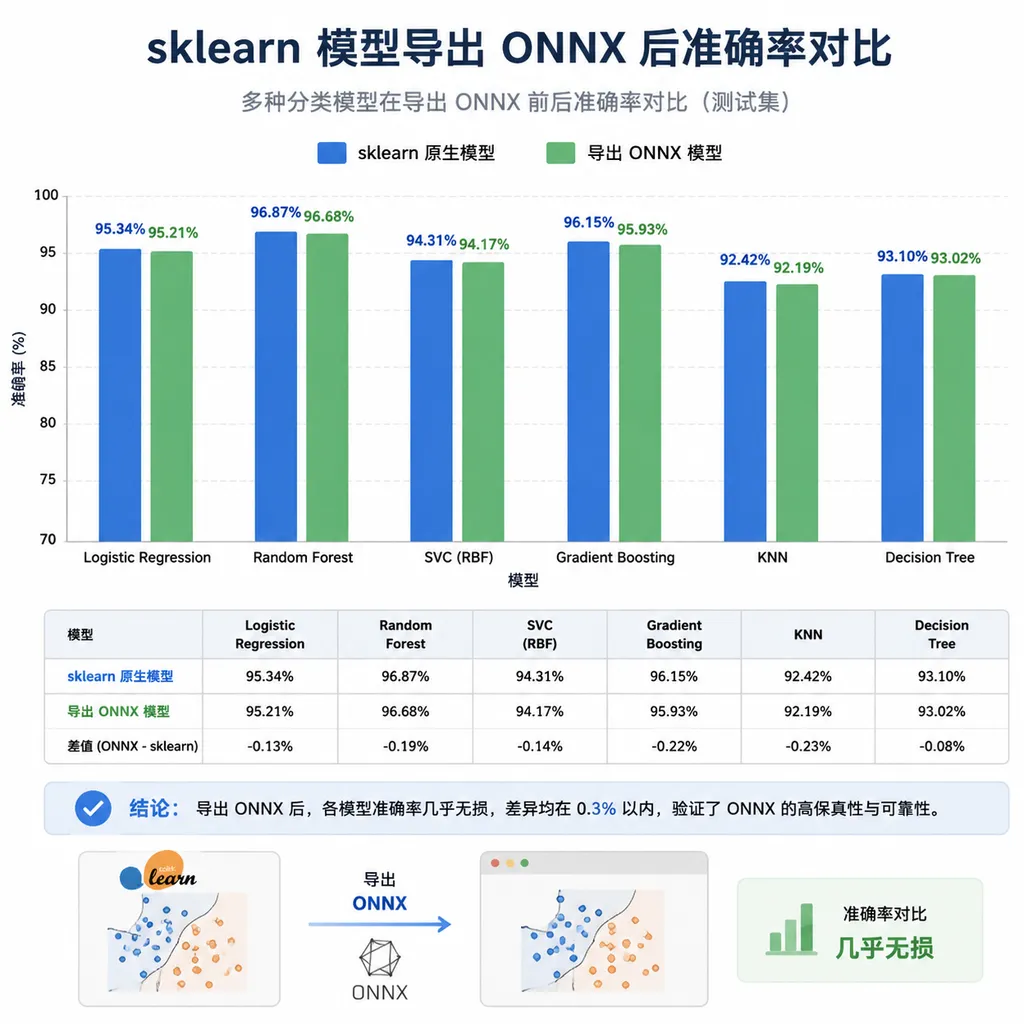
At this point you'll find the accuracy is almost identical to the original sklearn model (differences are usually within 1e-6, caused by floating-point computation order).
If you need probabilities — for calibration, AUC calculation, etc. — then parse the ZipMap properly:
pred_proba_raw = sess.run([proba_name], {input_name: X_test.astype(np.float32)})[0]
# pred_proba_raw is a list of dicts
print(pred_proba_raw[0])  # {0: 0.02, 1: 0.95, 2: 0.03}

# Convert to a 2D array
n_classes = len(clf.classes_)
pred_proba = np.array([[d[c] for c in clf.classes_] for d in pred_proba_raw])
Think ZipMap is annoying? Disable it during conversion:
onx = convert_sklearn(
    clf,
    initial_types=initial_type,
    options={id(clf): {'zipmap': False}}
)
After adding this option, the probability output becomes a standard [n_samples, n_classes] 2D array. You can use argmax directly without unpacking dictionaries.
Why Does ZipMap Exist at All?
A bit of background here. ZipMap was designed in the ONNX ML operator set to support traditional machine learning model outputs. It explicitly maps class labels (which may be strings or integers) to probabilities, avoiding implicit assumptions like "which class does column 0 correspond to?"
From a design perspective, this makes sense: the order of clf.classes_ in sklearn may not match what you expect, especially when labels are strings ('cat', 'dog', 'bird') or non-contiguous integers. ZipMap explicitly binds labels to probabilities and avoids ambiguity.
But the tradeoff is that it outputs a non-tensor structure like Sequence<Map<int64, float>>, which is awkward for downstream inference frameworks. Many deployment environments — especially C++ and mobile — handle it poorly. So in pure numerical pipelines, zipmap=False is almost always the best default choice.
The Common Pattern Behind These Issues
Now that we've covered this specific case, it's worth discussing the broader pattern. When converting sklearn or PyTorch models to ONNX, dramatic accuracy drops generally fall into a few categories. Don't assume precision loss the moment you see metrics decline:
- Output parsing mismatch: this case falls into that category. It's the most common and most frequently misdiagnosed issue. The hallmark is a cliff-like accuracy collapse (30%+), not minor fluctuations.
- Incorrect input dtype: sklearn often uses
float64, while ONNX typically usesfloat32. If your training data spans large ranges or feature scales differ significantly, conversion can introduce noticeable numerical deviations — but usually not a 40% drop, more like a few percentage points. - Missing preprocessing: maybe you used
StandardScalerduring training but forgot to export it together with the model pipeline. In production, this is the number one deployment pitfall. - Opset version mismatch: some operators degrade in lower opset versions. For example,
TreeEnsembleClassifierhad known multiclass issues in earlier opsets.sklearn-onnx 1.20supports opset 22 by default, so check this first if you encounter strange behavior. - Operator precision loss: actual floating-point precision differences are usually only noticeable in deep learning models. Tree models are rarely affected.
A good troubleshooting order is: first verify output parsing, then input dtype and preprocessing, and only afterward suspect operator implementations. About 80% of "accuracy collapse" cases are solved at the first step.
A More Reliable Validation Workflow
No matter what model you're converting, it's a good habit to run a sample-by-sample diff after exporting to ONNX:
# Original sklearn predictions
sk_pred = clf.predict(X_test)
sk_proba = clf.predict_proba(X_test)

# ONNX predictions
onnx_pred = sess.run([label_name], {input_name: X_test.astype(np.float32)})[0]

# Label consistency
label_match = np.mean(sk_pred == onnx_pred)
print(f"Label match rate: {label_match:.4f}")

# If consistency < 0.99, it's probably parsing or preprocessing,
# not a precision issue
assert label_match > 0.99, "Check input dtype, preprocessing, and output node order"
Adding this assert to your deployment CI can save you from a lot of bizarre production incidents later.
A Quick Note on the Current State of sklearn-onnx
sklearn-onnx 1.20 is currently the stable version. It supports most mainstream sklearn algorithms, including tree models, linear models, SVMs, KNNs, and even some preprocessing components in pipelines. Its support for opset 22 is fairly complete, and it works best alongside onnxruntime 1.18+.
The value of this toolchain is straightforward: you don't need to rewrite sklearn models in C++ or stuff them into a heavyweight inference service. Exporting to ONNX lets you run them almost anywhere, including browsers (onnxruntime-web), mobile devices, and edge hardware.
But precisely because this is a "black-box conversion," input and output conventions become critically important. Designs like ZipMap are extremely unfriendly to newcomers, and the official documentation doesn't emphasize this pitfall enough. As a result, the same Stack Overflow question keeps reappearing every few months.
So if you're deploying sklearn models, remember three things:
- Always run consistency validation after export. Don't assume "conversion means it works."
- Use
zipmap=Falsein numerical pipelines. It saves a lot of downstream code. - Bundle preprocessing into a pipeline before conversion. Don't rely on manually reproducing it during deployment.
This particular case is a classic example: the mistake was basic, but the cost of the bug was enormous. A 40% accuracy gap in production is enough to kill a project outright. Many engineering disasters come from code that "seems to run fine."


