
PlanWright Featured on HN: Adding a Console to AI Coding Agents

A tool called **PlanWright** made it to Hacker News this week, featuring a unified task planning and execution control plane for AI coding agents such as **Claude Code** and **Cursor Agent**. The developer community’s discussion around the *“agent orchestration layer”* has heated up once again.
PlanWright Lands on Hacker News: The “Control Plane” for AI Coding Agents Goes Solo
This week a Show HN project called PlanWright popped up on Hacker News, describing itself as “a control plane for AI coding agents.” The post shot to the front page within hours, sparking hundreds of comments. Tools of this kind have been appearing over the past year, but few have been as direct as PlanWright in putting the term “control plane” right in the title.
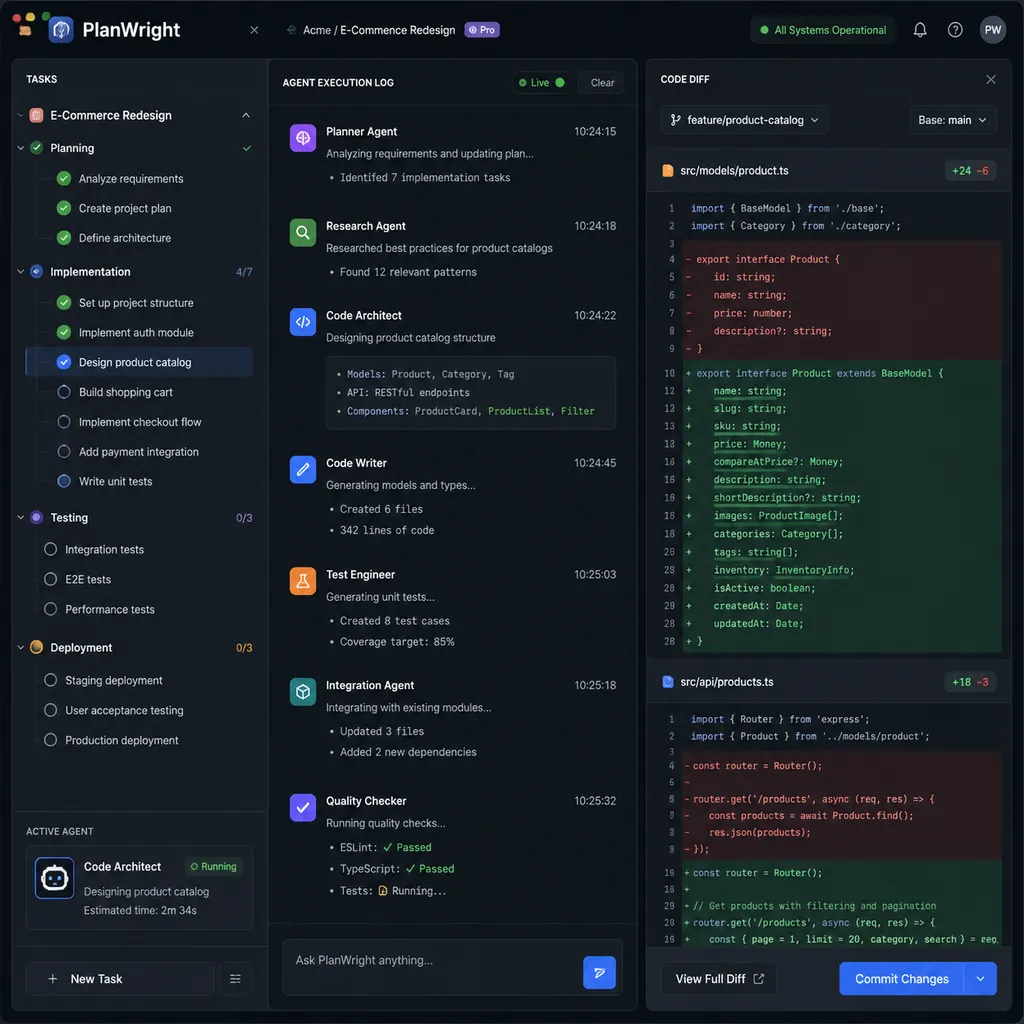
First, let’s clarify what it is: PlanWright doesn’t write code itself, nor does it train models. What it does is this — if you’ve got several self‑running AI coding agents like Claude Code, Cursor Agent, Codex CLI, Aider, and Continue, PlanWright sits on top of them to break down tasks, assign work, track progress, and merge results. To use an analogy: if Claude Code is an intern who can code independently, then PlanWright aims to be the project manager — an overused but still fitting analogy.
Why This Is Only Appearing Now
To understand this, roll back a year. In early 2025, when Claude Code’s --dangerously-skip-permissions option started trending, a Hacker News discussion went viral. Simonw commented something along the lines of: “Let Claude Code run with full permissions for a few minutes, watch it call a bunch of tools and solve the problem; in that moment you get it.”
That was when mainstream developers first felt that “this thing can actually work by itself.”
After that, the community’s attention shifted from “can the model write correct code?” to “how do we make agents run reliably for long stretches?” Many discussions followed: how to write AGENTS.md, whether to use a TODO file, whether to keep state with SQLite, and whether plan files or checklists were useful. A top comment under the popular HN post “Build a Basic AI Agent from Scratch: Long Task Planning” captured it well — in most cases, just telling an agent “make a plan first, then execute” already works significantly better than a raw run, and more complex mechanisms usually offer diminishing returns.
But this “good enough” approach breaks down in multi‑agent, multi‑task, multi‑repo situations. Imagine juggling five feature branches at once, each split into three or four subtasks — some better suited for Claude, some faster with Cursor, some cheaper with Aider plus scripts — manual scheduling becomes chaos. That’s exactly the gap PlanWright targets.
What It Actually Does
Based on the website and the author’s responses on HN, PlanWright’s core capabilities break down into four areas:
Task Graph:
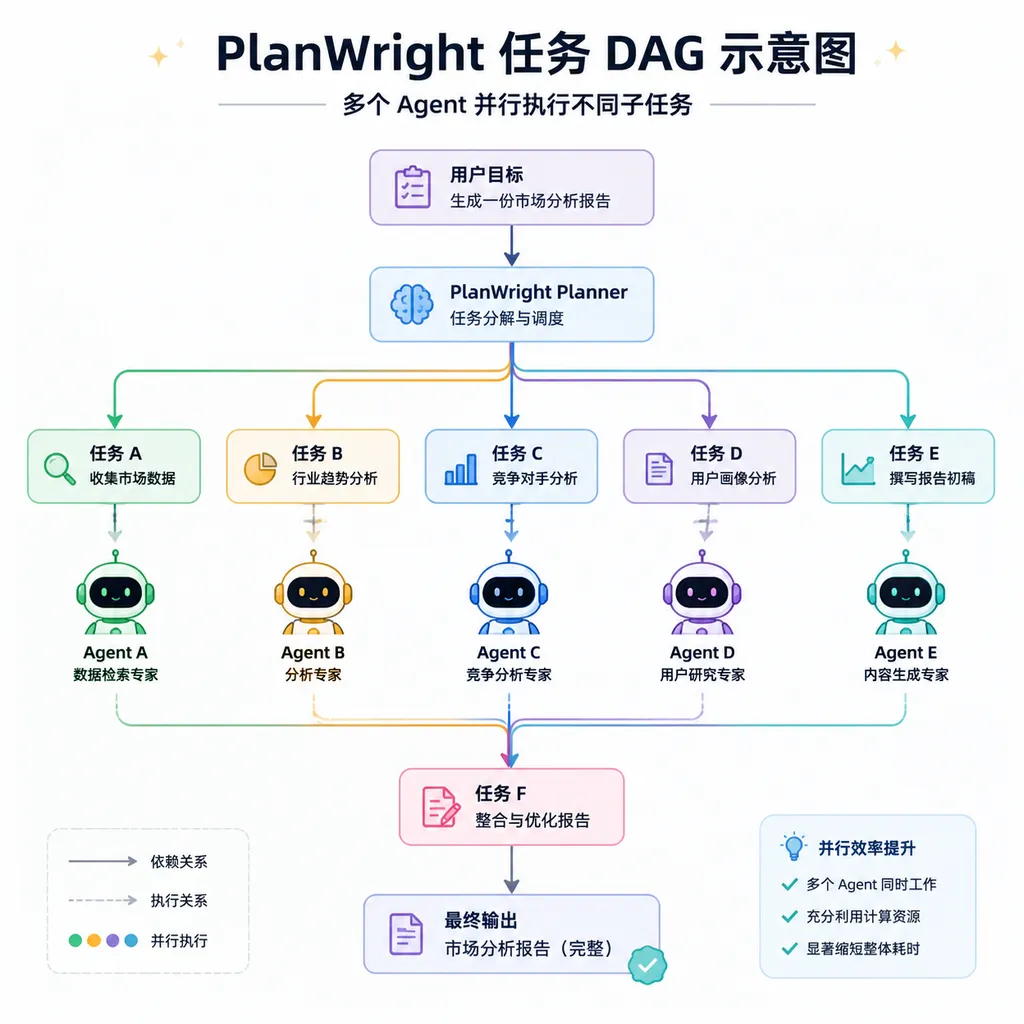
You give it a high‑level goal, like “Add multi‑tenant support to this Django project.” It decomposes that into a DAG where each node is a subtask that a specific agent can handle independently, with explicit dependencies between nodes. The decomposition is done by an LLM, but the result is structured data that humans can edit directly.
Agent Routing:
Each node can be assigned to a particular agent. PlanWright includes adapters for Claude Code, Cursor Agent, Codex, Aider, and more. Routing rules can be manual or automated — for example: “use Claude for refactoring, Cursor for creating new files, Aider for running tests.”
Execution Sandbox:
Each agent runs in an isolated workspace based on git worktree. When an agent finishes, PlanWright merges the diffs, runs tests, and resolves conflicts. This is one of the most practical features — and the one most developers have complained about — because multi‑agent collaboration often ends in merge conflict disasters.
Interrupt and Takeover:
You can pause any node at any time, take over manually, make edits, and then let the agent continue. This design is clearly inspired by Cursor’s “chat + edit” interaction pattern — users no longer tolerate pure automation; they expect to be able to “step in at any time.”
The Arguments in HN Comments
The comment threads were even more interesting than the tool itself, roughly splitting into three camps:
1. “Isn’t this just a workflow orchestrator for agents?”
Some commenters compared PlanWright to “Airflow for LLM agents,” suggesting that such a thing should have existed already, and that plenty of open‑source projects (LangGraph, CrewAI, AutoGen, etc.) were doing similar work. The author replied that his goal wasn’t agent‑to‑agent collaboration but to make “one person managing ten agents” feasible — focusing on human supervision, not agent communication. It’s a clear and distinct positioning.
2. “No matter how fancy the layer above, if the model’s bad, it’s useless.”
This camp argues that as long as base LLMs still confidently hallucinate APIs or write broken code, any number of planners stacked on top is just building towers on sand. That criticism isn’t unfair, but others pushed back hard — today’s (2026) models are far stronger than last year’s. The jump in long‑context consistency from Claude 4.x and GPT‑5 is plainly visible, and the improved fault tolerance of plan‑and‑execute systems is huge.
3. The most intriguing camp asks, “Who pays down the tech debt generated by agents?”
One comment resurfaced an older post pointing out that AI‑generated code can be wildly uneven, and allowing agents to mass‑produce it could cause tech debt to pile up faster than humans can fix it. The counterargument: why assume only humans can repay AI’s debt? Let agents refactor their own code, or dedicate “debt‑cleaning agents” — it’s entirely plausible. PlanWright’s task‑graph design fits this idea well, letting you explicitly add “review” and “refactor” nodes so some agents inspect the output of others.
My Take
A few grounded observations:
The “control plane” positioning is correct.
Over the past two years, AI coding tools have evolved clearly — from Copilot’s “complete one line,” to Cursor’s “change a function,” to Claude Code’s “complete an entire task.” The next step is inevitably “manage multiple self‑running agents.” So tools in this space will emerge. PlanWright may not be the final winner, but it’s aiming at the right target.
But the term “control plane” might be overstated.
As it stands, PlanWright looks more like a multi‑agent orchestrator plus git worktree manager than a true control plane — something like Kubernetes is for containers. A real control plane involves resource scheduling, cost tracking, observability, and policy engines. PlanWright currently just delivers orchestration. Still, for a freshly launched Show HN project, that’s impressive.
The biggest challenge is the moat.
The adapter layer isn’t complicated — Claude Code, Cursor, Aider, and others all have CLIs or standard APIs, so anyone could build an MVP in a couple of weeks. Unless PlanWright can differentiate in hard areas like task decomposition quality or multi‑agent conflict resolution, later entrants could easily catch up. The author mentioned future plans for cross‑agent memory sharing and runtime‑based routing optimization — both promising if executed well.
Should developers try it?
If you’re a solo dev happily using Claude Code or Cursor Agent, PlanWright isn’t critical yet — adding orchestration might cost more time than it saves. But if you’re already running three or four agents in parallel and manual coordination is falling apart, it’s worth a try.
A Bigger Picture
Beyond PlanWright itself, the fact that this project hit HN highlights a broader trend — layering in AI coding tools is becoming real. The model is one layer, the agent runtime another, then orchestration, with upcoming layers for observability, cost management, and auditing. Earlier this year, more companies began building internal AI Factories — a term first popularized in the HN discussion “Building a Personal AI Factory” — and it’s now being put into practice by real teams.
This layered structure resembles the evolution of cloud‑native systems. Before Kubernetes, everyone hacked together deployment scripts; after Kubernetes, we got Istio, Prometheus, Argo, and an ecosystem around it. The current AI‑agent stage is like “everyone’s writing their own shell scripts to orchestrate agents.” PlanWright is trying to become that unified orchestration layer. Whether it succeeds is unknown, but the direction is clear.
By the way, if you’re benchmarking models behind different agents or doing A/B tests for multi‑model routing, aggregator platforms like OpenAI Hub simplify things — one key gives access to GPT, Claude, Gemini, DeepSeek, all OpenAI‑compatible, without SDK or network headaches. That’s a separate layer from PlanWright’s orchestration layer, but used together, they make sense.
In Closing
Whether PlanWright becomes the final winner is uncertain — most Show HN projects fade within six months — but the idea that AI coding agents need a control plane already holds water. Whoever makes “one person managing ten agents” easier than “one person writing code,” will have a shot at becoming the next Cursor‑level success.
For now, the field is wide open, few players exist, and the landscape is far from settled. Over the next six to twelve months, this space is going to get lively.


