
Reverse engineering protocols automatically turn into documentation — Anything Analyzer is now open source.
The open-source tool **Anything Analyzer** can automatically generate structured documentation from analysis scenarios involving protocols such as registries and 2API. This documentation can be directly fed to AI for writing integration code, reducing what used to require manual packet capture and tedious data sorting to just a few minutes of work.
A Tool That Lets Reverse Engineers Lose a Few Fewer All-Nighters
On April 13, an open-source project called Anything Analyzer surfaced in the Development & Optimization section of Linux.do. The author’s positioning is quite straightforward — “A foolproof tool for generating keygen/2API protocol analysis documents, ready for AI code generation.”
In plain terms: if you have a target that needs reverse analysis (like a keygen or a piece of software’s private API protocol), the tool helps automatically organize the protocol details into a structured Markdown document, which you then feed to Claude, GPT, or DeepSeek, letting the AI generate the integration code for you.
It basically ties two normally separate processes — protocol reverse engineering and code generation — together through a single document.
What Problem Does It Actually Solve
Anyone who’s done protocol reverse engineering knows the hardest part isn’t intercepting the traffic — it’s organizing the data afterward.
A typical scenario: you’ve captured dozens of requests with Wireshark or mitmproxy; each one has different headers, bodies, parameter names, encryption methods, and signature algorithms. You have to look at them one by one, take notes, then piece together the full protocol structure in your head (or in a messy note file). That process can take anywhere from several hours to several days.
Then you start coding. Halfway through, you realize you’ve misunderstood a field, so you go back, recheck the captures, and fix the code. Over and over again.
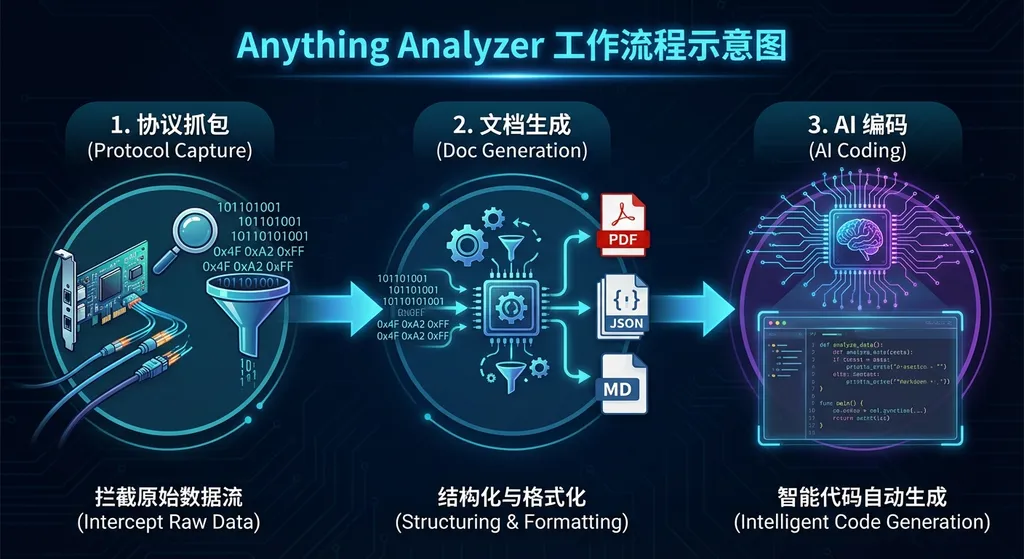
What Anything Analyzer aims to eliminate is that “manual data organization” step in the middle. Its logic is:
- You feed in capture data, binary samples, or protocol interaction logs
- It automatically analyzes request/response structures, parameter types, encryption traits, and call order
- It outputs a neatly formatted Markdown document with endpoint listings, parameter descriptions, authentication flows, and data structure definitions
- The document format is naturally AI-friendly — you can just paste it into any major model’s chat window, and it will understand and generate integration code
The key lies between steps 3 and 4. Not just any document will let AI generate code accurately — structure, terminology consistency, and contextual completeness all directly affect the model’s output. Anything Analyzer optimizes this document-generation process to ensure the output is in a format large models can consume efficiently.
Starting from the CLI-Anything Approach
If you’ve followed open-source developments recently, you might notice Anything Analyzer’s design philosophy is similar to another project — CLI-Anything.
The core of CLI-Anything is a roughly 600-line Markdown document — HARNESS.md. It’s essentially a meticulously designed SOP (Standard Operating Procedure). Once fed to an AI Agent, the Agent can analyze source code, design architecture, write code and tests, and package and release the product — all following step-by-step instructions. CLI-Anything itself doesn’t have a single line of “engine code”; it’s fully driven by prompts.
A Tencent Cloud Developer Community article aptly summarized this model:
A meticulously designed prompt (SOP) + AI Agent’s coding ability = an automatically generated tool
Anything Analyzer takes the same path — except its scenario shifts from “generating CLIs for open-source software” to “generating analysis documents for private protocols.”
Their commonality: turn human expertise into structured documentation, then let AI handle the grunt work.
The rules in CLI-Anything’s HARNESS.md weren’t invented out of thin air — they were written through trial and error while building over 20 CLI tools. Each time the team hit a roadblock, they added another rule to the document.
The protocol analysis templates in Anything Analyzer have probably evolved in a similar way: manually analyze dozens of protocols, summarize patterns, and then codify those patterns into an automated workflow.
Technical Details: How It Works
From what’s publicly known, Anything Analyzer’s workflow can be broken down into several phases:
Phase 1: Data Input
It supports multiple input formats. You can feed in pcap capture files, HAR files (exported from browser developer tools), or even manually compiled request logs. For keygen scenarios, you can also feed in binary samples for static analysis.
Phase 2: Protocol Identification and Structuring
This is the core step. The tool automatically identifies:
- Request endpoints and HTTP methods
- Parameter types (Query, Body, Header)
- Data encoding methods (JSON, Form, Protobuf, or custom binary formats)
- Authentication and signature mechanisms (Token, HMAC, RSA, etc.)
- Dependencies between requests (e.g., call A to get a token, then use token to call B)
For encrypted fields, it won’t crack them (that’s another domain), but it will annotate with hints like “likely AES-CBC encrypted” or “this signature appears to use HMAC-SHA256,” providing cues for later manual verification and AI coding.
Phase 3: Document Generation
The output Markdown document looks roughly like this (simplified example):
# Target Protocol Analysis

## Authentication Flow

1. POST /api/auth/init
   - Request: {\"device_id\": \"<string>\", \"timestamp\": <int>}
   - Response: {\"challenge\": \"<base64>\", \"session\": \"<string>\"}
   - Note: timestamp must be a UTC second-level timestamp

2. POST /api/auth/verify
   - Headers: {\"X-Session\": \"<session from step 1>\"}
   - Request: {\"response\": \"<computed_challenge_response>\"}
   - Signature: HMAC-SHA256(body, key=challenge)
   - Response: {\"token\": \"<jwt>\", \"expires_in\": 3600}

## Core Endpoints

### GET /api/license/check
- Headers: {\"Authorization\": \"Bearer <token>\"}
- Query: {\"product_id\": \"<string>\", \"machine_hash\": \"<string>\"}
- Response: {\"valid\": <bool>, \"features\": [...]}
- Rate Limit: 10 req/min per token
Notice the structure: each endpoint lists its request, response, signature method, and dependencies very clearly. Feed this document to any mainstream large model, and it can directly generate matching Python, Node.js, or Go client code.
Phase 4: AI Coding (Your Part)
Once you have the document, you can use your preferred approach to have AI generate the code. The simplest way is to paste it into ChatGPT, but a more efficient method is to call the API, pass the document as part of the system prompt, and let the model generate code within full context.
For example, to use Claude to generate Python client code:
import openai

# Use OpenAI Hub to call Claude, direct access, and OpenAI-compatible
client = openai.OpenAI(
    api_key="your-openai-hub-key",
    base_url="https://openai-hub.com/v1"
)

# Read the protocol analysis document generated by Anything Analyzer
with open("protocol_analysis.md", "r") as f:
    protocol_doc = f.read()

response = client.chat.completions.create(
    model="claude-sonnet-4-20250514",  # could also be gpt-4o, deepseek-chat, etc.
    messages=[
        {
            "role": "system",
            "content": f"You are a senior backend engineer. Below is the target service’s API protocol analysis document:\n\n{protocol_doc}\n\nPlease generate complete Python client code based on this document, including authentication flow, error handling, and retry logic."
        },
        {
            "role": "user",
            "content": "Generate a complete Python SDK using httpx as the HTTP client, supporting asynchronous calls."
        }
    ],
    temperature=0.3,
    max_tokens=8000
)

print(response.choices[0].message.content)
Using OpenAI Hub saves you from having to manage separate API keys and endpoints for each model — one key lets you switch between GPT, Claude, Gemini, and DeepSeek. Choose whichever model best understands your protocol document. In practice, Claude performs consistently on complex protocol logic, while DeepSeek offers strong cost-effectiveness in Chinese contexts.
Community Feedback: What Developers Think
From the Linux.do discussion thread, the project drew quite a bit of attention on launch day. The engagement wasn’t explosive, but the quality was high — most commenters were genuine reverse engineers or developers working on protocol integration.
An interesting sign of community collaboration appeared when one developer commented:
“I can tweak this part myself, mate — I’ll stabilize my version first and then make a PR? You focus on core features.”
This shows two things: first, people are actually using the tool — deeply enough to modify it; and second, the community has organically developed a division of labor — some handle core features, others polish the edges, collaborating through PRs. That’s a good sign for a brand-new open-source project.
As of publication, the project has over a hundred views on Linux.do, and stars are still accumulating.
In the Bigger Picture
The AI tooling ecosystem of 2026 is undergoing a clear shift — from “AI doing your work” to “AI needing better inputs to do your work well.”
In the past two years, all eyes were on model capability — could GPT-4 code, could Claude reason, could DeepSeek do math?
By 2026, model capabilities have hit a high ceiling; now the bottleneck lies in input quality: how you describe the problem, structure the context, and ensure the model has all the information it needs.
Anything Analyzer is a product of this shift. It doesn’t solve “Can AI write code?” (of course it can) — it solves “What information does AI need before it can write accurate code?” The protocol document is that critical middle layer — translating human reverse-engineering knowledge into a format an AI can consume effectively.
Similar ideas are emerging elsewhere. CLI-Anything uses HARNESS.md to drive Agents that build CLIs; EverythingAgent uses structured task descriptions to drive Windows automation; AutoGPT uses task decomposition to break complex goals into executable sub-tasks. The underlying logic is the same: rather than making AI guess what you want, structure your request.
Its Limitations
No tool is perfect.
First, protocol reverse engineering is still an experience-intensive field. Anything Analyzer automates the “organize and format” step, but packet capture, decryption, and identifying key requests still need human judgment. It’s not a full end-to-end reverse-engineering solution — it’s more of a workflow accelerator.
Second, for complex custom binary protocols (like private game client communications), automatic detection accuracy still needs verification. These protocols often lack clear structural cues — field boundaries rely on experience. The tool can give you a first pass, but you’ll likely need manual corrections.
Third, output document quality directly determines AI code quality. If your capture data is incomplete (say you missed a key authentication step), the document will have gaps — and the AI’s generated code will reflect those gaps. Garbage in, garbage out — automation doesn’t change that rule.
Lastly, compliance. The legality of protocol reverse-engineering varies by jurisdiction. The tool itself is neutral, but users must judge whether their specific use case is compliant — the project author notes this in the documentation as well.
How It Compares to Existing Solutions
Before Anything Analyzer, developers approached protocol analysis in a few ways:
- Pure manual: Wireshark + Notepad — most flexible but slowest
- mitmproxy scripts: write Python to parse specific patterns, but each target needs a new script
- Postman/Insomnia imports: organizes HTTP requests but doesn’t analyze protocols or generate AI-friendly docs
- Various reverse-engineering frameworks (Frida, Xposed, etc.): focused on runtime hooks, not documentation
Anything Analyzer differentiates itself with the documentation generation step. It doesn’t try to replace Wireshark or Frida but rather plugs in afterward — transforming analysis output into a format AIs can use directly. Smart positioning — it doesn’t fight established tools, it fills a missing link.
If you had to draw an analogy, it’s a bit like what Swagger/OpenAPI is to REST APIs. Swagger doesn’t design APIs, but it standardizes their descriptions, enabling code generators, doc renderers, and test tools to build around that standard.
Anything Analyzer aims to do the same — only for reverse-engineered APIs instead of ones you designed yourself.
Real Value for Developers
So, is it worth paying attention to?
If your daily work involves protocol integration, interface reverse engineering, or analyzing third-party service APIs without documentation — yes. It won’t turn you into a reverse-engineering expert overnight, but it can easily double your efficiency — especially in the “analysis is done, now code it” phase.
If you only occasionally integrate a couple of public APIs, you probably don’t need it — public APIs usually come with docs already.
A practical use case: you’re building an aggregator product that needs to connect to ten or more undocumented third-party services.
Previously, you’d capture, analyze, and code each integration manually — two to three days per service.
Now, you can use Anything Analyzer to cut the organization step to under half an hour, then let AI generate draft integration code for all of them. All you do is review and adjust. Your whole cycle could shrink from a month to a week.
That’s the tool’s real value — not replacing you, but freeing you from the repetitive work so you can focus on the parts that actually need human judgment.
Final Thoughts
The open-source scene in 2026 has become increasingly pragmatic. Instead of building massive “do-everything” platforms, developers are focusing on very specific workflow pain points — solving them with minimal overhead.
Anything Analyzer is a perfect example of that philosophy — it doesn’t try to be a full reverse-engineering suite; it just does one thing well: protocol analysis → structured documentation, then leaves the rest to AI.
The project is still in its early days. Both feature maturity and community ecosystem will need time to grow. But the direction is right — as AI coding capabilities soar, whoever can structure inputs better will leverage AI more effectively.
Developers interested can check out the original thread on Linux.do — and drop a Star. In a project’s early stage, real user feedback matters far more than a hundred Stars.
References
- Anything Analyzer original post — Linux.do Development & Optimization section — project announcement and community discussion
- Linux.do Development & Optimization category — the project’s community section, including related technical discussions


