Qoder Mobile Is Here: Manage Agents Remotely

Alibaba launched Qoder Mobile today, offering feature parity across iOS, Android, and HarmonyOS. It can remotely take over CLI and desktop coding agents and delegate tasks to run in the cloud.
Alibaba officially launched the new Qoder Mobile today (July 25), with iOS, Android, and HarmonyOS versions released simultaneously. Rather than squeezing an AI IDE onto a phone screen, it provides a mobile console for coding Agents running on a computer or in the cloud: developers can check task progress, approve sensitive operations, answer follow-up questions from the Agent, and add instructions at any time.
Qoder Mobile currently supports remote control of Qoder CLI and Quest sessions in Qoder Desktop, as well as delegating tasks to run in the cloud. Alibaba also offers an H5 web version that can be accessed from a mobile browser without installing an app, making it suitable for handling tasks on the fly.
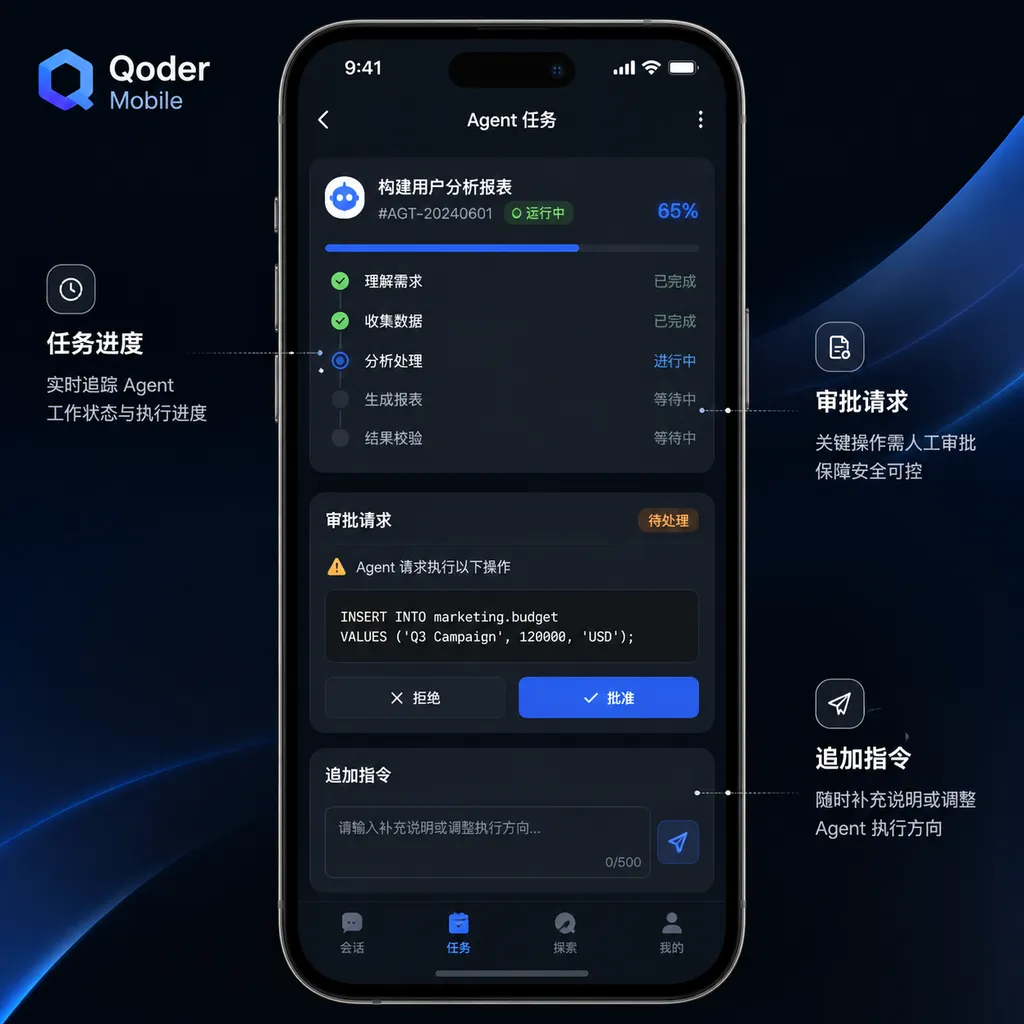
What is truly noteworthy about this update is not that Alibaba has built yet another mobile app, but that the center of interaction for coding Agents is shifting: people no longer need to sit in front of an IDE and watch them work from start to finish. They only need to step in at critical points.
The Phone Is Not for Writing Code, but for Managing It
Traditional mobile programming tools have always faced an unavoidable problem: the screen is too small.
Even if the terminal, editor, Git panel, and file tree are transferred wholesale to a phone, input efficiency, information density, and the experience of switching between multiple files are still difficult to make satisfactory. Truly complex development tasks still require a computer. Qoder Mobile does not attempt to overcome this physical limitation. Instead, it takes a different approach—the computer continues executing, while the phone handles supervision.
In remote-control mode, CLI or Desktop sessions continue running on the user’s computer, while the app synchronizes only the Agent’s status and interaction context. After leaving their workstation, developers do not need to recreate the task or explain the project context again on their phones. What they see on the phone is the same session, the same context, and the operations the Agent has already performed.
A typical scenario looks like this:
- On a computer, a developer asks Qoder to analyze a continuous integration failure and attempt to fix the tests;
- The Agent begins reading the repository, modifying files, and running tests, and the task may continue for more than ten minutes;
- The developer leaves the computer to attend a meeting, but the task continues uninterrupted;
- When the Agent requests permission to perform an operation or encounters ambiguity in the requirements, the phone receives a notification;
- The developer approves the operation or adds constraints in the app, and the task continues;
- Once it is complete, the developer returns to the computer for final code review and submission.
This is more like managing a remote engineer than using remote desktop software. Users do not need to tap desktop UI elements precisely on a phone or struggle with a scaled-down IDE. They only need to deal with status, questions, permissions, and results.
Qoder Positions Mobile as the Agent Control Plane
Technically, Qoder Mobile serves as the control plane rather than the execution plane.
The execution plane remains the local computer or cloud environment, where it accesses code repositories, runs commands, modifies files, and executes tests. The mobile app displays task status, relays user instructions, handles approvals, and receives completion notifications. This separation is better aligned with how Agent-based development tools work.
Earlier code assistants primarily operated at the editor autocomplete layer, with response times measured in seconds and the developer always present. Today’s coding Agents can break down tasks independently, search repositories, modify code across multiple files, and repeatedly run tests. Once task durations stretch from a few seconds to several minutes or even longer, requiring users to keep watching the terminal becomes an obvious waste of time.
Qoder Mobile addresses precisely this “waiting time.” It does not enable the model to write better code, but it can reduce the likelihood of the Agent getting stuck. Many long-running tasks fail not because the model is incapable of continuing, but because it is waiting for permission, a piece of business information, or clarification of an ambiguous requirement. Mobile notifications shorten the time needed to resolve these blockers from “the next time the user returns to the computer” to “as soon as the user sees the notification.”
This value may not be flashy, but it is more practical than adding a full code editor to a phone.
Consistent Functionality Across Three Platforms, with Context Continuity as the Priority
Alibaba says the iOS, Android, and HarmonyOS versions offer exactly the same functionality: they use the same tasks, the same interactions, and the same context. Differences between platforms are limited to integration with native system capabilities, such as Dynamic Island notifications on iOS and notification styles on Android.
This may sound ordinary, but it is actually critical.
The greatest risk for a cross-device Agent is not a missing button, but broken context. If a user says on the computer, “Do not modify the database schema,” but that constraint is not preserved when switching to the phone—or if instructions added on the phone are not accurately written back to the original session—remote control becomes a new source of risk.
Qoder Mobile’s core metrics therefore should not be whether its pages resemble the desktop version, but whether:
- Session status is synchronized in real time;
- Mobile instructions are written to the original session in the correct order;
- Approval actions are accurately mapped to specific tool calls;
- A consistent state can be restored after a network interruption;
- Conflicts are handled correctly when multiple devices are used simultaneously;
- Notifications clearly distinguish between “approval required” and “status update only.”
The company’s emphasis on shared context across all three platforms at least indicates that the product is heading in the right direction. For Agent tools, cross-device consistency matters more than the number of mobile features.
Cloud Delegation Means the Computer Does Not Need to Stay On, but the Boundaries Still Need Clarification
In addition to remotely controlling local sessions, Qoder Mobile supports delegating tasks to run in the cloud. This is different from remotely viewing an Agent running on a computer.
The latter depends on the computer-side session continuing to run. If the computer goes to sleep, loses its network connection, or exits the development environment, the task may stop. Cloud delegation moves the execution environment to remote infrastructure, with the phone responsible only for submitting and managing tasks. In theory, this eliminates the need to keep a personal computer online.
For developers, the three modes can be understood as follows:
- Remote-control mode: The phone acts as a remote control for a local Agent, while code and tools primarily run on the user’s own computer;
- Cloud-delegation mode: The phone submits tasks, and a cloud Agent executes them independently in a remote environment;
- H5 mode: A similar management interface is accessed through a mobile browser without installing a client.
However, Alibaba currently uses similar wording for the existing ability to “delegate tasks to run in the cloud” and the “cloud execution mode” on its roadmap. This suggests that the current cloud-delegation capability may not yet be in its final, complete form. Developers still need clearer product documentation on the issues they actually care about, including environment configuration, repository authorization, credential management, network access scope, task retention time, and how outputs are returned.
In enterprise repositories especially, cloud execution is not as simple as starting a container. The Agent may need access to private dependencies, internal Git services, test databases, and artifact repositories. Whether short-lived credentials can be injected securely and with least privilege will determine whether this capability is merely “good enough for a demo” or ready for production development workflows.
Approval Mechanisms Matter More Than the Ability to Add Instructions at Any Time
Remotely managing an Agent from a phone is convenient, but it can also create an illusion: that being able to check progress at any time makes the task safe.
The opposite is true. The more autonomously an Agent can operate, the more important approval boundaries become. Reading files, modifying code, running tests, installing dependencies, accessing the network, and deleting resources should not be treated as operations of equal risk. A mature mobile control interface must help developers quickly identify the risk of an action, rather than merely displaying a generic “Allow?” prompt.
An ideal approval card should answer at least the following questions:
- What command is the Agent preparing to execute?
- In which directory and environment will the command run?
- Which files will it read or modify?
- Will it access an external network?
- Does it involve secrets, production resources, or irreversible operations?
- If the user rejects it, does the Agent have an alternative approach?
Phones are suitable for infrequent decisions, not for reading lengthy logs. Qoder plans to support viewing task outputs and code diffs directly on phones, which will significantly improve the product’s completeness. Until diffs are properly adapted for mobile devices, phones are better suited to approving continued execution than to conducting final code reviews.
Development teams should not weaken existing code-protection measures simply because mobile approval is available. Branch isolation, test gates, human review, least-privilege access, and credential rotation remain irreplaceable. Mobile only shortens the decision-making chain; it is not a green light for the Agent.
The H5 Version Is an Easily Underestimated Addition
Alibaba also offers an H5 version of Qoder Mobile that can be used directly in a browser, with an experience the company says is close to that of the native app.
For individual users, native apps offer more convenient push notifications, Dynamic Island integration, and system notifications. In enterprise environments, however, the H5 version may be more practical. Many companies restrict the installation of third-party apps on work phones or require approval through a mobile device management system. A browser-based entry point reduces deployment costs and also makes the service easier to access from tablets, backup devices, and temporary terminals.
Of course, H5 also has clear shortcomings. Background activity, notification timeliness, biometric authentication integration, and system-level interactions are generally inferior to those of native apps. For high-risk approvals that require an immediate response, notification reliability directly affects task completion time. Alibaba’s decision to build three native versions in parallel, rather than covering every platform with a web wrapper, indicates that it wants mobile to become a long-term access point rather than merely a companion page for launch.
The Mainland China and International Versions Remain Separate Systems
Qoder is currently divided into Qoder CN for mainland China and the international version of Qoder, with no interoperability between accounts and data. The international version is already available on the App Store and Google Play in multiple markets, including Hong Kong, Macao, Taiwan, Japan, India, Singapore, Malaysia, Canada, and Australia.
Account separation may be necessary for compliance and data-boundary reasons, but it also creates additional costs for cross-region teams. Developers cannot assume that a mainland China account can be used to sign in to the international version, and tasks, sessions, and context will not migrate automatically. Before adopting the service, teams need to confirm where their members are located, where their code is hosted, and which version of the service they are using.
Enterprise buyers also need further clarification on data residency, log-retention policies, administrator audit capabilities, and how sessions and cloud tasks are reclaimed when employees leave the company. As the mobile app moves the Agent beyond fixed office devices, identity and device security only become more important.
It Solves One of the Most Practical Problems in Agent Products
Qoder Mobile is not an upgrade to the model’s capabilities, nor will it directly improve code-generation quality. What it provides is a layer of infrastructure that inevitably becomes necessary as Agent products move toward asynchronous workflows.
When coding tools still operate as a simple “ask a question, get an answer” exchange, mobile offers little value. But when an Agent can keep working for half an hour, wait for multiple confirmations, and schedule tasks between local and cloud environments, developers need a control console they can carry with them. Products such as Cursor and Claude Code have driven the adoption of terminal-based Agents, but the industry is still exploring how to shift humans from “accompanying the Agent throughout the entire process” to “stepping in only when needed.” Qoder’s choice is relatively clear: leave execution to computers and the cloud, and use phones for management.
This is the right direction, and it better reflects real-world development scenarios than the idea of “building an entire project on a phone.”
Whether it can become a tool developers use every day, however, depends on three details: whether status synchronization is stable, whether approval information is sufficiently clear, and whether mobile diffs are genuinely readable. If notifications are delayed, sessions frequently disconnect, or every approval still needs to be verified on a computer, the mobile app will be reduced to a progress viewer.
Conversely, if Qoder can fill the gaps in cloud task environments, permission controls, and code-output review, the phone could indeed become a lightweight development terminal for coding Agents—not for typing code, but for coordinating a software engineering team that never clocks out.
What to Watch Next
According to the official roadmap, Qoder Mobile will add the ability to view task outputs and code diffs on mobile devices and will further improve its cloud execution mode. What deserves more attention next is not how many additional Agents it integrates, but the following foundational capabilities:
- Whether cloud execution environments are reproducible: Can dependencies and test environments be reliably recreated from repository configuration?
- Whether permissions are sufficiently granular: Can approval policies be configured by command, directory, network, and resource type?
- Whether diffs are suitable for small-screen review: Do they support per-file collapsing, semantic summaries, and risk flags?
- Whether enterprise auditing is comprehensive: Who issued a task, who approved an operation, and what the Agent changed should all be traceable;
- How cross-device conflicts are handled: When instructions are added simultaneously from desktop and mobile, their order and status must be clearly defined;
- How damage from abnormal tasks is contained: Users should be able to pause a task, revoke authorization, or terminate a cloud environment with a single tap on their phones.
The launch of Qoder Mobile today shows that competition in AI programming tools has expanded beyond models and IDE plugins into task orchestration, asynchronous execution, and cross-device collaboration. In the next stage, developers will not only be paying for “who writes code better,” but for who can keep Agents working reliably over long periods without crossing security boundaries.
That is the real problem mobile needs to solve.
References
- ITHome: Alibaba Launches Qoder Mobile Apps Simultaneously for Android, iOS, and HarmonyOS—Introduces the three-platform release, remote control, cloud tasks, H5 access, and planned future features.