WeCom Integrates AI into Workflows

WeCom’s AI assistant “Dayuan” entered closed beta today. It can understand the current interface and invoke dozens of capabilities, including documents, spreadsheets, meetings, and calendars. Its value lies not only in summarizing messages, but in beginning to operate enterprise collaboration systems directly.
WeCom Has Embedded AI Into the Workflow
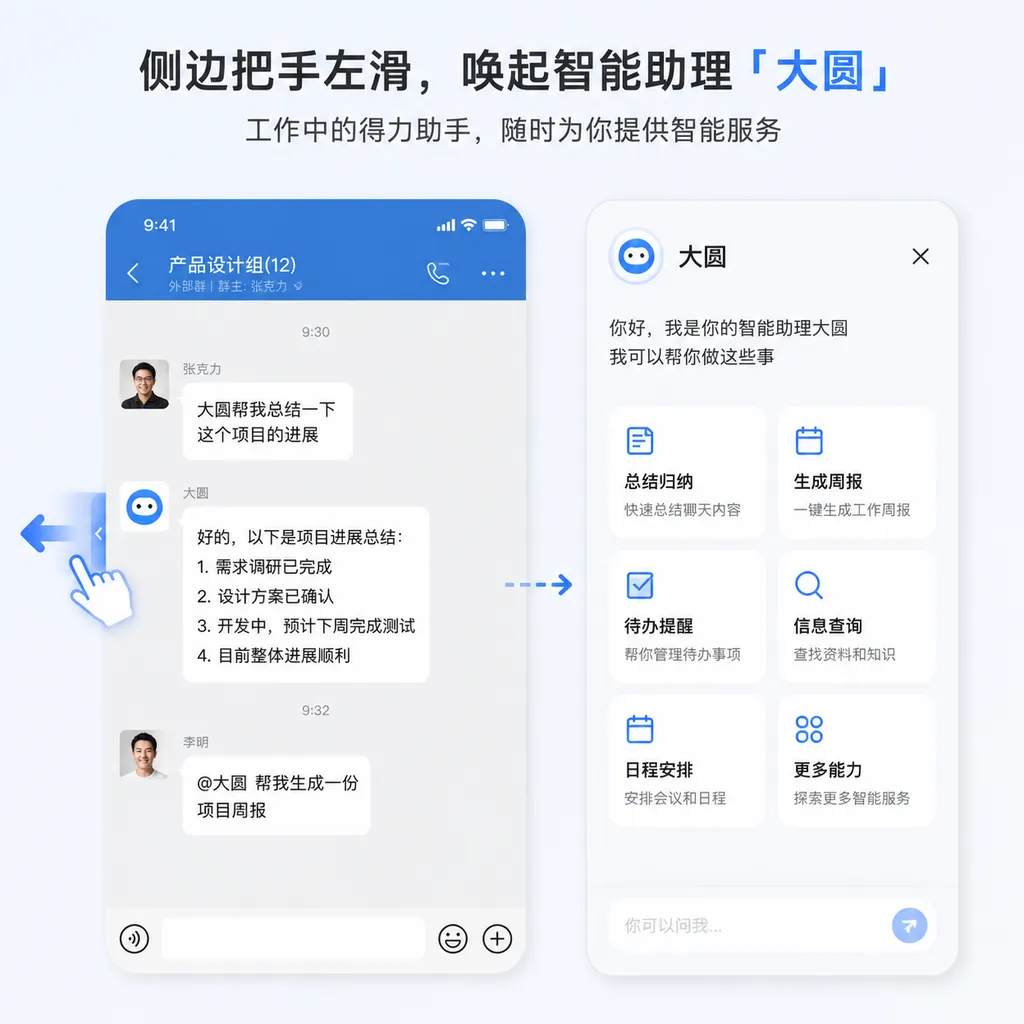
On July 27, WeCom announced that its intelligent assistant, “Dayuan,” had entered closed beta testing. Mobile users can invoke it from any screen in WeCom by pressing and holding the side handle, then swiping left. On desktop, users can access the “Intelligent Assistant” from the left sidebar.
This is not just another chatbot floating alongside office software. According to information currently disclosed by WeCom, Dayuan can understand the context of the user’s current screen and invoke dozens of WeCom capabilities, including smart documents, smart spreadsheets, meetings, and calendars.
In other words, it does not merely answer, “What does this passage mean?” It also attempts to take over the question of, “What should be done next?”
From “Summarize This for Me” to “Do This for Me”
Enterprise office environments have never lacked AI summarization tools. The real problem is that information is scattered across group chats, private messages, voice messages, emails, documents, spreadsheets, meeting minutes, and calendars. Users must first locate the content, copy it into the model, and then manually enter the output back into their business systems.
This process may appear to involve only a few extra copy-and-paste operations. But once multiple projects, groups, and permission levels are involved, the ten minutes saved by AI can easily be consumed by the effort required to organize the context.
Dayuan’s solution is to embed AI directly into WeCom. Wherever users invoke it, it begins understanding the task from the context of that screen. When faced with 99+ unread messages, users can ask, “Which messages should I prioritize?” When a manager asks a question, they can have it organize their thoughts and generate a structured framework for the response. When a weekly report is due, it can compile completed tasks, project progress, and retrospective insights based on messages, documents, and email activity in WeCom.
The typical scenarios presented by WeCom include:
- Message processing: Distilling lengthy group chats, unread messages, and voice messages, while identifying information that requires a priority response;
- Reply assistance: Generating response ideas based on the current conversation, without requiring users to explain the entire context again;
- Weekly report generation: Extracting progress from work records such as messages, documents, and emails to produce an editable first draft;
- To-do management: Identifying tasks in conversations, recording them for users, and providing ongoing reminders;
- Collaboration tool invocation: Using built-in WeCom capabilities such as smart documents, smart spreadsheets, meetings, and calendars;
- Scheduled operations: Performing actions such as sending messages or emails at specified times according to user instructions.
The most important change here is that the AI’s input is no longer limited to prompts submitted manually by users.
When using general-purpose chatbots in the past, users had to “feed” the model the relevant background: which customer was involved, what stage the project had reached, and what had been discussed in previous meetings. WeCom now wants the system to assemble this context automatically. Chat windows, organizational relationships, and collaboration data all become part of the prompt.
“Swipe Left to Invoke” Is More Than an Interaction Gimmick
Dayuan’s entry point may appear to be nothing more than a side handle, but this design is crucial.
Competition in workplace AI may appear to center on model performance, but in practice it is more about access points and context. Even if an AI tool has stronger reasoning capabilities, its adoption in high-frequency office work may quickly decline if users must switch applications, upload files, and supply background information every time they use it.
Dayuan uses a global side entry point, meaning users do not first have to ask themselves, “Which AI application should I open?” In a group chat, it processes the group conversation. In a document, it understands the document. On a spreadsheet or meeting page, it invokes the relevant capabilities. AI is transformed from a destination into an operational layer that appears within the user’s current workspace.
This is somewhat similar to global voice assistants on smartphones, but the context available to WeCom is more concentrated and structured: who belongs to which department, which people are involved in a project, when meetings take place, and how documents circulate. Such information is often more decisive than public internet knowledge in determining whether an office task can be completed correctly.
At this stage, therefore, Dayuan’s strongest competitive advantage may not be text generation, but rather the simultaneous presence of three conditions:
- Close proximity to work data: Group chats, documents, and calendars do not need to be imported repeatedly;
- Close proximity to execution tools: After producing a conclusion, it can continue by creating to-dos, processing documents, or scheduling events;
- Close proximity to user actions: It can be invoked directly from any screen, reducing application switching.
This is also the dividing line between enterprise workplace AI and general-purpose chat products. The latter excel at providing answers, while the former must understand organizational context, comply with permissions, and complete actions.
The Real Barrier Is Permissions, Not the Model
From a technical architecture perspective, Dayuan resembles an enterprise-grade agent more than a simple chat window.
A request such as “Help me write this week’s report” involves at least several steps behind the scenes: identifying the relevant time frame, retrieving the chats and documents in which the user participated that week, filtering out irrelevant content, extracting tasks and outcomes, determining which information may be included in the report, and finally generating text in a relatively consistent format. If the user also wants to synchronize to-dos or schedule a meeting, the system must continue by invoking internal WeCom tools.
The model is only one part of the process. Retrieval quality, identity authentication and authorization, tool invocation, output validation, and audit logs all affect the final experience.
This also raises the question enterprises care about most: What exactly can Dayuan access?
As of July 27, publicly available information has focused on capabilities and use cases, but has not fully disclosed the following details:
- Whether administrators can configure the data accessible to AI by department, member, or application;
- Whether private chats, group chats, emails, and documents follow exactly the same permission inheritance rules;
- Which actions require secondary user confirmation before the AI can access documents, create calendar events, or send messages;
- How data generated during retrieval and generation is retained, and whether enterprise-side auditing capabilities are available;
- The underlying model used by Dayuan, its context-window length, pricing model, and official release date.
These are not peripheral issues. If AI incorrectly summarizes a group message, the user can usually correct it manually. But if it creates the wrong calendar event, sends an email by mistake, or includes information that should not be shared in a cross-departmental weekly report, the consequence escalates from an “inaccurate answer” to a business incident.
A viable enterprise agent must observe a basic boundary: “If users could not originally see the content, the AI must not be able to see it either; if users are not authorized to perform an action, the AI must not be able to perform it either.” A better design should also distinguish between read-only and write operations. Summarizing messages can be completed directly, while high-risk operations such as sending content externally or modifying shared documents should retain a confirmation step.
Until these mechanisms are clarified, Dayuan is better suited to information-intensive but relatively low-risk tasks, such as summarizing unread messages, distilling meeting content, drafting weekly reports, and suggesting to-dos.
Weekly Reports May Be the Most Practical Entry Point
“AI-generated weekly reports” may not sound new, but they are a useful test of whether a workplace agent has truly been integrated into the workflow.
Weekly reports written by general-purpose models are often well formatted but vague. The reason is straightforward: the model knows only what the user includes in the prompt. It does not know which meetings the user actually attended that week, which documents they updated, or which group chats they used to advance projects.
An AI built into WeCom, by contrast, may be able to infer progress from work activity. For example, a document may have been revised on Wednesday, the project group may have confirmed the delivery date on Thursday, and the meeting minutes may have recorded the next steps on Friday. These previously scattered signals can be combined into a complete progress update.
However, this also introduces another problem: evidence of activity is not the same as evidence of achievement. Sending more messages and attending more meetings does not necessarily mean making a greater contribution. If Dayuan merely rearranges records of activity, it will still produce a weekly report that only makes the user “look busy.”
The usefulness of its weekly report feature therefore depends on whether it can distinguish among discussion, decision-making, execution, and results—and whether it allows users to trace each summary item back to the relevant message or document. In terms familiar to developers of retrieval-augmented generation systems, this means not only producing an answer, but also retaining reliable citations and a chain of evidence.
Tencent Is Building the AI Control Layer for Its Enterprise Collaboration Product
Over the past two years, AI updates to workplace software in China have mostly begun with document generation, meeting transcription, and knowledge-base Q&A. These capabilities are relatively self-contained and easy to demonstrate, but they often remain isolated point solutions.
What makes Dayuan more noteworthy is WeCom’s attempt to place messages, documents, spreadsheets, meetings, emails, and calendars behind a single natural-language interface. Users do not need to learn where each feature is located. They simply describe the goal, and the assistant determines which data to retrieve and which tools to invoke.
This will change the product structure of workplace software. In the past, features were buried under layers of menus, and users completed tasks by clicking through them. In the agent model, users state their goals and the system plans the path. Menus will not disappear, but they may gradually recede into roles involving confirmation and fine-tuning.
WeCom has one clear advantage in this competition: it connects both internal enterprise collaboration and customer communications. A large share of business processes already takes place in chats rather than being stored in standardized databases. Provided that permission governance is handled properly, these unstructured records can become important material for agents seeking to understand the state of the business.
Its weakness is equally clear. The more critical the information carried by WeCom, the higher enterprises’ expectations for stability, privacy, and control. Consumer AI can tolerate occasional errors through rapid iteration, but enterprise agents must explain “why this was summarized this way,” “which data was used,” and “what actions were performed.” Building this infrastructure is often more difficult than integrating a more powerful model.
Promising for Now, but Demos Alone Are Not Enough
Based on the capabilities disclosed so far, Dayuan is moving in the right direction. Rather than treating AI as an isolated chat box, WeCom is placing it above the workflow, allowing it to read context and invoke tools. Swiping left to invoke it may seem simple, but it represents a shift in enterprise collaboration from “finding features” to “stating tasks.”
During the closed beta, however, the most important question is not whether it can generate an impressive weekly report, but how it performs against the following hard metrics:
- Whether retrieval is complete and accurate when information spans multiple groups and documents;
- Whether summaries include sources so users can verify them;
- Whether tool-invocation failures are reported clearly rather than being falsely presented as completed actions;
- Whether actions involving sending, modifying, or sharing content have reliable confirmation mechanisms;
- Whether enterprise administrators have sufficiently granular permissions, logs, and data-governance capabilities;
- Whether response times and usage costs are acceptable at the scale of real organizational data.
If these issues are handled well, Dayuan will be more valuable than a simple AI writing tool. It will be able to reorganize the data and capabilities already accumulated within WeCom into a unified operational interface.
If they are handled poorly, it may end up being little more than a summarization button that is easier to invoke.
Dayuan is still in closed beta. Whether it is available to a particular enterprise or account depends on WeCom’s actual rollout. WeCom has not yet announced full application details, a general release date, or pricing in this announcement.
References
- ITHome: WeCom Intelligent Assistant “Dayuan” Enters Closed Beta and Can Be Invoked With a Left Swipe — Introduces Dayuan’s closed-beta status, invocation method, and core capabilities involving documents, spreadsheets, meetings, calendars, and more.