Getting Started with the Copilot App
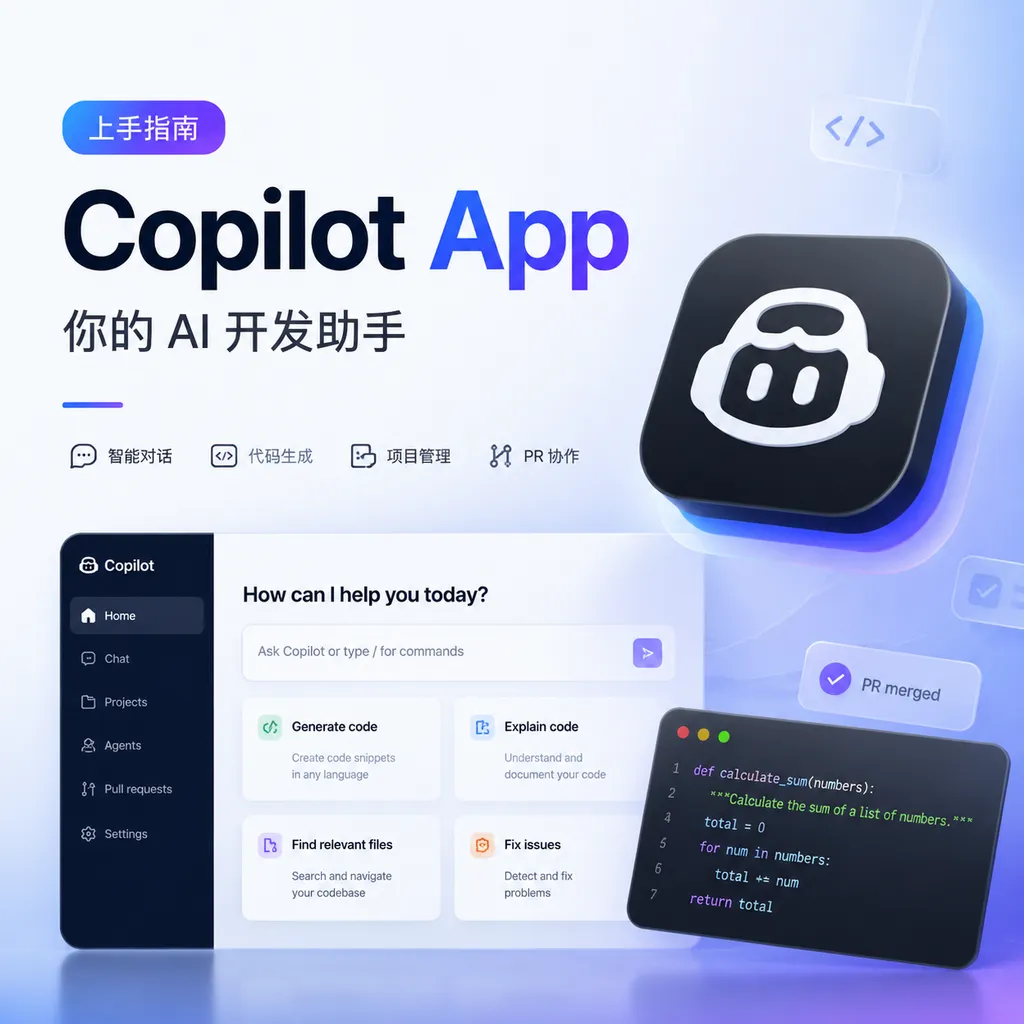
GitHub Releases a Getting Started Guide for the Copilot App, Shifting the Focus from Code Completion to Organizing the Entire Development Workflow with Projects, Canvas, and Multiple AI Agents.
GitHub recently published a getting started guide for the Copilot App, providing its first systematic overview of how to create projects in the app, use Canvas to break down requirements, and assign specific tasks to AI agents.
This is not another tutorial teaching developers to press Tab to accept code completions. GitHub’s message is clear: the basic unit of work in the Copilot App is shifting from a snippet of code or a single conversation to a continuously evolving software project.
As of July 27, 2026, GitHub is expanding Copilot from an IDE assistant into an agent workspace covering planning, coding, testing, review, and commits. For developers, what truly matters is not that the chat window has received a new interface, but that the development process is being broken down into four manageable objects: projects, context, tasks, and executors.
What Problem Does the Copilot App Actually Solve?
The traditional Copilot interaction model is simple: a developer opens a file, enters a comment or some code, and the model predicts what comes next. Copilot Chat took this a step further by allowing developers to ask questions about a codebase, generate functions, or explain errors.
However, both models share the same problem: their working context is tied to the current editor and session. Once a task spans multiple files, involves external materials, or continues for several days, the conversation can easily deteriorate into an increasingly long and difficult-to-maintain stream of messages.
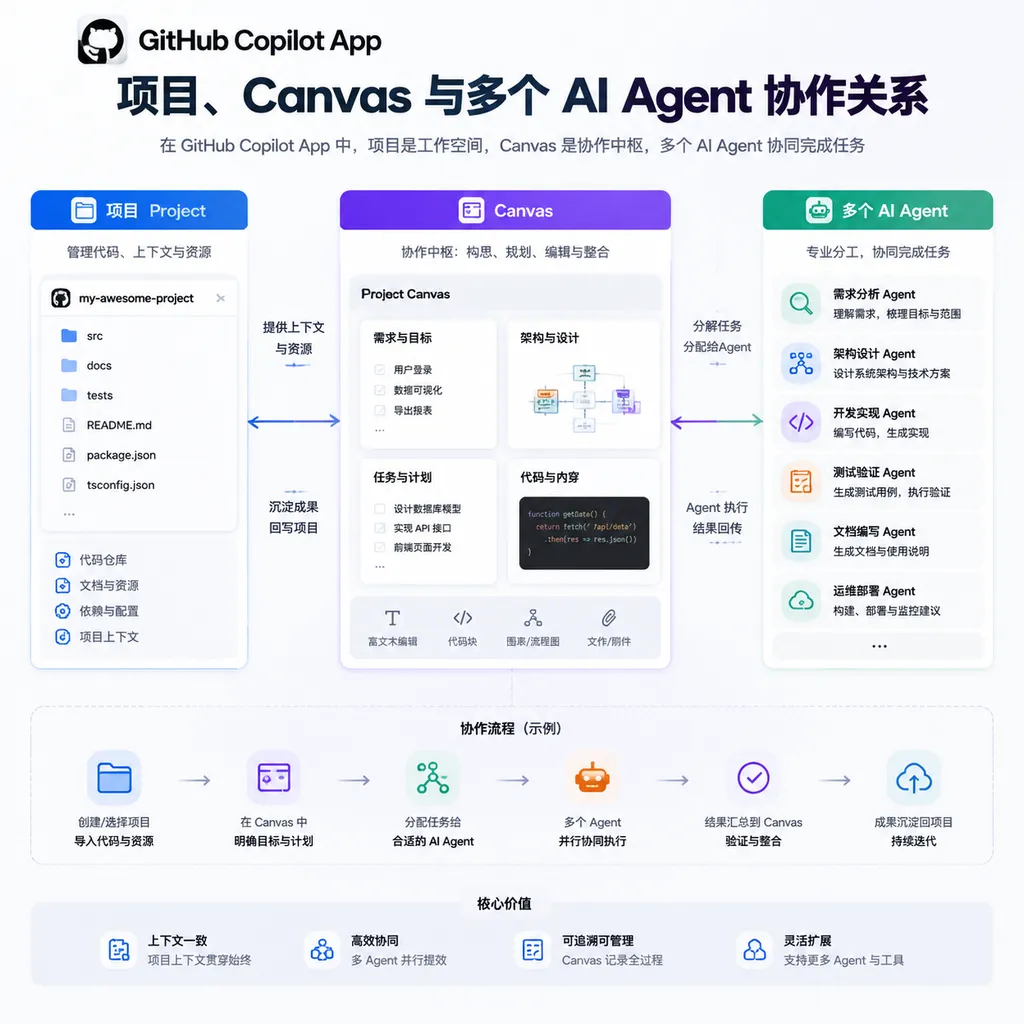
The Copilot App attempts to restructure that message stream:
- Project stores goals, materials, and interim results, serving as a task container;
- Canvas is used to develop requirements, solutions, drafts, and intermediate artifacts, functioning more like a workspace that can be continuously revised;
- Agent executes clearly scoped tasks, such as analyzing a repository, modifying code, adding tests, or preparing a pull request;
- Human developers define constraints, validate results, and remain responsible for the final merge.
This structure may sound like a project management tool, but it differs from Jira or Linear in one crucial way: tasks on the board are not merely recorded; they can also be consumed and executed directly by agents.
This is where GitHub’s advantage becomes apparent. General-purpose AI coding tools can read code and run commands, while Copilot is natively integrated with repositories, issues, pull requests, Actions, and permission systems. An agent’s intelligence certainly matters, but whether it can work without disrupting the existing development process is often even more important.
Step One: Create a Project, but Don’t Rush to Have an Agent Write Code
After opening the Copilot App, the most common beginner mistake is to create a project and immediately enter something like, “Build me an admin dashboard.” Although this prompt may appear to define a clear objective, it lacks a technology stack, scope, data structures, and acceptance criteria, forcing the agent to fill in the blanks on its own.
An actionable project description should include at least four categories of information:
- Objective: What must ultimately be delivered;
- Current state: The existing repository, technology stack, and constraints;
- Scope: What is explicitly included and excluded from this iteration;
- Acceptance criteria: What results qualify as complete.
For example, instead of saying, “Add login to the project,” write the task like this:
Objective: Add email-and-password login to the existing Next.js application.

Current state:
- Uses the Next.js App Router and PostgreSQL
- Prisma is used as the data access layer
- A users table already exists, but there is no session table

Scope for this iteration:
- Login, logout, and session validation
- Middleware for protected routes
- Unit tests for the login endpoint

Out of scope:
- OAuth
- Password recovery
- Multi-factor authentication

Acceptance criteria:
- Unauthenticated users visiting /dashboard are redirected to /login
- Passwords must not be stored in plaintext
- Login failures must not reveal whether an account exists
- Tests can run in the CI environment
The value of this description is not that it gives the model more text, but that it reduces the number of decisions the model must make on its own. For an agent, ambiguous requirements mean a larger search space; for developers, they mean more unpredictable changes.
If the project already has a repository, the first request should not ask for modifications either. Start by asking Copilot to produce a repository map: where the entry points are, how the main modules are organized, what the test commands are, and which files may be affected. Confirm that its understanding of the codebase is accurate before moving on to implementation.
Step Two: Treat Canvas as the Solution Layer, Not a Chat Draft
Canvas is a key concept in this getting started guide. Its purpose is not to provide a larger text box, but to separate the planning process from the chat history.
Chat is suitable for quick questions and answers, while Canvas is better for maintaining artifacts that will be revised repeatedly, such as:
- Feature specifications and acceptance criteria;
- Module dependency diagrams;
- Database migration plans;
- API contracts;
- Test matrices;
- Release and rollback checklists;
- Task assignments for multiple agents.
A relatively robust Canvas planning process can follow this sequence:
1. Generate an Impact Analysis Before an Implementation Plan
Ask Copilot to list the modules that may need to be modified, potential compatibility issues, and security risks. This stage is for investigation only, not coding.
2. Explicitly List Unknowns
For a login feature, for example, questions such as whether sessions should be stored in the database or encrypted cookies, which parameters should be used for the password algorithm, and whether the existing deployment environment can support the solution should all be identified as items requiring confirmation.
3. Break the Solution Down into Independently Verifiable Tasks
A good task can usually be completed within a single branch or pull request and has a clearly defined testing method. A bad task spans the database, frontend, deployment, and monitoring, ultimately becoming a massive patch that cannot be reviewed effectively.
4. Record Decisions and Their Rationale
Simply recording “Use PostgreSQL sessions” is not enough; you should also document why a pure JWT approach was rejected. When requirements change weeks later, the rationale will be more useful than the decision itself.
Canvas is therefore closer to a shared whiteboard for the development process than a display of the model’s thought process. It should preserve verifiable and editable project facts rather than accumulate lengthy model-generated analyses.
Step Three: Assign Work to Agents—Granularity Matters More Than Quantity
The Copilot App brings AI agents into the project workflow, but that does not mean more agents will always make the work faster. Having multiple agents modify the same set of core files in parallel is usually like asking several developers who do not know one another’s progress to commit code to the main branch at the same time: the work appears parallel, but the time saved is ultimately lost to conflicts and rework.
A better approach is to divide tasks so that they interact through stable interfaces wherever possible. For example:
- Agent A investigates the existing authentication flow and submits an impact analysis;
- Agent B writes the migration based on the confirmed data model;
- Agent C implements the frontend page after the API contract has been finalized;
- Agent D adds unit and end-to-end tests;
- Finally, another agent or a human developer checks the integrated result.
There are three practical principles here.
Principle One: Each Agent Should Have Only One Primary Objective
Do not mix refactoring, feature development, legacy bug fixes, and dependency updates into the same instruction. Agents are also affected by scope creep, and they generally will not challenge task boundaries as proactively as human developers do.
Principle Two: Have the Agent Report Its Plan First
For changes affecting databases, authentication, billing, or infrastructure, first ask the agent to explain which files it intends to modify, which commands it will run, and how it will verify the results. If the plan is unreasonable, correcting it is far cheaper than rolling back changes across dozens of files.
Principle Three: Every Task Must Include Verification Commands
“The code looks correct” is not an acceptance criterion. At minimum, specify some combination of linting, type checking, unit tests, integration tests, and build commands. For UI work, also specify the browser and critical interaction paths.
Use Repository Instructions to Reduce Repetitive Explanations
If every new task requires you to remind Copilot that the project uses pnpm, that generated files must not be modified, and that tests must be run with a specific command, the cost of collaboration has not truly decreased.
GitHub recommends adding .github/copilot-instructions.md to the repository to store constraints that apply across the entire codebase. For example:
# Repository instructions

- Package manager: pnpm
- Runtime: Node.js 24
- Run pnpm lint and pnpm test before completing a task
- Do not edit files under src/generated
- New API routes must include input validation
- Database schema changes require a migration and rollback note
- Keep public API changes backward compatible
For specific files, you can also use .github/instructions/**/*.instructions.md to add more granular rules. For example, you could define separate selector, screenshot, and parallel execution policies for Playwright tests.
These files are essentially repository-level development manuals for agents. They cannot guarantee that the model will follow every rule perfectly, but they can significantly reduce the cost of reintroducing background information in every session while also making the instructions reviewable and version-controlled by the team.
It is important to note that instruction files are not a permission system. Preventing agents from accessing production credentials, modifying protected branches, or performing high-risk operations still requires GitHub permissions, branch protection, environment approvals, and secret management.
Step Four: Review the Agent’s Artifacts, Not Just Its Final Response
After an agent completes a task, developers should treat it as a contributor whose work requires code review, not as a compiler.
Review the work in the following order:
- Check the scope of changes: Did it modify files outside the task’s scope?
- Check dependency changes: Did it introduce a heavyweight package for a minor feature?
- Check data and permission boundaries: Are input validation, authentication, and authorization complete?
- Check test quality: Do the tests genuinely cover failure paths, or were they written merely to pass?
- Actually run the commands: Do not simply trust the agent’s claim that the tests passed;
- Review the commit history and PR description: Ensure human reviewers can understand why the change was made and what was changed.
If you identify a problem, clearly specify the file, behavior, and expected result in a pull request comment, then ask Copilot to continue making corrections. Compared with “optimize this further,” an instruction such as “The expiration check in auth/session.ts uses local time. Standardize it on UTC and add tests covering transitions between calendar days” is more likely to produce reliable results.
GitHub’s cloud-based agent can also receive issues. In this case, the issue itself becomes the prompt, so the quality of its title, background, acceptance criteria, and reproduction steps directly affects the quality of the final code. In the past, an unclear issue might merely cause a colleague to ask a few follow-up questions. Now, it may cause an agent to produce a polished but fundamentally misguided pull request.
A Reusable End-to-End Workflow
Using “Add audit logging to an existing SaaS product” as an example, a Copilot App project could be organized as follows:
Phase One: Investigation
Ask an agent to identify every entry point for write operations, the current method of obtaining user identity, database capacity, and log retention requirements. It should produce an impact analysis without modifying any code.
Phase Two: Canvas Planning
Define the event structure in Canvas, including the actor, action, target object, timestamp, request ID, and any necessary summary of changes. Also make it explicit that sensitive fields must never be included in logs.
Phase Three: Task Breakdown
- Create the audit log table and indexes;
- Implement a centralized logging module;
- Integrate it with the three highest-risk administrative endpoints;
- Add a query interface;
- Write tests for concurrency, failure scenarios, and permissions;
- Prepare migration, monitoring, and rollback documentation.
Phase Four: Agent Execution
Assign tasks with fewer dependencies to different agents. Finalize the database schema and shared interfaces first, then develop higher-level functionality in parallel so that each agent does not design its own field structure.
Phase Five: Human Acceptance
Pay particular attention to whether logs could contain passwords, tokens, or complete request bodies; whether logging failures could affect the primary business flow; and whether the query API introduces unauthorized-access risks. These judgments involve business accountability and cannot be signed off automatically by a model simply because the tests pass.
MCP Can Extend Capabilities, but It Also Expands the Risk Surface
When a Copilot agent uses the Model Context Protocol, or MCP, to connect to browsers, databases, internal documentation, or GitHub services, it no longer merely generates text—it can invoke tools to perform actions.
This can significantly improve its usefulness. For example, an agent can read test specifications, launch a browser, run Playwright, identify failing steps, and then prepare a fix and a pull request. However, every additional MCP server also grants a new set of permissions to the execution environment.
At a minimum, teams should confirm:
- Where the server comes from and whether it has been approved by the organization;
- Which data it can read and which write operations it can perform;
- How credentials are stored and whether secrets could leak into logs;
- Whether high-risk operations require human confirmation;
- Whether agent-generated content will be sent to external services.
The principle of least privilege has not become obsolete in the age of agents. On the contrary, it is more important than ever. A model may misunderstand an instruction, and a tool can turn that misunderstanding into a real-world action.
The Copilot App Is Not a Replacement for the IDE
Based on its current product positioning, the Copilot App is more of a task control layer between the IDE and the GitHub platform than an all-purpose development environment intended to replace VS Code, JetBrains IDEs, or the terminal.
IDEs remain well suited to line-by-line code reading, breakpoint debugging, and fine-grained edits. The CLI is ideal for working directly with local repositories and command-line tools. Cloud agents are suitable for clearly scoped tasks that can be executed asynchronously. The Copilot App, meanwhile, organizes projects, Canvas, and agent sessions.
The most effective approach is therefore not to force all work to remain inside the app, but to choose the appropriate interface based on the task:
- For a quick change to a piece of logic, stay in the IDE;
- To investigate a cross-module issue, first ask an agent to generate a map;
- Break down complex requirements in Canvas;
- Assign independently verifiable background tasks to cloud agents;
- Keep humans in charge of architectural decisions and high-risk permissions.
Assessment: The Entry Point Is Simpler, but Engineering Discipline Matters More Than Ever
The most valuable part of GitHub’s getting started guide is not its explanation of where to find each button, but the basic structure it provides for agent-based development: projects preserve context, Canvas handles planning, agents execute tasks, and humans remain responsible for boundaries and acceptance.
This approach is indeed closer to real-world development than repeatedly pasting code into a chat box, and it is more reliable than simply pursuing ever-larger context windows. GitHub’s strategy of embedding agents into repositories, issues, and pull requests also offers a stronger path to practical adoption than creating an entirely separate, isolated workflow.
However, the Copilot App will not automatically fix poor requirements management. The more ambiguous the tasks, the fewer repository conventions there are, and the broader the permissions, the faster agents will generate technical debt. What developers truly need to learn is no longer how to write a magical one-line prompt, but how to define tasks, provide context, design acceptance criteria, and establish clear interfaces among multiple agents.
In other words, Copilot is evolving from a pair programmer into an orchestratable virtual engineering team. The new interface lowers the barrier to orchestration, but it does not reduce the responsibilities of the engineering lead.
References
- Official GitHub Copilot feature page: Learn about Copilot’s overall positioning across coding, chat, and agent workflows.
- Integrating agentic AI into your software development lifecycle: GitHub’s official tutorial on planning, the CLI, MCP, pull requests, and code review collaboration.
- Best practices for using GitHub Copilot to work on tasks: Covers issue writing, custom repository instructions, and ways to provide feedback on agent tasks.
- GitHub Awesome Copilot: A GitHub-maintained collection of examples for Copilot instructions, prompts, and agent configurations.