Integrating Grok 4.5 with Copilot
GitHub Copilot has begun rolling out Grok 4.5, offering a context window of up to 500,000 tokens, text-and-image input, and three reasoning intensity levels, with a focus on enhancing terminal-based coding and parallel multi-tool tasks.
Grok 4.5 Comes to Copilot
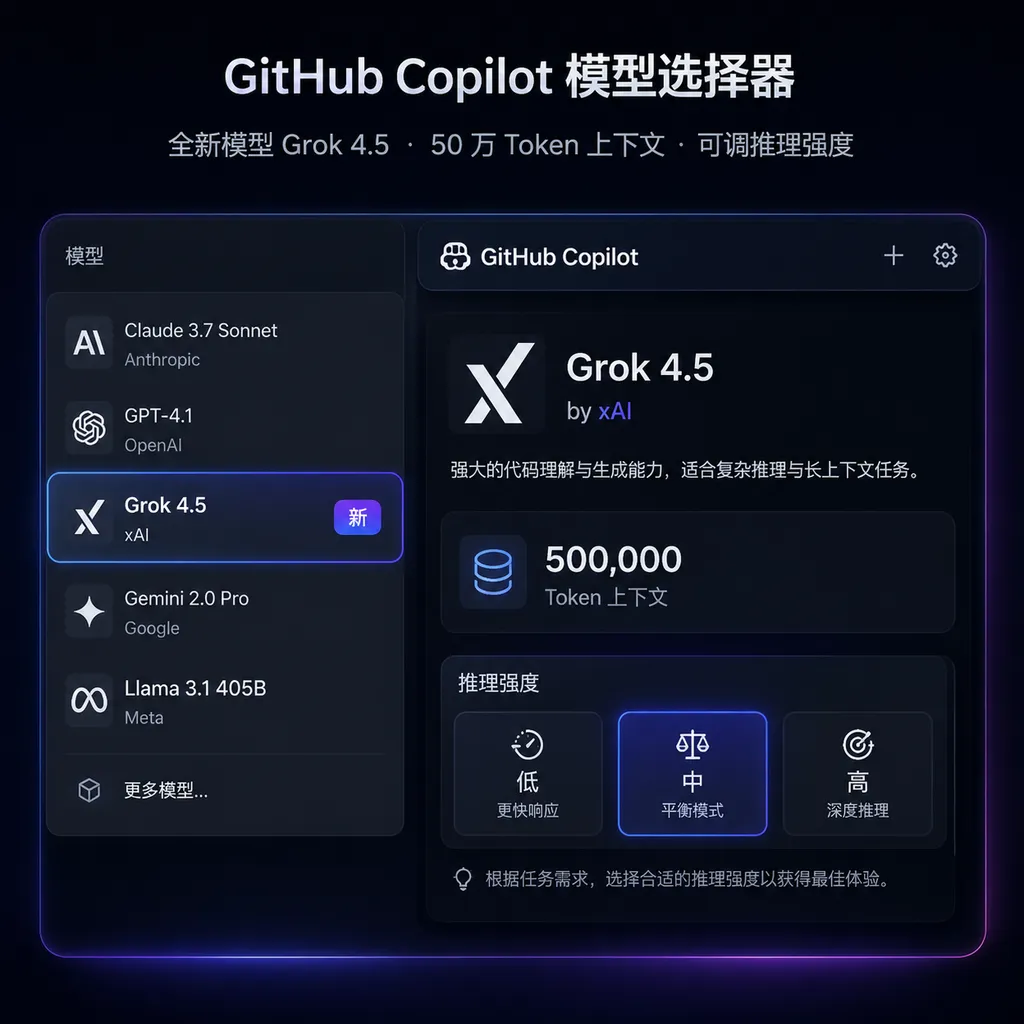
GitHub announced on July 28 that xAI’s Grok 4.5 has begun rolling out to GitHub Copilot. Developers can switch to Grok 4.5 through the model picker in products such as VS Code, Copilot CLI, and cloud agents. For some Business and Enterprise accounts, administrators must first enable the model in Copilot settings.
The focus of this update is not simply to add another chat model to Copilot, but to introduce a model clearly designed for agentic coding workflows: a context window of up to 500,000 tokens, support for text and image inputs, and three selectable reasoning-effort levels—low, medium, and high.
GitHub’s internal testing findings are also quite specific: Grok 4.5 performs strongly on terminal-oriented tasks in VS Code and Copilot CLI, particularly when orchestrating tools in parallel and taking direct action. In other words, its goal is not merely to improve a function, but to take over the entire workflow of “inspect the repository—locate the problem—invoke tools—modify files—run tests.”
500,000 Tokens: The Value Is Not in “How Much You Can Fit”
Grok 4.5 has a context window of up to 500,000 tokens. Roughly speaking, this is enough to hold large amounts of code, API documentation, logs, and requirement descriptions—far beyond the scope of traditional code-completion models, which can only inspect the current file and a small number of adjacent files.
However, “the model supports 500,000 tokens” and “Copilot feeds the model 500,000 tokens on every request” are two different things.
In real-world IDE workflows, Copilot typically still performs repository indexing, relevant-file retrieval, context trimming, permission filtering, and prompt assembly. The content ultimately sent to the model depends on product policies, the current task, account limits, and the invocation parameters GitHub has configured for the model. Developers should not interpret 500,000 tokens as the ability to paste an entire monolithic repository into the model at no cost.
Long context is genuinely useful in three main scenarios:
- Cross-module refactoring: Understand the data model, service layer, callers, and tests at the same time without repeatedly adding files manually.
- End-to-end troubleshooting: Analyze terminal logs, CI output, configuration files, and related code within the same task.
- Large-repository exploration: Have the agent first map out directories, dependencies, and key entry points before deciding which tools to invoke.
This matters more than simply pursuing a higher code-completion hit rate. Today’s Copilot is no longer just about “what to write on the next line,” but “what to inspect, modify, and run next.” The larger the context window, the less likely an agent is to forget assumptions, reread files unnecessarily, or associate the wrong modules across multiple rounds of action.
That said, 500,000 tokens is not the largest context specification currently available in the industry. Some models and development tools have already pushed context windows to one million tokens or more. Grok 4.5’s competitiveness therefore should not be judged by the number alone, but by whether it can retrieve effectively from long context, invoke tools reliably, and proactively verify results after modifying code. No matter how large the window is, if the model merely “flips through files” among hundreds of thousands of tokens, the actual experience may still be worse than with a smaller-context model that retrieves more accurately and executes more reliably.
Three Reasoning Levels Are More Practical Than Fixed “Deep Thinking”
Grok 4.5 offers three reasoning-effort levels in Copilot: low, medium, and high. The practical value of this design is that it allows developers to balance response speed, invocation cost, and task complexity.
| Reasoning level | Best suited for | Main trade-off | | --- | --- | --- | | Low | Explaining code, generating boilerplate, simple edits, routine commands | Fast responses, but unsuitable for complex planning | | Medium | Cross-file changes, test fixes, general refactoring | A relatively balanced trade-off between speed and reliability | | High | Architectural changes, complex failures, multi-step agent tasks | More thorough reasoning, but potentially longer waits and higher costs |
The easiest mistake for developers to make is setting every task to high. For renaming a variable, adding type annotations, or generating a routine unit test, high reasoning effort will usually only increase latency. Conversely, low reasoning effort may lead to premature conclusions when migrating a database, splitting services, or dealing with hard-to-reproduce concurrency issues.
A sensible approach is to classify tasks by risk: use low for operations that are easy to roll back and have only local impact; use medium for tasks that require reading multiple files but have a clear validation path; and reserve high for architecture-related work, production incidents, or tasks requiring coordination across multiple tools. Reasoning budgets should be allocated like CI resources, not maxed out by default.
Grok 4.5 Is More Like a “Terminal Operator”
GitHub specifically highlights Grok 4.5’s performance on terminal-based coding tasks, parallel tool orchestration, and direct execution. This reveals its positioning within the Copilot product line: rather than simply being a more capable coding Q&A model, it is more like a terminal operator that is willing to take action.
For example, when faced with a task such as “upgrade dependencies and fix failing tests,” traditional chat-based models often provide a list of suggested steps and leave developers to carry them out. An agent model, by contrast, must complete more of the workflow:
- Inspect the project’s package manager and lockfile;
- Research the target dependency and its breaking changes;
- Update dependency versions and related calling code;
- Run static checks, unit tests, or build commands in parallel;
- Continue making changes based on errors;
- Summarize the changes, risks, and checks that still fail.
“Parallel tool orchestration” is not just marketing language here. For checks that do not depend on one another, an agent can simultaneously read multiple modules, run different tests, or search for definitions in several locations, reducing the wall-clock time of the overall task. If Grok 4.5 can correctly consolidate results after parallel execution rather than being misled by multiple streams of output, it could be highly valuable for time-sensitive fixes and exploratory development.
Of course, a more proactive model also brings a greater risk of unintended actions. Before enabling terminal execution, teams should still restrict command permissions and avoid granting direct access to production environments, real credentials, and irreversible resources. A model’s ability to invoke tools does not mean it understands every security boundary within an organization.
The Experience Will Not Be Identical Across VS Code, CLI, and Cloud Agents
Grok 4.5 is rolling out across multiple GitHub Copilot interfaces, but the same model should not be assumed to perform identically in each one.
In VS Code, it can use the current file, selection, diagnostic information, and workspace index, making it suitable for reviewing and editing code interactively. In Copilot CLI, the model behaves more like a terminal agent, with a greater emphasis on command execution, log analysis, and tool orchestration. Cloud agents are better suited to asynchronously handling a relatively self-contained issue.
This also means model benchmark rankings offer only limited guidance. The real-world effectiveness of a coding agent depends not only on the underlying model, but also on:
- Which tools GitHub makes available to the model;
- Whether tool descriptions and system prompts are clear;
- Whether repository retrieval can find the correct files;
- Whether command execution has a robust feedback loop;
- Whether the agent can replan after failure instead of repeating the same action.
As a result, Grok 4.5 may exhibit different capabilities in the xAI API, Copilot CLI, and VS Code. Developers should evaluate it using their own repositories and real tasks rather than only asking it a few algorithm questions.
Pricing Cannot Be Estimated Directly From a Single Conversation
xAI lists Grok 4.5 API pricing at $2 per million input tokens and $6 per million output tokens. GitHub states that, in usage-based billing scenarios, the model is billed according to the provider catalog price, although the exact cost still depends on the Copilot plan, model request rules, and organizational settings.
Two billing systems must be distinguished here: the xAI API token price is the baseline for invoking the model directly, while usage through GitHub Copilot may also be affected by plan allowances, paid requests, and enterprise policies. You cannot simply see “$2 for input and $6 for output” and use those figures to derive the final cost of a Copilot agent task.
This is particularly important with a 500,000-token context window and high reasoning effort. An agent may repeatedly read files, invoke tools, receive outputs, and continue executing over multiple rounds. The actual consumption includes not only the developer’s one-sentence request, but also system prompts, repository context, tool results, and model-generated content. In large repositories, the cost of a single task can quickly grow if context is not controlled.
For teams, a more practical approach is to:
- Pilot the model in a small number of representative repositories rather than enabling it by default for everyone from the outset;
- Record completion rates, execution time, and request costs separately for low, medium, and high reasoning levels;
- Measure first-attempt completion rates rather than merely whether the model eventually produced an answer;
- Include the time spent on manual corrections rather than comparing token prices alone;
- Review data policies, model availability, and administrator settings for sensitive repositories.
What This Update Really Changes Is the Logic of Model Selection
As Copilot continues to add models from different providers, asking “which model has the highest overall score?” is becoming less meaningful. What developers increasingly need to determine is which model is best suited to the task at hand.
Simple completion and everyday Q&A prioritize low latency; complex refactoring prioritizes context and planning; terminal automation prioritizes tool use; and production incidents prioritize speed, verifiability, and recovery from failure. Grok 4.5’s strengths currently appear to be concentrated more in the latter two areas than in replacing every existing model.
The scenarios in which it is most worth trying include:
- Rapidly understanding an unfamiliar large repository;
- Working with code, terminal logs, and screenshots simultaneously;
- Handling tasks that include multiple checks that can run in parallel;
- Requiring an agent to directly modify and verify code rather than merely offer suggestions;
- Working under time pressure while still having tests and version control as a safety net.
Conversely, if the task is only to generate a short function, explain an error, or complete a local edit, a 500,000-token context window and high reasoning effort will not automatically provide better value.
Assessment: Not the Model With the Largest Context Window, but Its Product Positioning Is Clear
The value of integrating Grok 4.5 into Copilot is not that it adds yet another item to the model menu, but that it gives GitHub’s agent workflows an option oriented toward execution, parallelism, and long-running tasks. A 500,000-token context window is sufficient for most large development tasks, while the three reasoning levels mean teams do not have to pay the same latency and reasoning cost for every simple change.
What it most needs to prove now is its reliability in real repositories: whether it can consistently choose the correct tools, converge after parallel execution, and genuinely replan when tests fail. The bar for agentic coding has shifted from “can it write code?” to “can it reliably complete the job?”—and the latter is far more difficult than achieving a high benchmark score.
For teams already using Copilot, the most sensible strategy is not to immediately make Grok 4.5 the default, but to run comparative tests on a set of cross-file, terminal-intensive tasks that have often caused difficulties in the past. Only if it reduces the number of times humans need to take over will it have truly delivered on its capabilities.
For server-side workloads that need to invoke the model outside the IDE, the corresponding API can be used. Teams that already use OpenAI Hub to centrally manage models such as GPT, Claude, Gemini, and DeepSeek should also rely on the model IDs, context limits, and pricing information actually provided in the platform console rather than directly copying model names and parameters from Copilot.
References
- ITHome: Microsoft GitHub Copilot Now Supports the Grok 4.5 AI Model: Covers the rollout date, context window, reasoning levels, and API pricing.
- GitHub Docs: Supported AI Models in Copilot: Used to verify Copilot model support and availability across different product interfaces.
- GitHub Docs: Managing Access to Models in Copilot: Explains how to switch models and the administrator enablement process that may apply to organization and enterprise accounts.