A 26B model running on 2 GB of RAM?

The open-source project Turbo Fieldfare claims it can run Gemma 4 26B on any M-series Mac using about 2 GB of memory. What it actually reduces is not the model size, but the resident memory footprint, shifting the cost to SSD usage, latency, and throughput.
A 26B Model That No Longer Requires 26B-Class Memory
On July 29, an open-source inference engine called Turbo Fieldfare began attracting developers’ attention. The project’s headline is straightforward: run Gemma 4 26B on any M-series Mac using approximately 2GB of RAM.
That sounds somewhat counterintuitive.
By conventional calculations, even when a 26B model is compressed to 4-bit, its weights alone typically require more than 10GB. Add runtime buffers, the KV cache, and framework overhead, and mainstream solutions generally recommend at least 18GB–20GB of available memory. The Ollama community’s 26B weight package is approximately 15GB, and actual operation usually requires around 20GB. Conventional deployment experience for Gemma 4 26B generally treats 32GB of unified memory as a safer starting point.
Turbo Fieldfare cuts that figure directly to 2GB.
But first, a clarification is necessary: this does not mean there is an Apple Silicon Mac with only 2GB of physical memory, nor does it mean that 26B parameters have been compressed into a 2GB model file. The project emphasizes low resident memory usage during inference—in other words, it avoids keeping the complete weights in unified memory over the long term.
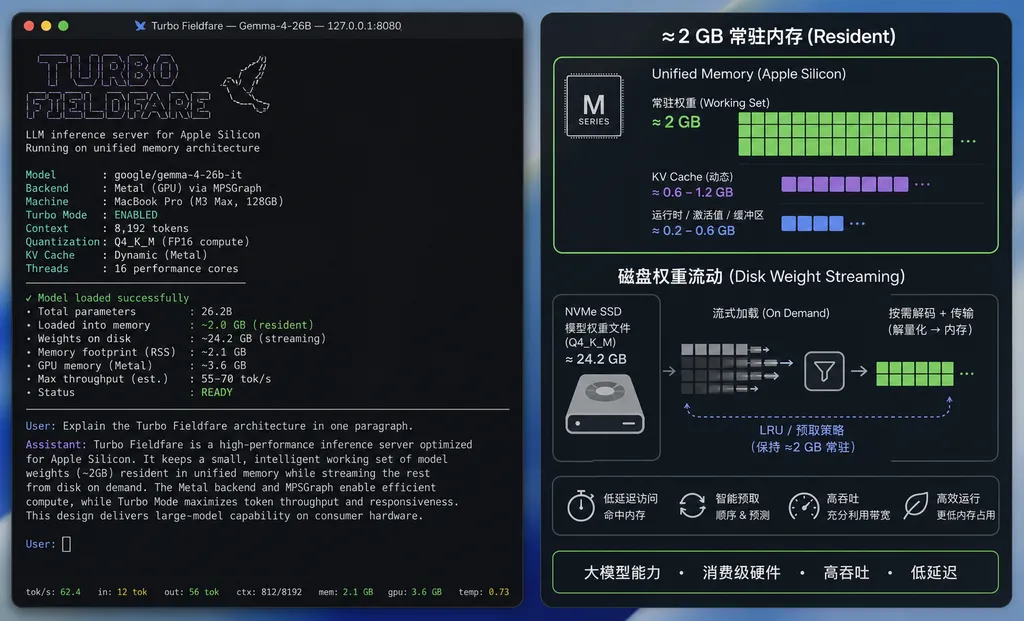
It Reduces Resident Memory, Not the Model Itself
Traditional local inference frameworks generally load most of the quantized model weights into memory first, then hand them over to the CPU or GPU for computation. Apple Silicon uses a unified memory architecture, so the CPU and GPU do not each need a separate copy of the weights. That is an advantage, but the total amount of unified memory remains a hard limit. Loading a 15GB weight file onto a 16GB Mac leaves little room for the operating system, applications, and the KV cache.
Turbo Fieldfare takes a different approach: it keeps most of the weights on the SSD and uses memory mapping or on-demand reads to load only the portions currently needed for computation into memory.
Think of it as a very thick reference book.
A conventional framework lays the entire book open on the desk first. Looking things up is fast, but the desk must be large enough. Turbo Fieldfare keeps the book on a shelf and retrieves only the few pages currently needed. This does require very little desk space, but retrieving the book, turning the pages, and putting it back all add latency.
The architecture of Gemma 4 26B-A4B also makes room for this approach. The A4B designation indicates that the number of parameters actually activated for each token is approximately 4B, rather than having all 26B parameters participate in every computation at the same intensity. For this type of sparse or mixture-of-experts architecture, if the runtime can determine which weights are currently needed, there is no need to keep every expert resident in memory simultaneously.
This is also what makes Turbo Fieldfare more practical than disk-streaming inference on an ordinary dense 26B model. It is not merely relying on macOS swap as a brute-force solution; it attempts to coordinate the model architecture’s “on-demand activation” with storage scheduling.
However, 2GB refers to the memory working set, not the total deployment cost. The model weights still occupy SSD space, and macOS itself consumes several gigabytes of memory. A more accurate version of the “2GB RAM” claim would be that the inference engine can limit its own resident memory usage to approximately 2GB—not that the entire computer requires only 2GB of memory.
Why Ordinary mmap Does Not Explain Everything
At this point, some developers may say: Haven’t we long been able to mmap a model file and make its RSS appear small?
The issue is that low RSS does not necessarily mean low real memory pressure, much less a usable inference system.
macOS places pages from mapped files into the file cache. A process may show low resident memory in the task manager, while the system is still using a large amount of cache. Once memory pressure rises, those pages are reclaimed, and the next round of computation must read them from the SSD again. If the access pattern has poor locality, inference can degrade into frequent random I/O.
Therefore, determining whether Turbo Fieldfare is truly effective requires more than a screenshot showing “2GB.” At minimum, four metrics must be examined:
- Time to first token: how long it takes to begin generating output after the prompt is loaded;
- Sustained generation speed: how many tokens per second it can achieve during steady-state operation;
- Long-context performance: whether the 2GB figure still holds as the KV cache grows;
- System-wide memory pressure: whether process RSS has merely been shifted into the file cache or compressed memory.
SSD read volume must also be monitored. Keeping weights on disk is not a free lunch. Apple’s built-in SSDs offer considerable bandwidth for sequential reads, but if MoE weight accesses are highly scattered, the bottleneck may shift from compute to read latency. In that case, a faster M-series chip may not deliver a proportional speed increase because the CPU or GPU may spend most of its time waiting for data.
Its Optimization Goals Differ From Ollama and MLX
There are currently two mature approaches to local inference on Macs.
One is the GGUF ecosystem built around Ollama and llama.cpp, whose strengths are broad model support, simple deployment, and cross-platform compatibility. The other is MLX, which is optimized specifically for Apple Silicon’s unified memory and Metal, generally delivering better throughput and lower framework overhead.
In published tests, the same Gemma 4 model may perform several times better or worse depending on the framework. On a 16GB Mac mini, for example, some Ollama configurations approach the machine’s total memory limit, while MLX-optimized versions offer clearly better memory usage and speed. This shows that whether a model can run has long depended on more than parameter count: weight format, operator implementations, caching strategies, and backend scheduling are equally important.
Turbo Fieldfare has a different goal:
| Solution | Primary Goal | Main Trade-Off | | --- | --- | --- | | Ollama / llama.cpp | Generality, ease of use, and model ecosystem | Large models typically require substantial memory | | MLX | Throughput and efficiency on Apple Silicon | More tightly coupled to the platform and still needs to hold most weights in memory | | Turbo Fieldfare | Extremely low resident memory and running models beyond normal hardware limits | Greater dependence on the SSD, with potentially limited latency and throughput |
Turbo Fieldfare should therefore not be understood simply as “faster than MLX” or “more memory-efficient than Ollama.” It makes a different trade-off: storage for memory, and latency for the ability to run the model at all.
If you have a Mac with 64GB or 128GB of memory, loading the complete weights into unified memory will most likely remain the more sensible choice. Turbo Fieldfare is really aimed at 8GB and 16GB devices that cannot accommodate a 26B model conventionally, as well as scenarios that require offline operation, privacy, and model quality but can tolerate slower generation.
How Developers Should Verify the 2GB Claim
The project is still at an early stage. What it needs most right now is not more reposting, but reproducible benchmarks. Testers should use a fixed model file, quantization format, context length, and sampling parameters, while recording RSS, system memory pressure, disk read volume, and tokens per second.
Start by cloning the project and pinning the commit so that data from different versions does not get mixed together:
git clone https://github.com/drumih/turbo-fieldfare.git
cd turbo-fieldfare
git rev-parse HEAD
When running the startup command provided in the README, monitor system status in another terminal:
# View overall memory pressure
memory_pressure

# View virtual memory, paging, and compression
vm_stat 1

# View the target process's resident memory; replace PID with the actual process ID
ps -o pid,rss,vsz,command -p PID

# View disk I/O for the process
sudo fs_usage -w -f filesys | grep turbo-fieldfare
Testing should cover short prompts, prompts containing several hundred tokens, and contexts of 4K tokens or longer. Testing only a simple “Hello” can easily conceal the true cost of weight scheduling and the KV cache.
The claim of “any M-series Mac” also needs an asterisk. SSD bandwidth, capacity, memory configuration, and thermal performance vary significantly between machines. If an entry-level device’s storage is nearly full, or if it is simultaneously running a browser, an IDE, and containers, the results may differ completely from the author’s environment. Whether an external SSD can deliver the same results also depends on interface bandwidth and random-read performance.
A Useful Engineering Breakthrough, but Not a Free Miracle
The most valuable aspect of Turbo Fieldfare is not that it sets a new memory-usage figure, but that it once again demonstrates that there is no absolute one-to-one relationship between a model’s total parameter count and the hardware threshold for running it locally.
Quantization reduces the number of bytes used by each parameter. MoE reduces the number of parameters activated per token. Streaming reduces the amount of weights that must be present in memory simultaneously. When all three are combined, a device that originally could not hold the model may indeed be able to run it.
But there is still a gap between “it runs” and “it is worth using.”
If actual generation is too slow, the first token takes a long time to appear, or SSD read activity remains consistently high, it is better suited to technical validation than use as an everyday coding assistant. Conversely, if the project can provide consistently acceptable interactive speeds on 8GB and 16GB Macs while keeping long-context memory pressure under control, it will be more significant than yet another quantized model—because it changes the capacity limits of local inference.
As of July 29, Turbo Fieldfare should still be regarded as an early-stage open-source project worth validating, rather than a mature solution that has already replaced Ollama or MLX. The 2GB claim is not technically impossible, but it must be considered alongside disk usage, system caching, context length, and generation speed.
In one sentence: this is clever resource scheduling, not a way to magically shrink a 26B model to 2GB.
References
- Turbo Fieldfare GitHub repository: Project source code, installation instructions, and the author’s explanation of running Gemma 4 26B with low memory usage.
- Reddit: Community testing of Gemma 4 26B-A4B on M-series Macs: Discussion among local inference users about quantization, CPU execution, and memory-constrained scenarios.