Canva Empowers Agents with Design Capabilities

Canva today launched MCP in the Chinese market, with initial integrations with Kimi, WorkBuddy, and Qoder Work CN. This enables agents not only to generate copy, but also to leverage visual creation, asset management, and brand asset capabilities to complete deliverables.
Agents Begin Operating Canva Directly
On July 30, Canva announced the official launch of its MCP (Model Context Protocol) capabilities in the Chinese market, along with the first integrations with local AI agent applications, including Kimi, WorkBuddy, and Qoder Work CN.
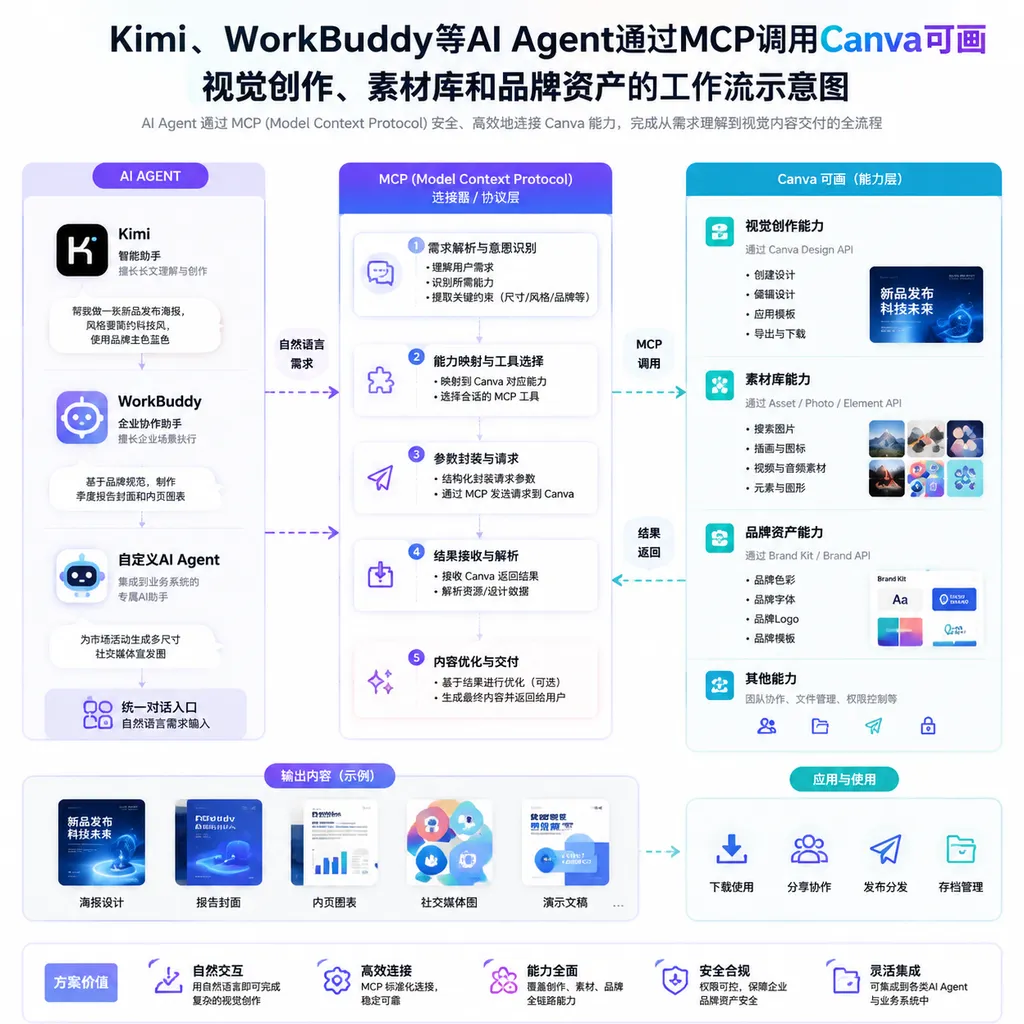
Following these integrations, the agents can use a standardized protocol to invoke Canva’s core capabilities, including visual content creation, asset management, and brand asset management. Put simply, users no longer need to receive copy in a chat window, manually open a design tool, search for templates, upload assets, and adjust brand colors. Agents now have the potential to connect these steps into a single workflow.
For example, a marketing professional could ask an agent to create a presentation reviewing the week’s sales data, generate three promotional graphics tailored to different channels, and consistently apply the company’s logo, fonts, and brand colors. Previously, language models could generally provide only titles, copy, and page outlines, while the actual design work still had to be done by a person. With Canva integrated, agents can go further by invoking design tools to combine text, data, templates, and corporate assets into visual content that remains editable.
This is not simply another entry point for “AI image generation.” It marks the beginning of agents operating design software as a production tool.
MCP Solves the Connection Problem, Not the Generation Problem
The value of MCP is often summarized as “USB-C for the AI era.” Although the analogy is not entirely precise, it is intuitive enough: MCP allows agents to discover and invoke external tools in a relatively standardized way, rather than requiring a separate proprietary plugin for every model and every application.
In a typical MCP interaction, an external service can expose tools, resources, and related descriptions to an agent. Based on the user’s objective, the agent selects the appropriate capability, organizes the parameters, initiates the call, and incorporates the returned result into subsequent steps. The model is responsible for understanding intent and orchestrating tasks, while Canva handles the design, asset, and brand asset operations it specializes in.
A visual content production pipeline can be abstracted as follows:
User objective
  -> Agent breaks down the task
  -> Retrieves corporate assets and brand guidelines
  -> Invokes visual creation capabilities to generate a design
  -> Adjusts dimensions and content for each channel
  -> Returns a reviewable, editable deliverable
The most important change here is that the output shifts from “text describing a design” to “the design itself.”
Language models have long been able to produce design instructions such as “use a blue-purple gradient background, center the title, and place the logo in the bottom-right corner.” They can also generate an image that looks good. But in enterprise workflows, a flattened image is often insufficient: copy needs to be revised, layers need to be adjusted, fonts must comply with licensing rules, logos must not be distorted, and different social platforms require different dimensions. A genuinely valuable deliverable should remain editable, reusable, and collaborative, rather than forcing users to recreate it after downloading.
This time, Canva is opening up not only visual generation but also asset management and brand asset management. That is more important than simply adding another text-to-image button. Asset management determines whether an agent can find the correct files, while brand asset management determines whether the generated content looks like it was “made by this company,” rather than like a generic AI poster.
Agents Such as Kimi Gain a Visual Execution Layer
The first group of integrations includes Kimi, WorkBuddy, and Qoder Work CN, spanning general-purpose assistants, workplace agents, and development scenarios. For these products, Canva provides an execution capability that was previously relatively weak.
Large models excel at processing language, retrieving information, and organizing structures, but visual production involves more than simply passing a prompt to an image model. Presentations require pacing across slides, marketing graphics need to be adapted to different channels, and enterprise content must account for templates, logos, fonts, color palettes, and historical assets. It would be costly and unnecessary for general-purpose agents to rebuild a complete design system themselves. Invoking a mature visual platform is a more sensible division of labor.
The practical value may emerge first in several high-frequency scenarios:
- Batch production of marketing content: An agent first extracts the campaign’s key selling points, then generates posters, social media graphics, and presentation materials, adjusting the specifications for each channel.
- Corporate reports and sales materials: Meeting notes, research findings, or spreadsheet data are organized into presentations, reducing repetitive work between creating a content outline and laying out the slides.
- Brand content governance: The agent prioritizes logos, fonts, color palettes, and templates already maintained by the company, reducing brand inconsistencies caused by employees choosing assets arbitrarily.
- Content repurposing: A long report is transformed into a presentation, infographic, and social media cards instead of requiring teams to create each format separately from scratch.
- Development collaboration: After organizing release information, feature descriptions, and screenshots, a development agent invokes design capabilities to generate launch materials or internal briefing pages.
From this perspective, Canva is not competing with Kimi for the agent entry point. It is competing for the “visual execution layer” behind the agent. Users still initiate tasks in the assistants they already know, but Canva performs the actual design operations. For a tool platform, this position may not be highly visible, but it could be more valuable than building yet another standalone chat interface.
“Controllability” Is Harder Than AI Image Generation
MCP integration can shorten the path to invoking tools, but it does not automatically solve design quality problems.
The first challenge is intent translation. When a user says, “Make it look more premium,” the model must translate that vague request into a template style, layout, typographic hierarchy, and asset selection. This process involves extensive aesthetic judgment and is difficult to complete with a single tool call. A capable agent needs to generate a draft and then iterate based on user feedback, rather than presenting “one-click generation” as a reliable deliverable.
The second challenge is brand constraints. Once a company exposes its brand assets to agents, convenience and risk increase simultaneously. Which teams can access which assets? Who can invoke unreleased product images? Can generated content be published externally without approval? How should invocation records be audited? These are unavoidable questions during implementation. MCP standardizes the connection method, but service providers and agents must still jointly design permissions, approval processes, and boundaries of responsibility.
Another challenge is reversibility. A design task is not like checking the weather, where the task is complete as soon as the call returns. A user may ask to shorten the title, replace the image on the third slide, or retain the current layout while switching to another brand color palette. If the agent cannot reliably locate the original design and its specific elements, and instead regenerates the entire piece with every revision, the workflow will quickly become unusable.
Therefore, determining whether this integration is genuinely useful requires looking beyond whether it “can generate” content. Four criteria matter:
- Whether the agent can consistently select the correct tool instead of frequently invoking the wrong one;
- Whether the returned result is a structured design that remains editable;
- Whether corporate assets and brand assets support fine-grained permission controls;
- Whether multi-turn revisions can modify existing content rather than rebuilding everything from scratch each time.
As of July 30, public information primarily confirms the launch date, the first partner products, and three categories of capabilities: visual creation, asset management, and brand asset management. The available reference materials do not yet provide detailed information about which MCP tools are exposed, account-specific permissions and plan limitations, invocation quotas, review mechanisms, or the delivery formats for generated content. These details will directly determine whether the integration merely makes for a good demo or is ready for enterprise production environments.
Canva Also Needs Agent Entry Points
This partnership does not benefit only one side.
Generative AI is changing how users enter design software. In the past, users opened a design tool first and then decided whether to use templates, image editing, or presentation features. In an agent workflow, users may simply describe their objective, while the agent decides in the background which tools to invoke. As tool brands move from the foreground to the background, those that can be discovered by more agents, invoked correctly, and relied on to complete tasks consistently will be better positioned to retain usage.
In recent years, Canva has expanded from an online design tool into a visual work suite spanning presentations, websites, documents, whiteboards, spreadsheets, images, and video. The broader the product’s scope, the better suited it is to agent orchestration: a single task does not need to stop at one image but can span data organization, content generation, layout design, and multi-channel distribution.
However, MCP also lowers the cost for agents to switch tools. The more standardized the protocol becomes, the easier it is for integrators to connect multiple design, image, and productivity services at the same time. Canva cannot build a defensible moat simply by “supporting MCP.” Its real competitive strengths still come from its supply of templates and assets, editing capabilities, multi-user collaboration, accumulated brand assets, and the reliability of its results.
In other words, MCP is more of a distribution channel than a moat.
These Tools Are the Missing Link Between Chat Assistants and Workflows
Over the past two years, the biggest problem with AI assistants has not been their inability to answer questions, but the amount of work people still need to do after receiving those answers. An assistant can write a campaign plan but cannot turn it into a complete set of materials that complies with brand guidelines. It can summarize a report but cannot reliably deliver an immediately editable presentation. It can recommend what types of assets to use but does not know what is actually available in the company’s asset library.
Canva’s MCP integration fills precisely this gap between recommendation and execution. For developers, this also means that the way agent products are evaluated needs to change. Model scores remain important, but tool discovery, parameter generation, permission controls, state management, and failure recovery will increasingly determine the final user experience.
This launch deserves recognition because it opens up a mature set of visual production capabilities rather than merely adding a chat entry point to an existing product. The initial integrations with local agents such as Kimi also show that Canva has chosen a more pragmatic path in the Chinese market: instead of asking users to migrate to a new assistant, it is placing its capabilities inside the agents they already use.
However, establishing an MCP connection is only the first step. “Completing a design with a single sentence” will move from a launch-event demonstration to a genuinely dependable production workflow only when agents can correctly access brand assets, generate editable content, handle multi-turn revisions, and properly manage permissions and auditing.
References
- Model Context Protocol Specification — The official MCP specification repository, used to understand the protocol architecture, tool invocation, and capability negotiation mechanisms.
- Model Context Protocol Servers — A collection of MCP reference servers and examples, used to understand how external tools expose capabilities to agents.