SenseTime’s 8B model brings native 4K to image generation

SenseTime today open-sourced SenseNova U1.5-Lite-Preview. The new model, built at an 8B-MoT scale, enhances 4K generation, text rendering, and image editing, but its true value will still depend on VRAM usage, generation speed, and open benchmarks.
SenseTime Open-Sources SenseNova U1.5-Lite-Preview, an 8B Model Taking on Native 4K
SenseTime today (August 3) open-sourced its unified multimodal model, SenseNova U1.5-Lite-Preview. This 8B-MoT preview model focuses on native 4K image generation while upgrading local textures, Chinese and English text rendering, complex layouts, image editing, and visual instruction-following capabilities.
The model weights and related materials are now available on GitHub, Hugging Face, and the ModelScope community. According to information published by SenseTime, U1.5-Lite-Preview significantly outperforms U1, released in April this year, across multiple benchmarks for generation and editing quality. With its relatively lightweight parameter count, it also aims to match some commercial closed-source image models.
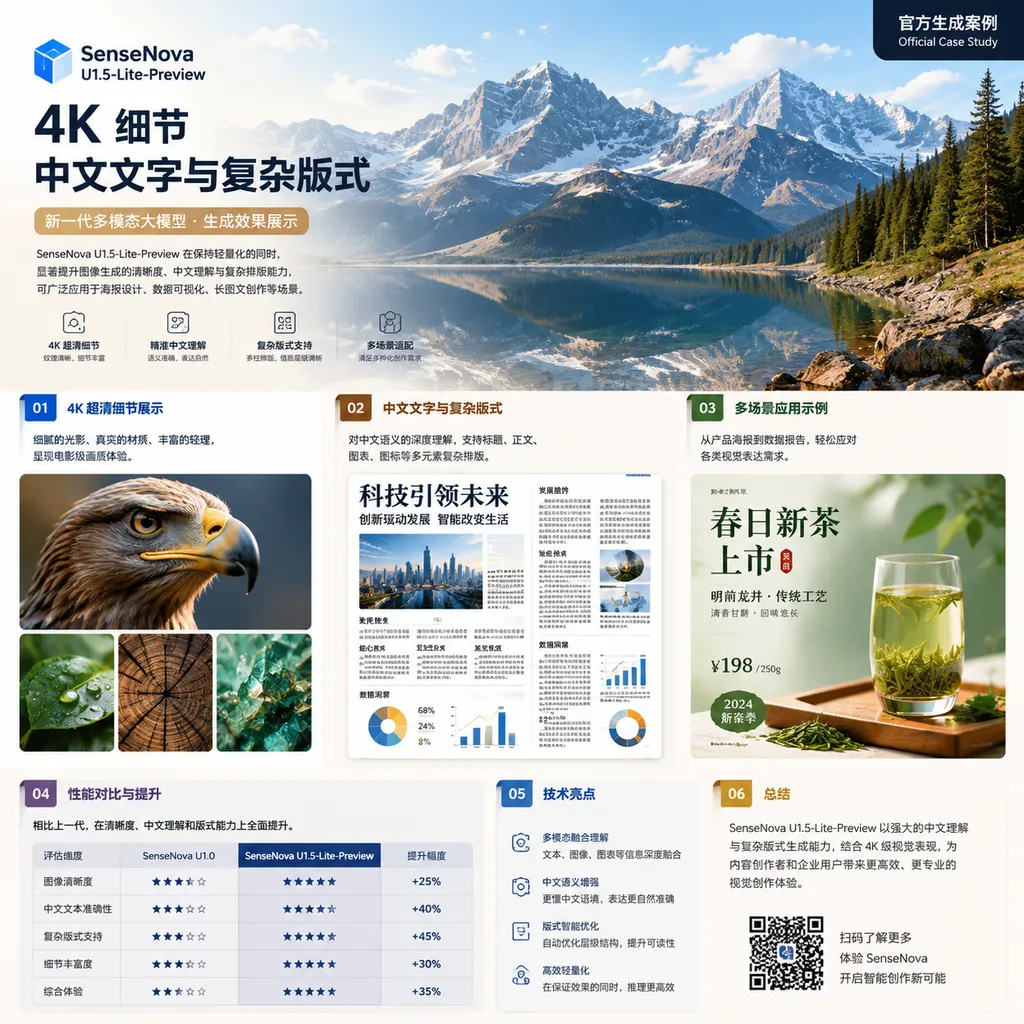
The most marketable label for this upgrade is, of course, “native 4K with 8B parameters.” For developers, however, what truly matters is not the resolution figure itself, but whether SenseTime can simultaneously solve three more difficult problems: structural stability at high resolutions, controllability of text and layouts, and content consistency during multi-turn editing.
Simply upscaling an image to 4K is no longer difficult. The real dividing line in model capability is whether fingers, product text, material textures, and spatial relationships remain intact on a 4K canvas.
Not Just Adding an Upscaler to U1
The SenseNova U1 series was officially released in April this year and is built on SenseTime’s proprietary NEO-unify architecture. Its goal is not to simply connect a visual understanding model, a language model, and an image generator into a pipeline, but to unify multimodal understanding, reasoning, and generation within a single architecture.
Traditional multimodal workflows are more like a relay race: a vision model first reads the image, a language model interprets the request, and a generative model then performs the drawing or editing. Every handoff can lose some detail. For example, if a user asks to “retain the red seal in the lower-left corner of the package and only replace the background with snow-capped mountains,” an intermediate module might summarize the seal as a generic logo, causing it to be redrawn entirely in the final output.
A unified model seeks to bring images, text, and instructions into the same semantic space. Instead of first compressing an image into a sentence and then recreating it from that description, the model attempts to preserve the correspondence between linguistic semantics and pixel-level visual information. This approach is particularly well suited to:
- Redrawing product assets from reference images;
- Replacing local regions and transferring styles;
- Continuous, multi-turn visual and textual creation;
- Visual editing that requires spatial reasoning;
- Text-heavy content such as posters, menus, and e-commerce hero images.
U1.5-Lite-Preview can be understood as an engineering-focused enhancement along this path. The main changes listed by SenseTime include:
- Native support for 4K image generation;
- Improved local textures, details, and real-world material qualities;
- Better Chinese and English text generation and complex layout composition;
- Greater image-editing stability;
- Stronger visual instruction following.
These capabilities are not independent of one another. Higher resolution gives the model more pixels with which to render details, but it also magnifies errors. Text generation depends on precise local structural control, while complex layouts depend on global spatial planning. If a model can only add texture without preserving the overall composition, the result may look sharper, but the text will still be wrong and objects will still be distorted.
Native 4K Matters, but Output Dimensions Are Not Everything
When image models refer to 4K, they generally mean an output resolution of approximately 3840×2160. That amounts to roughly 8.29 million pixels, nearly eight times the pixel count of a 1024×1024 image.
Therefore, “native 4K support” is not the same as generating a low-resolution image first and then enlarging it with a super-resolution model. The latter is more like making a larger print from a small photograph: edges can be sharpened and some textures can be added, but incorrect text, fingers, and spatial relationships in the original image are difficult to fix from scratch. Native high-resolution generation, by contrast, has the potential to plan the structure and details of a large canvas directly during generation.
Some restraint is warranted here, however. Based on currently available public information, SenseTime has not yet fully explained the specific inference pipeline behind its “native 4K” claim—for example, whether generation is completed in a single stage, whether tiled or progressive generation is used, or whether the model includes an internal high-resolution refinement step. For developers, these differences directly affect:
- Peak VRAM usage;
- Time to first image and total generation time;
- Stability across different aspect ratios;
- Consistency across different regions of an image;
- Whether deployment is feasible on consumer-grade GPUs;
- Throughput and cost during batch generation.
In other words, a 4K output file does not automatically mean that the model genuinely understands a 4K canvas. At minimum, assessing the robustness of this capability requires examining three types of detail: whether distant people are distorted, whether small text is legible, and whether objects and lighting remain consistent across opposite sides of the image.
8B Is Lightweight, but 4K Inference Will Not Be
Another selling point of U1.5-Lite-Preview is its 8B-MoT configuration. Compared with unified multimodal models containing tens of billions of parameters, 8B is indeed a more accessible range for deployment and experimentation. It also gives the community an opportunity to perform fine-tuning, quantization, and inference optimization for vertical use cases.
However, fewer parameters do not necessarily mean low VRAM requirements.
A rough estimate based solely on weight size suggests that eight billion parameters stored in BF16 require approximately 16GB. Quantization can reduce this significantly. In actual operation, however, developers must also account for visual encoding, image decoding, intermediate activations, caches, and the additional overhead of high-resolution generation. In 4K scenarios in particular, the pressure created by activations and attention computation may be far greater than that of the weights themselves.
It is therefore impossible to conclude from “8B” alone that the model can smoothly generate 4K images on a particular consumer GPU. How the MoT architecture schedules computation, how many parameters are actually activated, whether CPU offloading is supported, and how much text capability is lost through low-bit quantization will all depend on subsequent technical documentation and community testing. The current official release is a Preview version, and developers would be best advised to treat it as a testable candidate model rather than a fully polished production component.
This is also the most practical value of SenseTime’s decision to open-source the model: closed-source models typically provide only results and pricing, whereas open weights at least allow developers to compare speed, VRAM consumption, quantization errors, and failure cases side by side.
Chinese Text and Complex Layouts Are Closer to Production Needs Than 4K
Over the past two years, image models have become very good at producing images that are impressive at first glance. Once they enter real-world business workflows, however, text is often the first area in which problems emerge.
E-commerce hero images need to display specifications and discounts accurately. Restaurant posters must ensure that dish names and prices are correct. Event pages need to handle mixed Chinese and English text. A single punctuation error—or rendering “limited-time offer” as visually similar gibberish—can make an entire image unusable as a deliverable.
SenseTime has placed particular emphasis on more accurate Chinese and English text generation and complex layout composition. This deserves more attention than a simple improvement in aesthetic scores. Chinese contains a large number of structurally complex characters, and the model must not only know what to write but also handle glyph shapes, line spacing, alignment, hierarchy, and whitespace. Complex layouts further require the model to understand the spatial relationships among titles, subtitles, primary images, and decorative elements.
If these capabilities can be reproduced consistently, U1.5-Lite-Preview will be better suited to scenarios such as:
- Batch generation of e-commerce product images and promotional posters;
- Menus and campaign materials for local businesses;
- Game interfaces, cards, and text-based concept designs;
- Social media covers and long-form infographics;
- Modifying copy, products, or backgrounds based on brand templates.
There is still a considerable gap, however, between “being able to generate correct text” and “being able to reliably generate any requested text correctly.” Evaluations should not rely solely on officially curated examples. They should stress-test the model with long Chinese passages, numbers, English abbreviations, special characters, and multi-column layouts.
Developers can create their own regression set using a fixed collection of prompts, for example:
Generate a 16:9 poster for a technology launch event. The main title should be
“Unified Multimodality, Native 4K,” the subtitle should be “SenseNova Developer
Day 2026,” and the date should be “August 18, 2:30 PM.” Do not add or remove any
characters from the Chinese text, and preserve the capitalization of the English
text. Center the title and place the date in the lower-right corner. The background
should include a silver robot, but it must not obscure any text.
Testing should record at least text accuracy, layout compliance, consistency across repeated generations, and the legibility of small text at 4K. Judging the model from a single successful example can easily be misleading because of randomness.
Image Editing Is the Main Battleground for Unified Models
Compared with generating an image from a blank canvas, image editing provides a much more demanding test of whether a model truly understands user intent.
When a user says, “Change the cup to glass,” the request typically implies a series of constraints: the cup’s position and shape should remain largely unchanged, the table should remain unchanged, the person should remain unchanged, the glass should refract the background, and the shadows should be adjusted accordingly. Many generative models turn editing tasks into complete redraws. Although the result may be more visually attractive, it alters parts of the image that the user never asked to change.
SenseTime says U1.5-Lite-Preview improves image-editing stability and visual instruction following. If those improvements translate into better content fidelity, their significance may exceed that of 4K support. Enterprise workflows rarely produce a final image from a single prompt; instead, they repeatedly modify fixed products, people, or brand assets.
When evaluating editing capabilities, developers should pay particular attention to:
- Whether unedited regions drift;
- Whether a person’s identity and facial features are preserved;
- Whether a small edit causes the entire image to be reconstructed;
- Whether original details are gradually lost over multiple editing rounds;
- Whether the model can simultaneously execute multiple instructions with positional constraints;
- How large the performance gap is between Chinese and English instructions.
This is where the theoretical advantage of a unified understanding-and-generation model becomes apparent. It is not merely responsible for “drawing”; it must also understand what needs to change and what must remain untouched.
Matching Closed-Source Models Remains an Official Claim for Now
SenseTime says U1.5-Lite-Preview significantly outperforms U1 across several mainstream benchmarks for generation and editing quality, and that its 8B-MoT configuration delivers results comparable to commercial closed-source models. When it previously released U1 Lite, SenseTime also stated that its general-purpose image-generation quality was comparable to large closed-source models such as Qwen-Image 2.0 Pro and Seedream 4.5, while offering advantages in inference response speed.
These claims help position the model, but they are not a substitute for independent evaluation.
Image-generation benchmarks can easily be affected by prompt distribution, evaluator models, output-selection methods, and aesthetic preferences. In particular, “comparable” may mean that only a few metrics are close; it does not necessarily mean parity across text rendering, editing, realism, speed, and cost.
For an open-source model, a more convincing comparison should disclose all of the following:
- Blind-test results using identical prompts and resolutions;
- Per-image generation time and peak VRAM usage;
- Failure rates across different aspect ratios;
- Character-level accuracy for Chinese and English text;
- Preservation of identity and backgrounds after multi-turn editing;
- Changes in generation quality before and after quantization;
- Whether additional super-resolution, reranking, or post-processing modules are used.
Until such data becomes available, the most prudent conclusion is: U1.5-Lite-Preview presents a competitive technical direction, but whether it truly achieves the production stability of leading closed-source services still needs to be demonstrated by the community.
Open Source Does Not Mean Ready Out of the Box
U1.5-Lite-Preview currently has an official GitHub documentation page and a Hugging Face model repository. Before integrating it, developers should still review the model card, license, dependency versions, and usage restrictions—especially the terms for commercial deployment and redistribution. They should not assume that the model can be used without restrictions simply because it is described as “open source.”
The Preview designation also means that the API, weights, inference scripts, and recommended parameters may change in the future. Production teams should pin specific versions and dependency environments, and maintain an internal evaluation set to prevent shifts in visual style, text accuracy, or editing behavior after upgrades.
The conclusion from this SenseTime release is straightforward: this is not merely a resolution upgrade. It is an attempt to use an 8B-class unified model to test whether high-quality image generation, visual understanding, and controllable editing truly need to depend on massive closed-source systems.
The direction is sound, and open sourcing the model lowers the cost of validation. But 4K is only the price of admission. Whether U1.5-Lite-Preview ultimately earns a place in developers’ toolkits will still come down to three familiar questions: Can it run efficiently? Can it edit accurately? And will it remain stable after 100 consecutive runs?
References
- ITHome: SenseTime Open-Sources SenseNova U1.5-Lite-Preview—Release information from August 3 summarizing upgrades including native 4K, text generation, complex layouts, and image editing.
- GitHub: Official SenseNova U1.5 Preview Documentation—Documentation for the U1.5 preview release in SenseTime’s OpenSenseNova repository.
- Hugging Face: SenseNova U1.5-8B-MoT-Preview—Model weights, model card, and subsequent usage information.