What’s the Cost of Forcing a 70B Model to Run on 4GB of VRAM?

AirLLM enables even a single 4 GB GPU to run inference on a 70B model by loading weights layer by layer. It solves the problem of “whether it can run,” at the cost of extremely slow generation speeds and massive disk I/O.
4GB of VRAM Really Can Run a 70B Model
Recently, the open-source project AirLLM has once again sparked discussion in the developer community: it enables a consumer GPU with only 4GB of VRAM to run a 70B large model that would normally require more than 100GB of VRAM—without first applying distillation, pruning, or full-model low-bit quantization.
This is true, but we first need to clarify what “run” means.
AirLLM addresses whether a model can complete inference, not whether it can serve requests at practical speeds. It turns the problem of insufficient VRAM into problems involving disk reads, system-memory transfers, and PCIe bandwidth. The result is that a model that previously could not be loaded at all can now generate output slowly. However, using it as a replacement for production inference engines such as vLLM or SGLang is generally unrealistic.
In short: AirLLM is a model exploration tool for low-VRAM devices, not a free VRAM expansion trick.
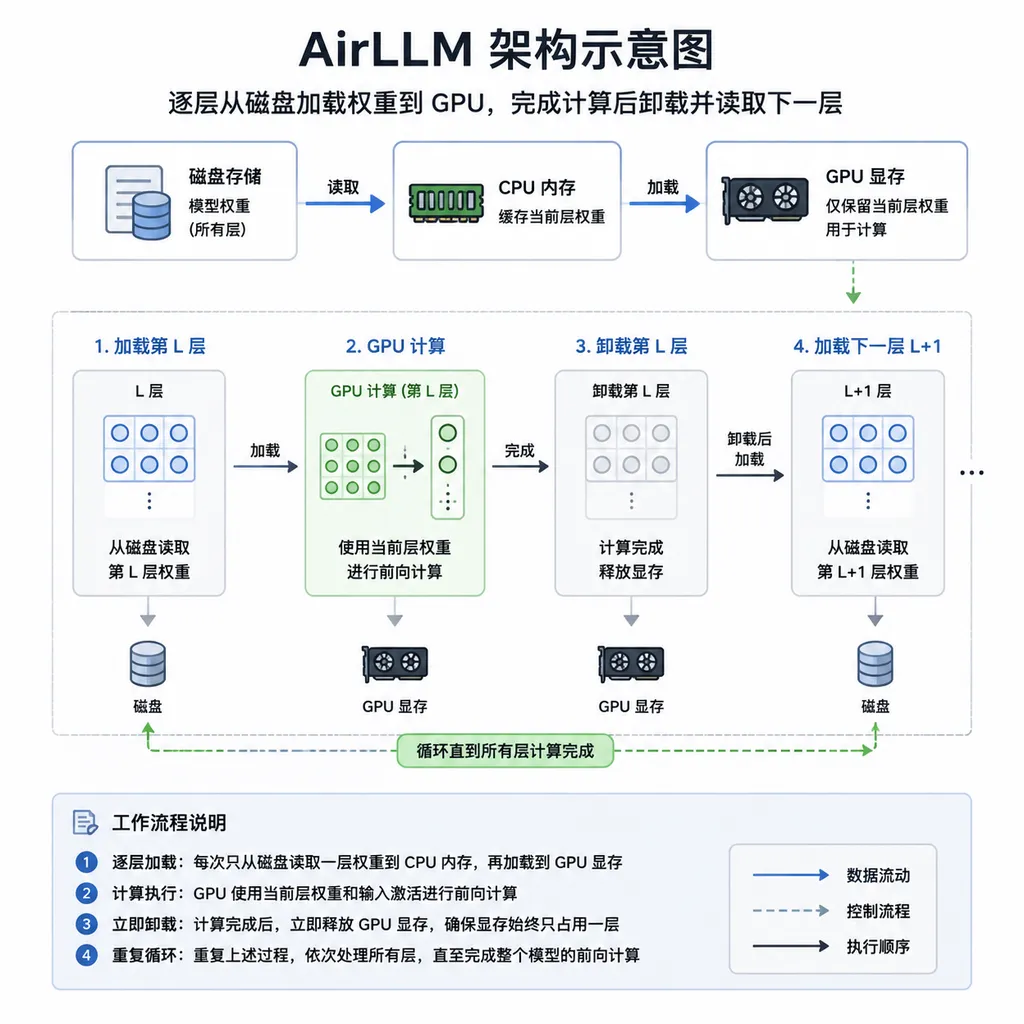
How It Fits 140GB of Weights into 4GB of VRAM
For a 70B model stored in FP16 or BF16, the parameter weights alone require approximately:
70 billion parameters × 2 bytes ≈ 140GB
Conventional inference engines try to keep these weights resident on the GPU. Even with 4-bit quantization, the model weights usually still occupy 30GB to 40GB, far more than a single 4GB graphics card can hold.
AirLLM does not try to compress the entire mountain further. Instead, it changes how the mountain is moved.
A Transformer model consists of an embedding layer, dozens of repeated Transformer blocks, and an output layer. During forward inference, these layers execute sequentially: after Layer 1 finishes, its result is passed to Layer 2; after Layer 2 finishes, the result is passed to Layer 3. AirLLM takes advantage of this sequence by splitting the model in advance into small files stored by layer, then performing the following loop during inference:
- Read the current layer’s weights from disk;
- Move the weights to the GPU;
- Execute the current layer’s computation;
- Retain the intermediate activations and required KV cache;
- Unload the current layer’s weights;
- Load the next layer and continue until one forward pass is complete.
Llama-family 70B models typically have around 80 Transformer layers. Averaged across the model, each layer’s FP16 weights are roughly 1.5GB to 2GB, although the embedding layer and output head may differ. As long as only one layer resides in VRAM at a time, with enough space left for activations, the CUDA context, and caches, it is indeed possible for 4GB of VRAM to complete short-context inference.
This resembles an operating system’s virtual-memory mechanism: if the entire program cannot fit into memory, only the pages currently needed are swapped in. The difference is that AirLLM swaps entire Transformer layers rather than ordinary memory pages.
The Real Bottleneck: The Model Must Be Moved Again for Every Generated Token
Low VRAM is only the visible part of the problem. AirLLM’s fundamental cost is data movement.
An autoregressive model does not compute an entire answer all at once. It predicts only the next token each time. Generating one token requires the current hidden state to pass through every layer of the model in sequence. Generating the next token requires another pass through all layers.
If a 70B model uses FP16 weights, one complete forward pass theoretically needs to touch approximately 140GB of parameters. PCIe 4.0 x16 alone has a theoretical bandwidth of around 32GB/s, so the ideal lower bound for transferring the weights is already:
140GB ÷ 32GB/s ≈ 4.4 seconds
This does not yet account for the following overhead:
- Actual NVMe SSD read speeds;
- File-system and memory-mapping overhead;
- Effective CPU-to-GPU transfer efficiency;
- Time spent by the GPU performing matrix computations;
- Python scheduling and layer-switching costs;
- The inability to hit the operating system’s page cache on the first read;
- Processing of the embedding layer, output head, activations, and KV cache.
If every token requires cold-reading all weights from an SSD with a sequential read speed of around 7GB/s, the theoretical disk-side time alone could approach 20 seconds. Actual results will be affected by the memory page cache, prefetching, compression method, and model architecture, but the conclusion remains unchanged: AirLLM inference is usually I/O-bound rather than limited by GPU compute.
This is also why replacing the GPU with a more powerful one may not produce a linear speedup. An RTX 4090 has far more compute power than an older 4GB graphics card, but if the weights still need to be moved layer by layer from the SSD, the GPU will spend much of its time waiting for data.
Before You Begin: Enough VRAM Does Not Mean the Entire Machine Is Sufficient
Before deployment, the following environment is recommended:
- An NVIDIA GPU with CUDA support; 4GB of VRAM is the minimum worth attempting;
- Preferably Linux; WSL2 is recommended on Windows;
- A working combination of PyTorch and CUDA;
- At least 16GB of system memory, with 32GB or more being safer;
- An NVMe SSD rather than a mechanical hard drive or slow external drive;
- Sufficient disk space.
Disk space is particularly easy to overlook. The FP16/BF16 weights of a 70B model may exceed 130GB, and AirLLM must also generate files split by layer during its first run. The original weights and split files may coexist during conversion, so reserving at least 250GB to 350GB is recommended, depending on the model format and whether compression is enabled.
First, check the GPU and CUDA:
nvidia-smi
python -c "import torch; print(torch.__version__); print(torch.cuda.is_available())"
Create an isolated environment:
python -m venv .venv
source .venv/bin/activate
python -m pip install --upgrade pip
pip install airllm
Compatibility among AirLLM, PyTorch, Transformers, and Accelerate may change across versions. By 2026, dependency versions pinned in older tutorials may no longer apply. If the installed environment cannot recognize a model class, fails to load safetensors, or reports CUDA operator errors, consult the current dependency instructions in the project repository first rather than blindly copying a combination of versions from several years ago.
Minimal Working Example
The following example uses AirLLM’s AutoModel interface to load a Hugging Face model. Replace the model name with a 70B repository that you have permission to access and that is supported by the current version of AirLLM.
from airllm import AutoModel

MODEL_ID = 'your-org/your-70b-instruct-model'
MAX_LENGTH = 128

model = AutoModel.from_pretrained(MODEL_ID)

prompt = ['Explain layered inference in three sentences.']
inputs = model.tokenizer(
    prompt,
    return_tensors='pt',
    return_attention_mask=False,
    truncation=True,
    max_length=MAX_LENGTH,
    padding=False,
)

output = model.generate(
    inputs['input_ids'].cuda(),
    max_new_tokens=32,
    use_cache=True,
    return_dict_in_generate=True,
)

text = model.tokenizer.decode(
    output.sequences[0],
    skip_special_tokens=True,
)
print(text)
The model will not be ready for conversation immediately after the first load. AirLLM usually needs to download the model first and then convert the original shards into a layout suitable for layer-by-layer reading. For a 70B model, this step may take a long time and generate a large amount of disk writes.
It is a good idea to open another terminal and monitor resource usage:
watch -n 1 nvidia-smi
If iotop is installed, you can also check whether the disk has become the bottleneck:
sudo iotop -oPa
Typical behavior includes periodic rises and falls in VRAM usage, sawtooth-shaped GPU utilization, and sustained high SSD load. Low GPU utilization does not mean the program is idle. More often, it means the compute units are waiting for the next layer’s weights.
Do Not Max Out These Three Parameters at the Start
1. Control Output Length
For the first test, set max_new_tokens to 8, 16, or 32 instead of immediately trying to generate 500 tokens. Every additional token generated by AirLLM requires another traversal of the model’s layers. A short answer is enough to verify that the model works; there is no need to spend half an hour waiting for a long article.
2. Limit Context Length
“Running 70B on 4GB” usually implies a short-context condition. As input length increases, activations and the KV cache also grow. FlashAttention can reduce intermediate memory usage during attention computation, but it cannot make the KV cache disappear entirely, nor can it eliminate weight transfers.
If 128 tokens work but several thousand or tens of thousands of tokens cause an OOM error, that does not contradict the project’s claims. Peak VRAM usage depends on the model architecture, data type, context length, batch size, and attention implementation—not just the parameter count.
3. Keep the Batch Size at 1
AirLLM’s advantage is trading time for space, not providing high throughput. Increasing the batch size raises memory usage for activations, attention caches, and intermediate tensors. On a 4GB GPU, a batch size of 1 is the only reasonable starting point.
Optional Compression: Not Intended to Make Tensor Cores Faster
AirLLM’s core functionality does not depend on traditional full-model quantization, but some versions provide layer- or block-level compression options, such as:
model = AutoModel.from_pretrained(
    MODEL_ID,
    compression='4bit',
)
Whether this is supported, the exact parameter names, and the supported model architectures should all be verified against the current repository version.
The primary value of compression here is reducing disk usage and I/O traffic. Traditional quantized inference focuses more on low-bit matrix multiplication so that resident weights can be computed faster after being loaded into VRAM. AirLLM’s compression is more about easing the burden of moving every layer. Both approaches may be called quantization or compression, but their optimization goals are not exactly the same.
Compression is not free either. It may add decompression or dequantization overhead and cause some loss of accuracy. If the SSD is already fast but the CPU is weak, compression may not deliver a proportional speedup. Actual per-token latency is the metric that matters.
Common Failures: The Model Itself Is Usually Not the Problem
The Disk Fills Up During the Initial Split
Symptoms include a write failure halfway through conversion or the system drive suddenly being left with only a few gigabytes of free space. The solution is to place the Hugging Face cache and model-splitting directory on a high-capacity SSD:
export HF_HOME=/mnt/nvme/huggingface
export TRANSFORMERS_CACHE=/mnt/nvme/huggingface/transformers
Run df -h before starting to check the remaining space. Do not wait until 140GB of weights have been downloaded to discover that there is nowhere to write the split files.
A 4GB Graphics Card Still Runs Out of Memory
First, reduce the input and output lengths, close other programs using the GPU, and check whether the desktop environment, browser, or display services are consuming VRAM. When a consumer 4GB GPU is also driving a display, the actual available VRAM may be only slightly above 3GB.
In addition, different 70B models do not have exactly the same layer structure. “70B” refers only to the parameter scale and does not guarantee that every 70B repository can run within the same amount of VRAM.
GPU Utilization Is Very Low
This is likely normal. Check SSD throughput and CPU usage. If the disk is reading at full speed, the system is I/O-bound. Moving the model to a faster local NVMe drive is usually more effective than upgrading the GPU. Network drives, mechanical hard drives, and inexpensive USB SSDs will further degrade generation speed.
The Second Launch Is Still Slow
The split cache can avoid repeated preprocessing, but it cannot eliminate layer-by-layer loading during inference. The second run may be faster than the first, but it will not suddenly reach the speed of a conventional GPU inference engine.
AirLLM, llama.cpp, or vLLM: Which One Should You Choose?
| Solution | Core Approach | Low-VRAM Capability | Speed and Throughput | Best Suited For | |---|---|---:|---:|---| | AirLLM | Load weights by layer and unload them after computation | Extremely strong | Very low | Verifying whether very large models can run, studying model layers, and low-frequency offline tasks | | llama.cpp | GGUF quantization with hybrid CPU/GPU offloading | Strong | Usually more practical | Local chat, quantized models, and deployment on consumer hardware | | Transformers/Accelerate Offload | Automatically distribute weights among GPU, CPU, and disk | Moderate to strong | Depends on the offload ratio | Prototyping and compatibility with Hugging Face workflows | | vLLM/SGLang | Keep weights resident on the GPU and optimize the KV cache and batching | Weak; depends on sufficient VRAM | High | Online APIs, multi-user concurrency, and production services |
If your machine has 24GB of VRAM and you simply want to use a 70B model locally, prioritize 4-bit quantization, hybrid CPU/GPU offloading, or multi-GPU sharding. These options are usually more practical than AirLLM. AirLLM’s advantage is clearest only under one extreme condition: the model is far larger than all available memory, but you still want it to complete a full inference pass.
When AirLLM Is Worth Using
AirLLM is relatively well suited to the following tasks:
- Checking whether a particular 70B model can load and generate correctly;
- Validating prompts and output formats without a high-VRAM GPU;
- Studying model-layer structures, weight distributions, or compatibility;
- Running small-batch offline tasks that are not latency-sensitive;
- Demonstrating the relationship among VRAM, system memory, disk, and computation;
- Low-frequency inference involving private data that cannot be uploaded to the cloud.
It is not suitable for:
- Real-time user-facing chat;
- High-concurrency API services;
- Multi-turn tool use by agents;
- Long-form tasks that generate thousands of tokens at a time;
- Production environments that depend on stable P95/P99 latency;
- Frequently switching among multiple 70B models.
Agent workloads are especially problematic because a single user request may trigger multiple rounds of model inference. Even if each generation contains only a few dozen tokens, planning, tool calls, observations, and summarization can add up to hundreds of forward passes. AirLLM’s layer-by-layer I/O costs will be multiplied accordingly.
Our Assessment: It Removes the Barrier, but Not the Cost
The most valuable aspect of AirLLM is not that it suddenly gives an old graphics card the capabilities of a data-center GPU. Rather, it demonstrates an important engineering principle: a model’s parameter count determines its storage requirements, but it does not have to strictly determine its instantaneous VRAM usage.
Through layer-level splitting, memory mapping, prefetching, and timely deallocation, developers can turn an inference task that is “impossible to load” into one that is “very slow but can finish.” This has practical value for model research, compatibility testing, and resource-constrained environments.
However, it does not change the fundamental economics of large-model inference. The 140GB of weights still need to be stored, read, and transferred. Every new token still requires data to pass through all layers. The VRAM saved must ultimately be paid back in the form of time, SSD wear, disk space, and system complexity.
As of August 3, 2026, AirLLM remains more of a specialized tool than a general-purpose local inference solution. If the question is, “Can a 4GB graphics card run a 70B model?” the answer is yes. If the question is, “Can it be used like an ordinary chat model?” the answer is usually no.
These two statements are not contradictory. On the contrary, together they explain AirLLM’s true value: it turns a hardware limitation from a wall into a very long road.
References
- AirLLM GitHub Repository: Project source code, installation instructions, layer-by-layer inference implementation, and the latest compatibility information.
- Hugging Face Safetensors Documentation: An introduction to the Safetensors storage format, memory mapping, and secure loading mechanisms.
- Hugging Face Model Hub: Used to find model weights, architecture configurations, and access permissions. Confirm that the target model is compatible with AirLLM before running it.