Cloudflare Gives Every Agent a Computer

Cloudflare open-sources @cloudflare/computer, unifying Isolate and container execution through persistent workspaces so AI agents don’t have to keep an entire container running long-term.
Cloudflare Has Turned the Agent’s “Computer” into a Programmable Abstraction
On August 3, Cloudflare open-sourced @cloudflare/computer, which is currently in early preview. It aims to give every AI agent its own virtual work computer, complete with a persistent file system, the ability to read, write, and edit files, and support for executing commands, working with Git repositories, and running tests.
But this “computer” is not a dedicated virtual machine kept running for every agent, nor is it a permanently running Docker container for each user. What Cloudflare has actually introduced is a workspace abstraction: file state persists over time, while the compute environment is selected dynamically based on the demands of each task.
Lightweight tasks run in an execution environment based on Workers Isolates. Cloudflare Containers are started only when npm, native binaries, compilers, or a full Linux toolchain are required. Both environments see the same set of files, and any changes made during a task are synchronized back to the unified workspace afterward.
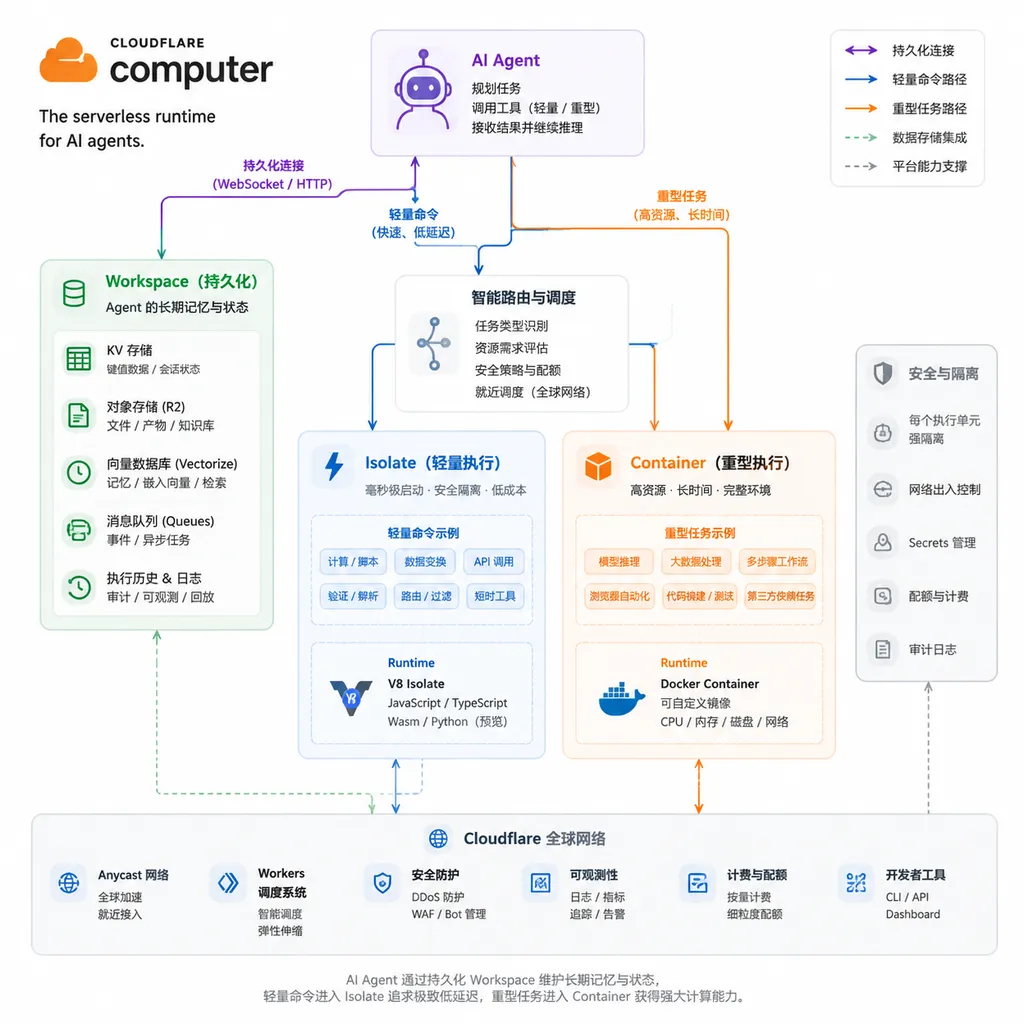
This design is not aimed at “letting agents run commands”—sandbox products have long been capable of that—but at a more practical problem: when the number of agents scales from thousands to hundreds of millions, how can platforms avoid keeping containers running indefinitely for large numbers of idle agents?
Why Chatbots Do Not Need Computers, but Coding Agents Do
Traditional chat models operate in a relatively simple way: they receive context, generate a block of text, and end the current inference turn. Even when connected to search engines or databases, many tasks can still be reduced to a single tool call followed by a single result.
Coding agents are different. An agent that can genuinely fix an issue usually needs to repeat the following workflow:
- Clone or import a code repository;
- Search for relevant files and symbols;
- Modify one or more pieces of code;
- Run unit tests, linting, or build commands;
- Read the error output;
- Make further changes and rerun the tests;
- Generate a patch, commit, or downloadable artifact.
The key here is not how intelligent the model is, but that intermediate state cannot be lost. The directory the agent sees in step six must be consistent with the directory it modified in step three. Logs generated by tests, dependency lockfiles, and temporary artifacts must also remain available to subsequent inference turns.
In other words, what an agent needs is not a one-off function execution, but a “desk” it can continue using. Files are the materials laid out on the desk, the shell and toolchain are the tools in its drawers, and the model decides what to pick up and what to do next.
The common approach today is to create a container for each agent. The advantage is strong compatibility: Linux, Node.js, Python, Git, compilers, and system tools can all be included. The drawback is equally straightforward—even when no tasks are running, containers still consume some memory, CPU quota, and scheduling resources.
This is not a major problem for an individual developer or a few dozen concurrent sessions. But for a platform aiming to support hundreds of millions of long-lived agents, it quickly becomes a cost and scheduling problem. Most agents do not compute continuously throughout their lifecycle. Instead, they “reason for a few seconds, execute something, wait for the user or an external system, and then continue.” Keeping a full container running alongside each agent results in poor utilization.
Core Architecture: Persistent State, Compute on Demand
The core of @cloudflare/computer is the Workspace. According to Cloudflare’s published design, the Workspace resides inside a Durable Object, with SQLite storing the authoritative state and a virtual file system provided on top of it.
Files can be imported from cloud storage, Git repositories, or custom data sources. Agents are given a set of capabilities compatible with AI SDK tool-calling conventions, including:
read: Read files;write: Create or overwrite files;edit: Modify existing content;ls: List directories;exec: Execute commands.
Simplified into a flowchart, the architecture looks roughly like this:
User task
   ↓
LLM planning and tool selection
   ↓
Persistent Workspace (SQLite as the authoritative state)
   ├─ read / write / edit / ls
   └─ exec
       ├─ Lightweight tasks → Isolate + just-bash
       └─ Linux / npm / native tools → Cloudflare Container
                    ↓
             File changes synchronized back to Workspace
The most notable aspect of this architecture is that it splits the “computer” into two independently scalable components:
- The state layer persists over time, storing the agent’s files and task progress;
- The execution layer appears on demand and can be released when no longer needed.
This resembles the design philosophy behind serverless databases and object storage. Developers see a continuously available working environment, while the underlying system does not need to keep it on the same machine or in the same container at all times.
Isolates Run Things Cheaply; Containers Run the Real Work
Cloudflare has highlighted two types of execution backends.
The first is built on Workers Isolates. The system uses just-bash to translate shell behavior into JavaScript, which is then executed inside a dynamic Worker. It is suitable for lightweight tasks such as file editing, text and data processing, and certain Git operations.
The advantages of Isolates are fast startup, low resource overhead, and high density. An Isolate is not a complete Linux system, so there is no need to load a full user space and numerous base processes for every agent. For tasks such as finding files, replacing strings, generating JSON, or viewing Git diffs, a full container is indeed excessive.
But Isolates are not magic. Translating shell behavior into JavaScript can cover only supported commands and semantics. It is difficult to fully reproduce a Linux environment this way, let alone provide arbitrary compatibility with ELF binaries, system calls, and native dependencies. As soon as a task enters a real software engineering scenario—such as installing an npm package with native extensions, invoking a compiler, running browser dependencies, or executing project tests—containers remain irreplaceable.
The second backend is therefore Cloudflare Containers. It provides a complete Linux environment and uses FUSE—a file system in userspace—to mount the unified Workspace inside the container. Agents can use npm, testing frameworks, and native executables there to handle workloads that Isolates cannot support.
Cloudflare’s position is that containers are not obsolete; they simply should not be the default starting point for every agent operation.
This is a sound assessment. It resembles hot and cold tiering in databases: frequent, lightweight access takes the inexpensive path, while the expensive path is used only when genuinely necessary. Compared with binding one container to each agent session, selecting an execution backend on a per-command basis is better suited to the intermittent nature of agent workloads.
Models Can Select the Environment, but Platforms Cannot Shift Security Responsibility onto Models
According to the public description, the model can select an appropriate runtime environment based on tool descriptions. File processing and Git operations, for example, are routed to the isolated environment first, while tasks requiring full Linux, npm, or compilation tools invoke a container.
This lowers the barrier to development, but it should not be mistaken for a guarantee that “the model will automatically make the safest and least expensive decision.” LLMs are inconsistent at judging task complexity and can also be manipulated by malicious README files, issue descriptions, or test output within a repository.
Prompt injection is a typical risk. After an agent clones a third-party repository, files inside it may contain instructions telling the agent to read environment variables, upload secrets, or execute downloaded scripts. If the platform simply gives the model exec as an unrestricted tool, an isolated Workspace may reduce lateral impact, but it cannot prevent data exfiltration from the current task.
@cloudflare/computer provides permission controls, auditing, and observability for operations—all essential foundations for production use. However, developers still need to design their own policies, including:
- Which directories may be read, modified, or exported;
- Which commands may run directly and which require user confirmation;
- Whether containers may access the public internet and, if so, which domains;
- Whether secrets are injected as short-lived tokens or exposed directly as environment variables;
- Whether agents may install dependencies, execute repository scripts, or start background processes;
- How long workspaces are retained and how to ensure that state cannot be recovered after deletion;
- Whether audit logs can be correlated with specific users, model decisions, and tool calls.
The truly difficult part is not building a demo that can run npm test, but maintaining execution boundaries when malicious input, supply-chain attacks, and model mistakes are all possible at the same time. Cloudflare provides the infrastructure building blocks, but it does not design the permission model on developers’ behalf.
It Adds Another Layer of Abstraction Beyond an “Agent Sandbox”
There is no shortage of agent sandboxes and remote execution environments on the market. The core interfaces of most solutions can be summarized as follows: create a sandbox, upload files, execute commands, download results, and destroy the sandbox.
The difference with @cloudflare/computer is that it wants applications to interact with a logically persistent “computer,” rather than a specific container instance. A container is merely one pluggable execution surface for the Workspace.
This provides three practical benefits.
1. The Agent Lifecycle Is No Longer the Same as the Container Lifecycle
An agent can wait for hours or even days while retaining only its file state, without requiring the compute environment to remain online. This is more reasonable than a permanently running container for use cases such as asynchronous code reviews, periodic reports, customer service ticket processing, and cross-system approvals.
2. Lightweight Commands Do Not Have to Incur the Cost of a Full Linux Environment
Many agent operations are essentially text transformations and file management. Running them in an Isolate can reduce the costs associated with container startup, image distribution, and resource reservation.
3. Applications Do Not Need to Manage Two Sets of File State
The lightweight environment and the container share the same Workspace. Developers do not need to manually copy files between the “edge runtime’s files” and the “container disk,” nor does the model need to remember which backend holds a given file.
However, this abstraction also introduces new complexity. FUSE synchronization consistency, concurrent write conflicts, large-repository import speeds, performance with enormous numbers of small files, container cold-start latency, and the cost of growing SQLite state will all affect the real-world experience.
If every step of a task ultimately has to run in a container, the benefits of the Isolate tier may be limited. The design’s cost advantages become clear only when tasks consist primarily of simple file processing. It does not replace containers unconditionally; rather, it adds scheduling and persistence layers on top of them.
Early Preview Means the Direction Is Clear, but Production Readiness Remains Unproven
Cloudflare has published the project on GitHub. The repository includes the top-level Computer package, prebuilt components for Linux x64, and several examples. However, Cloudflare still labels it as an early preview, and the top-level package remains under active development.
At this stage, developers are better off using it for prototypes and controlled workloads rather than immediately deploying it for highly privileged production tasks. At least several metrics still need to be validated:
- The actual latency of switching between Isolates and containers;
- Workspace read and write performance with large code repositories;
- Consistency between FUSE mounts and SQLite’s authoritative state;
- File locking and conflict handling during concurrent tool calls;
- The combined cost of container usage, persistent storage, and network traffic;
- Support for custom runtimes, language toolchains, and local debugging;
- Whether tasks can reliably recover and be re-executed after failures.
In our view, @cloudflare/computer is not merely an agent wrapper built around a compelling concept. It addresses a very practical tension in agent infrastructure: models need a continuous working environment, but compute resources should not be occupied continuously.
Its most valuable aspect is not tools such as read, write, or exec, but the decoupling of persistent state from execution backends and the ability of Isolates and containers to collaborate through the same file-system view. If Cloudflare can refine consistency, permissions, cold starts, and billing, this model could become a common architecture for large-scale agent platforms.
For now, however, calling it “a computer for every agent” still carries a strong element of product storytelling. A more accurate description would be: each agent receives a persistent virtual workspace and a set of compute environments that appear on demand.
That may not sound as intuitive as a “computer,” but it is closer to the problem the system actually solves.
References
- ITHome: Cloudflare launches a new open-source library that gives every AI agent its own work computer — Covers the release date, Workspace design, and the two execution backends: Isolates and containers.
- GitHub: Cloudflare Computer open-source repository — Project code, package structure, examples, and current development status.