
Trellis v0.4.0: Native monorepo support, comprehensive upgrade to Codex orchestration capabilities
AI coding tool Trellis has released version v0.4.0, featuring native Monorepo support and multi-platform Codex orchestration capabilities. The update simplifies the initialization process, optimizes the parallel workflow model, and provides developers with a more flexible AI-assisted coding experience.
Trellis v0.4.0: Native Monorepo Support and a Major Upgrade to Codex Orchestration
The AI coding tool Trellis has just released version v0.4.0, addressing two major pain points: native support for Monorepo projects and a comprehensive upgrade to Codex’s orchestration capabilities. For developers who rely on AI-assisted coding, this release is well worth checking out.
Monorepo Support Is Finally Here
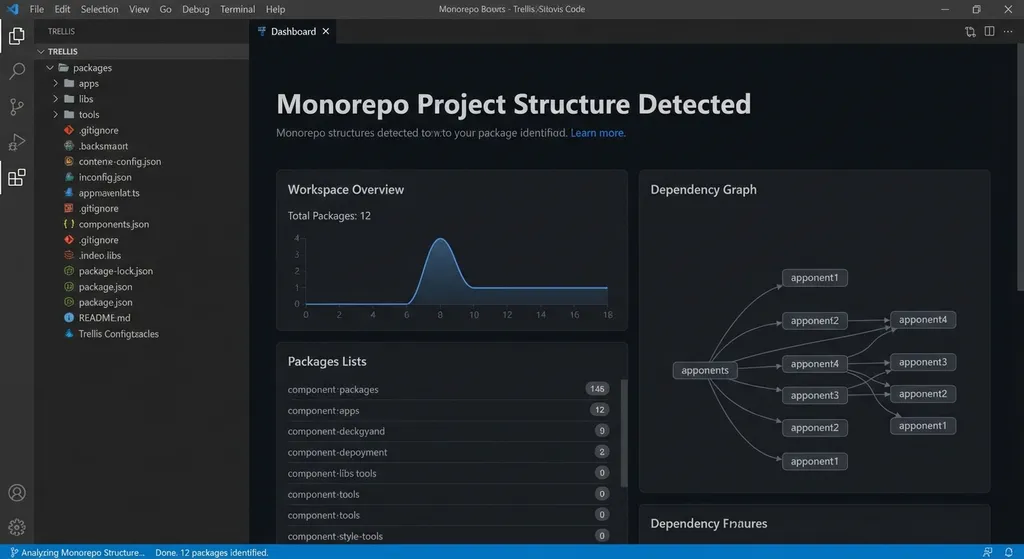
Previously, Trellis handled Monorepo projects rather awkwardly—it required lots of manual configuration for paths and dependencies. Version 0.4.0 brings native Monorepo support. Now, you only need to run trellis init in the project root directory, and the tool automatically detects the project structure, including workspace configuration, sub-package dependencies, and build scripts.
This improvement is especially useful for frontend teams, since most modern frontend projects use Monorepo architecture—multiple packages in one repository with shared configurations and toolchains. When using AI tools with these projects before, confusion often occurred: you might ask the AI to modify components under packages/ui, but it would accidentally alter code in packages/core as well.
Trellis v0.4.0 solves this by building a full project topology during initialization. The AI agent always knows which sub-package it’s modifying and how dependencies are structured, preventing cross-package mistakes. In tests on a Turborepo project with 15 sub-packages, Trellis accurately identified the correct package to modify and handled dependency updates automatically.
A “Full Power” Upgrade to Codex Orchestration
The other major focus of this update is support for Codex orchestration. Codex is Trellis’s multi-agent collaboration mechanism—it splits a complex task among several specialized AI agents that work in parallel. Before v0.4.0, this feature was only half-baked; now it’s production-ready.
The new version supports mainstream platforms such as OpenAI, Anthropic, Google Gemini, and DeepSeek. More importantly, the orchestration logic has been optimized—previously, the parallel and start modes interfered with each other. Now they are entirely isolated. When you explicitly call the parallel mode, the system clearly tells the main agent to switch contexts, and sub-agents won’t receive workflow-related instructions, preventing context contamination.
It’s a clever design. Most users still use the serial start workflow and only switch to parallel for very complex tasks. Making the two modes mutually exclusive—rather than letting the AI decide—reduces unpredictability.
For example, suppose you’re adding internationalization to a Next.js project. Using parallel mode, you could split the task like this:
- Agent A modifies routing and middleware.
- Agent B extracts text from components and integrates the i18n hook.
- Agent C generates multilingual JSON files.
- Agent D updates build configs and environment variables.
The four agents work simultaneously, and the main agent later performs integration and conflict resolution. In tests on a medium-sized project (about 50 components), parallel mode was nearly three times faster than serial execution.
Workflow Mode Refinements
Community feedback shows most users still prefer the start workflow—provide a task description, let the AI plan the steps, and execute. This mode works best for well-scoped tasks like “add validation to this form” or “optimize this query.”
Parallel mode has narrower use cases, but delivers major efficiency gains when:
- Cross-module refactoring: e.g., migrating from REST APIs to GraphQL, requiring changes to backend schemas, frontend queries, and type definitions.
- Batch migrations: e.g., moving from JavaScript to TypeScript, or from Webpack to Vite.
- Multi-platform adaptation: developing equivalent features for web, mobile, and desktop simultaneously.
A key improvement in the new version is that sub-agents in parallel mode now have isolated contexts. That means Agent A won’t see the code Agent B is modifying, preventing concurrency conflicts. The main agent performs a final dependency check and code merge to ensure all pieces work together.
Simplified Initialization Process
Previously, Trellis initialization was cumbersome—you had to manually specify the project type, framework version, build tool, and more. Version 0.4.0 simplifies it to a single command:
trellis init
The tool automatically detects:
- The language and framework (via
package.json,go.mod,requirements.txt, etc.) - Whether it’s a Monorepo (via workspace configuration)
- Build tools and scripts (
npm scripts,Makefile,justfile, etc.) - Code style configurations (ESLint, Prettier, rustfmt, etc.)
After detection, Trellis generates a .trellis/config.json containing the project’s metadata. When AI agents run, they read this config to understand how to build, test, and follow the project’s style rules.
Accuracy is quite good. Testing across multiple project types:
- Next.js + Turborepo: correctly recognized workspace structure and Turbo config.
- Rust workspace: correctly identified crate dependencies.
- Python Monorepo (Poetry): correctly parsed
pyproject.tomldependencies.
Only non-standard setups—like custom-script-managed Monorepos—may require manual tweaks.
The Real-World Meaning of Multi-Platform Codex Support
Trellis v0.4.0 supports models from:
- OpenAI (GPT‑4, GPT‑4 Turbo, o1 series)
- Anthropic (Claude 3.5 Sonnet, Claude Opus)
- Google (Gemini 1.5 Pro, Gemini 2.0)
- DeepSeek (DeepSeek‑V3, DeepSeek‑Coder)
- And other OpenAI API–compatible platforms.
This support goes beyond simple API compatibility—it optimizes for model strengths. For instance, Claude excels at code understanding and refactoring, so Trellis assigns such jobs to a Claude agent; DeepSeek‑Coder is efficient at boilerplate and test generation, so it handles those.
If you use an API aggregator like OpenAI Hub, setup is easier—just provide one API key to access multiple models. Example configuration:
{
  "codex": {
    "enabled": true,
    "providers": [
      {
        "name": "openai-hub",
        "base_url": "https://api.openai-hub.net/v1",
        "api_key": "your-api-key",
        "models": [
          "gpt-4-turbo",
          "claude-3-5-sonnet",
          "deepseek-coder"
        ]
      }
    ],
    "routing": {
      "code_generation": "deepseek-coder",
      "refactoring": "claude-3-5-sonnet",
      "general": "gpt-4-turbo"
    }
  }
}
This routing setup defines which model handles which task type. In practice, Trellis automatically selects models based on task characteristics but also allows manual overrides.
Balancing Performance and Cost
While parallel mode is faster, it’s also more expensive: multiple agents mean multiple simultaneous API calls, increasing token usage. According to Trellis’s official data, token consumption in parallel mode is roughly 2–4× that of start mode, depending on concurrency levels.
Still, the trade-off is worthwhile. A refactoring task that takes 20 minutes in start mode may finish in 7–8 minutes in parallel. For projects that value iteration speed, time outweighs API cost.
Trellis also optimizes its agent scheduling—parallelism isn’t blind. It analyzes task dependencies to execute only truly independent sub-tasks in parallel. For example, “update ORM models” depends on “modify database schema,” so those run serially.
Community Feedback and User Experience
According to discussions on the Linux.do forum, feedback on v0.4.0 is positive. Highlights include:
- Monorepo support truly removes a major pain point—no more manual path setup.
- Parallel mode boosts efficiency significantly in large refactors.
- Initialization is vastly simplified, lowering entry barriers for new projects.
Some challenges remain:
- The learning curve for parallel mode is steep—users must understand task decomposition.
- Occasional conflicts between agents require manual resolution.
- For small projects, parallel adds complexity with little benefit.
Trellis’s team recommends using start mode for small or simple projects (fewer than ~20 files). Parallel mode shines in complex, large-scale tasks.
Comparison with Other AI Coding Tools
There are many AI coding tools—Cursor, GitHub Copilot, and Codeium, to name a few. Trellis stands out in two main ways:
- Multi-agent collaboration – Most tools use a single-agent approach, while Trellis’s parallel mode allows multiple agents to work simultaneously, particularly advantageous for cross-module operations.
- Project-level understanding – Trellis builds a complete project topology during initialization, letting AI agents grasp global structure and dependencies instead of being limited to file-level context.
That said, Trellis also has drawbacks. It focuses on project-level refactoring and migration, while tools like Cursor or Copilot feel smoother for day-to-day completions or small edits. Many developers combine tools—using Cursor for general coding and switching to Trellis for large-scale refactors.
Future Development Directions
From this update, it’s clear the Trellis team is positioning it as a project-level AI assistant. Both Monorepo support and Codex orchestration reinforce that goal.
Community members have proposed new features:
- Incremental updates – currently, the agent reanalyzes the entire project each run; incremental analysis would be faster.
- Visual orchestration – task decomposition for parallel mode is automatic; a visual UI for manual overrides would add flexibility.
- Granular permission control – e.g., restricting certain agents to specific directories to prevent mistakes.
From a technical standpoint, Trellis’s architecture still has room for optimization. Currently, agent scheduling is centralized, with all sub-agents coordinated by a main agent. A decentralized, peer-to-peer model could improve parallel efficiency, though it would also add complexity—so it’s unlikely in the short term.
Summary
Trellis v0.4.0 is a meaningful upgrade, especially for teams working in Monorepo environments. Its native Monorepo support and optimized Codex orchestration significantly improve efficiency for complex tasks.
Still, its focus is clear—it’s not meant to replace daily autocomplete tools, but to assist with large-scale refactoring, migrations, and multi-module development. If your project fits these scenarios, it’s worth trying. For smaller tasks, Cursor or Copilot may still be more convenient.
For developers in regions with limited API access, platforms like OpenAI Hub make it easier to integrate multiple models without managing multiple keys or network issues. Once configured, Trellis automatically routes tasks to the right model with minimal manual effort.
References
- Trellis v0.4.0 Official Release Discussion – Detailed community discussion on new version features from Linux.do
- Questions About Trellis – User Q&A on workflow modes with official replies


