Open-Source Adaptation Layer for Agent Group Chats
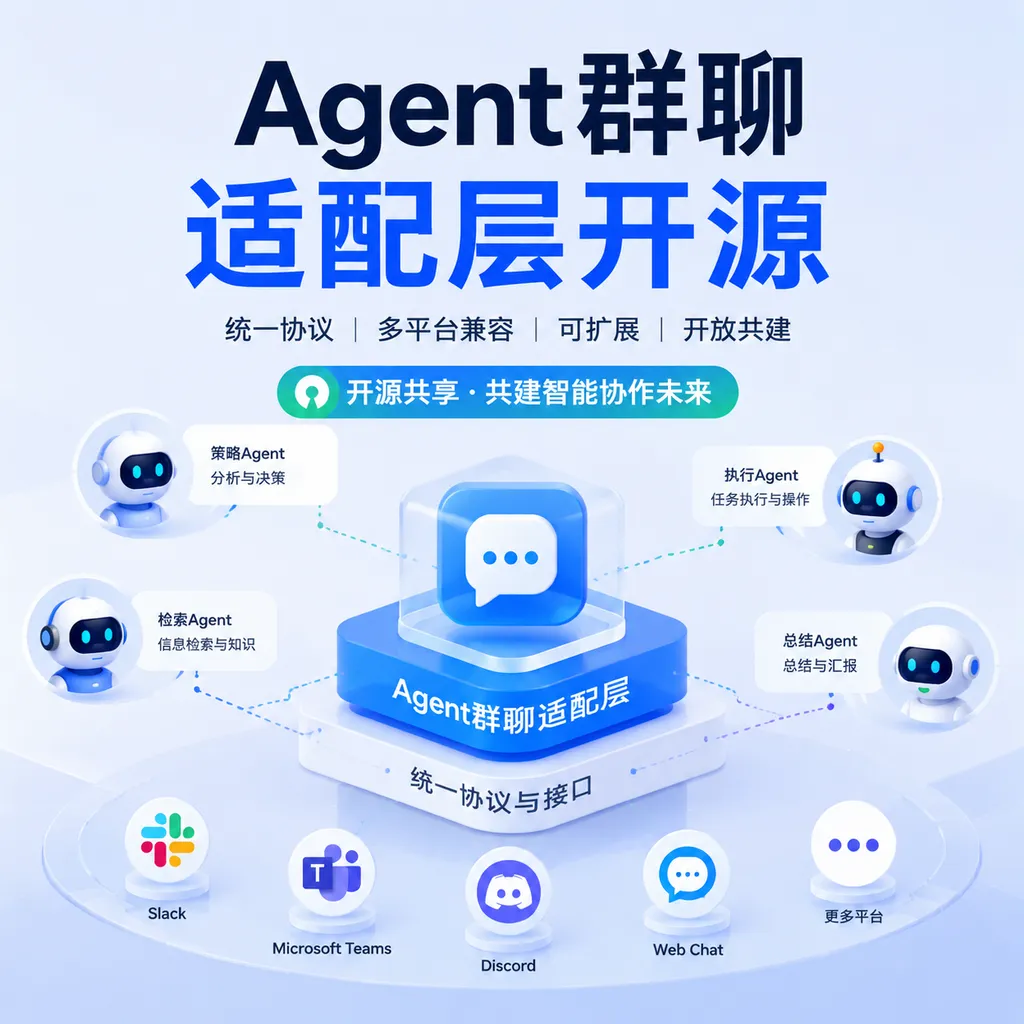
CopilotKit has open-sourced the Channels SDK, which uses a unified adapter layer to connect AI agents to Slack and Microsoft Teams while handling streaming responses, generative UI, and user authentication. It reduces duplicate integration work, but it is still far from achieving true “build once, run anywhere” portability.
One API to Move Agents from the Web into Workplace Group Chats
CopilotKit recently open-sourced the Channels SDK, which gives developers a unified channel abstraction for integrating existing AI Agents into collaboration tools such as Slack and Microsoft Teams—without having to rewrite message ingestion, thread management, streaming output, and interactive components for each platform.
As of August 6, 2026, the project’s source code is publicly available on GitHub, with current support focused on Slack and Microsoft Teams. The core capabilities listed by the project include generative UI, streaming responses, and user-based authentication, with plans to add more channels through an extensible Adapter mechanism.
This is not another framework that teaches developers how to build Agents. More precisely, the Channels SDK aims to fill a layer that has long been missing from the Agent technology stack: the channel adaptation layer.
Historically, getting an Agent to work in a web chat window did not mean it could be dropped directly into enterprise workflows. Slack has its own event subscriptions, thread semantics, and Block Kit, while Teams uses a different bot protocol and Adaptive Cards. Message formats, identity systems, permission models, retry mechanisms, and even the way “typing” indicators are presented all differ.
As a result, the same IT support Agent must be implemented once for Slack and often again for Teams. The model and tools remain unchanged, but the surrounding glue code multiplies.
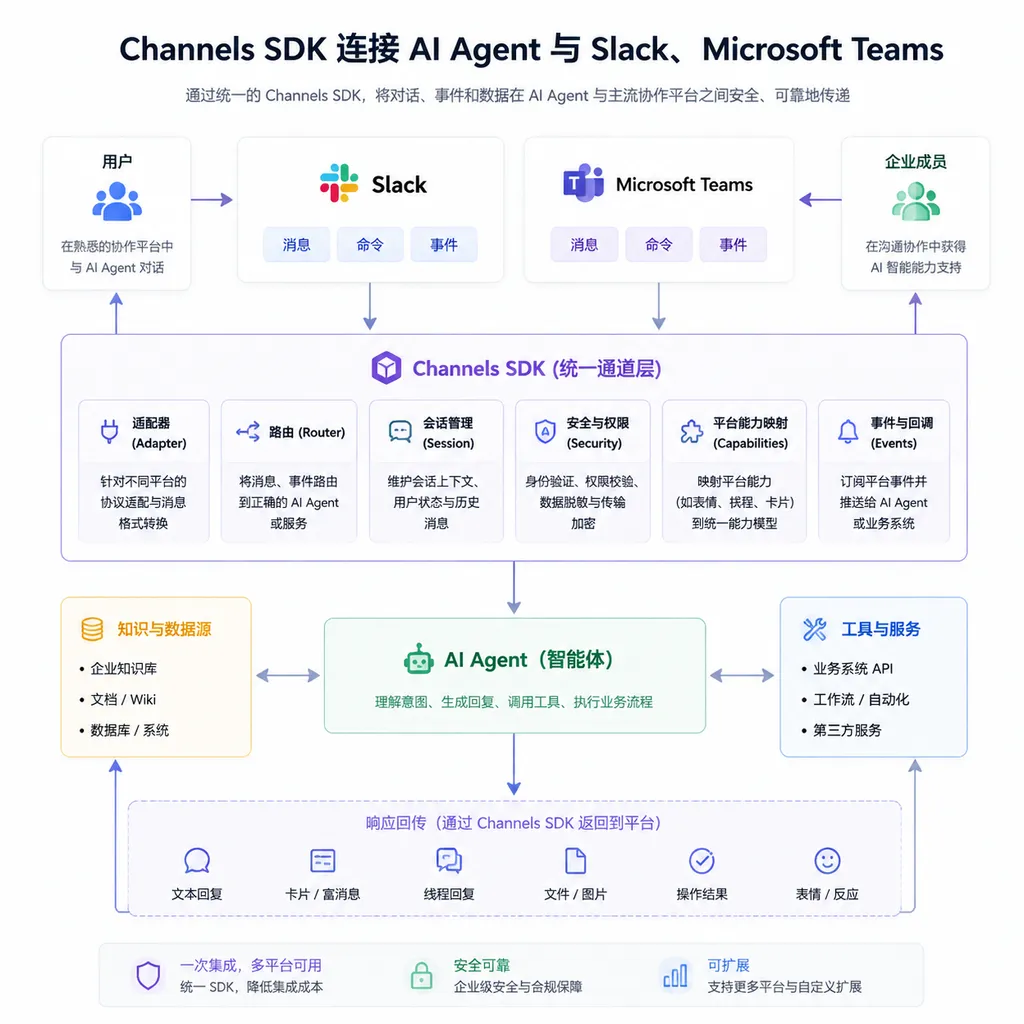
The Channels SDK is designed to encapsulate these differences in Adapters.
It Standardizes the Message-Processing Pipeline, Not the Interface
Architecturally, the Channels SDK can be understood as a “translation layer” between the Agent Runtime and collaboration platforms. A typical pipeline looks like this:
Slack / Microsoft Teams
          ↓
   Channel Adapter
          ↓
Unified user, session, thread, and message context
          ↓
      AI Agent Runtime
          ↓
Model inference, knowledge retrieval, MCP or business tool calls
          ↓
Structured responses, cards, buttons, approval actions
          ↓
   Channel Renderer
          ↓
Slack Block Kit / Teams Adaptive Cards
What deserves attention in this pipeline is not simply “receiving a message and sending a reply.” Traditional Bot SDKs have been able to do that for years. The value of the Channels SDK lies in its attempt to standardize interaction patterns specific to Agents.
1. Streaming Responses
On the web, tokens generated by a model can be continuously appended to the same chat bubble. Enterprise collaboration software, however, does not usually work this way. Developers must convert streaming output into repeated message updates while controlling the update frequency to avoid triggering platform rate limits or flooding a channel with fragmented messages.
The Channels SDK encapsulates these platform differences. The Agent can continue generating content as a stream, while the channel layer determines how to present it.
However, “streaming support” does not mean Slack and Teams will provide identical visual experiences. In most cases, it works more like throttled updates to the same message than the native token-by-token rendering seen in a browser. This is a limitation of the platforms themselves, not a difference the SDK can eliminate entirely.
2. Generative UI
Agent responses are no longer limited to Markdown text. For tasks involving deployments, reimbursements, tickets, and permissions, buttons, dropdowns, and confirmation cards are usually more reliable than asking users to enter natural-language commands.
The Channels SDK can map structured interfaces generated by an Agent to channel-specific components. For example, a release Agent might first display the version, environment, and change summary, followed by “Approve” and “Reject” actions. In Slack, this could be rendered with Block Kit; in Teams, it would need to be converted into the corresponding card components.
There is also clear “lossy translation” here: different channels do not support exactly the same layouts, component states, or interaction events. Developers are better off designing a minimal common component set rather than first building a highly customized Slack card and then expecting it to migrate to Teams without loss.
3. User-Based Authentication
This is one area where the Channels SDK matters more than a conventional chatbot wrapper.
When an enterprise Agent calls Notion, GitHub, a ticketing system, or an internal database, it cannot simply use a bot account with global permissions. The identity of the user in the channel, what that user is allowed to read, and which actions they can perform must be propagated through the Agent and tool-calling pipeline.
The Channels SDK provides mechanisms for carrying and associating user identities, but it does not automatically solve every authorization problem for developers. Mapping Slack user IDs and Teams accounts to internal enterprise identities, as well as storing, refreshing, and revoking OAuth tokens, must still be handled by the application backend.
In other words, the SDK can tell the Agent “who initiated this request,” but the organization’s own permission system ultimately decides “what this person is allowed to do.”
Why a Channel SDK Is Needed Now
Over the past year, the division of responsibilities in Agent infrastructure has become increasingly clear: models handle reasoning, protocols such as MCP connect tools, Agent Runtimes manage task loops and state, and observability platforms record execution traces. Yet the question of “where people collaborate with Agents” remains fragmented.
MCP solves how Agents access tools, while the Channels SDK solves how people reach Agents from their workplace tools. They are not competitors, but two connection layers operating in different directions.
This distinction is critical. Even if an Agent is connected to dozens of MCP Servers, employees still have to leave Slack or Teams to use it if it remains hidden inside a standalone website. The actual usage frequency of enterprise software is often determined not by the upper limits of its capabilities, but by how far away the entry point is.
Putting an IT support Agent into the group chats employees open every day is usually more effective than building another fully featured backend that nobody visits.
Use cases that are particularly suitable for early adoption include:
- IT service desks: Answer common questions in a channel, check device status, and create tickets when necessary;
- Development and operations: Check deployment status, summarize alerts, and initiate auditable approvals through cards;
- Enterprise knowledge assistants: Retrieve documents a user is authorized to access based on their identity, rather than exposing the entire knowledge base to a bot;
- Sales and customer success: Generate customer summaries and update the CRM based on channel context, while requiring human confirmation before writing changes;
- Internal workflow bots: Handle structured processes such as leave requests, procurement, and reimbursements, reducing the need for employees to switch between multiple systems.
The Real Selling Point Is Maintaining Less Glue Code
The most direct beneficiaries of the Channels SDK are not teams building only a Slack Bot, but Agent products that need to support multiple collaboration platforms.
If Slack is the only target channel and the product depends heavily on Slack-specific capabilities, using the native SDK directly may still be the better choice. Native solutions expose the platform’s complete feature set and make it easier to troubleshoot issues against official documentation.
But when the requirement becomes “launch on Slack this month and support Teams next quarter,” a unified channel layer begins to deliver value. The Agent’s reasoning logic, tool definitions, and business state can all be reused. The team primarily needs to add another Adapter rather than duplicate the entire bot project.
A simple comparison:
| Approach | Advantages | Trade-offs | Best suited for | | --- | --- | --- | --- | | Native Slack and Teams SDKs | Full platform capabilities and maximum customization | Duplicate multi-channel development and high maintenance costs | Single-platform, deeply customized applications | | Channels SDK | Reusable Agent logic and unified abstractions for streaming responses, identity, and UI | Platform-specific features may be constrained by the shared abstraction | Multi-channel Agents and rapid product validation | | Traditional enterprise Bot frameworks | Mature enterprise integrations and extensive governance capabilities | Often heavyweight, with potentially limited support for Agent-native interactions | Large organizations with existing bot ecosystems | | Custom channel adaptation layer | Complete control and alignment with internal standards | Requires long-term maintenance of protocol changes and edge cases | Large companies with dedicated platform teams |
Our assessment is that the greatest value of the Channels SDK is not making integration go from “difficult” to “easy,” but reducing the marginal cost of adding a second or third channel.
This is the common logic behind all cross-platform SDKs. The first Adapter may not save much time compared with native development, but the benefits of reuse emerge as the number of channels grows.
“Build Once, Run Everywhere” Remains an Aspiration
Developers should not treat the Channels SDK as a stable, uniform runtime environment like a browser standard. The differences between Slack and Teams extend beyond message formats and reach deep into their product semantics.
For example:
- Slack users are accustomed to channels, threads, and emoji reactions, while Teams places greater emphasis on organizations, teams, and meeting contexts;
- The two platforms impose different restrictions on cards, buttons, message editing, and attachments;
- Bot installation, administrator approval, and application distribution processes differ;
- Rate-limiting policies, event retries, and timeout rules differ;
- Data retention, eDiscovery, and compliance policies also differ in enterprise editions.
Channel abstractions are therefore inevitably imperfect. They may standardize 70% to 80% of common workflows, but developers still need extension points for the final platform-specific portion of the experience.
If an SDK pursues uniformity by reducing every channel to basic text input and output, it may be easy to use, but it loses the value of generative UI and enterprise workflows. If it exposes too many platform-specific details, it degenerates into little more than a bundle of native SDKs.
Whether the Channels SDK can establish itself in the long term depends on how it handles this tension: the common abstraction must be stable enough, while platform-specific extensibility must remain open.
Six Things More Important Than Getting the Demo Connected Before Going to Production
Bringing an Agent into a public channel only takes a demo. Bringing it into an enterprise production environment requires substantially more engineering work.
1. Event Idempotency
Slack or Teams may retry events after a timeout. If an Agent interprets duplicate messages as two separate tasks, it may create two tickets or execute the same deployment twice. Channel event IDs must be incorporated into the idempotency logic rather than relying solely on natural-language context for deduplication.
2. Fast Acknowledgment and Asynchronous Execution
Collaboration platforms usually require Webhooks to return an acknowledgment within a short period, while Agent reasoning and tool calls may take tens of seconds. The correct approach is to acknowledge receipt of the event first, process it asynchronously, and then update the original thread with the final result.
3. Rate Limiting and Backoff
Streaming messages inherently generate a large number of update requests. Production environments need throttling, exponential backoff, and failure recovery. Otherwise, a single busy channel could exhaust the application’s quota.
4. Permission Boundaries
Do not assume that because a Bot can see a channel, the Agent is allowed to send information from that channel to any external model or tool. Channel permissions, user permissions, tool permissions, and model data policies must be evaluated separately.
In particular, avoid having every tool share a single super-administrator token. High-risk actions such as deletion, deployment, money transfers, and permission changes should require explicit confirmation and approval steps.
5. Prompt Injection Protection
Group chat content, pasted logs, external web pages, and attachments may all contain malicious instructions. Allowing an Agent to read channel messages and then invoke highly privileged tools turns an ordinary chat entry point into an attack surface. Developers should distinguish between user instructions, untrusted content, and system policies, while validating tool parameters on the server side.
6. Lifecycle Management and Observability
It must be possible to observe whether a connection is actually ready, whether sessions are properly released when a process shuts down, and which steps a message passes through from receipt to response. Having a health check return HTTP 200 is not enough. If the channel connection has been lost, the service should not continue reporting itself as Ready.
At a minimum, logs should record the channel, tenant, user, thread, event ID, Agent run ID, tool-call results, and latency, while avoiding unnecessary sensitive message content.
Worth Trying, but Developers Should Not Bet Every Channel on It Yet
The Channels SDK is headed in the right direction. As Agents move from standalone chat pages into real business workflows, the channel layer will become an independent infrastructure component, much like model gateways and tool protocols. Enterprises will not use Agents through only one entry point, and development teams do not want to maintain nearly identical bot codebases for every entry point.
For now, however, the project is best suited to two types of teams: product teams validating demand across both Slack and Teams, and developers who already have an Agent Runtime and want to add enterprise collaboration entry points quickly.
If an application must make deep use of a platform’s meeting, canvas, workflow, or administration capabilities, developers should first verify that the Channels SDK exposes enough native extension points. An abstraction layer can reduce duplicate work, but it should not become a ceiling on access to platform capabilities.
The most practical significance of the Channels SDK today is that an Agent’s “frontend” no longer has to mean a web chat box. It places the Agent back where teams are already doing their work, while elevating channel adaptation from disposable glue code into a separately maintainable engineering layer.
This may not attract as much attention as the release of a new model, but it is likely much closer to real-world Agent adoption than yet another chat demo.
References
- CopilotKit / Channels SDK GitHub Repository: Project source code, usage instructions, and an overview of Slack and Microsoft Teams channel capabilities.
- Main CopilotKit GitHub Repository: Background on the CopilotKit project, Agent UI, and related infrastructure.