QNAP Puts Multimodal AI into a NAS

Today, QNAP introduced AI Mode for Qsirch, enabling natural-language searches across files, audio, and video using local VLMs and LLMs. Its real value lies not in its ability to “chat,” but in keeping private data on the NAS.
QNAP Packs Multimodal AI Into the NAS
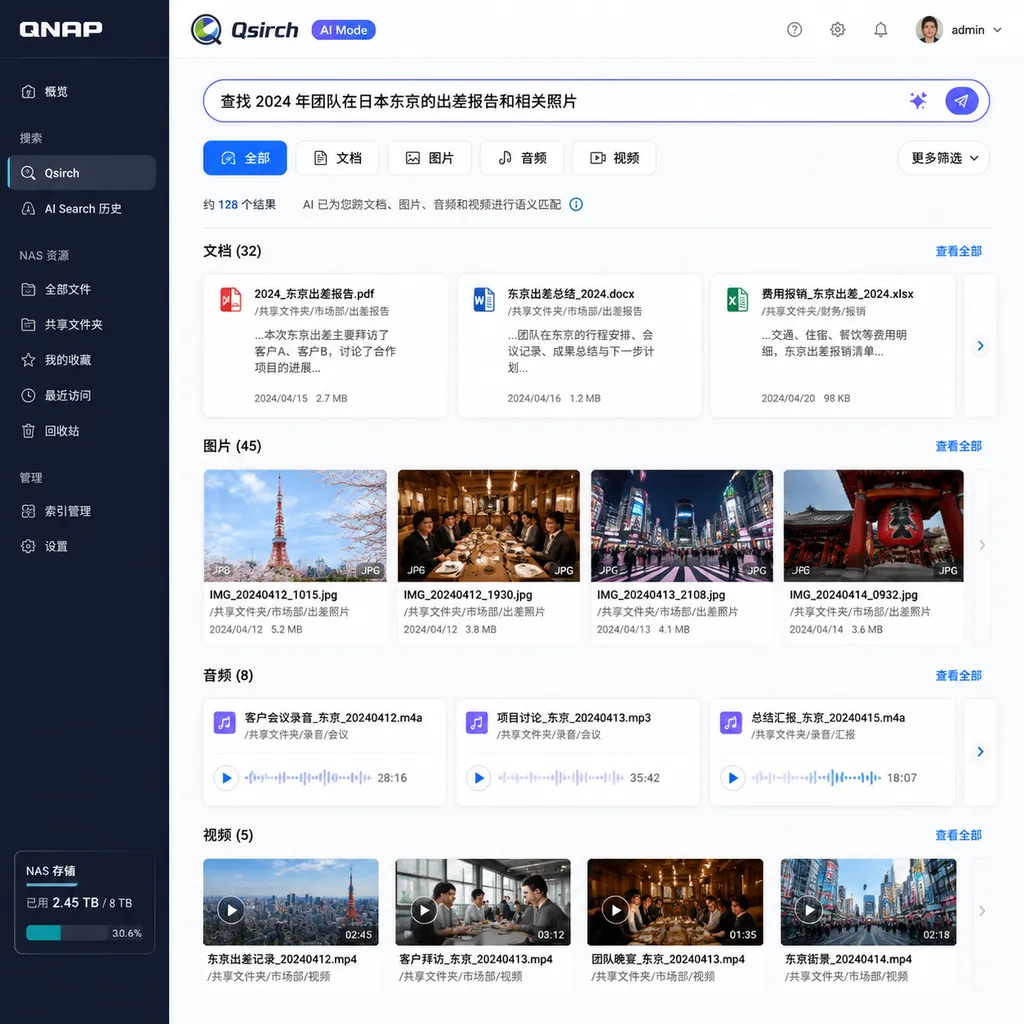
QNAP today (August 12) upgraded its NAS search application Qsirch with Qsirch AI Mode, powered jointly by a vision-language model (VLM) and a large language model (LLM). Users no longer need to remember filenames or exact keywords. They can simply describe what they are looking for in natural language to search across documents, images, audio, and video.
More importantly, QNAP explicitly states that the relevant model inference runs locally on the NAS, so file contents do not need to be sent to public cloud APIs.
This is not as simple as adding a chat window to a NAS. Qsirch AI Mode aims to solve a longstanding problem in enterprise file systems that traditional search has never truly addressed: people remember the content, but not where it was stored.
The Search Target Shifts From “Filename” to “What the File Means”
Traditional NAS search primarily relies on filenames, extensions, creation dates, tags, and full-text indexes. It works well for structured archives, but only if users know what to enter.
In reality, they often do not.
A user may remember “the photo from last year’s trade show with a red booth and three people,” but not know that the image is named IMG_8421.jpg. They may also remember that “someone discussed delaying the database migration in a meeting,” without knowing which recording, video, or set of meeting minutes contains the remark.
Qsirch AI Mode allows users to enter descriptions such as:
Find photos from last year’s product launch that contain a red backdrop

Search meeting recordings that mention “delaying the database migration” and locate the relevant time segment

Find reports and presentations that discuss supply chain risks while also mentioning the European market

List video segments that show a whiteboard architecture diagram and discuss vector databases
These queries go beyond the capabilities of ordinary keyword matching. They simultaneously involve natural-language intent, visual content, speech transcription, contextual relationships, and semantic associations across different files.
QNAP’s approach is to divide the task between two types of models: the LLM is responsible for understanding queries, document semantics, and context, while the VLM identifies what images and video frames depict. The two models are not merely placed side by side; they work together throughout the retrieval process.
Put simply, the LLM is responsible for “understanding what you want to find,” while the VLM is responsible for “understanding what the images on the drive show.”
A Dual-Model VLM and LLM Setup Fills the Cross-Media Retrieval Gap
Qsirch’s product information shows that AI Mode was introduced in version 7.1.0. Compared with its previous reliance on metadata and full-text indexes, this update expands the range of searchable content.
For documents, Qsirch AI Mode does more than check keywords. It also matches against the body text and its context. For example, if a user searches for “reasons for budget overruns,” the results do not necessarily need to contain that exact phrase. If a report describes rising raw-material prices, delivery delays, and additional procurement, the semantic model may still identify it as relevant.
For images, the VLM can create semantic representations based on visual content. Even if a photo has no manually assigned tags, it can theoretically be retrieved using descriptions of the number of people, setting, objects, colors, and scene. This is especially useful for photography libraries, design teams, retail store inspection records, and on-site manufacturing photos.
Audio and video support is one of the more practical parts of this upgrade. QNAP says AI Mode supports bidirectional synchronization between timelines and transcribed text. This means search results do not have to return only a two-hour video file; they can also point to the specific location where the relevant content appears.
That is the difference between “finding the file” and “finding the segment containing the answer.”
In the past, even when enterprises transcribed speech from videos, the transcript and video timeline were often treated as two disconnected objects. After finding a sentence, users still had to drag the progress bar manually. Linking text matches to the timeline is what truly lowers the cost of using audio and video materials.
However, final positioning accuracy will still depend on speech recognition quality. Overlapping speakers, technical abbreviations, dialects, noise, and mixed languages can all cause transcription errors. AI Mode improves the search interface, but it does not automatically eliminate underlying audio-quality problems.
“Running Locally” Matters More Than “AI Search”
There are already numerous AI knowledge base and enterprise search products on the market. A common workflow is to divide files into chunks, generate vectors, and then call cloud-based models for query rewriting, reranking, or answer generation. From a development perspective, this architecture is mature, easy to scale, and quick to adopt model updates.
The problem is that much of the data most worth searching cannot be uploaded.
Contracts, financial statements, R&D drawings, customer information, medical images, meeting recordings, and internal code repositories are often among an enterprise’s most sensitive assets. If gaining semantic search capabilities requires sending original content or text chunks to third-party APIs, compliance reviews, data residency requirements, and vendor risk can quickly outweigh the efficiency gains.
Qsirch AI Mode keeps VLM and LLM inference within the NAS, at least avoiding an architecture in which file contents are handed to public cloud models for processing. For teams already using a QNAP NAS as an internal file hub, this approach is more natural than building a separate cloud-based knowledge base: the data does not need to be moved, and the permissions system may continue operating around the existing storage environment.
Local inference also provides two direct benefits:
- Less network dependence. Searching intranet data does not require turning every query into an external API request, making continued operation possible during internet outages or disruptions to external services.
- More predictable usage costs. There are no ongoing charges based on token usage or the number of image calls. Costs primarily shift to local hardware, storage, and electricity.
However, “local inference” should not simply be equated with “absolute security.” Administrators still need to verify the exact behavior of model downloads, software updates, telemetry, remote access, and logging. If the NAS itself lacks proper account permissions, snapshots, backups, and network isolation, running the model locally will not protect the data.
A more accurate statement is: local AI reduces the data exposure surface, but it does not replace comprehensive security governance.
Hardware Performance Will Ultimately Determine the Experience
Putting models on a NAS mitigates privacy concerns, but it also introduces computational challenges.
A traditional NAS is primarily responsible for storage, verification, synchronization, and network services. AI-powered retrieval must also handle document parsing, OCR, speech transcription, image understanding, vectorization, and model inference. These tasks demand far more from the CPU, memory, GPU, or other accelerators than file sharing does.
When the feature is enabled for the first time, the system will usually need to index existing files. For teams with hundreds of thousands of images, multiple terabytes of video, or years of meeting recordings, initial processing time may matter more than the speed of an individual query.
At a minimum, the following issues should be evaluated before deployment:
- Whether the NAS model and hardware meet AI Mode’s requirements. An entry-level ARM-based NAS and an enterprise device with a discrete GPU cannot possibly provide the same inference experience.
- How much space the models and indexes consume. In addition to the original files, transcripts, thumbnails, vector indexes, and model weights all increase storage consumption.
- Whether incremental indexing affects normal business operations. Large-scale video transcription or image analysis may compete for computing resources with backups, synchronization, and multi-user access.
- Which file formats, languages, and encodings are supported. “Document support” does not mean the system can parse every scanned PDF, legacy office file, or specialized engineering format.
- Whether permissions are enforced throughout the search results. AI search must respect existing directory and user permissions. People who are not authorized to access the original files must not be able to view their contents through summaries, transcripts, or caches.
- Whether indexes can be completely deleted. After files are deleted, account permissions change, or retention policies are enforced, derived vectors, transcripts, and caches should also be updated or removed accordingly.
The information QNAP has released confirms its direction toward local models and cross-media retrieval. However, availability across different NAS models, model sizes, performance differences, and detailed language support should still be verified against the actual software release and device compatibility list. For enterprise users, these are not peripheral specifications; they are core conditions that determine whether the feature can be deployed in production.
It Is Not the Same as RAG, but the Boundary Is Becoming Blurred
QNAP has previously offered a RAG-based enterprise search solution through Qsirch. It can work with local or external models to retrieve information from and answer questions about data stored on a NAS. This new AI Mode places greater emphasis on natural-language retrieval and cross-media understanding, with the goal of helping users find files and specific content.
The boundaries between the two are not exactly the same.
Semantic search answers the question, “Which content is relevant to my query?” RAG usually goes a step further by sending the retrieved results to a generative model, which organizes them into an answer and includes sources. The former is closer to an intelligent retrieval layer, while the latter extends into knowledge-based question answering.
From a reliability perspective, a list of search results may sometimes be better suited to enterprise use than an automatically generated answer. Generative answers can combine multiple sources into conclusions that sound coherent but are inaccurate. Search results instead allow users to inspect the original files, sentences, and video segments directly, providing a clearer audit trail.
Qsirch AI Mode is therefore best positioned not as an “all-purpose assistant inside the NAS,” but as an entry point that understands content more effectively. It first identifies materials scattered across different formats, after which a person or a downstream RAG system can handle summarization and decision-making.
QNAP Is Transforming the NAS From a Storage Device Into a Private Data-Computing Node
NAS vendors once competed on the number of drive bays, transfer speeds, snapshots, virtualization, and application ecosystems. Since the emergence of generative AI, a new point of competition has arisen: who can enable stored data to participate directly in model inference without leaving the local environment.
QNAP’s advantage is that the data is already on the device, eliminating the need for uploads, synchronization, and reauthorization. Its disadvantage is equally clear: local devices have limited computing power, and their model update cadence and inference quality will generally struggle to keep pace with cloud services over the long term.
This means local NAS AI will not replace every cloud-based model. A layered architecture is more realistic: sensitive data and basic retrieval remain on the intranet, while complex reasoning or general-purpose tasks with demanding timeliness requirements are delegated to external models in accordance with security policies. The significance of Qsirch AI Mode is that the first layer is finally no longer limited to filename searches and mechanical full-text matching.
For individual home users, this feature may be used primarily to find photos and videos. For teams with large amounts of unstructured data, however, it is much closer to a productivity tool. Examples include:
- Legal teams locating discussions of specific clauses across contracts and meeting recordings;
- R&D teams tracking issues across design drawings, test videos, and failure reports;
- Media teams searching years of footage by visuals and dialogue;
- Manufacturers finding abnormal cases across inspection photos, maintenance records, and training videos;
- Enterprise IT teams building a searchable data entry point without uploading internal materials.
These scenarios do not require the model to write poetry or behave like a chatbot. It only needs to find the correct file reliably and take the user to the correct page or timestamp.
Verdict: The Direction Is Right, but Success Depends on Whether It Can Stay Enabled
Qsirch AI Mode is an update with a clear direction. VLMs, LLMs, and local storage are a natural combination: the models understand, the NAS stores, and search connects the two. Compared with uploading files in bulk to third-party AI services, local inference also aligns more closely with enterprise procurement and compliance requirements.
However, products like this cannot be judged by a single successful result in a demonstration. The real experience depends on whether indexing is stable, resource consumption is acceptable, permissions are strictly inherited, and newly added files enter the search scope promptly.
If AI indexing keeps the NAS under heavy load for extended periods, or if users must wait tens of seconds for every query, administrators will eventually disable the feature. If it can continuously perform incremental processing in the background and return cross-media results at close to ordinary search speeds, it will become one of the few truly substantial upgrades to NAS software in recent years.
In other words, QNAP has answered the question of why a NAS needs AI. It must now answer the more difficult question: can the NAS systems already deployed in ordinary enterprises actually run this AI stack effectively?
References
- ITHome: QNAP Launches AI Mode for Qsirch, Using VLMs and LLMs to Improve the NAS Content Search Experience — Covers the launch date of Qsirch AI Mode, its local inference approach, cross-media search capabilities, and audio/video timeline synchronization features.