Baidu has used AI to parallelize the three core office apps.
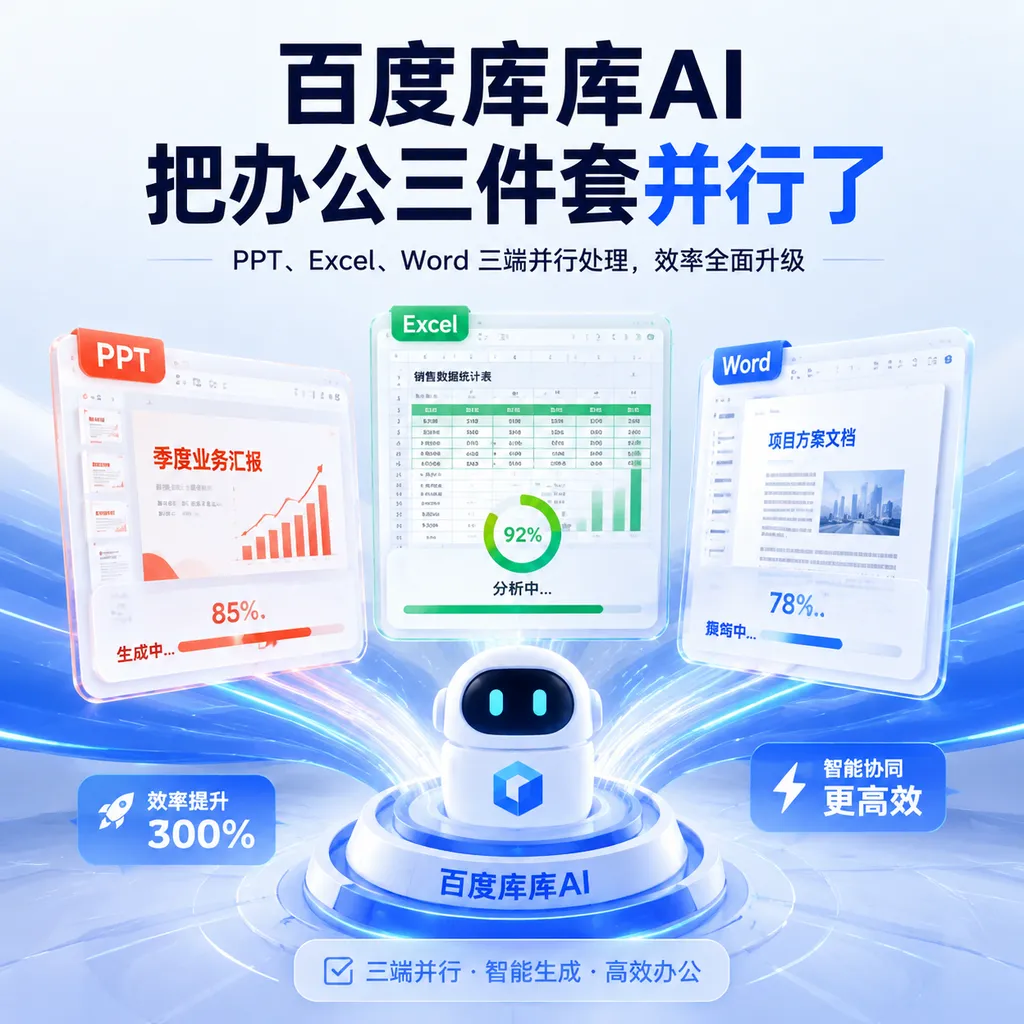
Baidu has renamed GenFlow “Kuku AI” and launched standalone versions for PC, the web, mini programs, and enterprise users. Its core selling point is not another chat interface, but the ability to have PPT, Excel, and Word agents work in parallel on the same complex task.
Baidu’s Kuku AI Puts the Office Trio to Work in Parallel
Baidu is turning the AI productivity capabilities embedded in Baidu Wenku and Baidu Netdisk into a standalone business.
On August 14, at its AI Day open house, Baidu officially gave GenFlow—the general-purpose agent for Baidu Wenku and Baidu Netdisk—the Chinese name “Kuku AI.” It also launched a standalone productivity platform available as a PC client, web app, mini program, and enterprise edition.
The most noteworthy part of this update is not the adoption of a more memorable Chinese name, but Baidu’s clearer product positioning: Kuku AI does not merely generate individual documents; it is a productivity workspace capable of orchestrating multiple specialized agents to complete tasks across files.
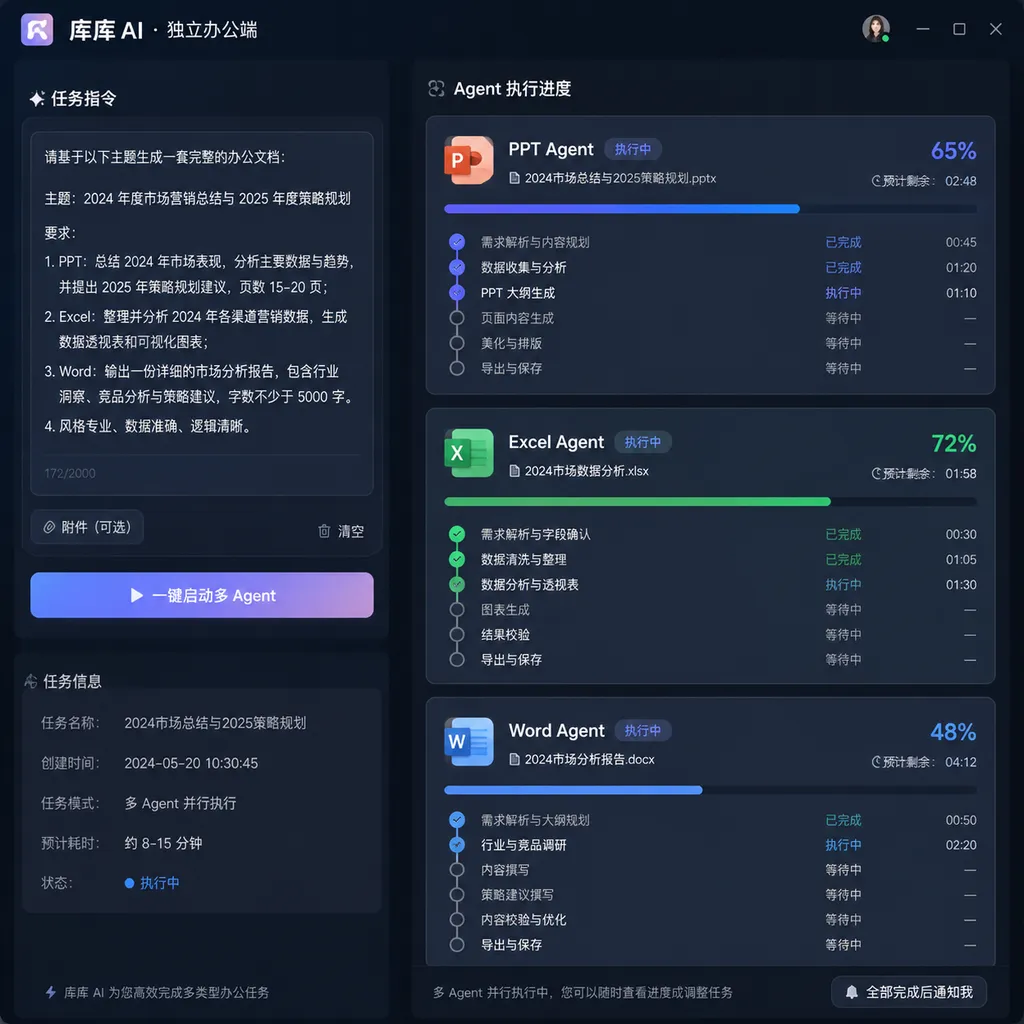
According to Baidu, users can enter a single instruction and have the system invoke PowerPoint, Excel, and Word agents in parallel to handle presentations, spreadsheets, and written reports, respectively. It can also generate or convert posters, videos, podcasts, mind maps, code, mini programs, and webpages, with element-level editing available in a unified interface.
From “Create a Document for Me” to “Deliver a Complete Package”
Over the past two years, the most common interaction in AI productivity products has been for users to upload materials and ask the model to summarize or rewrite them, or generate a presentation. This addresses isolated content-production needs but remains some distance from a genuine workplace workflow.
Real-world tasks rarely involve just one file.
For example, after receiving a company’s financial statements, an analyst may need to:
- Clean the financial data and build a forecasting model in Excel;
- Write a research report in Word based on the model’s results;
- Condense the key conclusions into a roadshow presentation;
- Add data sources to charts and standardize metrics across files;
- Update all three materials again when the data changes.
If document export is simply bolted onto a conventional chatbot, users still have to copy results between multiple windows, check formatting, and correct figures. The “parallel invocation” emphasized by Kuku AI attempts to transform this process into a task system coordinated by a primary agent, with multiple sub-agents dividing up the work.
It can be understood this way: the primary agent receives the request and breaks it down into a plan; the Excel agent handles data and formulas; the Word agent structures the analysis; and the PowerPoint agent manages the visual presentation. Rather than merely generating three files at the same time, they must also share task context and intermediate results.
This is far more difficult than opening three chat windows at once. Meaningful parallelism is not about having multiple progress bars advance simultaneously; it is about ensuring that all three agents use the same data, conclusions, and version.
If Excel calculates revenue growth at 18%, Word reports it as 16%, and PowerPoint displays yet another figure, faster execution will only create more rework. Kuku AI’s success will therefore not be determined by how impressive its Generate button looks, but by whether it can ensure cross-file consistency, trace citations back to their sources, and propagate changes across files.
A Standalone Platform Is Not Just a New Entry Point—It Is a Bid to Become the Primary Productivity Interface
GenFlow was already available through products such as Baidu Wenku and Baidu Netdisk. By elevating it into a standalone brand available across PC, web, mini-program, and enterprise environments, Baidu is signaling that AI productivity is no longer merely an add-on feature within Wenku or Netdisk.
This is a significant change.
Wenku’s core use cases are content search and document consumption, while Netdisk focuses on file storage and synchronization. An agent, by contrast, aims to take over tasks. Although all three revolve around files, users perceive them differently. Keeping an agent buried inside existing products makes it easy to view it as merely “another AI button,” making it difficult to establish an independent workflow.
A standalone platform allows Baidu to reorganize the interface around the agent, including task plans, file spaces, long-term memory, specialized skills, and editors, without being constrained by the directory structure of a conventional cloud drive.
According to Baidu, GenFlow exceeded 100 million monthly active users in April this year, while its AI productivity services currently have more than 25 million MAUs. It should be noted that these figures come from Baidu, and because GenFlow was previously distributed across multiple entry points, including Wenku and Netdisk, they cannot be directly equated with stable active-user numbers for the standalone productivity platform. Nevertheless, they show that Baidu is not starting from scratch: Wenku’s content, Netdisk’s files, and its existing traffic give Kuku AI a more obvious starting advantage than most AI productivity startups.
Baidu also says that the Wenku and Netdisk ecosystem is connected to 1.8 billion professional documents and 700 million academic resources, and can incorporate private materials from users’ Netdisk accounts with their authorization. For a productivity agent, this combination of a public-domain knowledge base and private file repository is more important than merely switching to a larger model.
Large models handle reasoning, but productivity quality is often constrained by whether the source materials are complete, whether files can be parsed, and whether data can be traced back to its source. Without context, even the smartest agent can produce only well-formatted but superficial materials.
Betting on Finance First Tackles the Right Problem—but Also Raises the Risks
Kuku AI’s initial productivity mode has been specifically optimized for financial use cases. It offers specialized agents such as equity research analysts, quantitative investment managers, in-depth company research experts, and wealth management advisers. It also includes skills for candlestick-chart analysis, investment reviews, the three financial statements, discounted cash flow analysis, comparable-company analysis, Word-format research reports, and roadshow presentations.
From a product-strategy perspective, finance is a sensible entry point.
For one thing, financial work relies heavily on collaboration across Word, Excel, and PowerPoint, features high information density, and involves a great deal of repetitive labor—making it well suited to demonstrating the value of parallel multi-agent workflows. For another, financial models and research reports have relatively standardized structures. Agents can use templates, rules, and specialized skills to make their outputs more controllable instead of improvising from a blank page every time.
But finance is also the domain in which problems are most readily exposed.
If an adjective is wrong in ordinary marketing copy, it may merely weaken the wording. If a valuation model cites the wrong year, unit, or currency, it could directly alter the conclusion. For Kuku AI to advance from “capable of generating content” to “professional-grade,” it must pass at least the following tests:
- Are data sources traceable? Every key figure should ideally link back to the original spreadsheet, page in a filing, or database field.
- Are formulas auditable? The Excel agent should not merely write results into cells; it should also preserve formulas, assumptions, and dependencies.
- Are changes synchronized across files? After revenue forecasts are adjusted, the valuation, research report text, and PowerPoint charts should all update together.
- Is uncertainty explicitly communicated? The model should not “fill in” missing data; it should prompt the user for confirmation.
- Are professional conclusions reviewed by humans? Agents can shorten the time required to process information, but they should not be treated as investment decision-makers.
Finance-specific optimization is both the area in which Kuku AI can most readily differentiate itself and the area that cannot be judged solely by demos. Complete templates and attractive charts do not mean that the underlying figures are reliable.
The Technical Focus Is Not the Model, but the Orchestration Layer
Baidu says Kuku AI is built on capabilities including an underlying mixture-of-experts architecture, tools and an omniformat editor, specialized sub-agents, skills, long-term memory, proactive services, and device-cloud coordination.
Of these terms, the agent orchestration layer is what will truly determine the everyday user experience.
A complex productivity task typically involves understanding requirements, retrieving materials, breaking down the task, invoking tools, validating intermediate results, generating files, and incorporating user edits. An error at any stage will propagate downstream. Although a multi-agent architecture can improve concurrent efficiency and specialization, it also introduces greater coordination costs:
- When subtasks have dependencies, they cannot be run blindly in parallel;
- Different agents need to share structured state rather than merely pass along natural-language summaries;
- If a long-running task fails, the system should support partial retries instead of regenerating every file from scratch;
- After a user changes a spreadsheet, the system needs to determine which documents are now outdated;
- The permissions, file scope, and external data sources involved in every invocation must be logged.
An Office agent is therefore more like a workflow engine than a chatbot with Office icons. For developers, the key issue is not which model Baidu uses, but how it represents task dependencies, preserves intermediate state, and maintains shared objects across multiple editors.
The so-called “element-level online AI editing” capability is equally important. Generating an entire slide is not difficult. The challenge is enabling the system to respond to a request such as, “Change the chart on the right side of the second slide to show year-over-year growth, preserve the layout, and update the conclusions slide accordingly,” by modifying only the relevant elements rather than regenerating the entire presentation. Productivity software must ultimately provide fine-grained control; otherwise, the agent is merely a one-off content generator.
Compared With Copilot and WPS AI, Baidu Holds a Different Hand
The AI productivity market already has no shortage of participants. Microsoft’s advantages lie in Microsoft 365’s native file formats, enterprise accounts, and collaboration ecosystem. In China, WPS AI is more closely aligned with existing Office editing habits and controls high-frequency entry points across documents, spreadsheets, and presentations. General-purpose agent products, meanwhile, emphasize browser operations, deep research, and cross-application automation.
Kuku AI’s differentiation rests primarily on three cards:
- Baidu Wenku’s vast repository of professional content;
- Personal and organizational files stored in Baidu Netdisk;
- The integration of multiple types of file generation, conversion, and editing into a single agent workflow.
Its strengths are abundant source materials, ready access to files, and broad output-format coverage. Its weaknesses are equally clear: whether users will ultimately adopt Kuku AI as their primary productivity interface—rather than returning to Microsoft Office or WPS after generating content—will depend on the depth of its editing capabilities, format compatibility, and team collaboration features.
The moat around productivity software has never been AI alone. Comments, tracked changes, permissions, version control, printing, complex formulas, macros, templates, and cross-organizational workflows may not sound exciting, but they are the infrastructure businesses genuinely depend on every day. Kuku AI may move faster during the generation stage, but if delivered files still require extensive manual repair, it will struggle to replace existing tools and will remain merely an upstream content-production tool.
The Enterprise Edition Must Ultimately Answer the Permissions Question
Baidu has also launched an enterprise edition of Kuku AI. For enterprise customers, model capabilities are generally neither the only nor necessarily the most important procurement criterion. Data boundaries matter more.
When a primary agent can read Netdisk files, invoke multiple sub-agents, and generate materials that can be distributed externally, the permissions model becomes more complex than in conventional document software. Enterprises need to know:
- Which files the agent accessed;
- Which content was sent to the cloud for inference;
- Whether sub-agents inherit all permissions from the primary agent;
- Whether generated content could incorporate materials from other projects;
- Whether administrators can audit invocation chains and export activity;
- How personal memories and organizational skills are handled when an employee leaves.
Long-term memory is particularly important. It allows an agent to remember user preferences, writing styles, and frequently used templates, making it more convenient with continued use. But in an organizational environment, memory must have a defined scope and lifecycle, and it must be possible to delete and migrate it. Otherwise, convenience will quickly become a compliance risk.
Baidu’s Netdisk and enterprise storage capabilities provide a foundation for contextual management, but they also mean that outsiders will hold the company to a higher standard when evaluating its data isolation and permissions architecture.
Kuku AI Is Headed in the Right Direction, but the Validation Period Is Only Beginning
Renaming GenFlow and launching a standalone platform show that Baidu is not content to add a few AI features to Wenku and Netdisk. It wants to occupy the gateway to the next generation of productivity software. Compared with “enter a sentence and generate a presentation,” enabling multiple Office agents to collaborate in parallel on the same task is indeed much closer to a real production workflow.
The direction is sound—and more valuable than continuing to pile on chat features.
However, multi-agent productivity products can easily create an illusion: during a demo, three progress bars run simultaneously, giving the appearance of a complete team; in actual use, however, users may spend even more time checking whether the three agents are saying the same thing.
To determine whether Kuku AI is genuinely useful, three metrics will be worth watching: the first-pass delivery rate for complex tasks, the time required for manual revisions, and the ability to propagate updates after data or instructions change. The number of files generated, templates offered, or agents available is not the final answer.
If Baidu can truly connect Wenku content, Netdisk files, specialized skills, and fine-grained editing, Kuku AI could become a highly competitive product in China’s AI productivity market. If it fails to solve cross-file consistency and auditability, it will remain merely a larger content-generation toolbox.
At least this time, Baidu is targeting the right problem: a productivity agent should not merely write a page for the user—it should complete an entire workflow.
References
- ITHome: Baidu Wenku and Netdisk’s GenFlow Officially Renamed “Kuku AI,” Launches Standalone Productivity Platform — Covers the rebranding, standalone product formats, user figures, and parallel invocation capabilities of the Office agents.