To save money with Claude Code, clear the context first.

Anthropic has released six new cost-saving recommendations for Claude Code. The key is not to ask fewer questions, but to prevent irrelevant context from repeatedly entering the billing pipeline. Clearing sessions, locking in the model, and compressing output are often more effective than shaving a few words off prompts.
Anthropic Starts Teaching Developers How to Spend Less of Their Own Money
On August 15, Anthropic shared six tips for optimizing Claude Code costs, focusing on an often-overlooked issue: what developers are really wasting is not just output tokens, but the historical context that is sent again with every request.
The six official recommendations are: use /clear after completing a task, choose the model and reasoning effort in advance, reference files precisely with @, reduce command-line output, run /compact before the prompt cache expires, and delegate high-output tasks to subagents.
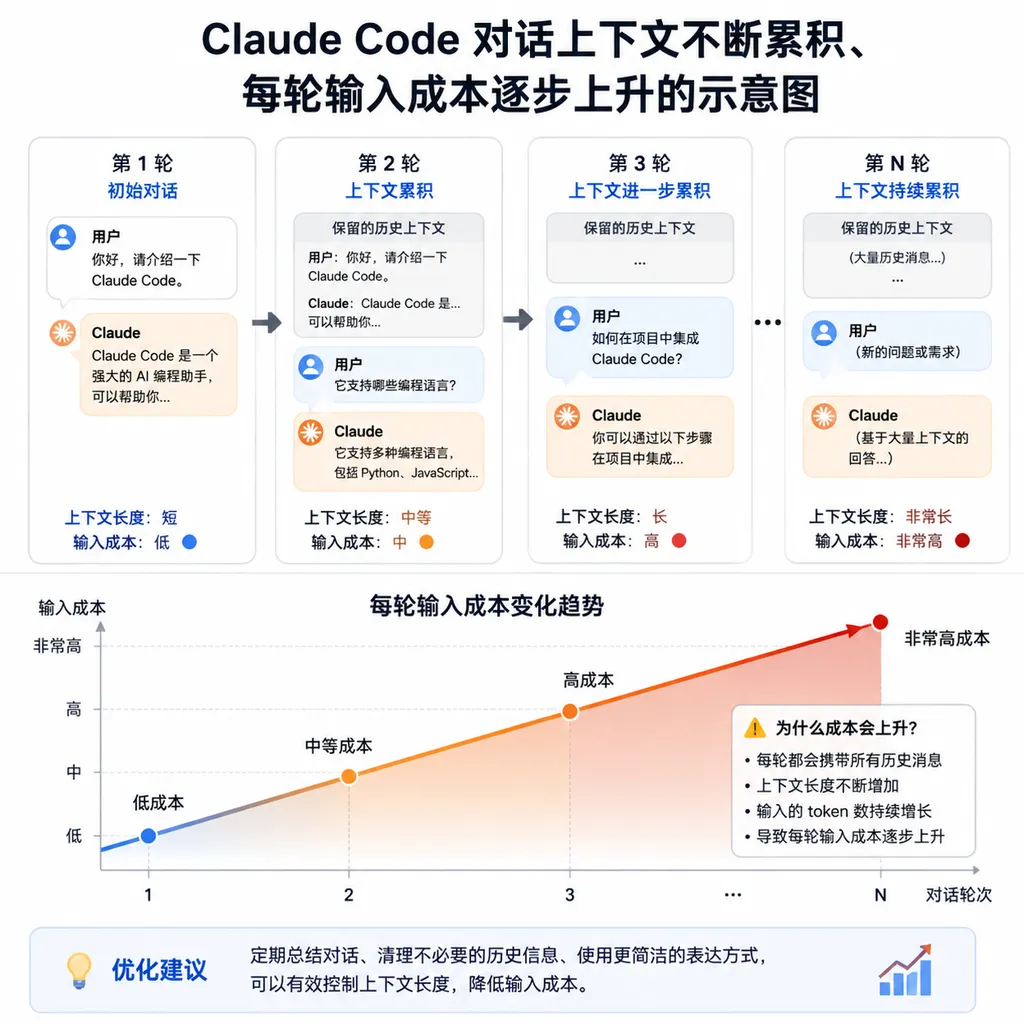
These recommendations may look like operational details, but they all reflect the same cost principle: Claude Code’s context is not a one-time expense—it is a recurring cost that can be charged again with every turn of a conversation.
Test logs left over after fixing a bug, source code that has already been read but is no longer relevant, and long lists returned by tools may all continue to appear in every subsequent request. The developer sees only one new instruction, but the model may receive a complete working context containing hundreds of thousands of tokens.
That is why the cost of the same request—“change the button to blue”—can differ dramatically between a new conversation and an old one that has been running for several hours.
First, Understand Where the Tokens Are Being Spent
Each Claude Code model invocation can roughly be divided into two stages.
The first stage is prefilling, or prefill. The model needs to read the system instructions, the project’s CLAUDE.md, user messages, conversation history, tool definitions, file contents, and the results returned by previously executed commands. These make up the input tokens.
The second stage is decoding, or decode. The model generates analysis, tool-call parameters, code modification plans, and the final response. These make up the output tokens.
Developers tend to focus on the second part because the output is directly visible. In long conversations, however, the first part is often the source of continuously growing costs.
Think of it as a meeting: you only want to discuss one new issue, but before anyone can speak, everyone has to reread dozens of pages of previous meeting minutes. The new issue may be only one line long, while the minutes keep getting thicker.
Prompt caching can reduce the cost of repeatedly reading this information, but the cache is not permanent, does not work across models, and does not apply unconditionally. Changes to the model, reasoning configuration, or context prefix can all reduce the cache hit rate. Once the cache expires, the old context must be processed again as regular input.
Anthropic’s recommendations, therefore, are not simply telling developers to “say less.” They are asking developers to actively manage the context lifecycle.
Tip 1: Use /clear When a Task Is Finished
Of the six tips, the simplest and most worthwhile is: do not force unrelated tasks into the same conversation.
Fixing a login API, adjusting frontend styles, and troubleshooting a slow database query may all belong to the same project, but they require entirely different files and logs. If all three tasks are piled into a single conversation, Claude Code may still carry the authentication logic from the first task and the build output from the second while working on the third.
After finishing a task, run:
/clear
This clears the current conversation context so that the next task starts from a cleaner state.
However, using /clear more frequently is not necessarily better. If Claude is in the middle of a refactoring task spanning multiple files, clearing the context will cause it to lose the dependency relationships and design decisions it has already established, forcing it to reread the files later. A more appropriate boundary is “one independently verifiable task,” such as a bug, a migration, a test failure, or a clearly defined refactoring phase.
For work that must continue across conversations, ask Claude to save the current state to a project file before starting a new conversation:
Write the completed changes, unresolved issues, key files, and next steps to progress.md.
The new conversation can then restore the necessary information through @progress.md. Compared with dragging the entire conversation history forward, this is like condensing dozens of pages of running notes into a one-page handoff document.
Tip 2: Choose the Model and Reasoning Effort at the Start
Anthropic recommends selecting the model and effort level at the beginning of a conversation rather than switching frequently in the middle of a long exchange.
The switch itself is not what incurs a charge. The issue is that prompt caches are generally tied to the model, context prefix, and request configuration. If you switch models after a conversation has accumulated a large amount of history, the previously cached content may no longer be reusable, requiring the new model to reread the entire context.
This recommendation places some constraints on the common workflow of “use a cheaper model to explore, then switch to a stronger model to finish.” Using models in tiers is still reasonable, but it is best done through separate conversations or subagents rather than by changing gears inside an already lengthy main conversation.
A more practical allocation strategy is:
- Use a lower-cost, faster model with low-to-medium reasoning effort for routine code reading, small changes, and test fixes;
- For architectural changes, complex concurrency issues, and cross-module refactoring, start a new conversation with a stronger model;
- Delegate mechanical tasks such as file searches and log summarization to a separate subagent;
- Do not keep the model at the highest reasoning budget just to answer a simple syntax question.
Reasoning effort also affects output-side consumption. Simple renaming, adding types, and adjusting test assertions generally do not require extensive reasoning. The highest setting should be reserved for tasks that genuinely require exploring multiple approaches and verifying edge cases.
Tip 3: Reference Files with @ Instead of Making Claude Guess
If a developer merely says, “Take a look at the auth file,” Claude Code may first search the directory, then read several similarly named files before it can identify the intended target. Search results, candidate paths, and file contents all enter the tool-call history and continue consuming context.
A more direct instruction would be:
Check the refresh-token concurrency issue in @src/server/auth.ts. Modify only this file.
The value of an @ reference is not merely that it eliminates one tool call. It also reduces the model’s exploration space. Especially in large monorepos, auth.ts, auth/index.ts, services/auth.ts, and test fixtures may all exist at the same time. A vague instruction can trigger a chain of unnecessary searches.
Precise references, however, do not mean attaching dozens of files at once. The principle of context management is not to “use fewer tools,” but to “include only the information necessary to solve the current problem.” If a developer references 20 files at once with @, the context window will still fill up quickly.
A good prompt should specify the files, the goal, and the boundaries of the modification at the same time. For example:
Read @src/cache/redis.ts and @tests/cache/redis.test.ts.
Identify the cause of the connection leak and provide the conclusion first. Do not scan other directories; tell me if you need additional files.
This costs less than saying, “Help me inspect the cache module,” and is also more likely to produce a verifiable result.
Tip 4: Make Commands Quieter
Claude Code’s tool output is also part of the context. A test framework printing hundreds of passing results, a build tool outputting the full dependency tree, or a log command returning thousands of lines of history will all crowd out space needed for subsequent reasoning.
Anthropic therefore recommends adding quiet flags to high-output commands and recording stable rules in CLAUDE.md. For example:
Prefer concise output when running tests:
- Use pytest -q for pytest
- Use --reporter=dot for Vitest
- Retrieve only the last 100 lines for log queries by default
- After the first failure, rerun only the relevant test file
The corresponding commands might be:
pytest -q
npm test -- --reporter=dot
tail -n 100 app.log
The benefits of this recommendation are often underestimated. Command-line output does not consume tokens only when it is generated. It may remain in the conversation and be sent again with every subsequent request. The real cost of a 5,000-line test log is not limited to reading it once.
Of course, quiet mode should not be enabled blindly. Detailed logs are still necessary when troubleshooting intermittent failures, internal compiler errors, or concurrent tests. The right approach is to show summaries by default and expand details on demand, rather than dumping everything into the main context by default.
Tip 5: Run /compact While the Cache Is Still Warm
If a task is not yet finished but the conversation has become lengthy, use:
/compact
This compresses the conversation history into a shorter summary while retaining the main objective, key decisions, and current progress. Anthropic specifically notes that it is best to do this before taking a break or stepping away, while the prompt cache is still valid, rather than waiting several hours and compacting it after returning.
According to the explanation shared this time, processing old context while the cache is still being hit may cost only a fraction of regular input processing. If you wait until the cache expires, the system must first reread the long history at the normal price before it can generate a summary.
It is like organizing meeting minutes: if attendees do it while the discussion is still fresh in their minds, they can summarize it quickly. If they wait until the next day, they first have to listen to the entire recording again.
The distinction between /compact and /clear is also straightforward:
/clearis suitable when the task is finished and the old context has little remaining value;/compactis suitable when the same task is continuing but the process has generated too much information, making it necessary to retain conclusions while removing the running transcript;- If the essential state can already be written to code, an issue, or a progress file, it is generally best to save it there first and then clear the conversation.
Compaction is not lossless. A summary may omit a temporary constraint, a failed approach, or an unverified assumption. Before running /compact on a complex task, explicitly tell Claude which information must be retained, such as the supported database versions, interfaces that must not be modified, and root causes that have already been ruled out.
Tip 6: Delegate High-Output Tasks to Subagents
Log analysis, repository-wide searches, dependency scanning, and test-result classification often generate large amounts of intermediate information. If all of this is performed in the main conversation, the main context will quickly be overwhelmed by search results and command output.
The advantage of a subagent is that it has its own independent context. It can read files and run commands within its own window, then return only its conclusions to the main conversation. The main agent does not need to carry the entire investigation process—it receives only the research report, not every draft scattered across the researcher’s desk.
Tasks suitable for delegation include:
- Searching the entire repository for calls to a particular function;
- Summarizing thousands of lines of test or production logs;
- Comparing multiple implementation approaches and listing their risks;
- Scanning for breaking changes caused by dependency upgrades;
- Finding similar implementations within a specific directory.
However, a subagent is not a free compression tool. It still consumes its own input and output tokens. If multiple agents are launched simultaneously and made to read the same set of files repeatedly, the total cost may actually increase.
The deciding factor, therefore, is not how “difficult” the task is, but how “messy” its intermediate process will be. If a task generates large volumes of search results and logs that will only be used once, it is a good candidate for isolation. If the main conversation must reference those results one by one, the benefits of splitting the task become smaller.
Effective Optimization Means Controlling Repeated Billing
Anthropic’s six tips can be summarized at three levels:
- Reduce the information entering the context: reference files precisely and compress command output;
- Reduce how long old information remains: use
/clearwhen a task ends and/compactpromptly during long tasks; - Prevent caches and contexts from contaminating one another: choose the model and reasoning effort in advance, and use subagents to isolate high-output tasks.
The highest-priority action is not a complex configuration, but establishing task boundaries. Many developers spend considerable time shortening their prompts while allowing one conversation to run continuously for hours. The former may save only a few dozen tokens, while the latter may cause tens of thousands—or more—historical tokens to be included in every request.
CLAUDE.md should follow the same principle. It is suitable for long-term, stable project rules needed in nearly every task, such as test commands, coding style, and prohibited operations. It is not suitable for a complete architecture overview, historical decision records, or deployment instructions relevant to only a few tasks. The longer this file becomes, the higher the fixed startup cost of every conversation.
For API users billed by usage, these optimizations will be reflected directly in their bills. For Claude Pro or Max subscribers, they mean reaching usage limits later and completing more tasks within the same allowance. Official estimates indicate that active developers’ daily Claude Code token costs can reach approximately $13, with monthly spending potentially ranging from $150 to $250. Actual costs, however, vary significantly depending on the model, cache hit rate, task type, and usage intensity.
A Workflow You Can Follow Directly
If you do not want to memorize six rules, reduce your daily workflow to the following steps:
- Before starting a task, choose the model, reasoning effort, and acceptance criteria;
- Use
@file-pathto provide the minimum necessary context; - Use quiet test and log commands by default, expanding the details only when needed;
- Delegate exploration-heavy tasks to a subagent with clearly defined boundaries;
- At the end of each phase, save key state to
progress.mdor a project issue; - Use
/compactwhen continuing the same task, and/clearwhen switching tasks; - Do not switch models in the middle of a long conversation merely to save a little on the unit price.
The value of Anthropic’s latest guidance is that it reframes Claude Code’s cost problem from “the model is too expensive” to “context engineering.” Model pricing certainly matters, but for agentic programming tools, the way invocation chains, tool output, and historical information are organized also determines the final bill.
In one sentence: Do not optimize only the sentence you just entered—also examine what the model is being forced to reread on every turn.
References
- ITHome: Programmers Around the World Are Wasting Tokens—Anthropic Shares Six Money-Saving Tips for Claude Code—Summarizes Anthropic’s six latest Claude Code cost-optimization recommendations and their billing context.
- Zhihu: Optimizing Claude Code—How to Save Tokens Significantly—Discusses the additional token usage caused by
CLAUDE.md, tool schemas, and fixed context. - Zhihu: 7 Practical Tips to Reduce Claude Code Token Consumption by 80%—Provides additional practices involving context cleanup, Skills migration, and slimming down project memory.