WeCom Hands the Workplace Entry Point to Agents

WeCom 5.0.10 opens its CLI and MCP to all enterprises, allowing both mainstream and self-hosted agents to directly access workplace capabilities such as documents, email, and meetings. The real change is not the addition of another AI entry point, but that agents are beginning to gain execution privileges within enterprise systems.
On August 18, WeCom announced that version 5.0.10 had officially opened its CLI and MCP capabilities to businesses of all sizes. Mainstream AI agents such as WorkBuddy, DeepSeek Harness, and MiniMax Code, as well as agents developed in-house by enterprises, can now directly access WeCom’s core office modules, including documents, spreadsheets, email, meetings, calendars, and contacts.
This upgrade removes thresholds related to company size, qualifications, and other requirements. In other words, this is no longer a custom integration capability available only to large customers. Small and midsize teams can also connect agents to WeCom, enabling them to read materials, analyze data, create documents, and even take further actions such as sending messages, creating tasks, and scheduling meetings.
The significance of this development is not that WeCom has added yet another “AI feature.” The more important change is that agents can finally reach beyond the WeCom chat window and directly operate office systems.
In the past, enterprises primarily used large models to “write” and “answer questions.” Now, Tencent is attempting to push agents into execution tasks such as “searching, calculating, creating, sending, and scheduling.”
Agents Gain Access to More Than Chat History
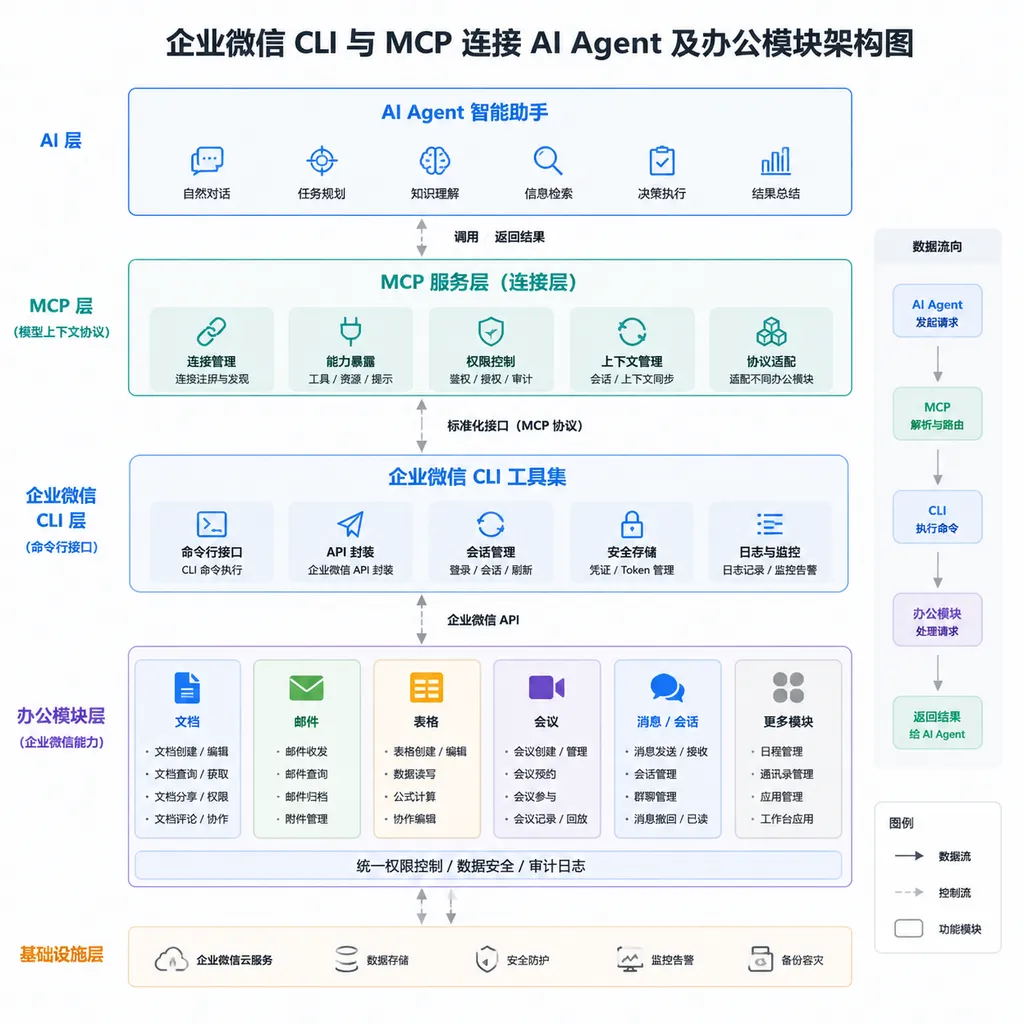
The capabilities WeCom has opened this time cover office scenarios including messages, email, documents, standard and smart spreadsheets, tasks, calendars, meetings, WeDrive, and contacts. At the operational level, agents can perform tasks including:
- Querying recent conversations in which a bot participated and sending messages to those conversations;
- Searching, reading, sending, or replying to corporate emails;
- Creating, searching, and reading documents, and editing content created by the bot;
- Reading spreadsheet data such as sales figures, inventory, and project progress;
- Creating and maintaining smart spreadsheets;
- Creating, searching, and modifying tasks and calendar events;
- Creating meetings and reading meeting details and minutes;
- Searching, uploading, or downloading files in WeDrive;
- Searching for members in the corporate directory and retrieving their basic information.
Taken individually, none of these capabilities is new. WeCom had already provided a large number of open APIs, and enterprises could perform similar operations through apps, bots, and server-side APIs.
The difference is that developers previously had to handle authentication, API wrapping, parameter mapping, and error retries themselves, and then package these capabilities as Function Calling tools that models could recognize. A task such as “generate a sales proposal based on customer feedback” might require a chain of document retrieval, spreadsheet reading, model analysis, PowerPoint generation, and file write-back operations. A change to any single API could break the entire workflow.
With the CLI and MCP now available, WeCom has effectively prepared a standardized toolbox for agents. Developers no longer need to build a separate adapter for every type of agent, and models no longer need to operate office software by simulating clicks.
What has been eliminated is not merely a few lines of request code, but an entire layer of integration glue.
CLI and MCP Solve Two Different Types of Problems
The CLI and MCP introduced together in this release are often discussed as a pair, but their roles are not entirely the same.
The CLI is a command-line tool, functioning more like a deterministic execution interface that scripts and agents can invoke. Developers can install the WeCom CLI locally or in a controlled runtime environment and directly invoke specific capabilities after initialization. For example, the official terminal installation instructions include:
npm install -g @wecom/cli
npx skills add WeComTeam/wecom-cli -y -g
wecom-cli init
After configuring credentials, tools can be invoked through commands. For example, to query a list of corporate directory members:
wecom-cli contact get_userlist '{}'
For agents that support a Skills mechanism, the installation process can be simplified even further. Users can give the following instruction to the agent, which can then attempt to load the capability automatically:
Install npx skills add WecomTeam/wecom-unified -y -g for me
The CLI’s advantages are that it is direct, easy to debug, and suitable for integration into scripts, CI jobs, or existing automation workflows. The drawback is that bot credentials must be securely stored in the runtime environment, while Node.js dependencies, tool versions, and local permissions become additional operational concerns.
MCP, meanwhile, addresses the question of how agents discover and use tools. It can be understood as a universal socket for the agent ecosystem: WeCom describes what tools it offers, what parameters each tool requires, and what results it returns. MCP-compatible clients can then connect to and invoke those tools without requiring a new protocol implementation for every model or agent.
MCP does not eliminate WeCom’s own accounts, permissions, or data boundaries, but it standardizes how tools are connected on the model side. This is MCP’s practical value: it does not make models smarter, but it ensures that tool integration no longer depends entirely on proprietary plugins.
For enterprise development teams, the two approaches can coexist: the CLI is suitable for automation scripts and engineering workflows, while MCP is better suited to general-purpose agents, desktop clients, and multi-tool orchestration.
From “Write a Report for Me” to “Find the Data and Write the Report Yourself”
Following this opening, the most typical change for agents is that users no longer need to upload files one by one into a chat window.
For example, a head of sales could ask an agent to generate a business analysis report based on sales data, customer feedback, and weekly meeting minutes from the past three months. The agent could then independently search for relevant documents and spreadsheets in WeCom, extract information such as key customers, deal progress, and reasons for customer churn, complete its analysis, and create a new document.
If access to spreadsheets, meetings, and messages is also enabled, the workflow can be extended further:
- Aggregate business metrics from multiple spreadsheets;
- Explain abnormal fluctuations using meeting minutes;
- Generate a business dashboard and recommended sales actions;
- Create follow-up tasks and assign owners;
- Schedule a review meeting;
- Send the results to a designated group chat.
In the past, workflows of this kind typically required a combination of RPA, workflow platforms, and custom APIs. Agents can now dynamically determine which tools to invoke based on natural-language instructions, making them better suited to tasks with variable steps and scattered information sources.
However, it is also important to recognize that an agent’s ability to “understand ambiguous goals and plan steps” does not mean it is inherently good at handling critical business data. Inconsistent spreadsheet field definitions, disorganized document naming, and missing meeting minutes can all introduce errors into the final result. CLI and MCP connect the toolchain, but they do not automatically perform data governance for the enterprise.
If a knowledge base contains three different versions of pricing rules, the agent will merely spread the incorrect version faster.
Models Have Not Been Given Unrestricted Access
Once agents truly enter office systems, the greatest risk shifts from “incorrect answers” to “incorrect actions.”
If a model miscalculates a figure, the result can usually still be reviewed. But if it sends an email by mistake, overwrites a spreadsheet, creates an incorrect calendar event, or sends an internal file to the wrong group chat, the consequences are no longer merely a matter of output quality.
For MCP integrations, WeCom continues to use its existing permission and approval mechanisms, which primarily include four layers of control:
- User permissions and AI operation permissions are configured separately: An employee’s access to certain data does not mean that an agent authorized by that employee automatically receives the same operational permissions;
- Critical actions require human approval: For sensitive or high-impact operations, AI cannot independently complete the final step;
- Authorizations can have expiration dates: After a temporary task is completed, the relevant permissions can be automatically revoked;
- Invocation and execution processes are logged: What data the AI accessed, which capabilities it invoked, and what actions it performed can all be traced.
These four measures largely address the most critical permission issues in enterprise agent deployments: least privilege, humans in the loop, time-limited credentials, and audit logs.
However, the existence of security mechanisms does not mean that all capabilities should be enabled immediately in a production environment. WeCom’s official instructions also warn that AI agents may be affected by model hallucinations and other issues, potentially causing data leaks and privilege escalation. It therefore recommends validating them in a test organization first.
Developers should also pay particular attention to three often-overlooked attack surfaces.
The first is prompt injection. Emails, documents, and meeting minutes read by an agent may all contain malicious instructions. If the model cannot distinguish between “business data” and “system commands,” an attacker could use an email to induce it to upload files or broaden the scope of its searches.
The second is the dependency supply chain. Having an agent automatically execute npx skills add is certainly convenient, but it still fundamentally involves running an external software package. At a minimum, enterprises should pin versions, verify sources, and perform installation and validation in an isolated environment, rather than simply passing an installation prompt to a highly privileged production agent.
The third is approval fatigue. If an agent requires human confirmation for every step, users will quickly develop the habit of clicking “Approve” automatically. If no confirmation is required, the risks become amplified. A more sensible design is to classify actions by risk level: reading low-sensitivity documents can be performed automatically, while actions such as sending information externally, making bulk changes, or downloading sensitive files must require secondary confirmation.
Tencent Is Competing for the “Action Layer” of Enterprise Agents
Over the past two years, AI competition among Chinese office software products has focused primarily on the model interface: who can summarize meetings, generate documents, and answer questions from knowledge bases. As the capabilities of foundation models gradually converge, the real differentiators are shifting toward data and execution tools.
Models can be replaced, but organizational relationships, historical documents, business spreadsheets, and approval rules within office systems are difficult to move. By opening MCP support, WeCom appears to be embracing third-party agents, but it is effectively positioning itself as the action and permission layer for enterprise agents.
This is a relatively pragmatic business strategy.
Tencent does not need to ensure that every enterprise exclusively uses its own models, nor does it need to build every agent product itself. As long as agents ultimately need to access materials, contact employees, and perform office actions through WeCom, WeCom can retain control of the entry point to organizational data and workflows.
For developers, this kind of openness is also more useful than simply adding another built-in AI assistant. Enterprises can select different models and agent frameworks based on cost, reasoning capabilities, and compliance requirements, while reusing the same set of WeCom capabilities through the CLI or MCP. In-house agents also no longer need to repackage every API from the ground up just to connect to office systems.
However, “supporting MCP” does not mean being fully cross-platform. WeCom’s permission model, bot system, range of editable objects, and API restrictions still apply. What an agent can ultimately do depends on the tools opened by the platform, not on the three letters “MCP.” A standard protocol reduces integration costs, but it does not eliminate platform boundaries.
What Really Matters Is Write Access
In product demonstrations, automatically aggregating data, generating reports, and creating PowerPoint presentations are the capabilities users notice most easily. For enterprise agents, however, reading information is only the beginning. What truly changes workflows is the ability to write and execute.
When an agent can create documents, modify spreadsheets, create tasks, schedule meetings, and send messages, it is no longer merely a question-answering bot. It becomes a digital employee with limited system privileges. The engineering priorities then change accordingly:
- Previously, the focus was on context length; now, it must be on the scope of permissions;
- Previously, the focus was on answer accuracy; now, it must be on task success rates and erroneous operation rates;
- Previously, conversation logs were sufficient; now, every tool invocation must also be logged;
- Previously, the experience could be improved through prompt optimization; now, approval, rollback, idempotency, and error recovery mechanisms are also required.
WeCom 5.0.10’s opening of these capabilities will not immediately give every enterprise a mature autonomous agent. It first addresses a more fundamental issue: agents finally have an officially supported, auditable path into the office tools that enterprises use every day.
That is far more important than adding yet another chat box to a sidebar.
What will determine the experience going forward is not whether an agent can invoke ten modules, but how much access an enterprise is willing to grant, whether tool invocations are reliable, and whether the agent can be stopped, traced, and rolled back when something goes wrong. For teams preparing to integrate these capabilities, the most sensible sequence remains to begin with read-only retrieval, gradually enable creation and editing capabilities, and only then allow external sending and bulk operations.
Connecting an agent to enterprise systems is only the first step. The truly difficult part of this new round of competition in office software is ensuring that agents operate reliably within defined boundaries.
References
- ITHome: WeCom 5.0.10 Opens CLI and MCP Support, Enabling 10 Major Office Modules to Connect to Mainstream Agents—A report on the scope of WeCom’s newly opened capabilities, supported integration targets, security mechanisms, and typical application scenarios.