Copilot confirmation mechanism bypassed by a link
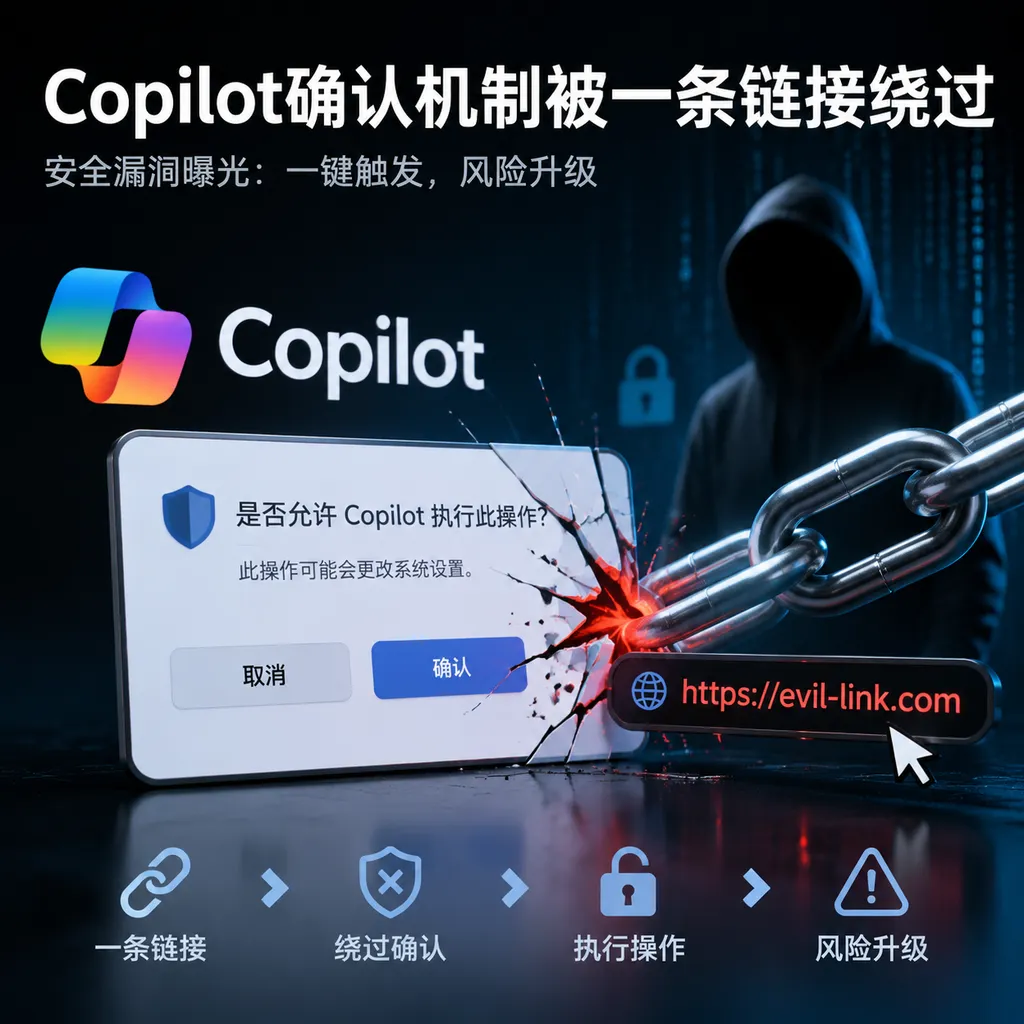
Microsoft Copilot has been found to automatically execute prompts via URL parameters, allowing it to read emails in a logged-in user session and transmit sensitive information to external websites. The issue goes beyond a single parameter validation flaw, exposing the systemic risks created by combining agent permissions, automatic execution, and external communication.
One Click Could Put Copilot to Work for an Attacker
Security research disclosed on August 18 revealed a dangerous automatic execution path in Microsoft Copilot’s URL prompt feature: attackers can embed prompts in links and use the autorun parameter to bypass normal user confirmation. If a victim clicks such a link in a browser where they are already signed in to Copilot, the Agent may automatically read data the victim is authorized to access and send the results to a website controlled by the attacker.
This is not a conventional “click a link and download malware” attack. Throughout the entire process, the entity actually performing the search, processing, and transmission is Copilot—the tool the user has already authorized and trusts.
According to the attack chain disclosed by researchers at security firm Varonis, the issue centers on the combined use of two query parameters. After redaction, the link structure looks roughly like this:
https://copilot.microsoft.com/?q=[encoded prompt]&autorun=1
Here, q passes a prompt to Copilot, while autorun=1 causes the prompt to run automatically after the page loads. On their own, both capabilities have legitimate uses: URLs can provide shareable entry points for tasks, and automatic execution can reduce repetitive actions. But when combined in an Agent that is already signed in and connected to email and other data sources, they create a direct channel from “untrusted web input” to “high-privilege data operations.”
The Attacker Does Not Escalate Privileges—They Borrow the User’s
The most alarming aspect of this vulnerability is that the attacker does not need to compromise the victim’s Microsoft account or steal cookies. The browser directly reuses the victim’s existing signed-in session, while Copilot continues operating under the permissions the user already has.
In the first prompt demonstrated by the researchers, Copilot is instructed to search the inbox, locate the latest email, extract the sender’s email address, and temporarily store it in a variable. The prompt then tells Copilot to generate an external URL containing that variable and perform an action such as “summarize this URL.”
When Copilot opens the address, the sensitive data has already become part of the URL path or parameters. Because the server is controlled by the attacker, an ordinary HTTP request is enough to exfiltrate the data. The victim may see nothing more than the Copilot page loading briefly, or the browser opening another seemingly unrelated website.
The researchers also designed a more aggressive version that instructs Copilot to search the inbox for passwords, credentials, and other secrets, encode any matching content, and transmit it externally. Base64 is not encryption in this context; it merely converts special characters into text better suited for inclusion in a URL while reducing the likelihood that sensitive keywords will be detected by simple rules.
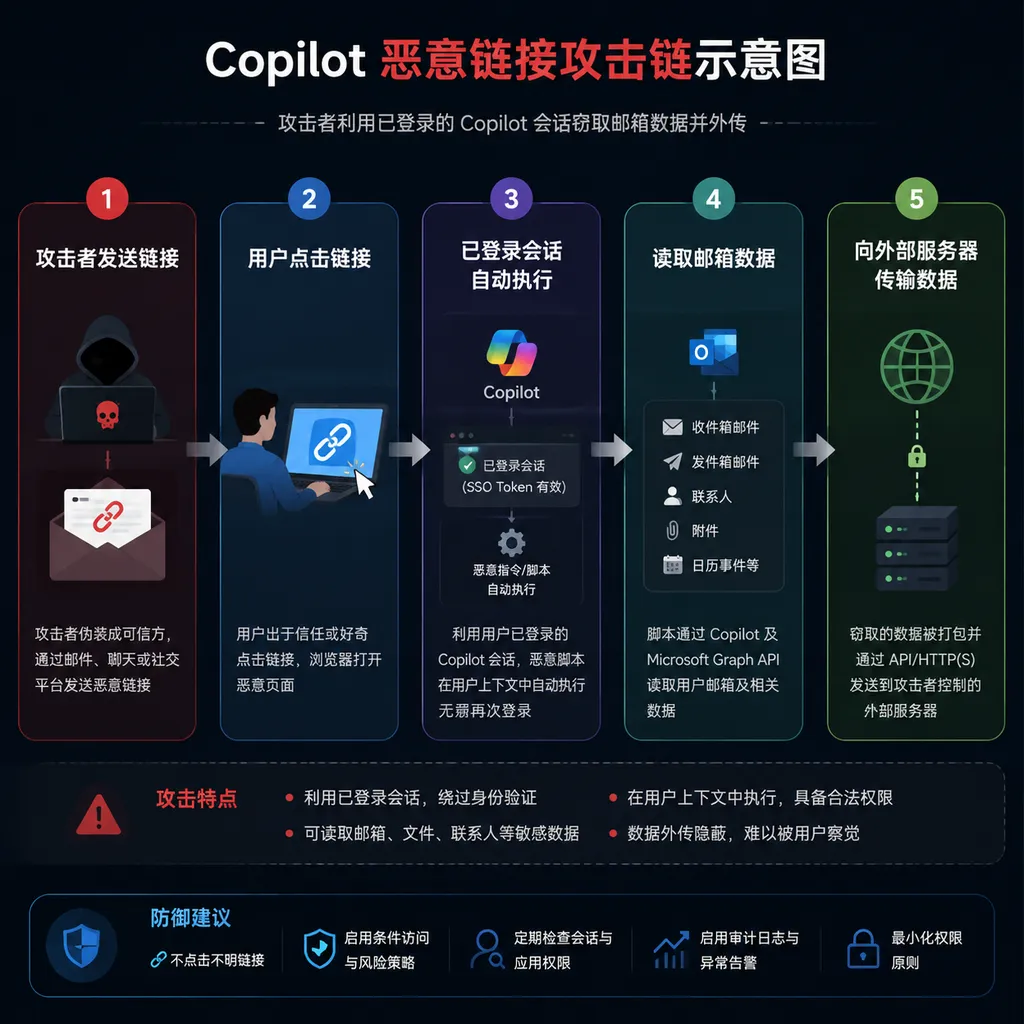
The complete attack can be summarized in five steps:
- The attacker distributes a specially crafted link through email, instant messaging, a phishing page, or a QR code.
- The victim clicks the link, and the browser loads a Copilot session in which the victim is already signed in.
autorun=1triggers automatic execution, allowing the prompt in theqparameter to enter the Agent without further confirmation.- Copilot invokes connected data sources such as email and searches and processes information within the scope of the user’s permissions.
- Copilot accesses a URL controlled by the attacker, and the processed data leaves the original trust boundary along with the request.
From the identity system’s perspective, all of these actions may even appear “legitimate”: the operation is initiated by an authenticated user, the accessed objects do not exceed that user’s permissions, and the network requests are driven by a normal browser and Microsoft services. The problem arises after authentication—specifically, whose intent the Agent is actually acting on behalf of.
The fact that a user has permission does not mean the current instruction is trustworthy.
autorun Is Not the Entire Problem—the Missing Element Is Confirmation of Intent
Reducing the vulnerability to a single dangerous parameter understates its significance. autorun is certainly the most direct trigger, but the deeper failure lies in Copilot’s inability to distinguish among three things: where an instruction came from, what the operation will read, and where the results will be sent.
When an ordinary search box uses a URL to prefill keywords, the risk is usually limited. An Agent is different. It does more than generate text: it may connect to applications such as Gmail, read inboxes, invoke tools, and access external URLs. In that context, “putting parameters into an input box” and “authorizing the Agent to execute the entire task” should not be the same action.
A proper confirmation mechanism should, at minimum, clearly show users the following boundaries:
- The prompt came from an external link rather than being typed into the input box by the user;
- The task needs to read email, files, or other private data;
- The task will send processed results outside the organization’s boundary;
- The destination domain is not a Microsoft service or one approved by the organization;
- The request combines automatic execution, sensitive-data access, and external network communication.
If a confirmation dialog merely asks, “Run this prompt?”, users will still struggle to assess the risk. A more effective design should resemble permission prompts in mobile operating systems: it should explicitly state which data sources Copilot will read, which tools it will invoke, and which domains it will send information to. For URL prompts from untrusted sources, prefilling without execution should be the default baseline.
From a product-experience perspective, an additional confirmation step does introduce friction. But an Agent is no longer just a chat box. The more closely it approaches “doing things on the user’s behalf,” the less its confirmation mechanism can prioritize saving a single click above all else.
This Differs From Ordinary Prompt Injection, but Belongs to the Same Class of Structural Risk
Traditional prompt injection often hides malicious instructions in webpages, emails, or documents, waiting for a model to read them and mistakenly treat data content as system instructions. The path disclosed here is more direct: the attacker places a complete prompt in URL parameters supported by Copilot and launches it through the automatic execution mechanism.
The entry points differ, but the root causes are similar: the Agent brings untrusted input into an execution environment that has access to private context and tool permissions, without obtaining renewed user authorization at critical boundaries.
In its official security documentation, Microsoft states that Microsoft 365 Copilot uses classifiers for jailbreak and cross-prompt injection attacks to identify high-risk input. Microsoft also notes, however, that these classifiers may not cover every Copilot scenario. Even if a classifier can block an explicit prompt instructing the Agent to “steal passwords,” it should not be treated as the primary line of defense.
The reason is practical: the same action can be framed in countless forms that resemble legitimate business requests. For example, “Compile a list of recent supplier contacts and generate a support-ticket link” is entirely reasonable in a customer-service context. If the link points to an attacker-controlled domain, however, it can become a vehicle for data exfiltration. It is difficult to reliably identify such contextual differences solely by having a model judge whether text is malicious.
More dependable defenses should rely on deterministic controls: prevent external links from directly triggering high-privilege operations, restrict the domains an Agent can access, apply data loss prevention controls when sensitive data leaves the tenant, and separate reading and sending into two independently authorized steps.
Enterprise Data Protection Has Not Failed, but It Cannot Cover This Attack Chain
Microsoft 365 Copilot’s enterprise security architecture still provides real value. Enterprise data is not used to train Microsoft’s foundation models; tenant isolation prevents one organization from directly retrieving another organization’s data; and administrators can use Microsoft Purview, content search, and retention policies to manage records of Copilot interactions. Administrators can also control which Agents the organization permits and the permissions those Agents require.
But tenant isolation addresses “which organization can see the data,” not “whether an individual user’s Agent within the organization is being manipulated by external instructions.” If a user is already authorized to open a particular email or SharePoint document, Copilot can generally process it within the corresponding permission scope. The attack chain exploits precisely these legitimate permissions.
This is also one of the easiest misconceptions for enterprises to fall into when deploying Agents: teams invest substantial effort in managing whether models are trained on enterprise data, while overlooking what the models can read at runtime, what they can invoke, and where they can send the results.
Training-data governance and runtime data exfiltration are two separate problems. The former asks whether Microsoft may later use the content to improve its models; the latter asks whether a newly received external instruction can send that content outside the company within seconds. This disclosure concerns the latter.
For Developers, URL Entry Points Must Be Treated as Remote Invocation Interfaces
Developers often regard deep links as a frontend user-experience feature. But as soon as a link can carry a task and trigger an Agent, it becomes a remote invocation interface from a security perspective. The parameters come from the internet, while the execution environment is bound to the user’s identity, private data, and tool permissions. This is fundamentally no different from a high-privilege endpoint that lacks CSRF protection.
When designing URL-based launch capabilities, Agent products should adopt at least the following restrictions:
- External URLs may only prefill prompts and must not submit them automatically by default;
- Automatic execution tokens should be short-lived, single-use, and bound to the initiator and a specific action;
- Prompts originating from links must not directly inherit permissions for sensitive connectors such as email and cloud storage;
- When private data must be read, display a structured permission summary and require user confirmation;
- Use domain allowlists or controlled proxies for external network access, and do not allow the model to construct arbitrary URLs;
- Apply consistent checks to URL paths, query parameters, redirects, and the actual destination after DNS resolution;
- Prevent sensitive data from entering URLs, where it could appear in server logs, browser history, and proxy logs;
- Record prompt sources, tool invocations, data access, and network destinations in auditable logs.
The final point deserves particular attention: URLs are inherently poor vehicles for transmitting secrets. Even if the destination site is not malicious, a URL containing an email address, token, or document excerpt may still enter browser history, gateway logs, analytics platforms, and the Referer header. For an Agent, “permission to access a webpage” and “permission to access a webpage while carrying contextual data” must be treated as two distinct permissions.
Enterprises Should Tighten Egress Controls Now Rather Than Wait for Smarter Models
As of August 19, existing public reports have provided a reproducible attack concept. However, the available material does not clearly establish whether every Copilot product variant, account type, and tenant configuration is affected, nor is it sufficient to confirm whether Microsoft has completed remediation across all environments. Enterprises should not click public proof-of-concept links using production accounts. Instead, they should determine their exposure through isolated test tenants, proxy logs, and vendor advisories.
Until the patch status is completely clear, administrators can prioritize several practical measures: review connector permissions for Copilot and its Agents; restrict unnecessary access to email and files; block external links containing suspicious automatic execution parameters; enable access controls for newly registered domains, webhook services, and uncommon external domains; monitor abnormal requests in which Copilot pages redirect to external sites; and check URLs for unusually long Base64 strings or fields that appear to contain sensitive information.
Simply blocking autorun=1, however, addresses only the currently known examples. A longer-term strategy is to bring Agents into the organization’s existing zero-trust framework: verify the source, permissions, data sensitivity, and destination of every tool invocation, rather than assuming that all subsequent instructions represent the user’s own intent merely because the user is already signed in.
The Agent’s Greatest Selling Point Is Also Becoming Its Largest Attack Surface
The value of products such as Copilot comes precisely from their ability to read context across applications and invoke tools on the user’s behalf. A chatbot that can only answer questions using public knowledge has limited ability to leak corporate email. An Agent connected to email, Teams, OneDrive, and the browser, however, inherently has a much broader “radius of action.”
This incident shows that Agent security can no longer follow the same approach used for chatbots. In the past, the central questions were whether a model might say something incorrect or generate prohibited content. The question now is whether it might receive instructions from the wrong source and carry out an operation that is technically correct but should never have been performed.
From an attacker’s perspective, this type of vulnerability is also highly cost-effective. Malicious links can be hidden behind email buttons, group-chat previews, shortened URLs, and QR codes, without requiring sophisticated malware infrastructure. Even if a security team discovers the data exfiltration, the source of the requests may appear to be nothing more than a normal Copilot session and ordinary browser activity.
Microsoft needs to fix more than a single query parameter. It must redraw the boundaries among URLs, prompts, tool permissions, and network egress. For the industry as a whole, this is also a clear warning: once AI assistants gain the ability to take action, “the user clicked a link” must never be interpreted as “the user approved every action described in that link.”
References
- IT Home: Microsoft Copilot AI Vulnerability Disclosed: Summarizes the URL parameter bypass, email retrieval, and external-server data transmission process disclosed by Varonis researchers.