SenseTime Open-Sources the U1.5 Lite 8B Multimodal Model

SenseTime today open-sourced SenseNova U1.5 Lite, featuring a native unified multimodal architecture at the 8B-MoT scale, with support for 4K image generation, complex layout understanding, and high-fidelity image editing.
SenseTime Packs 4K Image Generation and Fine-Grained Editing into an 8B Model
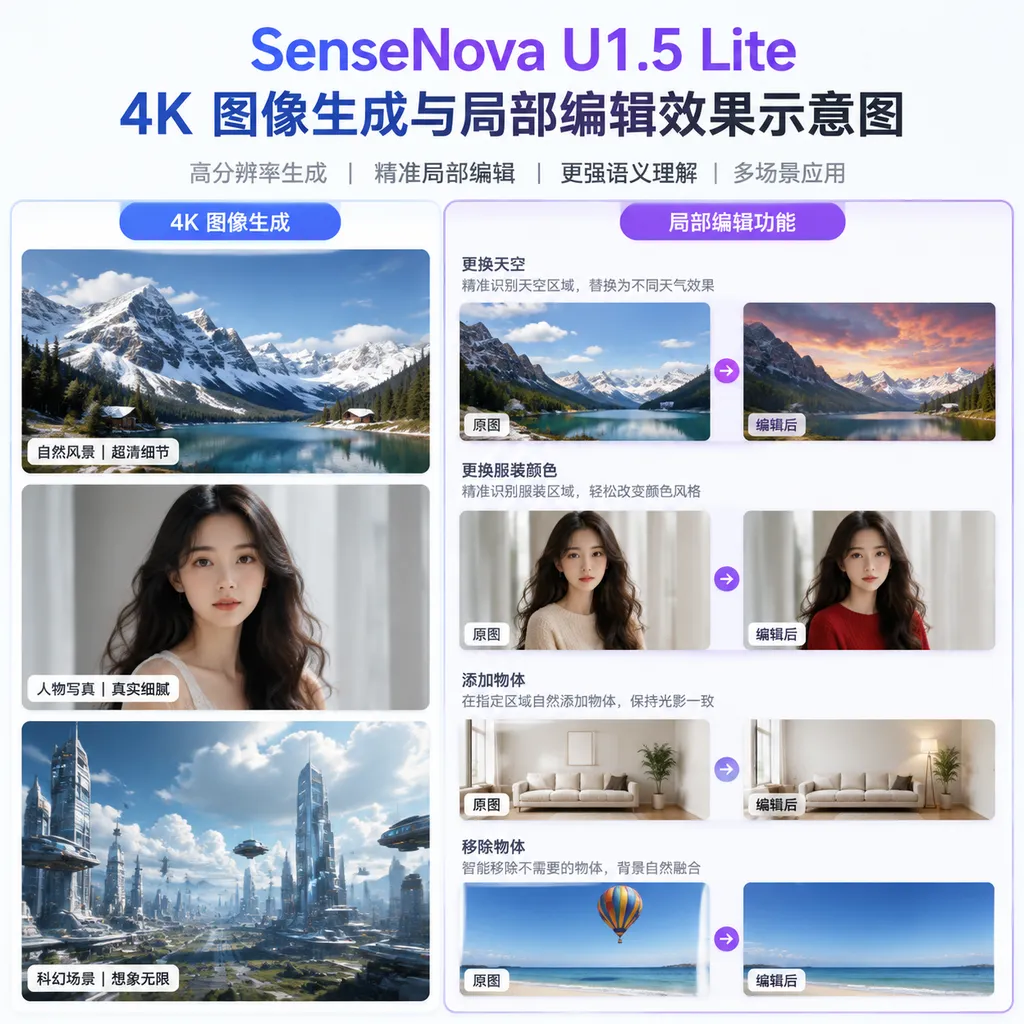
SenseTime today (August 21) announced the open-source release of the lightweight unified multimodal model SenseNova U1.5 Lite. This marks a formal iteration of the SenseNova U1 series, with a clear core selling point: at the lightweight 8B-MoT scale, it natively supports 4K image generation while handling image editing, complex text layout, and multiple visual constraints within a single model.
This is not just another open-source model that can “draw pictures from text.” SenseTime is targeting problems closer to those found in production environments: given a reference image and a long prompt describing the subject and layout requirements, and then asked to modify only one area, can the model deliver the complete image instead of forcing the user to redraw the entire image from scratch every time?
Previously, SenseTime released SenseNova U1 in April, using the NEO-Unify architecture to explore a unified modeling approach for visual understanding, reasoning, generation, and editing. At the beginning of August, the preview version of U1.5 Lite was made available to the public. Today’s release of SenseNova U1.5 Lite further formalizes and open-sources capabilities including 4K output, localized editing, and complex visual control.
The Focus Is Not “Being Able to Generate,” but “Not Changing What Wasn’t Requested”
Over the past two years, competition among image-generation models has gradually shifted from “who can draw more realistically” to “who can reliably deliver according to requirements.” Differences between models may be difficult to spot in a simple landscape image, but they quickly become apparent in e-commerce product images, event posters, infographics, brand visuals, and iterative editing scenarios. Misspelled headlines, distorted numbers, drifting character identities, incorrect object counts, and localized edits that affect the entire image are all frequent failures in real-world workflows.
The upgrades in SenseNova U1.5 Lite are focused primarily on these delivery-critical areas.
1. Stronger Instruction Following Under Multiple Constraints
According to SenseTime, the model can process multiple constraints involving subjects, quantities, spatial relationships, text, layout, and style simultaneously, while supporting context lengths of approximately 3K to 4K. In other words, users do not have to break their requirements into several simple instructions. They can describe in a single prompt what is in the image, where each element should go, how the text should be arranged, what overall style to use, and which areas must not be changed.
This is particularly important for infographics and marketing materials. For example, a poster about the “new energy industry chain” might simultaneously require raw materials on the left, batteries and complete vehicles in the center, and application scenarios on the right. Each module may need a title, arrows, and explanatory text; the overall design may need to use a dark, technological style; and an area for the brand logo may need to be reserved at the bottom. Traditional image-generation models can usually complete some of these requirements, but often struggle to ensure that all the relationships hold at once. The direction pursued by U1.5 Lite is to move these tasks from “looking right” toward “organizing a complete visual expression.”
This also explains why SenseTime repeatedly emphasizes native unified multimodality. Conventional multimodal systems often combine a vision encoder, a language model, and an image-generation module. The model must pass visual information between different components. The NEO-Unify approach, by contrast, attempts to enable vision and language to interact within the same model. For complex editing, the model does not merely look at an image, produce a description, and then hand it off to another module for redrawing. Instead, it seeks to establish a shorter path between understanding, localization, reasoning, and generation.
2. Generation Quality Is Shifting from Local Clarity to Overall Completeness
SenseTime says that U1.5 Lite improves composition, color, materials, lighting, realism, and local details, reducing situations in which “individual parts are correct but the overall result lacks completeness.”
This statement targets a typical weakness of current image models: an image may look highly refined in isolated areas but become inconsistent when viewed as a whole. For example, a person’s facial details may be sharp while the arm proportions are incorrect; a product may have convincing highlights while the light direction conflicts with the background; or an individual character on a poster may be legible while clashing with the overall layout and use of whitespace.
U1.5 Lite has redesigned its generation head for high-resolution generation and expanded training to 4K resolution. The goal is not simply to upscale low-resolution images, but to model finer textures, small text, and lighting refraction during generation while preserving the stability of the overall composition as much as possible.
It is important to note that “native 4K output” does not mean that every prompt can reliably produce cinematic-quality 4K material. Higher resolution means more pixels, but it also means that composition, text, object relationships, and detail consistency must all be maintained simultaneously. Whether the model can remain stable across different image types, hardware configurations, and long prompts will still depend on real-world deployment and testing by the community.
Editing Capabilities Are the Real Highlight of This Upgrade
If image-generation capabilities determine whether a model can attract users, editing capabilities determine whether it can enter real-world workflows.
SenseNova U1.5 Lite places particular emphasis on preserving subject identity, spatial structure, layout relationships, and non-edited areas. Users can specify editing targets through Bounding Box, Visual Marker, or single-image and multi-image references. In simple terms, users can tell the model “where to edit” and “who or what to use as a reference,” rather than relying solely on a vague natural-language description.
For example, a user can upload a product poster and replace only the event date and discount figures while keeping the background, product position, font style, and layout unchanged. They can also select an object in a person’s hand, replace it with another product, and require the new object to match the original image’s lighting, depth of field, and material properties. For designers, this capability is more valuable than regenerating an image that merely “looks roughly similar,” because the latter often means having to inspect the entire composition again.
The model also supports editing with multiple reference images. A user can extract character features from the first image, clothing from the second, and the scene style from the third, then combine them into a new image. In the past, such tasks typically required multiple models, complex masks, and repeated trial and error. If U1.5 Lite can maintain stable subject identity and structure across a broader range of scenarios, the open-source community may be able to integrate it into workflows for e-commerce asset production, game concept design, and branded content creation.
Text and Complex Layouts Remain a Key Differentiator for Open-Source Models
Chinese and English text generation, posters, infographics, brand visuals, and multi-text layouts are another area that SenseNova U1.5 Lite specifically strengthens.
The challenge that image models most often underestimate is not drawing an individual object, but making a poster containing a dozen blocks of text, multiple modules, and a clear reading order genuinely usable. Text generation requires handling character shapes, while complex layouts also involve alignment, hierarchy, spacing, reading paths, and the relationships between text and graphics. If even one headline contains an incorrect character, the entire piece of commercial creative may become unusable for direct delivery.
SenseTime says that U1.5 Lite has reached a delivery level close to that of extremely large commercial models in text rendering and complex layouts. The value of this claim needs to be assessed through public benchmarks, community reproduction, and validation in real projects. But the direction is sound: if an open-source image model excels only at artistic styles but cannot reliably handle prices, dates, product specifications, and brand copy, its practical use will remain limited to the inspiration and sketching stage.
The Significance of 8B-MoT: Bringing These Capabilities to a More Deployable Scale
SenseNova U1.5 Lite uses an 8B-MoT scale. MoT generally refers to a mixture-of-experts-style architecture in which the model’s total parameter count and the number of parameters actually activated during a single inference pass are not necessarily the same. Compared with commercial models ranging from tens of billions to hundreds of billions of parameters or more, an 8B-scale model is better suited for research institutions, startups, and individual developers to download, evaluate, and customize.
However, “lightweight” does not mean deployment costs can be ignored. 4K image generation and editing involve a large number of visual tokens. Actual VRAM usage, inference speed, quantization performance, and resource requirements for multi-image inputs all need to be tested against the official implementation and specific hardware environments. Developers should not look only at parameter counts; they also need to consider model weight formats, inference frameworks, licenses, VRAM requirements, and support for batch tasks.
From a product perspective, the value of U1.5 Lite is not merely that it lowers the barrier to downloading a model. It also attempts to bring capabilities that were previously distributed across multiple models or tools into a single unified model:
- Image understanding: Understanding subjects, spatial relationships, text, and visual structures;
- Reasoning: Decomposing complex creative requirements from natural-language instructions;
- Image generation: Generating images that meet requirements for composition, style, and detail;
- Editing: Localizing specified areas while keeping the remaining content unchanged as much as possible;
- Reference-image control: Extracting information about style, people, materials, and layout from one or more images.
For developers, this means that an application may no longer need to maintain one image-understanding model, one image-generation model, and one localized-editing model, while also handling state transfer between them. A unified model could simplify workflows, especially for creative products that require iterative modifications and multi-turn interaction.
Which Scenarios Might Adopt It First?
The first category is e-commerce and marketing content. Tasks such as changing product backgrounds, generating assets in multiple sizes, modifying promotional dates, replacing models’ clothing, and preserving brand colors and layouts all place high demands on localized editing and text accuracy.
The second category is infographics and presentations. Developers could provide the model with structured data, process descriptions, or product selling points, and then continue adjusting individual modules through region markers. Compared with regenerating the entire image every time, iterative editing better reflects real-world design workflows.
The third category is pre-production for games and film. Multi-reference-image composition, character-identity preservation, and style transfer can be used for concept sketches, scene exploration, and storyboard design. However, when character consistency, copyrighted assets, and commercial licensing are involved, caution is still required regarding data compliance and output review.
The fourth category is on-premises deployment. For teams that cannot upload corporate images to external services, open-source weights provide the possibility of running and customizing the model in private environments. Financial, manufacturing, retail, and advertising companies could further train style-adaptation modules around their internal assets or connect the model to existing asset-management systems.
Assessment: Open-Source Multimodal Competition Is Entering the “Delivery Capability” Stage
The release of SenseNova U1.5 Lite sends at least one clear signal: competition among open-source multimodal models is no longer focused solely on parameter counts or the ability to produce an impressive single sample. The key questions are now whether a model can handle complex instructions, iterative editing, and commercial layouts.
SenseTime’s advantage is that it has not treated 4K as a standalone upscaling feature. Instead, it has combined high-resolution generation, text layout, region control, and editing preservation in a single upgrade. For developers, this is more practical than simply pursuing larger image dimensions.
However, it also faces two practical issues. First, official claims such as “surpassing models in the same class” and “approaching commercial models” require more reproducible evaluations, particularly for Chinese text accuracy, multi-reference-image consistency, the rate of changes outside the edited area, and success rates with long prompts. Second, the engineering benefits of a natively unified architecture will ultimately depend on whether inference frameworks and community tools can keep pace. If the model weights are open-sourced but deployment is complicated, VRAM requirements are high, and editing interfaces are immature, real-world adoption will still be limited.
SenseNova U1.5 Lite is currently available through channels including GitHub and Hugging Face. For developers, a sensible way to get started is not to treat it immediately as an online production API, but to first evaluate four metrics using a fixed test set: whether the text is accurate, whether the subject remains stable, whether non-edited areas change, and whether 4K output justifies the additional compute. Only after all four meet business requirements should developers consider integrating the model into automated content-production workflows.
The real highlight of SenseTime’s open-source release is not the promotional phrase “an 8B model can also produce 4K images.” Rather, it is the attempt to turn image generation from a one-off result into a unified multimodal workflow in which users can repeatedly operate on an image, make localized revisions, and preserve its visual state. If the community can validate this direction, it could genuinely change how open-source image models are used.
Open-Source Links
- GitHub: SenseNova U1 — Model code, related resources, and usage instructions.
- Hugging Face: SenseNova U1.5 Model Collection — Model weights and accompanying resources.
References
- ITHome: Native 4K Image Output Supported, SenseTime Open-Sources 8B-Parameter Multimodal Large Model SenseNova U1.5 Lite — An overview of SenseTime’s August 21 open-source announcement and the model’s main capabilities.
- GitHub: OpenSenseNova/SenseNova-U1 — Official open-source project page.
- Hugging Face: SenseNova U1.5 Model Collection — Official model release and weight-resource page.