GPT-Image-2 Directly Outputs Transparent PNGs
<think>**Clarifying GPT-Image-2 API features**</think> OpenAI has added transparent background output to the GPT-Image-2 API. Developers can set `background=transparent` to generate PNGs with an alpha channel, eliminating the need for traditional background removal.
<think>Planning technical markdown translation</think>
GPT-Image-2 Can Now Generate Transparent PNGs Directly
Today (August 21), OpenAI added a seemingly minor but highly practical capability to the GPT-Image-2 API: the ability to generate images with transparent backgrounds and an Alpha channel directly.
Developers no longer need to have the model generate an image with a white background first, then call a background-removal model or image-editing tool to remove it. By setting background to transparent in the request and selecting an output format that supports transparency, such as PNG, they can obtain assets that can be overlaid directly onto webpages, PowerPoint presentations, product images, or design layouts.
This feature is currently available only through the API. OpenAI also recommends not repeatedly describing the background in the prompt, but instead controlling transparency through the parameter. If the image contains numbers, prices, specifications, or serial numbers, it still needs to be reviewed manually or programmatically.
The Key Change Is Not “Turning a White Background Transparent,” but Removing a Step from the Workflow
Transparent PNGs are nothing new. What is really worth noting is that the generation pipeline has changed.
Previously, the typical process for creating an AI asset with a transparent background was:
- Generate an image with a white, green, or solid-color background;
- Use a segmentation model to identify the subject;
- Calculate a mask and process the edges;
- Repair semi-transparent areas such as hair, glass, smoke, and shadows;
- Export an RGBA PNG;
- Check the result separately against dark and light backgrounds.
The most troublesome part is not “deleting the white pixels,” but handling the edges.
For example, the edge of a glass may refract the background color, a plush toy may have large numbers of fine hairs around its outline, and a product shadow often falls somewhere between fully transparent and fully opaque. Simple color-based removal can only set the Alpha value of a particular category of RGB pixels to 0, which can easily leave white fringes, jagged edges, or an unnatural gray outline.
GPT-Image-2 can now return files that directly contain transparency information, meaning callers can skip the separate background-removal step. It is not drawing a gray-and-white checkerboard inside the image, nor painting the background white and pretending it is transparent. The PNG file genuinely contains an Alpha channel.
From a product perspective, this is more useful than adding yet another filter. It may not make an individual image “more spectacular,” but it can significantly reduce the engineering complexity of producing assets in bulk.
How to Call the API
The calling method is straightforward. There are only two core parameters:
background: transparent: Requests a transparent background;output_format: png: Selects the PNG format, which supports Alpha channels.
The prompt should focus on describing the subject, composition, viewpoint, and style, rather than also requesting a white photo studio, a solid-color backdrop, or an indoor scene. Otherwise, the visual semantics in the prompt may conflict with the interface parameters.
Below is a minimal request example using an OpenAI-compatible interface. If calling through OpenAI Hub, simply replace the Base URL and Key in the environment variables with the values provided by the console. The endpoint path and request body remain in the OpenAI format:
export OPENAI_BASE_URL="Your OpenAI-compatible Base URL"
export OPENAI_API_KEY="Your API Key"

curl -sS "${OPENAI_BASE_URL}/v1/images/generations" \
  -H "Authorization: Bearer ${OPENAI_API_KEY}" \
  -H "Content-Type: application/json" \
  -d '{
    "model": "gpt-image-2",
    "prompt": "A front-facing mechanical cat sticker, centered subject, complete outline, blue and silver color scheme, crisp edges, with a small amount of padding around the subject",
    "background": "transparent",
    "output_format": "png"
  }' > response.json
Image APIs typically return Base64-encoded data in the response. You can decode and save it with Python:
import base64
import json

with open("response.json", "r", encoding="utf-8") as f:
    result = json.load(f)

image_base64 = result["data"][0]["b64_json"]
image_bytes = base64.b64decode(image_base64)

with open("mechanical-cat.png", "wb") as f:
    f.write(image_bytes)
In production, do not rely solely on the file extension. A file named .png does not necessarily contain valid transparency. It is best to check the image mode and Alpha range before storing it:
from PIL import Image

image = Image.open("mechanical-cat.png")
print("mode:", image.mode)

if "A" not in image.getbands():
    raise ValueError("The image does not have an Alpha channel")

alpha = image.getchannel("A")
alpha_min, alpha_max = alpha.getextrema()
print("alpha range:", alpha_min, alpha_max)

if alpha_min == 255:
    raise ValueError("The image has an Alpha channel, but all pixels are fully opaque")
This step is important. From an engineering perspective, what needs to be verified is whether the file actually contains transparent regions—not whether the generated preview looks transparent.
Why Background Requirements Should Be Moved from the Prompt to a Parameter
Previously, many developers would write a long list of requirements in the prompt:
Transparent background, true Alpha channel, no white background, no checkerboard, no walls, no floor, no environment…
The problem with this type of prompt is that it is still expressed in natural language. The model may interpret “checkerboard” as a visual element that needs to be drawn, or it may generate a background that looks transparent but has actually been baked into the RGB pixels.
A structured parameter functions more like an explicit output constraint. background=transparent controls file transparency, while the prompt controls the content. The division of responsibilities is clearer.
However, OpenAI’s recommendation to “not describe the background in the prompt” does not mean that shorter prompts are always better. Transparent assets still require clear descriptions of the following:
- What the subject is and how many subjects there are;
- Whether a complete outline is required;
- The camera angle and pose;
- Whether shadows, glows, and semi-transparent effects are allowed;
- How much of the canvas the subject should occupy;
- How much safe margin should be left around the subject;
- Whether the image contains text, numbers, or branding elements.
For example, “generate a pair of sneakers” is usually not stable enough. A more actionable version would be:
A low-top running shoe viewed from the front-left at a 45-degree angle, with the sole and laces fully visible, centered in the composition and occupying approximately 75% of the canvas, with soft product-photography lighting, a natural contact shadow, even margins on all sides, and no text or decorative elements.
This does not describe the background, but it retains all the compositional information that has the greatest impact on practical usability.
Best-Suited Scenarios: E-Commerce, Stickers, and Dynamic Compositing
OpenAI lists e-commerce product pages, PowerPoint illustrations, sticker assets, and product images as applications. Looking further, this capability is especially valuable in three types of development scenarios.
1. Bulk Production of E-Commerce Assets
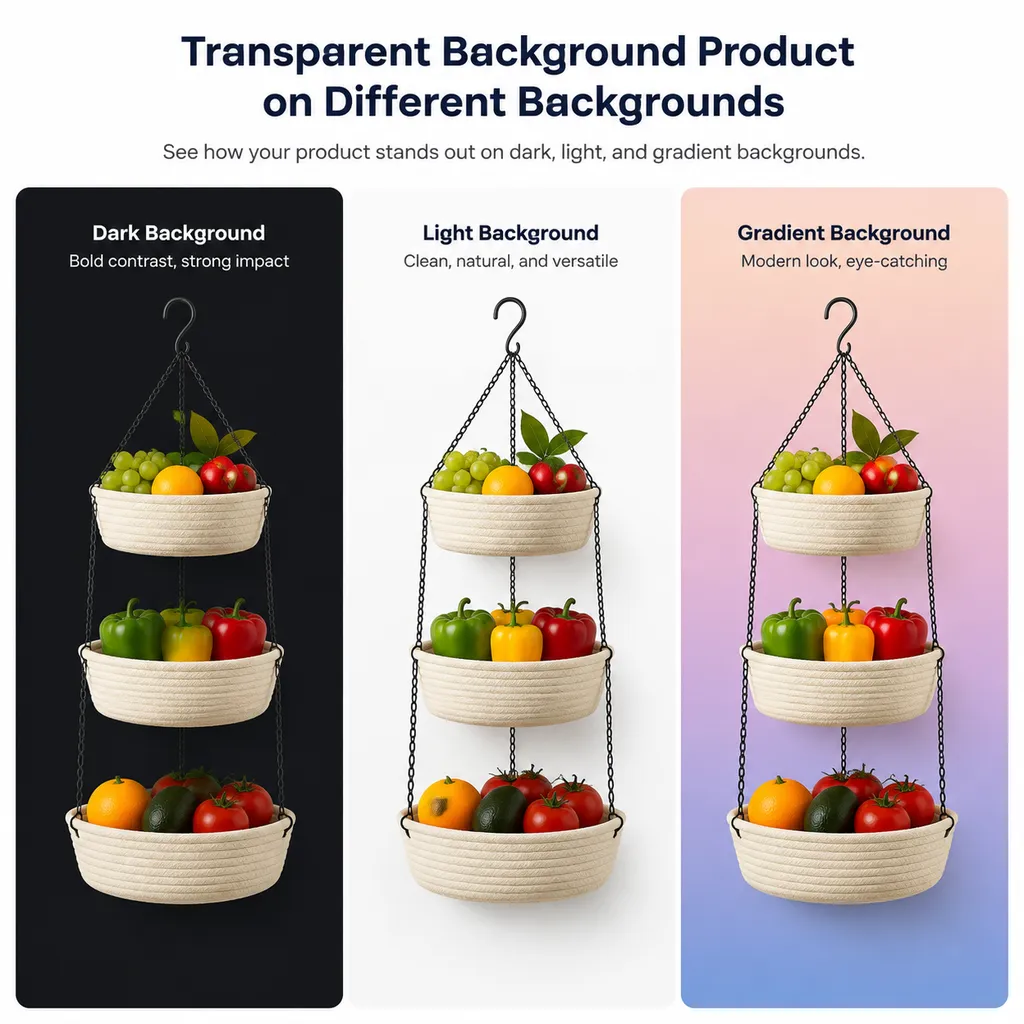
Product images often need to be adapted for white-background detail pages, dark promotional pages, seasonal campaign pages, and mobile cards. Previously, every generated image had to go through background removal and edge correction. Now, transparent assets can be generated first, with the frontend or an image service dynamically compositing them against different backgrounds.
For platforms with large numbers of SKUs, this means the background does not have to be embedded permanently in the original image. A single transparent product image can be reused across multiple marketing templates, while storage and version management also become simpler.
However, this does not replace product authenticity reviews. AI may alter the number of buttons, port locations, textures, packaging text, or even the product’s physical structure. For real products that are actually sold, transparent output solves a layout problem—not the problem of accurately reproducing the physical item.
2. Stickers in Games, Chat, and Content Products
Stickers, avatar accessories, livestream overlays, and lightweight game assets naturally require transparent backgrounds. Previously, every additional background-removal step introduced another opportunity for edge degradation. This is especially true for the hair, tails, and glowing effects of cartoon characters, which can easily be mistakenly removed by segmentation models.
Directly generating Alpha PNGs can shorten the path from prompt to usable asset. However, if the assets are going into a formal game project, dimensions, anchor points, collision regions, edge padding, and stylistic consistency still need to be checked. A single generated result should not be treated as a final asset without further processing.
3. Dynamic Server-Side Compositing
Transparent PNGs are also suitable for programmatic content production. For example, a server can generate a product, character, or icon, then composite it with a background, title, and price according to a user template. Compared with asking the model to generate a complete poster in one step, this approach is more controllable:
- The subject is generated by an image model;
- The background is managed by a template system;
- Text is rendered by a typesetting engine;
- Prices and serial numbers come from a business database;
- The final result is composited by an image-processing service.
This is far more reliable than asking the model to handle the image, text, numbers, and layout simultaneously. Generative models are well suited to creating visual elements, but they should not serve as the sole source of transactional information.
Having an Alpha Channel Does Not Mean the Background-Removal Problem Has Disappeared Completely
A note of caution is warranted: interface support for transparent backgrounds is not the same thing as receiving a commercial-grade mask every time.
The quality of a transparent asset involves at least four levels of evaluation:
- Channel presence: The file is genuinely RGBA rather than an RGB PNG;
- Background transparency: Empty areas of the canvas have Alpha values close to 0;
- Reasonable edges: The subject has no white or black fringes, jagged edges, or abnormal holes;
- Semantic correctness: Glass, sheer fabric, shadows, and hair that should be retained have not been mistakenly removed.
The fourth level is the most difficult to detect automatically. For example, if the model makes the inside of a glass completely opaque, the result is technically a valid transparent PNG, but it may look like plastic when composited onto a colored background. Similarly, if the shadow beneath a floating product is removed entirely, the subject may lose its sense of contact with the ground.
A relatively reliable acceptance process is to composite the result separately onto the following backgrounds:
- Pure white;
- Pure black;
- Highly saturated red or green;
- A light-to-dark gradient;
- A checkerboard inspection layer.
White fringes are most obvious against dark backgrounds, while black fringes are most obvious against light backgrounds. Highly saturated backgrounds can expose color contamination in semi-transparent areas. For bulk tasks, previews can be generated automatically with multiple backgrounds and then submitted to a review model or manually spot-checked.
Numbers and Text Remain Risk Points
OpenAI specifically reminds users to verify numbers in generated images. This is not a disclaimer that can be ignored.
Product packaging, dashboards, price tags, jersey numbers, dates, and specification values are all details that may look “close enough” visually but must be completely accurate from a business perspective. Even if GPT-Image-2’s text-rendering capabilities have improved, a generated image is still fundamentally not the same thing as a database-rendered result.
A more reliable approach is to split the workflow:
- Have the model generate the transparent subject without critical text;
- Add text using HTML Canvas, SVG, Pillow, Sharp, or a design template;
- Run OCR on the final image;
- Compare the OCR results field by field against the business data;
- Block publication if there is any inconsistency.
If the model must generate packaging with text, it should still be treated as a visual draft rather than product information that can be published directly.
Assessment of This Update: A Small Parameter with More Practical Value Than “Slightly Better Image Quality”
GPT-Image-2’s new transparent-background output is not a capability that will create a huge gap on leaderboards. It is, however, a typical developer-oriented feature: it eliminates an intermediate step that is repetitive, fragile, and capable of affecting quality.
Compared with traditional background-removal solutions, its advantages are a shorter pipeline, simpler deployment, and a greater chance of preserving complex semi-transparent visual effects. Traditional solutions, on the other hand, offer controllable inputs and repeatable results, and can process existing real photographs. The two approaches are not complete substitutes for each other.
If the task is “generate a transparent sticker or conceptual product from scratch,” GPT-Image-2 is more convenient. If the task is “accurately extract an existing product photograph,” professional segmentation and manual edge cleanup remain more reliable. For high-value e-commerce assets, the best approach will likely be generation, inspection, and secondary background removal when necessary—not blind reliance on a single output.
More importantly, this update makes image models resemble components in a production pipeline rather than black boxes that simply return finished images. Subjects, backgrounds, text, and layouts can be generated and managed separately, then combined through code. For developers, this kind of modularity is often more valuable than a purely aesthetic improvement.
References
- ITHome: OpenAI’s GPT-Image-2 Model Now Supports Generating Images with Transparent Backgrounds — Reports on this API update, applicable scenarios, parameter settings, and the reminder to verify numbers.
- Zhihu: GPT-Image-2 Usage Guide — Summarizes GPT-Image-2’s output formats, transparent-background support, and practical usage considerations.