Agnes Video 2.5 Flash Free for a Limited Time

Agnes Video 2.5 Flash is available for free for a limited time today, with the cost of generating 720p videos reduced to zero. What it truly lowers is the barrier to batch shot testing and integration validation, while resolution, duration, and concurrency still determine its production value.
Agnes Brings the Cost of Trial and Error in Video Generation Down to Zero
On August 26, Agnes AI made its video generation model, Agnes Video 2.5 Flash, available free of charge for a limited time. Under the latest pricing rules, the cost of generating 720P video has dropped from $0.025 per second to $0 per second. During the free period, there are no charges for output video duration, input assets, or reference images.
This is not simply a price cut.
The biggest difference between video generation and text models is that every request to “try another version” is more expensive. Revising a prompt for a text model usually consumes only a few thousand additional tokens; changing a single shot with a video model may require regenerating the entire sequence. Anyone who has actually produced short-form videos, advertising storyboards, or motion assets knows that a final 10-second video is often backed by dozens of failed generations.
Agnes Video 2.5 Flash temporarily eliminates this upfront trial-and-error cost.
At the original price, a 12-second 720P video would cost $0.30. That does not sound expensive for a single generation, but if a set of prompts is used to test 20 types of camera movement, followed by further iterations on characters, composition, and lighting for five selected versions, the workload can quickly grow to dozens or even hundreds of API calls. For individual developers and small teams, free access means they can first get the workflow running instead of watching their account balance while fine-tuning prompts.
It Is 2.5 Flash That Is Free, Not the Full 2.5 Model
The model variants need to be clearly distinguished before discussing this offer.
Agnes currently prices its video models roughly as follows:
| Model | Output Specification | Current Price |
| --- | --- | --- |
| agnes-video-v2.0 | Billed by video duration | $0/second |
| agnes-video-2.5-flash | 720P | $0/second for a limited time |
| agnes-video-2.5 | 720P | $0.025/second |
| agnes-video-2.5 | 960P | $0.040/second |
| agnes-video-2.5 | 2K | $0.055/second |
In other words, Agnes has not made every version of Video 2.5 free. Instead, it has carved out a Flash version fixed at 720P, trading clearly defined capability limits for a lower barrier to entry.
This is a sensible product segmentation strategy.
During development, there is usually no need to generate a final 2K video every time. For prompt validation, agent orchestration, storyboard selection, and first- and last-frame testing, 720P is already sufficient to determine whether the subject remains consistent, whether the camera movement meets expectations, and whether the reference images are working. Once a shot has been finalized, developers can switch to the standard version to generate 960P or 2K results, at a much lower overall cost than using a high-resolution model from the very first round.
Flash is therefore more like a “preview render” within the video generation pipeline than a complete replacement for high-specification final output. It addresses experimentation, not delivery in every use case.
What It Can Do: More Than Generating Video From a Single Prompt
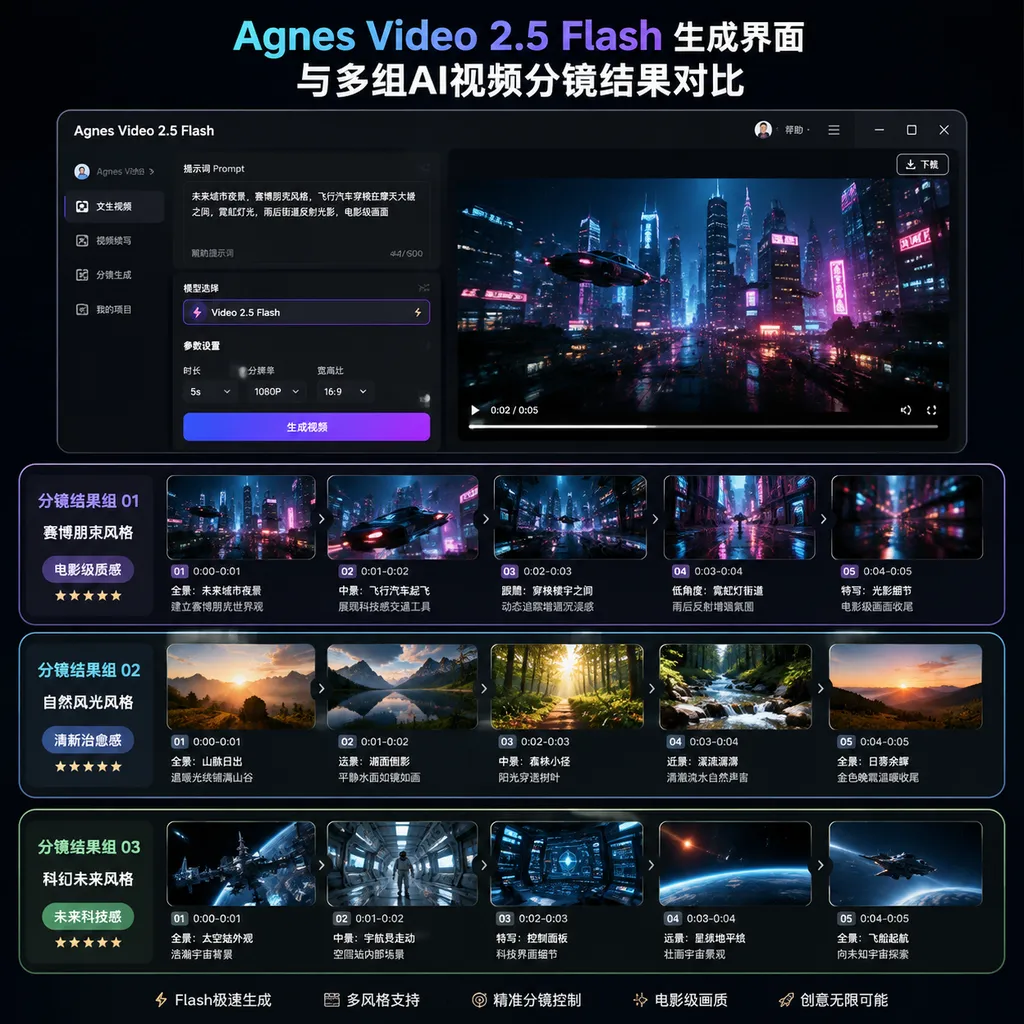
Agnes Video 2.5 Flash reuses the model capabilities and asynchronous task API of Video 2.5. It currently supports three core use cases:
- Text-to-video: Generates video from a text description for concept shots, draft assets, and creative validation;
- First- and last-frame control: Specifies the starting and ending frames of a video, allowing the model to fill in the motion between them;
- Reference image generation: Uses multiple input reference images to constrain characters, objects, clothing, or visual style.
Its key limitations are also clearly defined:
- Output resolution is fixed at
720P; - Each video can be between 4 and 12 seconds long;
- Each task generates only one video, meaning
n=1; - Reference image mode accepts up to five images;
- Tasks are created asynchronously, and their status must be queried using the video task ID;
- No end date has been announced for the free period, and future policies are subject to the platform’s latest pricing information.
These limitations make it better suited to generating short shots than producing a continuous narrative lasting dozens of seconds in a single pass.
For AI short dramas, the more practical approach is still to break the script into shot units of 4 to 12 seconds: first generate character design images, then use reference images to lock in the subjects, generate each shot individually, and finally assemble them in an editing application. The model handles motion and visuals within individual shots, while the workflow manages character assets, pacing, transitions, and audio tracks.
This is also how current video models can realistically be used in production. Expecting a model to produce a complete short film from a single prompt leaves the result heavily dependent on chance. Breaking the work into trackable asynchronous calls for shots, assets, and task states is much closer to a production system.
The API Integration Has Not Changed, and Migration Cost Matters More Than Price
Agnes Video 2.5 Flash uses an OpenAI Videos-compatible API. Its model ID is:
agnes-video-2.5-flash
For projects that already manage model calls using the OpenAI format, migration typically requires only replacing the model ID and ensuring that all parameters comply with the limitations of the Flash version. OpenAI Hub can also call this model using a unified API key and compatible format. This makes it suitable for incorporating Agnes alongside other video, image, or text models within the same workflow, reducing the cost of separately maintaining authentication and vendor adaptation layers.
The following is an example of creating a task using the compatible format. The actual base URL is subject to the information provided in the OpenAI Hub console:
curl -X POST "$OPENAI_HUB_BASE_URL/v1/videos" \
  -H "Authorization: Bearer $OPENAI_HUB_API_KEY" \
  -H "Content-Type: application/json" \
  -d '{
    "model": "agnes-video-2.5-flash",
    "prompt": "A yellow ox wearing a red scarf walks through a rice field at dawn, tracked from a low camera angle, with light mist, warm backlighting, a cinematic look, and stable camera movement",
    "size": "720P",
    "seconds": "8",
    "n": 1
  }'
Rather than keeping the HTTP connection open while the model generates the video, the API first returns a video task ID. The application should save this ID and then poll the query endpoint for the task status:
curl "$OPENAI_HUB_BASE_URL/v1/videos/$VIDEO_ID?model_name=agnes-video-2.5-flash" \
  -H "Authorization: Bearer $OPENAI_HUB_API_KEY"
In a production environment, do not simply poll once per second. A better approach is to use exponential backoff, gradually increasing the query interval from two seconds to four seconds, then eight seconds, for example. For failed tasks, record the prompt, input image versions, model ID, and request parameters. Video tasks take longer to complete, and without a task status table and a failure retry mechanism, free API calls can easily create a large number of asynchronous issues that are difficult to diagnose.
In addition, API keys should never be placed in frontend code, public repositories, or client-side logs. Particularly during a free period, a leaked key may not immediately generate a bill, but it can quickly exhaust the account’s concurrency limits or trigger risk controls, causing legitimate tasks to queue or even fail.
The Free Offer Delivers the Most Value in Three Scenarios
1. Batch Testing Prompts and Cinematic Language
A good video prompt is not simply one packed with as many adjectives as possible. Subject movement, camera movement, shot size, lighting, and style can conflict with one another. For example, if a prompt asks for both a “locked-off camera” and a shot that “orbits the subject,” the model can only follow one of those instructions selectively.
With free access, developers can divide the same content into multiple sets of structured prompts and compare them in batches:
- The stability of locked-off versus tracking shots;
- The effect of close-ups, medium shots, and wide shots on subject consistency;
- Whether first- and last-frame constraints cause abrupt changes in the intermediate motion;
- The benefit of using one reference image versus multiple reference images;
- How completely actions are performed in 4-, 8-, and 12-second tasks.
These tests were possible before, but every test incurred a charge. With the price reduced to zero, model evaluation can move beyond “watching a few official demo clips” and become genuine regression testing.
2. Adding a Low-Cost Execution Layer to Video Agents
Many video agents remain stuck at the demo stage, not because large language models cannot write scripts, but because generating the downstream assets is too expensive. If an agent automatically breaks a script into shots, generates reference images, creates videos, checks the results, and retries failed attempts, a single user request could trigger more than a dozen video tasks.
With Flash available for free, developers can test the entire pipeline more aggressively:
- A text model breaks the script into shots;
- An image model generates reference images for characters and scenes;
- A video model creates multiple short shots based on the reference images;
- A vision model checks the subjects, actions, and subtitle safe areas;
- Unqualified shots have their prompts automatically revised and are retried;
- The final results are passed to editing and audio modules for composition.
The biggest benefit here is not saving the cost of one or two generations, but making “retry on failure” a default capability. A video agent without retries is closer to an automation script. It only begins to resemble a usable system once it includes a closed loop of evaluation and retrying.
3. Selecting a Model at Low Cost
Video models are difficult to assess based on leaderboards alone. Different models vary significantly in character movement, physical realism, camera control, text generation, and stylization. The same model may also perform very differently when handling live-action people, e-commerce products, and animated characters.
The limited-time free offer gives teams a lower-cost window for model selection. Turning 20 to 50 shots from real business scenarios into a fixed test set, then recording success rates, average generation times, failure types, and manual rework time, is far more meaningful than comparing a few handpicked demo clips.
But “Free” Does Not Mean There Are No Costs
Agnes has reduced the per-call price to zero, but it has not eliminated every cost associated with video generation.
The first is time. Asynchronous tasks still need to queue and generate. If the free offer causes request volumes to surge, latency may become more volatile than usual. For user-facing products, average processing time is not enough; P95 and P99 latency also need to be monitored.
The second is engineering cost. Video files are much larger than text responses, and downloading, storing, transcoding, moderating, and distributing them through a CDN all cost money. Generating a batch of 12-second videos for free does not mean those videos can also be stored and distributed for free.
The third is the cost of quality screening. Generating 100 videos is not difficult; identifying the five that are actually usable is the real challenge. Without automated scoring, deduplication, and manual review tools, more API calls only increase the burden of asset management.
Finally, there is policy risk. In June of this year, Agnes made its Agnes 2.0 Flash text model, image models, and Video 2.0 API available under an “indefinitely free” policy. The official wording for Video 2.5 Flash, however, is “free for a limited time.” The two should not be confused. No specific end date has been announced, and developers should not permanently build a zero price into their business models.
A more prudent approach is to record the theoretical list-price cost of every task from day one. Even if the actual bill is zero, costs should be modeled at $0.025 per second. Once the promotion ends, the team will immediately know how much the product’s gross margin will be affected, rather than discovering only after paid billing resumes that a single user request triggers dozens of video tasks.
Agnes Is Trading Free Access for Real Developer Workloads
From the perspective of industry competition, limited-time free access to video models is evolving from a marketing campaign into a customer acquisition strategy.
The barrier to trying text models is already very low, while video models remain constrained by price, queues, and generation time. The provider willing to let developers conduct large-scale testing first is more likely to become a default model in content tools, marketing platforms, and agent products. Once a model has been embedded into a workflow, migration usually involves more than changing a model name. It also requires retuning prompts, reassessing the effectiveness of reference images, and rebuilding failure-handling logic.
Agnes’s strategy is straightforward: the standard version retains 960P and 2K output with regular pricing, while the Flash version uses free 720P generation to attract API calls. Developers gain a low-cost window for experimentation, while the platform gains real prompts, task workloads, and use-case feedback. It is an exchange whose value is clear to both sides.
For Agnes, however, the real test now shifts from model demos to service capabilities. Free access will quickly magnify issues involving concurrency, queues, failure rates, and abuse. A video model’s ability to produce impressive examples merely shows that it has a strong performance ceiling. Whether it can maintain stable task states, predictable latency, and a sufficiently high success rate under simultaneous demand from large numbers of developers is what determines whether its API has long-term value.
Conclusion: Worth Trying, but Do Not Treat a Limited-Time Free Offer as a Moat
The limited-time free offer for Agnes Video 2.5 Flash is a tangible benefit for developers. With 720P output, durations of 4 to 12 seconds, text-to-video generation, first- and last-frame control, and support for up to five reference images, it already covers the prototyping needs of most video workflows. For projects that require frequent shot experimentation, automatic retries, and batch evaluation in particular, reducing the price from $0.025 per second to zero will significantly change how testing is conducted.
Its boundaries are equally clear: there is no 960P or 2K output, each task generates only one video, the duration of the free offer is uncertain, and storage, moderation, and orchestration costs still exist beyond generation itself.
The most sensible approach, therefore, is not to generate videos aimlessly just because they are free, but to build a test set, task queue, and cost model as soon as possible. Use Flash first to stabilize prompts and workflows, then decide whether final output should be generated with the standard version or another model.
The barrier to video generation has indeed fallen another step. But free access can only make it easier for developers to enter the arena; it cannot win the competition for any model.
References
- As AI Short Dramas Grow More Expensive, Agnes Raises the Banner of “Free” — Reviews Agnes’s previous strategy of offering its text, image, and Video 2.0 models for free, providing useful background for the current limited-time free offer for 2.5 Flash.