Google Takes AI Video to 4K and 40 Seconds

Gemini Omni 1.1 Flash adds 4K output, segmented continuation, first- and last-frame control, and low-cost previews. More important than the improvement in visual quality, Google is beginning to deliver the controllability needed to integrate AI video into production workflows.
Google Updates Gemini Omni as AI Video Moves from “Generating Clips” to “Producing Shots”
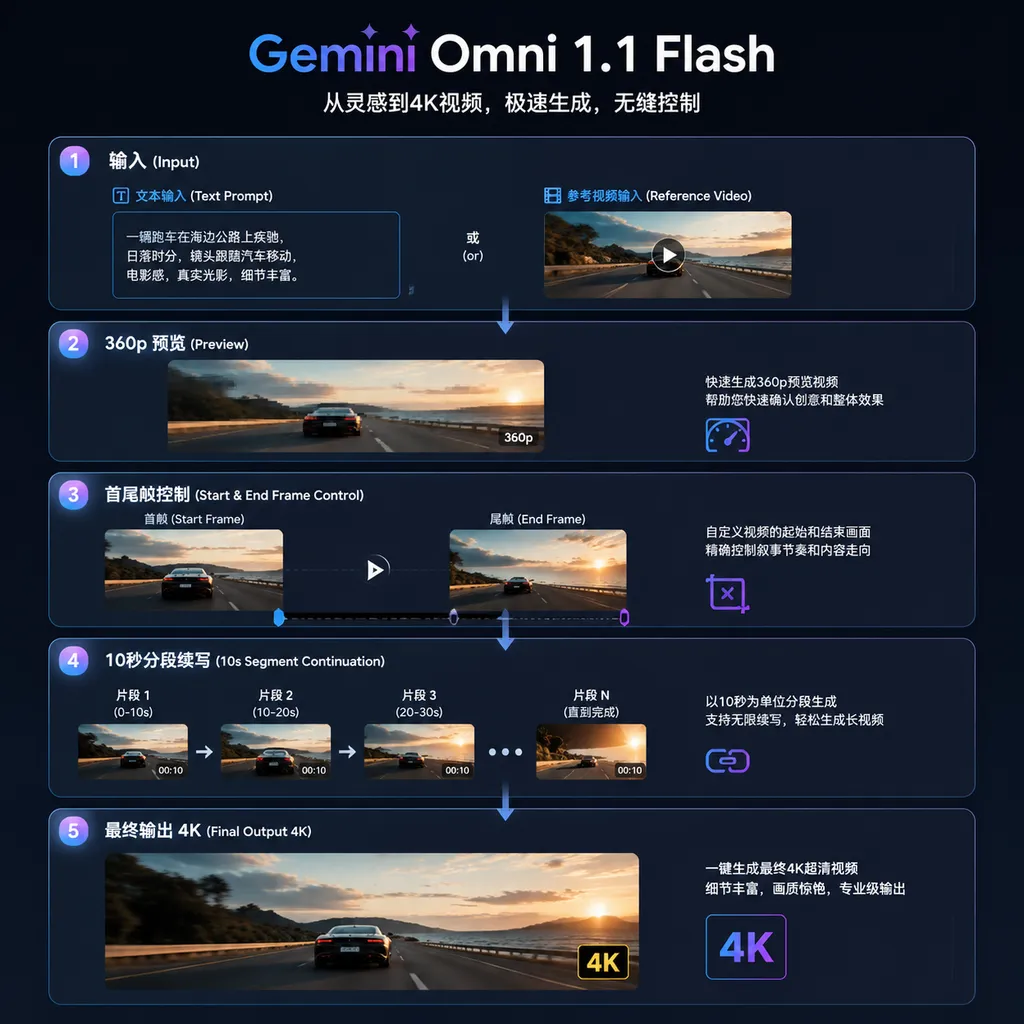
On August 27 local time, Google launched the Gemini Omni 1.1 Flash video generation model. The new version supports output at up to 4K, can continue generating from the end of an existing video, and can extend a single video to a cumulative length of up to 40 seconds through multiple extensions.
The update also adds specified start and end frames, support for 3-second reference video inputs, and a lower-cost, faster 360p preview mode.
Judging by the specifications alone, 4K and 40 seconds are the most eye-catching features. From a real-world production perspective, however, the latter three are more valuable: continuation, start/end frame constraints, and low-resolution previews. They address not whether the model can generate attractive visuals, but whether the results can be incorporated into a repeatable, cost-controlled video workflow.
Up to 10 Seconds at a Time, but Extendable to 40 Seconds from the Ending
Gemini Omni 1.1 Flash’s scene extension feature allows users to continue generating footage from the end of an existing video. Each extension adds 10 seconds, for a cumulative maximum of 40 seconds.
One point requires clarification: 40 seconds does not mean the model can generate a complete 40-second video in a single pass.
It is more like contextual continuation for video: first generate one clip, then use the end of that clip as the starting point for the next generation. Users can add new instructions for actions, shots, or scenes in each round, gradually moving the story forward.
For example, a product advertisement could be divided into four segments:
- Show the product’s appearance in the first 10 seconds;
- Move the camera closer in the second segment to present material details;
- Transition to a real-world use case in the third segment;
- Finish with the brand identity and closing shot in the final segment.
This approach is more practical than generating 40 seconds directly. The longer a video diffusion model runs, the more likely it is to encounter problems such as character appearance drift, objects disappearing without explanation, and uncontrolled camera movement. Dividing a long video into multiple reviewable 10-second segments makes it possible to revise prompts, replace assets, or regenerate footage at each stage.
The trade-off is equally clear: the longer the continuation chain, the more likely small errors from earlier segments are to propagate into later ones. If a character’s clothing, hands, or background has already changed in the second segment, the fourth segment may deviate even further from the original design. The actual performance of so-called “seamless continuation” therefore cannot be judged solely by whether the edit points are smooth; consistency in characters, spatial relationships, and lighting across segments must also be considered.
In other words, 40 seconds is a cumulative production limit, not proof that the model has fully solved long-video consistency.
4K Upgrades Delivery Capabilities, but There Is No Free Lunch
Gemini Omni 1.1 Flash can now output video at 1080p or 4K. Higher resolution is genuinely useful for advertising assets, large-screen displays, film and television previsualization, and content that requires secondary cropping.
This is particularly true when reusing assets across vertical, horizontal, and multiple distribution formats. 4K gives post-production teams more room to crop. Creators can first generate a widescreen master and then crop it into the 9:16 format required by short-form video platforms without a noticeable loss in image quality from upscaling.
However, “4K support” should not be equated with native detail comparable to live-action 4K footage. Common AI video issues—including texture flickering, distorted text, edge jitter, and inconsistent details between consecutive frames—do not automatically disappear simply because the output has more pixels. Developers and content teams should treat 4K as a higher-specification final output option rather than as a standalone measure of generation quality.
Costs also diverge quickly:
| Output Resolution | Price per Second | Cost of a 10-Second Video | Theoretical Cost for a Cumulative 40 Seconds | | --- | ---: | ---: | ---: | | 360p | $0.03 | $0.30 | $1.20 | | 720p | $0.10 | $1.00 | $4.00 | | 1080p | $0.15 | $1.50 | $6.00 | | 4K | $0.30 | $3.00 | $12.00 |
At the current approximate exchange rate, a single generation of a finished 40-second 4K video costs about RMB 80. This does not include unusable outputs, retries, multiple candidate versions, or the cost of regenerating a failed segment during the continuation process.
Assuming that each shot requires an average of five attempts and the team must generate three creative directions for the client to choose from, the pure inference cost of a 40-second 4K project could rise from a few dozen yuan to more than a thousand yuan. This is not inexpensive for individual users experimenting with the model. For commercial production teams, it remains far cheaper than traditional filming—but only if the model reduces rework instead of creating more unusable material.
Therefore, 4K is better suited to the end of the workflow: validate at low resolution first, then deliver at high resolution.
360p Previews May Be the Most Practical Feature in This Update
Gemini Omni 1.1 Flash adds a 360p preview mode. Compared with standard 720p generation, it can be up to 60% faster and costs only $0.03 per second—approximately 30% of the 720p price.
This feature may not be as attention-grabbing as 4K, but it is closer to what developers actually need.
The cost of video generation comes not only from the price of a single API call, but also from the large number of failed attempts. An ambiguous action description in the prompt, poor composition in the reference material, or a conflict between camera movement and subject motion can render an entire video unusable. If every validation attempt uses 1080p or 4K, teams are effectively paying final-delivery prices for creative directions that have not yet been confirmed.
360p can serve as a “draft build” for video generation:
- Verify that the characters and scenes are correct;
- Check the direction of camera movement;
- Test whether an action can be completed within the specified duration;
- Quickly compare different prompts;
- Generate storyboards and client previews;
- Filter out clearly failed results before processing batch tasks further.
A reasonable production pipeline could be:
Prompts and reference assets → Batch 360p previews → Human or model-based filtering → 720p continuity validation → Final 1080p/4K output
This tiered rendering approach is not new; traditional 3D production and film post-production have long worked this way. AI video models are finally beginning to distinguish between “preview” and “delivery,” rather than forcing users to gamble on an expensive full-quality generation every time.
Start and End Frame Control Solves the Problem of “Knowing Where to Start but Not Where to End”
The new version allows users to specify both the starting and ending frames of a video, with the model generating the transitions, actions, and camera movements in between.
Previous image-to-video systems typically fixed only the first frame. The model knew where the shot began but not where it was supposed to end, often resulting in drawn-out actions, subjects moving in the wrong direction, or sudden distortions in the final few seconds.
Adding an end frame transforms the generation task from open-ended creation into path planning with boundary conditions. For example:
- The starting frame shows closed product packaging, while the ending frame is a close-up of the product after the packaging has been opened;
- The starting frame shows a daytime street scene, while the ending frame shows neon lights illuminated at night;
- The starting frame shows a person standing at a doorway, while the ending frame shows the person inside;
- The starting and ending frames come from two separate storyboard panels, and the model fills in the camera movement between them.
This is particularly well suited to advertising transitions, storyboard in-betweening, short-film previsualization, and connecting existing footage. For commercial projects that require stable composition, start and end frame control is often more important than a marginal improvement in visual quality.
Of course, if the two frames differ too significantly, the model may still complete the transition through rapid morphing or unnatural occlusion. Developers need to limit the number of subjects, control camera distance, and ensure that the spatial structures of the start and end frames provide an interpretable transition path.
A 3-Second Reference Video Adds Motion Information Beyond What a Reference Image Can Provide
Gemini Omni 1.1 Flash supports reference video clips up to 3 seconds long to preserve scene context, character state, and visual style.
The value of reference video is that it tells the model not only “what something looks like,” but also “how it moves.” A character image can provide information about the face, clothing, and body shape, but it cannot fully describe gait, camera rhythm, or how hair moves with the body. Although 3 seconds is brief, it is enough to capture a motion pattern.
This makes the model better suited to scenarios such as:
- Continuing the camera movement of an existing shot;
- Replicating how a product rotates, opens, or closes;
- Maintaining the rhythm of a character’s movements;
- Extending live-action footage into generative shots;
- Producing multiple background or style variations of the same advertisement.
From a product strategy perspective, Google is clearly not satisfied with building only a text-to-video tool. Gemini Omni is turning text, images, and video into composable control signals, gradually bringing the generation model closer to a natural-language-driven video editor.
For Developers, the Challenge Is Shifting from Prompting to Task Orchestration
As resolution, reference input, and continuation capabilities increase, the core work involved in integrating a video model is no longer just writing a prompt. It now involves designing asynchronous task and asset management systems.
A production environment must address at least the following issues:
- Video tasks are typically completed asynchronously, requiring status polling or callbacks;
- 360p previews and 4K final renders should be associated with the same project and version;
- Each continuation must record the parent video, extension starting point, and prompt;
- If one segment fails, the entire 40-second video should not be rerun indiscriminately;
- Reference assets may involve copyright, privacy, and retention-period considerations;
- Cost controls must be implemented at the user, project, and resolution levels;
- Download links are usually temporary, so results should be transferred to object storage promptly.
A more robust data structure should not merely store a video URL, but maintain a generation chain:
project → shot → generation → extension → render_variant
Each generation should record the model version, prompt, reference asset hashes, resolution, duration, cost, and random seed. Each extension should record the video segment from which it continues. This way, if the result from 30 to 40 seconds is unsatisfactory, only the final segment needs to be rolled back and regenerated.
API Call Example: Submit the Task First, Then Query the Result
Gemini Omni 1.1 Flash is a proprietary commercial model. Aggregation APIs such as OpenAI Hub, which provide OpenAI-compatible calling conventions, can place authentication and model switching behind a unified interface. However, video generation generally uses asynchronous tasks, and the endpoint and model identifier should be based on what is actually available in the platform console.
Below is an example of a common request structure:
curl https://api.openai-hub.com/v1/videos/generations \
  -H "Authorization: Bearer $OPENAI_HUB_API_KEY" \
  -H "Content-Type: application/json" \
  -d '{
    "model": "gemini-omni-1.1-flash",
    "prompt": "A silver industrial robot walking through the streets of Shanghai on a rainy night, tracked from a low camera angle, with neon lights reflected on the wet pavement and the camera moving steadily forward",
    "duration": 10,
    "resolution": "360p",
    "aspect_ratio": "16:9"
  }'
The API will typically return a task ID first:
{
  "id": "video_task_abc123",
  "status": "queued",
  "model": "gemini-omni-1.1-flash"
}
The generation status can then be queried:
curl https://api.openai-hub.com/v1/videos/video_task_abc123 \
  -H "Authorization: Bearer $OPENAI_HUB_API_KEY"
In production, it is not advisable to submit a separate 4K task after obtaining the preview, because an independent regeneration may change the characters, actions, or camera movement. A better approach is to use the platform’s high-resolution rendering or quality-upgrade parameters to convert the approved preview task into the final output. The specific fields should follow the actual API documentation.
The Focus of Google’s Upgrade Is Not Just “Longer and Sharper”
The competition in AI video is changing. Early models competed over who could generate the most impressive few-second demos. Now, the real differentiator is who can reduce unpredictable results and integrate video generation into advertising, e-commerce, gaming, and film production workflows.
Gemini Omni 1.1 Flash’s 4K output raises the delivery ceiling, while its 40-second extension capability increases narrative length—but both directly increase inference costs. By comparison, 360p previews, start and end frame control, and reference video input are the real keys to increasing generation success rates and reducing rework.
Google’s product strategy is clear: instead of trying to generate a complete finished video in one pass, it divides video production into multiple stages that can be previewed, constrained, continued, and upgraded in resolution.
This approach is more practical than merely increasing resolution. For developers, it means that a video generation application can no longer consist of just a prompt box and a download button. It must begin to provide version management, shot orchestration, asset references, cost budgeting, and partial retries.
Gemini Omni 1.1 Flash has not eliminated consistency risks in longer videos, and 40 seconds is still far from sufficient for complete cinematic storytelling. But it does at least show that AI video models are beginning to move from “being able to produce one attractive shot” toward “being able to participate in a controllable production workflow.”
References
- ITHome: Google Launches Gemini Omni 1.1 Flash AI Video Generation Model with Up to 4K Resolution — Summarizes information about the new model’s scene extension, start and end frames, 360p previews, 4K output, reference video support, and tiered pricing.