Meta Lets AI Take Over VR Testing

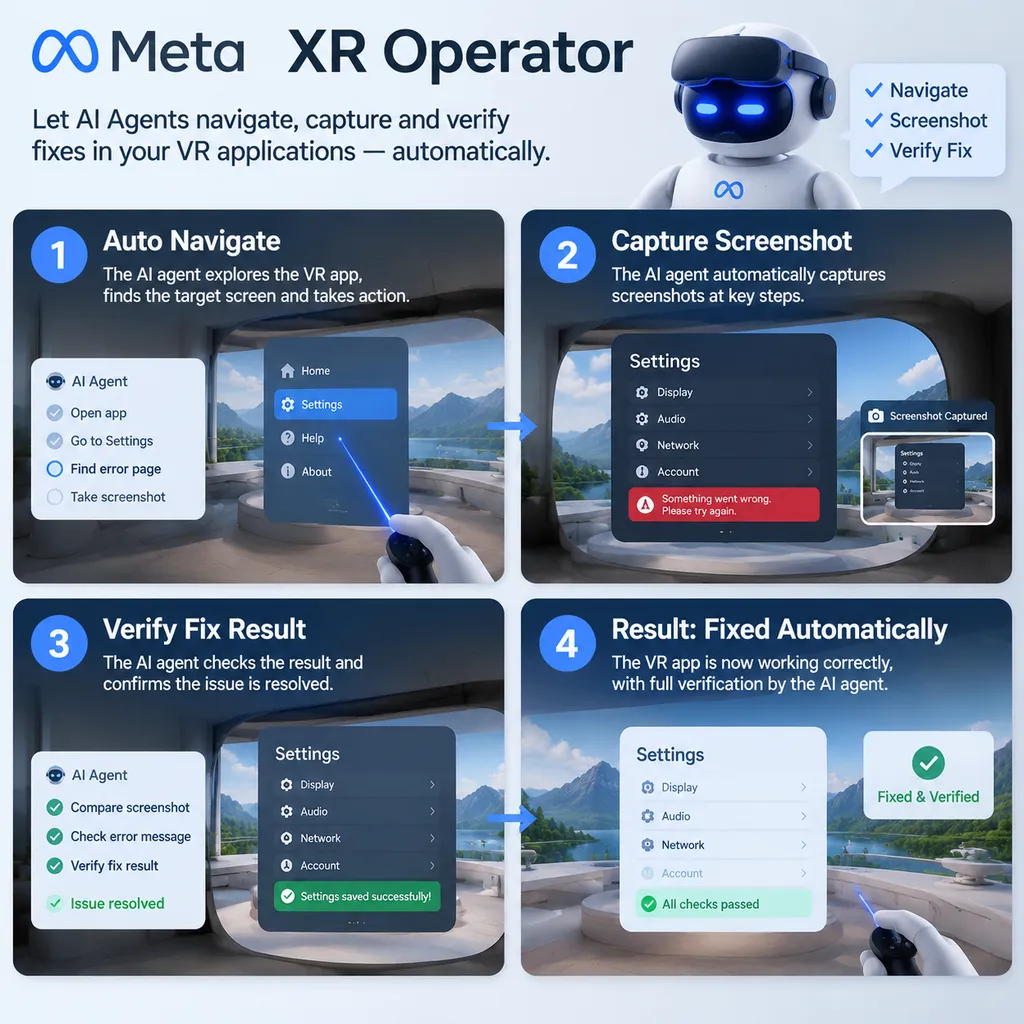
Meta recently introduced the experimental developer tool XR Operator and integrated it into Meta XR SDK v205. With the help of the OpenXR API layer and MCP, an AI agent can launch and operate VR applications, take screenshots, pinpoint issues, modify code, and verify the results of fixes, moving VR application debugging from manual interaction to an automated closed loop for the first time.
Meta Lets AI Take Over VR Testing: XR Operator Connects to the SDK, Allowing Agents to Automatically Discover and Fix Application Issues
On August 29, Meta announced the release of the experimental developer tool Meta XR Operator. Integrated into Meta XR SDK v205, its goal is not to help developers generate a few lines of VR code, but to let AI agents directly enter the runtime environment of VR applications and complete the entire workflow of launching, observing, operating, capturing screenshots, locating problems, modifying code, and verifying the results again.
What is truly noteworthy is that Meta is attempting to compress one of the most cumbersome manual processes in VR development, repeatedly putting on and taking off a headset, entering a scene, moving the viewpoint, operating controllers, taking screenshots, returning to the computer, and modifying code, into a testing loop that an agent can execute automatically.
For traditional 2D applications, automated testing is nothing new. Browsers can be controlled by scripts, and mobile applications have mature UI automation frameworks. But both the inputs and outputs of VR applications are more complex: the test subjects include not only buttons and text, but also head pose, two-handed controllers, spatial position, gaze direction, immersive UI, and real-time rendering results. The significance of XR Operator is that it exposes these states, which were previously difficult for automation tools to understand, to MCP-compatible AI agents.
It Does Not Merely “Write Code”; It Can Enter the Application Itself
According to Meta, XR Operator is essentially an OpenXR API layer. It is currently provided as an experimental component and connects running XR applications to AI agents through MCP.
It can be understood as a “translation layer” between the application, the XR runtime, and the agent:
- The application continues to run as before, without requiring its business logic to be rewritten for agent integration;
- The OpenXR API layer exposes XR session, input, and spatial state;
- The MCP proxy converts these capabilities into tools that agents can call;
- Based on natural-language instructions, the AI agent reads state, sets poses, simulates input, and obtains screenshots;
- The agent then feeds its observations back into the code-editing and testing workflow.
This means developers can tell an agent: “Launch the project, enter the main menu, click Start Game, move to the exit, confirm whether the exit button is displayed, and save a screenshot of the result.” The agent does not merely produce a test script; it attempts to perform these actions in the running application and return evidence.
In Meta’s official examples, the agent can query the current XR session state and read and set head and controller poses as well as input states. For developers, this is more valuable than simply calling a screenshot API, because many VR bugs are not cases where “a button does not exist.” Instead, the button may appear somewhere the user cannot reach, the controller ray may be offset, an interactive object may fail to follow after a viewpoint change, or the application may not respond correctly to a particular input state.
“Build, Test, and Verify” Become a Closed Loop
The core problem XR Operator addresses is the debugging break that has long existed in VR development.
The traditional workflow usually looks like this: a developer modifies a Unity project on a computer, launches the application, puts on a Quest headset, waits for the scene to load, uses the controllers to complete an interaction, discovers a problem, takes off the headset, and returns to the editor to modify the code. A seemingly simple interaction issue may require dozens of repetitions. In collaborative work, testers must also describe the reproduction steps, screenshots, and device state to the developer all over again.
XR Operator attempts to turn this process into:
- The agent reads the task requirements and project code;
- Launches the application or connects to a running XR session;
- Queries the current scene, input, and device state;
- Performs navigation and interactions based on natural-language descriptions;
- Captures the screen and determines whether it matches expectations;
- If it finds a problem, locates the relevant code or configuration;
- Makes modifications and reruns the tests;
- Verifies that the fix has taken effect using new screenshots and state information.
The key to this workflow is not how “smart” any individual step is, but that the agent no longer remains confined to the code editor. It can connect code changes with actual runtime results, reducing situations where “the code looks fine, but everything is completely different once the headset is on.”
For developers, the most direct benefit is a shorter feedback cycle. In the past, a single test feedback cycle might take minutes, or require repeated communication between testers and programmers. After connecting an agent, many relatively deterministic checks can run automatically after every build. Regression testing is especially suitable: developers no longer need to personally walk through basic flows such as the main menu, teleportation, object pickup, and button interactions every time.
Natural-Language Testing Is More Flexible Than Recorded Scripts
XR Operator supports describing test scenarios in natural language, which clearly distinguishes it from traditional record-based automation tools.
Traditional scripts generally depend on fixed coordinates, fixed input sequences, and fixed scene states. Once the UI position changes, loading times vary, or an object moves from the left side to the right, the script may fail. An agent, however, can make a certain degree of judgment based on the current screen and application state. For example, it can first look for the “Start Game” button and then click it; after entering the scene, it can confirm that the target object has appeared before proceeding to the next step.
Of course, this does not mean natural language eliminates the need for test engineering. Developers still need to provide clear acceptance criteria. Otherwise, the agent may only be able to judge that something “looks like it is complete.” A more reliable description should include specific actions and observable results, such as:
After entering the training ground, face the blue target and fire once using the right-hand controller. Confirm that the target is hit and that the score increases. If nothing changes, capture the current screen and report the controller input state.
This type of description breaks the test into three parts, actions, objects, and results, making it easier for the agent to return verifiable evidence.
In real projects, teams can also turn common test scenarios into task templates, such as:
- Startup and initial loading tests;
- Interaction tests for the main menu and settings pages;
- Basic interaction tests for teleportation, grabbing, and throwing;
- Level transition and save recovery tests;
- UI accessibility tests under specific device poses;
- Regression tests for key task completion conditions and state machines.
These tests do not necessarily need to replace manual acceptance testing, but they can free people from a large amount of repetitive mechanical work.
Meta XR Simulator Is the Critical Piece
Meta recommends using Meta XR Simulator for rapid desktop iteration. For VR teams, this is more important than whether “AI can operate a headset.”
If every agent test must connect to a physical Quest headset, automation efficiency will be constrained by the number of devices, network conditions, headset-wearing status, and the runtime environment. Simulator provides an XR environment that can run on the desktop, where agents can perform navigation, input, and screenshot operations. Developers can first use the simulator for frequent, deterministic regression tests, and then move critical scenarios to real hardware for final verification.
However, the simulator is not a complete substitute for the real world. Meta has explicitly warned that some tools behave differently in Simulator than on a physical headset: image capture returns simulated imagery rather than real passthrough video, and spatial entities correspond to a synthetic environment loaded into the simulator rather than a scan of the room where the user is actually located.
This means XR Operator is currently better suited to testing “application logic and interaction flows” than to directly replacing real-device testing. Whether a menu opens, whether a button responds, whether a scene switches correctly, and whether a particular state updates are all suitable for an agent. But real passthrough effects, camera quality, complex lighting, wearing comfort, and spatial anchoring across different room layouts still need to be verified by a person in the headset.
Integration Costs Are Low, but Toolchain Compatibility Is Required
Meta says XR Operator does not require application code changes, so developers can try integrating it into existing projects. In a Unity workflow, the basic steps include:
- Install Meta XR Core SDK v205 or later;
- Enable the Meta XR Operator OpenXR API layer in the project;
- Configure the MCP proxy through the SDK’s AI Tools panel;
- Connect an MCP-compatible AI coding agent to the running application;
- Perform tests using Meta XR Simulator or a real XR runtime environment.
Meta emphasizes that XR Operator is model-agnostic. It is not tied to any particular model, but collaborates with compatible agents through the open MCP standard. Meta’s current setup process can connect to several mainstream agents, including Claude Code and Codex. For developers, this design is more practical than introducing a closed “Meta-exclusive AI tester”: model capabilities will change rapidly, while MCP can serve as a relatively stable tool interface.
Developers can also register custom tools to expose application-specific capabilities to the agent. For example, a game could provide tools such as “reset the current level,” “spawn a specified item,” “toggle debug mode,” and “read the task state.” This means the agent does not have to rely entirely on visual recognition to determine results; it can also read structured state from inside the application.
This is also the key to whether XR Operator can move from demonstrations into production. If the agent can only view screenshots, its capabilities remain close to those of a visual robot that can operate a mouse. Only by allowing it to read controlled application state at the same time will it be possible to build a stable automated regression system.
Current Limitations: It Is Not Yet a VR Human Tester
Meta defines XR Operator as an experimental tool and lists several clear limitations.
First, it currently cannot listen to audio effects within an application. For applications that rely on spatial audio, notification sounds, or voice feedback, the agent cannot confirm whether sounds play at the correct time, from the correct direction, or at the correct distance, even if the visuals appear correct.
Second, it cannot accurately evaluate animation and motion effects. Static screenshots are suitable for determining whether “a button appears,” “a scene has loaded,” or “the colors and text are correct,” but they are not suitable for determining whether character movements are stuttering, object trajectories feel natural, hand animations are clipping through geometry, or camera movement causes motion sickness.
Subtle visual defects may also be overlooked. Issues involving resolution, anti-aliasing, edge flickering, transparent materials, reflections, dynamic shadows, and low frame rates may not be identified reliably from a single screenshot. This is even less sufficient for detecting real-device issues such as heat, performance fluctuations, tracking loss, and experience differences caused by users having different heights.
Meta therefore recommends initially using XR Operator for static and relatively deterministic scenarios. This is a conservative recommendation, but it also represents the most reliable implementation boundary at present. Developers should not equate “the agent returned a test passed result” with “the VR experience has no problems.” It is more like an automated testing assistant that operates quickly and covers a broad range of scenarios, rather than a final experience reviewer.
What Meta Really Wants to Capture Is the XR Development Entry Point
From a product strategy perspective, XR Operator is more than a testing plugin.
The barrier to VR development has always involved more than rendering technology. Developers must also constantly switch between the “code world” and the “spatial world.” If Meta can make an AI agent the connector between these two worlds, it may be able to keep more XR development activity within its own SDK, Simulator, and Horizon OS toolchain.
This aligns with the direction taken by game engine vendors as they promote AI editors, automated debugging, and intelligent testing. But the special nature of XR makes this even more valuable. With 2D applications, developers can directly observe results on a screen; with VR applications, the headset itself adds another layer of operational cost. Whoever can reduce this cost first may influence developers’ willingness to choose a particular platform.
At the same time, Meta’s choice to use MCP rather than bind the tool exclusively to its own models reveals another judgment: in development tools, models are not the scarcest resource. The ability to call application tools safely and reliably is. As long as an agent can understand tasks and call a set of reliable XR tools, developers can replace the underlying model according to their requirements for cost, speed, coding ability, or privacy.
However, this model also introduces new risks. Once an agent has permission to modify code and operate the runtime environment, the testing process requires stricter sandboxing, version control, and rollback mechanisms. Developers must clearly define which operations can be executed automatically and which modifications require human confirmation. Otherwise, an incorrect automatic fix could spread a localized problem across the entire project.
What It Means for Developers
In the short term, XR Operator is best suited to the following types of teams:
- Teams developing Quest or Horizon OS applications that require frequent regression testing;
- Developers using Unity and OpenXR workflows who want to reduce the number of times they manually put on a device;
- VR game projects with extensive menus, interaction flows, and state-machine logic;
- Teams that want to integrate AI coding agents into their existing development workflows rather than purchase a closed testing platform;
- Teams that need to identify obvious interaction problems early in CI or a desktop simulation environment.
However, if a project’s core experience depends on real-time animation, spatial audio, real-world room understanding, or complex visual quality, XR Operator can currently cover only part of it.
A reasonable approach is to divide testing into three layers. The first layer is run by the agent in Simulator and handles frequent verification of logic and deterministic flows. The second layer is handled by automated scripts or device clusters for real-hardware regression testing. The third layer is performed by human testers who evaluate immersion, comfort, visual quality, and experience issues that cannot be structurally described.
In other words, XR Operator can reduce developers’ complaints about having to put on a headset themselves every time, but it cannot yet eliminate the human judgment required to answer whether a VR experience is actually good.
Conclusion: VR Automation Finally Moves from Screenshots to Interaction
The release of Meta XR Operator does not immediately solve every problem in VR testing, but it takes a more important step: it brings AI agents out of the code editor and into the spatial application itself.
In the past, AI programming tools were mainly responsible for writing code, explaining errors, and generating test cases. XR Operator goes further by allowing agents to perceive running XR sessions and participate in verification through input, pose, and screenshots. As long as MCP, the OpenXR API layer, and simulator workflows become stable enough, XR development may eventually adopt a routine process like this: a developer submits a code change, the agent automatically launches the scene, performs dozens of interaction tasks, attempts to fix any failures it finds, and returns results containing screenshots and state information to the team.
There is still a long way to go before fully unattended VR testing becomes possible, especially in audio, animation, performance, and real-world spatial environments. But for the basic regression tests that consume the most time, XR Operator has already provided an actionable direction. What Meta now needs to prove is not whether an agent can occasionally complete a demonstration, but whether it can work continuously, reliably, and reversibly in real projects.
If the answer is yes, the bottleneck in XR development may shift from “how to get AI to write VR code” to “how to get AI to understand and maintain a dynamic 3D application over the long term.” That would be a much bigger change than automatically generating scripts.
References
- IT Home: Meta Releases XR Operator Developer Tool for Quest Headsets — A Chinese-language report covering the release of Meta XR Operator, its integration into SDK v205, and its current capability limitations.