
System-level packet capture + AI, API reverse engineering is automated from now on
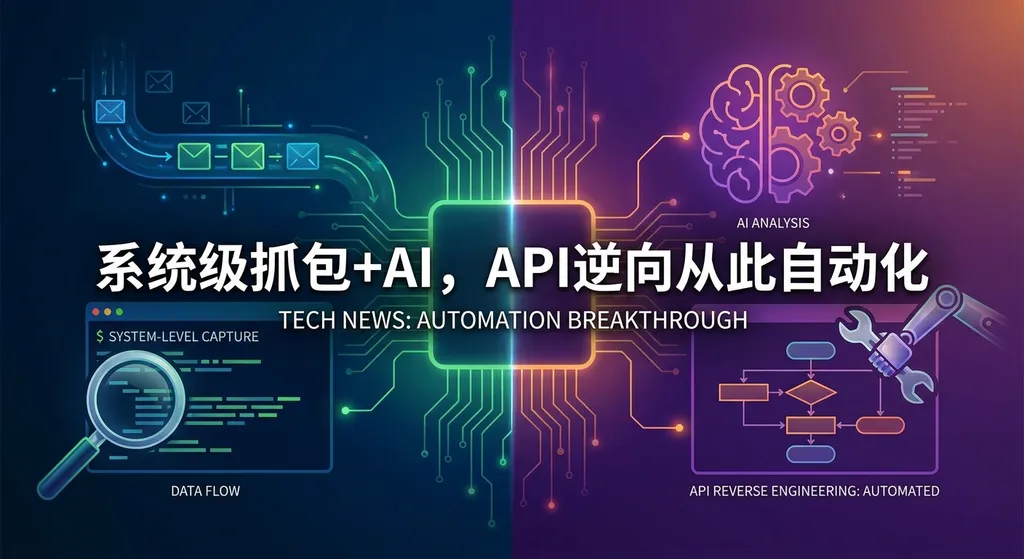
Anything Analyzer v3.0.0 released, adding system-level network monitoring capabilities. It can automatically capture any application's API requests and generate structured protocol documentation, which can be directly fed into AI coding tools to generate integration code—greatly lowering the barrier to API reverse engineering.
No More Manual Packet Captures — Anything Analyzer Automates API Reverse Engineering
Any developer who’s done API integration knows that the most painful part is often not the coding itself, but figuring out what the API actually looks like. Missing documentation, unclear field meanings, guessing at authentication logic — the time these eat up can exceed the time it takes to write business logic.
In mid‑April, the open‑source tool Anything Analyzer released a major update, version v3.0.0. The core change this time is just one, but it’s a big one: system‑level network monitoring.
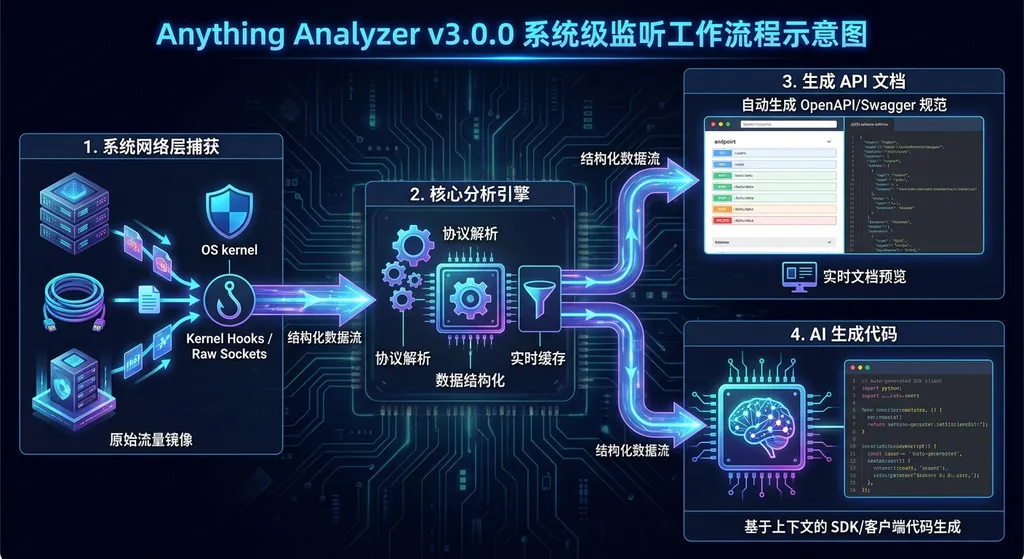
Simply put, before you had to manually configure a proxy, attach Charles or mitmproxy, and route traffic through them for analysis. Now, Anything Analyzer can intercept network requests directly at the operating‑system layer. Regardless of whether those requests come from a browser, desktop client, or background service, it can capture all HTTP/HTTPS traffic and automatically organize it into structured API protocol documentation.
The goal of this documentation is clear — to feed it directly to an AI for code generation.
What Problems Does It Actually Solve?
First, some background.
Now that AI coding tools like Cursor, Copilot, and Windsurf can write most of your boilerplate code, the bottleneck has shifted earlier in the process: you first need to tell the AI the API’s request format, parameter structure, and authentication method. Without this information, even the most powerful model can only produce something that looks right but doesn’t actually work.
The traditional workflow looks like this:
- Open Charles / Fiddler / mitmproxy, configure the proxy and certificates
- Operate the target app to trigger the endpoints you care about
- Search, filter, and copy requests and responses in the capture tool
- Manually organize them into documentation or a prompt for the AI
- Let the AI generate code, test it, find missing fields, go back to step 2
Each cycle of this is tedious — especially with complex apps containing dozens or hundreds of requests all mixed together.
Anything Analyzer aims to compress steps 1–4 into one step: you operate the app while it automatically captures, analyzes, and documents everything in the background.
How System‑Level Monitoring Works in v3.0.0
Before v3.0.0, Anything Analyzer worked more like an enhanced packet sniffer — you had to manually specify a target or proxy configuration. That was fine for many cases, but it broke down in scenarios like:
- The app uses certificate pinning, which makes proxy interception fail
- Some desktop clients don’t use the system proxy
- You don’t know which endpoints a feature will hit and need full capture before filtering
System‑level monitoring in v3.0.0 fundamentally means intercepting at a lower level in the network stack. Instead of relying on application‑layer proxy settings, it uses network interfaces provided by the OS (similar to Wireshark’s layer, but focused on HTTP/HTTPS parsing) to capture traffic.
That brings several implications:
- Broader coverage: any HTTP request from the local machine can, in theory, be captured — whoever sends it
- Less configuration: no more manual proxy setup or certificate import; it just works
- Non‑intrusive to target apps: the apps don’t notice the monitoring, reducing behavioural differences
Of course, HTTPS decryption still requires dealing with certificate trust — there’s no silver bullet here. But compared to per‑app configuration, v3.0.0 makes the process far more automated.
What the Generated Documentation Looks Like
This is what developers care about most.
Anything Analyzer doesn’t just dump request logs; it generates structured API protocol documentation. According to community feedback, the output typically includes:
- Endpoint URL and request method
- Request headers (including authentication tokens, cookies, etc.)
- Request body field structure and inferred types
- Response body field structure
- Call order and dependencies between endpoints (e.g., log in to get a token, then call business APIs)
Crucially, the document format is optimized for AI consumption. You can paste it directly into Cursor, Copilot Chat, or any AI coding tool supporting long context, letting the model generate integration code from real protocol details.
Example use case: you want to integrate an internal admin system’s data‑export feature, but it has no public API docs. Previously this might take half a day of packet capturing, organizing, and trial‑and‑error. Now the flow becomes:
- Start Anything Analyzer’s system‑level monitoring
- Perform a normal data export in the admin system
- Stop monitoring and obtain the auto‑generated protocol documentation
- Feed it to an AI to generate Python / Node.js integration code
The whole thing could take only about 10 minutes.
How It Compares to Existing Tools
Let’s be clear: Anything Analyzer isn’t trying to replace Charles or mitmproxy. Those remain irreplaceable for network debugging and performance analysis.
Anything Analyzer targets a more specific need: automatic conversion from packet captures to usable documentation.
| Dimension | Charles / Fiddler | mitmproxy | Anything Analyzer v3.0.0 | |------------|--------------------|------------|---------------------------| | Packet capture | Mature, stable | Programmable, flexible | System‑level, minimal config | | Documentation generation | None, manual | Via custom scripts | Automatic, structured docs | | AI integration | None | Requires custom code | Native support, AI‑optimized output | | Learning curve | Medium | High (scripting required) | Low (“plug‑and‑play”) | | Use cases | General network debugging | Automated testing, security analysis | API reverse‑engineering + AI coding |
So, Anything Analyzer’s differentiation lies in bridging packet capture and AI coding. It’s not the most powerful capture tool, but it’s probably the smoothest pipeline for “capture → documentation → AI‑generated code.”
Practical Use with AI Coding Tools
Project docs mention that the generated protocol analysis can directly integrate with AI dev tools like Cursor (CC). In practice, the workflow looks like this:
- Anything Analyzer produces an API doc (Markdown / JSON)
- Open the doc in Cursor or paste it into a chat window
- Use natural language to describe what you want, e.g. “Using this API doc, implement login and user export in Python requests.”
- The AI generates code based on the real endpoint details
Because the document includes real headers, parameters, and authentication logic, the generated code quality is much higher than what you’d get from verbally describing the API. That eliminates the “AI guessing parameter names” problem and saves debugging time.
If your workflow involves having a large‑language model perform further automation (e.g., analyzing multiple API docs, generating test cases), you can route through an API aggregation platform like OpenAI Hub to call different models under one key. Here’s an example of feeding the Anything Analyzer output to a model to auto‑generate integration code:
import openai

client = openai.OpenAI(
    api_key="your OpenAI Hub API Key",
    base_url="https://api.openai-hub.net/v1"
)

# Assume api_doc is the API protocol document produced by Anything Analyzer
api_doc = open("captured_api_doc.md", "r").read()

response = client.chat.completions.create(
    model="gpt-4o",  # or claude-sonnet, gemini-pro, deepseek-chat, etc.
    messages=[
        {
            "role": "system",
            "content": "You are a senior backend developer skilled at generating Python integration code from API protocol docs. Include full error handling and authentication logic."
        },
        {
            "role": "user",
            "content": f"The following is an automatically generated API protocol document:\n\n{api_doc}\n\nBased on it, use the Python requests library to generate complete integration code, including login auth and core business calls."
        }
    ],
    temperature=0.3  # Lower temperature for more stable code generation
)

print(response.choices[0].message.content)
The advantage of this approach is flexibility — you can pick different models depending on API complexity: DeepSeek for simple CRUD endpoints, Claude or GPT‑4o for complex authentication flows, all under one API key.
Community Feedback and Current Status
According to discussions in the linux.do community, after v3.0.0’s release participation increased sharply — threads are already on page 14. User feedback clusters around:
Positives
- System‑level monitoring is indeed convenient — no more proxy configuration headaches
- Documentation quality surpasses manual compilation, especially in reflecting endpoint dependencies
- Smooth integration with AI coding tools
Points to Note
- Some users reported 502 errors, though discussions suggest these were temporary server issues, not tool bugs (502 is a server‑side error)
- Cross‑OS behavior varies; Windows compatibility issues are the most mentioned
- HTTPS decryption still requires user understanding — not completely “zero‑config”
Overall, this is a fast‑moving open‑source project. System‑level monitoring in v3.0.0 is a directional leap, though stability and cross‑platform consistency still need work.
Why This Matters
In a broader sense, Anything Analyzer embodies a trend: automating context acquisition for AI coding tools.
Over the past year, AI’s coding abilities have improved dramatically — from completion to full generation, from single files to entire projects. But an overlooked bottleneck remains: model output quality depends heavily on input context quality. Give it an accurate API doc, and it writes runnable code; give it a vague description, and you’ll get a half‑baked scaffold.
Thus, whoever can most efficiently turn real‑world technical information into AI‑consumable structured context will hold a key position in the AI‑coding pipeline.
Anything Analyzer tackles one slice of that problem: turning network protocols — messy, unstructured data buried in packet logs — into documentation that AI can immediately understand and use.
Similar ideas are emerging elsewhere: for example, Harness’s AI orchestration toolkit structures context using file systems, sandboxes, and memory (AGENTS.md); likewise, RAG solutions convert document repositories into searchable knowledge sources for models.
Different entry points, same direction: give AI better context to produce better results.
In Closing
If your daily work involves API integration, protocol analysis, or reverse‑engineering undocumented endpoints, Anything Analyzer v3.0.0 is worth a try. System‑level monitoring significantly expands its practical range.
But keep expectations realistic: it’s still a community‑driven open‑source project, not a polished commercial product. Compatibility issues and edge‑case bugs are normal. The upside is that open source lets you contribute fixes, and community iteration seems brisk.
For developers, the deeper insight is about workflow: once the “capture → documentation → AI‑generated code” pipeline becomes seamless, a lot of previously manual reverse‑engineering tasks may truly become one‑click operations.
That change may prove more interesting than the tool itself.
References
- Anything Analyzer v3.0.0 Release Discussion – linux.do: original community post including changelog and user feedback


