<think>**Translating headline precisely**</think> Microsoft Has Put the Brakes on AI Agents

Microsoft plans to introduce a human approval mechanism to Copilot Studio starting in September. Developers will be able to configure approval checkpoints for agents and tools, allowing high-risk actions—such as sending emails, closing tickets, and processing payments—to pause for confirmation before execution.
<think>Planning markdown-preserving translation</think>
Microsoft Has Added a Brake to AI Agents
Microsoft is adding a configurable “brake” to AI Agents in Copilot Studio. According to Microsoft, Copilot Studio plans to roll out an adjustment starting in September 2026: when an Agent is about to call a specific tool, it can pause first and wait for human approval before continuing.
This update is not aimed at whether “the model might answer incorrectly,” but at who is responsible for an Agent’s actions now that it has started to actually do things for enterprises.
Sending emails, closing tickets, and processing payments are tasks that could previously be executed directly by automated workflows. But once they are handed to an Agent capable of planning and calling tools, the risk changes from “the answer is inaccurate” to “the action has already happened.” Microsoft’s solution is not to try to make the model absolutely reliable, but to add a human control point to the tool-calling chain.
This may be an unavoidable step as enterprises move Agents from demonstration environments into production.
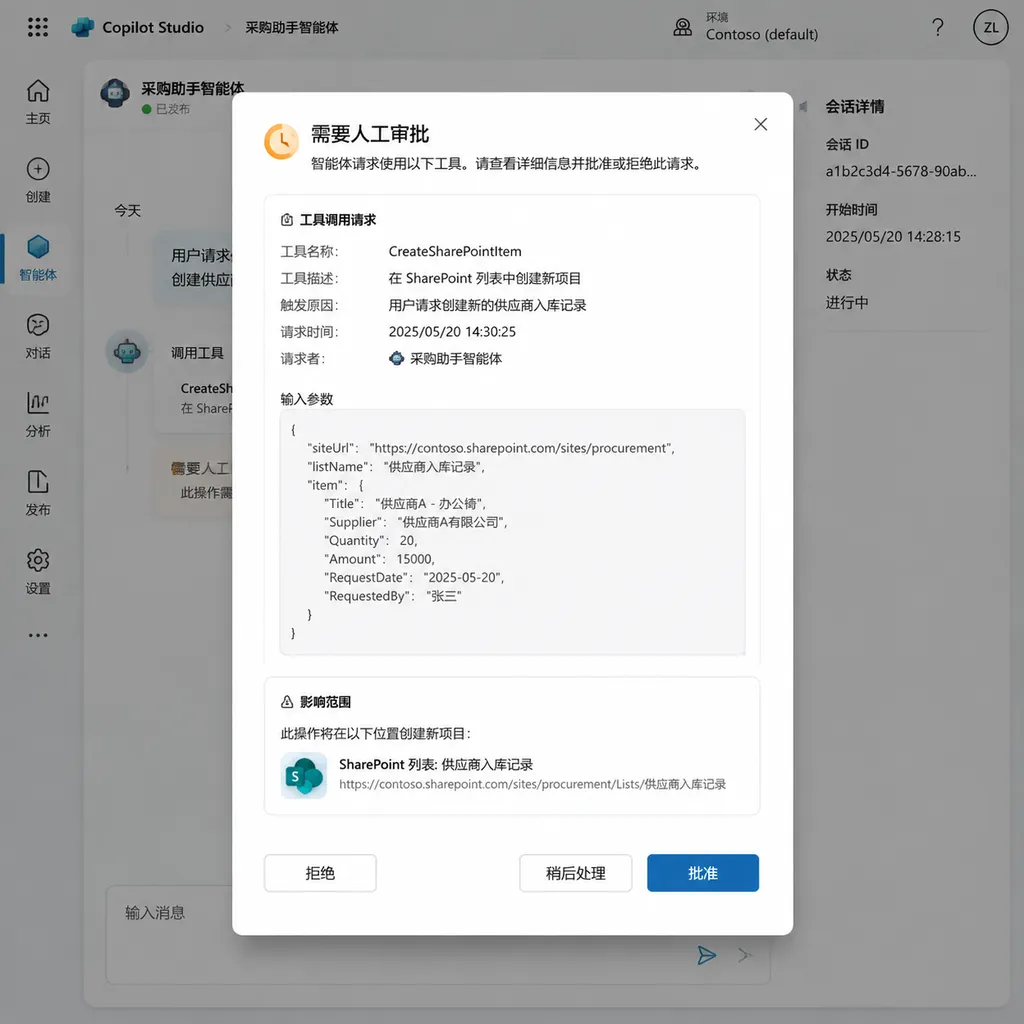
Approval Granularity Is at the “Tool” Level, Rather Than One-Size-Fits-All
Copilot Studio is Microsoft’s platform for creating, configuring, and managing AI Agents. It allows Agents to connect to email, ticketing systems, payment tools, and other enterprise business systems, carrying out a range of tasks from information retrieval to transaction processing.
The key to this update is that human approval is not simply a global switch that can only be turned on or off. Microsoft allows developers to configure approval requirements separately for each Agent and each tool.
When a tool is marked as requiring human approval, the Agent’s request to call that tool is paused and an approval request is generated. The request explains what the Agent is preparing to do, and the user can choose to:
- Approve this call: Allow only the current operation to proceed;
- Approve for this session: Continue allowing related operations within the current task or session;
- Reject the call: Prevent the tool from executing and cause the Agent to stop or return a failure status.
From an engineering perspective, this is equivalent to inserting a human node into the Agent’s execution graph: the model can continue analyzing, planning, and preparing parameters, but before it triggers an external side effect, it must wait for an explicit authorization signal.
This is similar to an approval node in a traditional workflow, except that the object being approved has changed from a “form” to an Agent’s tool call. The model proposes an action, the system pauses, and a human makes the final decision on whether the action should be carried out.
High-Risk Actions Can Finally No Longer Be Taken “On Their Own”
The scenarios listed by Microsoft are highly specific: sending emails, closing tickets, and processing payments.
These actions may not appear complicated, but they all share one trait: once executed, they can have a real impact on an enterprise’s external systems or business relationships.
For example, suppose a customer service Agent is responsible for handling support tickets. Based on the conversation, it may determine that an issue has been resolved and prepare to call a “close ticket” tool. With approval enabled, the Agent can complete its assessment and generate a reason for closing the ticket, but it cannot directly change the ticket’s status to closed. A customer service representative or supervisor must confirm first, after which the system will execute the action.
Similarly, a sales Agent may draft a quotation email based on the customer’s communication history. It can automatically extract the products, prices, and recipient, and prepare the body of the email, but the “send” action will be blocked. The approver can check the recipient, discount, and wording before allowing it to proceed.
The payment scenario is even easier to understand. An Agent can organize payment information from a purchase request and may even call a payment tool to prepare a transaction, but before funds actually leave the account, it must wait for human confirmation.
This mechanism cannot solve every problem, but it at least takes the most dangerous step back from the model: the model can make recommendations, the system can prepare the action, and a human decides whether to execute it.
It Addresses “Controllability,” Not “Accuracy”
It is important to be clear that human approval does not automatically make an Agent’s judgment correct.
If the Agent submits the wrong recipient, incorrect amount, or mistaken interpretation of a ticket to the approver, the approval process may simply transfer the risk to a pop-up that appears safer. If approvers cannot see the full context, or if they face hundreds of low-quality requests every day, they may eventually become mechanical clickers of the “Approve” button.
Therefore, the value of this feature does not lie in adding a button, but in whether it can provide sufficient decision-making context. At a minimum, a qualified approval request should tell the human:
- What the Agent wants to do;
- Why it wants to do it;
- What inputs and context it used;
- Which tool it will call;
- What the key parameters are;
- Whether the operation can be undone;
- How the task will proceed if the request is rejected.
The information Microsoft has disclosed so far focuses on “displaying the Agent’s intent.” But in a production system, merely displaying a statement such as “The Agent wants to send an email” is far from sufficient. The approver needs to see the recipient, subject, body summary, and attachment information. A payment operation requires the amount, account, currency, order number, and risk level. Closing a ticket requires the handling history, customer status, and any outstanding issues.
In other words, what truly matters is not whether approval exists, but whether the approval interface can translate the Agent’s black-box action into a business decision that a human can quickly verify.
“Approve for This Session” Is a Compromise Between Efficiency and Security
Microsoft is also providing an “Approve for this session” option, which is significant.
If a pop-up appears for every tool call, the Agent’s efficiency will quickly decline. A workflow that needs to send multiple notifications or update multiple tickets could force the user to confirm repeatedly, ultimately becoming “manual operation, with the model merely writing the steps.”
But if approval grants permanent authorization, the approval mechanism loses its meaning.
“Approve for this session” attempts to strike a balance between the two: users can authorize multiple calls within a limited task scope rather than permanently opening access to a particular tool. In theory, this can reduce repetitive confirmations while restricting the authorization boundary to the current session, task, or lifecycle.
However, the actual effect depends on how Microsoft defines a “session” and whether developers can further limit the authorization scope. A session authorization truly suitable for enterprise use should be bound to at least some of the following conditions:
- The current user or approver;
- The current Agent and task instance;
- The specified tool;
- A validity window;
- The number of calls;
- A monetary or data-volume limit;
- The target objects or resource scope.
Otherwise, “Approve for this session” could easily become a vague form of temporary administrator access: convenient, certainly, but difficult to explain after an incident exactly what the permission covered.
Why Microsoft Is Emphasizing This Now
Agent products are rapidly shifting from “assisting with answers” to “executing tasks on behalf of users.” In the past, Copilots mainly helped users write text, summarize documents, or generate code. Errors could generally be spotted before submission.
But when an Agent can connect to email, CRM systems, ticketing platforms, databases, and payment systems, the cost of errors rises significantly.
A model hallucination might produce nothing more than an incorrect explanation; a hallucinated tool call, however, could result in an incorrect email being sent to a customer, a record being deleted, an unresolved ticket being closed, or even an erroneous payment being completed. Particularly in multistep Agent workflows, an incorrect judgment made early on can be repeatedly amplified by subsequent steps.
As a result, the difficulty of deploying Agents in enterprises is no longer just choosing the right model. It is also about establishing a complete execution governance framework:
- Identity governance: Clearly define who manages each Agent;
- Permission governance: Specify what it can read, modify, and call;
- Risk classification: Distinguish between read-only, writable, irreversible, and financial operations;
- Approval mechanisms: Set up human confirmation for high-risk tools;
- Auditing and traceability: Record model inputs, tool parameters, approvers, and execution results;
- Exception handling: Ensure that the system can be stopped immediately in the event of looped calls, unauthorized access, or prompt injection.
This Copilot Studio update is effectively filling in the layer of control between an Agent being able to “call tools” and being trusted by an enterprise to operate with authorization.
But Human Approval Is Not a Cure-All
From a product-design perspective, Microsoft’s choice of human approval is pragmatic. From a security perspective, however, it is only the first line of defense.
First, approvers themselves may be subject to “context poisoning.” If the summary generated by the Agent omits critical risks or presents a high-risk operation as an ordinary workflow, a human may grant an approval that is procedurally correct but substantively wrong based on incorrect information.
Second, approval introduces latency. For real-time customer service, automated operations, and large-scale data processing, even a delay of several dozen seconds can affect the user experience. Enterprises cannot subject every action to the same level of human confirmation; they must establish a tiered strategy.
A more reasonable approach is to divide tool calls into several categories:
| Operation type | Example | Recommended strategy | | --- | --- | --- | | Low risk, reversible | Querying orders, reading a knowledge base | Execute automatically by default and record it in logs | | Medium risk, roll-back possible | Updating ticket tags, drafting emails | Session approval or sampled approval | | High risk, irreversible | Closing tickets, modifying permissions, deleting data | One-time human approval | | Financial and compliance-related | Payments, refunds, contract submissions | Multi-person approval or human takeover |
In addition, enterprises need to consider prompt injection. Even when an Agent has an approval node, malicious content may still induce it to generate an incorrect tool-call request. An approval process can intercept the final step, but it cannot replace input isolation, least-privilege access, parameter validation, and security policies on the tool side.
If an Agent is granted excessive permissions, adding a confirmation pop-up before a tool call will mostly reduce the probability of an incident; it will not eliminate the possibility of one.
The “Autonomy” of Agents Needs to Be Redefined
There is also a broader shift behind this update: enterprise expectations for Agents are moving from “complete automation” to “automation within boundaries.”
Early Agent narratives emphasized autonomous planning, autonomous tool use, and autonomous task completion, as if fewer human interventions automatically meant a more advanced product. But in real enterprise workflows, completely unattended operation is not always the goal. What many organizations truly want is for an Agent to handle 80% of repetitive work, turn humans from operators into supervisors, and preserve human control over critical actions.
This means an Agent’s maturity cannot be measured solely by its “automated completion rate.” It must also be evaluated on whether it can:
- Stop at the right point;
- Explain to humans what it intends to do next;
- Accept approval, rejection, and modifications;
- Choose a safe alternative path after being rejected;
- Leave an auditable record of every action;
- Be terminated quickly when an anomaly is detected.
An Agent that never stops may simply be an automation script that operates faster. An Agent that knows when it must stop—and can help people understand why it has stopped—is closer to the execution system enterprises need.
What This Means for Developers
For developers building enterprise Agents with Copilot Studio, this update should not be understood simply as “adding an approval switch in front of a tool.” It will, in turn, affect tool design and workflow architecture.
First, tools need to provide clear parameter and risk descriptions. A black-box tool that wraps every action into execute() makes it difficult to generate meaningful approval information. A more reasonable design is to split the process into two stages—“preview” and “execute”—so that the Agent first generates an operation plan that can be inspected, after which the system carries out the final action.
Second, high-risk tools should support idempotency and rollback. An approver may click repeatedly, and an Agent may retry because of a timeout. If tool calls do not have idempotency keys, problems such as duplicate payments and duplicate emails may still occur.
Third, developers need to place access controls on the tool service side rather than relying solely on Agent configuration. Approval rules in Copilot Studio can control the workflow, but actual authorization, parameter validation, and quota limits should still be enforced by the email service, ticketing system, or payment service itself.
Fourth, logs need to cover the entire chain: what intent the model proposed, what parameters the system generated, who approved the request, and what result the tool ultimately returned. Without this information, it is difficult to determine after an incident whether the problem originated with the model, the orchestration logic, the approver, or a downstream system.
The direction of Microsoft’s update is correct, but whether enterprises actually gain security benefits will ultimately depend on whether these engineering details are properly implemented.
Assessment: Agents Enter Production Not by Being Bolder, but by Learning to Brake
Adding human approval to Copilot Studio may make some Agents’ “automated completion rates” appear lower in the short term. It will increase waiting times and make workflow design more complex. But for actions involving external side effects, such as emails, tickets, and payments, this decline is worthwhile.
What enterprises have always truly feared is not that an Agent occasionally gets a sentence wrong, but that it might write an error into a business system, send it to a customer, or turn it into a real transaction without anyone realizing it.
Therefore, the value of this feature does not lie in making Agents smarter, but in making them easier to authorize. It reframes “Do we trust the model?” as a more actionable question: What may this Agent do automatically, within what scope, and at what boundary must it stop and ask a human?
This may also become a competitive focus for enterprise Agent products in the next phase. Model capabilities determine whether an Agent can complete a task; permissions, approvals, auditing, and rollback capabilities determine whether an enterprise dares to entrust that task to it.
Microsoft is beginning by adding this brake to Copilot Studio. Similar mechanisms will likely expand to more Agent platforms and development frameworks: authorization by tool, risk-based classification, session-based approval, and the preservation of human takeover rights before critical operations.
For developers, when designing Agents in the future, in addition to asking “Which tools can it call?”, they should first ask: Which tools must it stop before calling?
Sources
- ITHome: Microsoft Adds a “Brake” to Copilot AI Agents: Operations Such as Sending Emails Can Request Approval First — Introduces Microsoft Copilot Studio’s human-approval mechanism, configuration methods, and applicable scenarios.