
Codex is no longer just writing code — it's going to take over your computer.

OpenAI has released a major update for Codex, adding native computer control, background multi-agent parallelism, long-term task automation scheduling, and integration with over 90 plugins. Combined with GPT-5.4’s million-token context and computer-use capabilities, Codex is evolving from a coding assistant into a full-stack development agent.
OpenAI just gave Codex a major overhaul.
The core message of this update can be summed up in one sentence: Codex can now operate your computer like a human—watching the screen, clicking the mouse, typing on the keyboard, and switching between desktop applications to complete tasks. It’s no longer just a code generator, but a legion of intelligent agents quietly working in the background of your Mac.
This isn’t a minor patch. It’s a transformation of Codex’s identity—from a coding tool to a general-purpose development agent.
Computer Control: From Generating Code to Executing Code
No matter how smart the old Codex was, it fundamentally lived in a sandbox, writing code and running terminals. If you asked it to adjust some front-end styling, it could generate code but couldn’t open a browser to check if the rendering looked right. If you asked it to test an app, it could only talk theory.
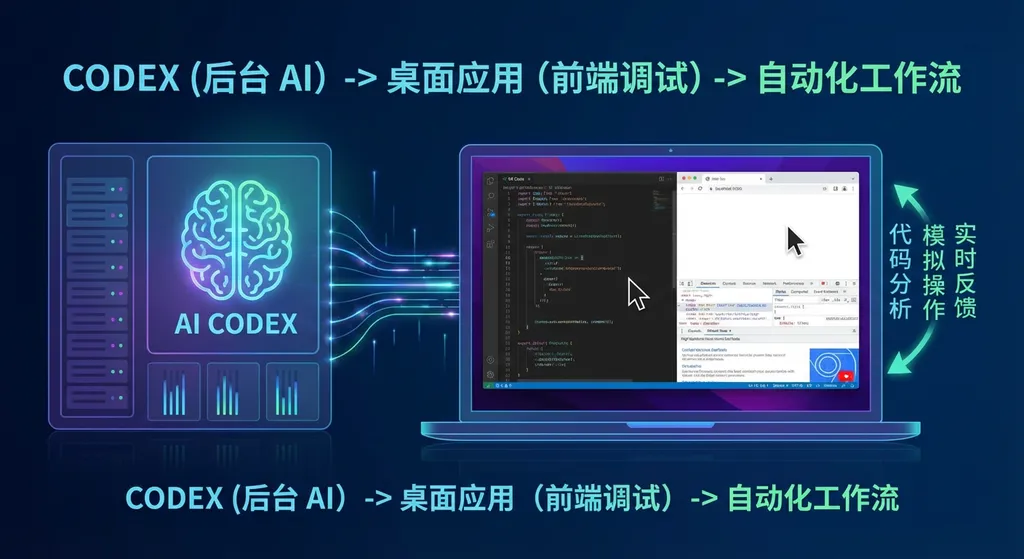
Now it’s different. The new Codex introduces native Computer Use capabilities, enabling it to:
- Directly control desktop applications—including browsers, IDEs, terminals, and even design tools like Figma
- Visually recognize screen content and understand the position and state of UI elements
- Simulate human actions such as mouse clicks, keyboard input, and scrolling
- Switch between multiple applications to carry out cross-tool workflows
A practical example: you ask Codex to fix a front-end bug. In the past, after it modified the code, it stopped—you had to refresh the page yourself, check the result, take comparison screenshots, and investigate further. Now, Codex can open the browser itself, load the page, screenshot and compare before-and-after differences, find new issues, and go back to fix them—all in a closed loop, fully automated.
This capability is powered by the simultaneously released GPT‑5.4, OpenAI’s first general-purpose model with native, best‑in‑class computer use abilities, supporting up to a 1M-token context window. A million-token context means the agent can maintain understanding of an entire project over long sessions without “forgetting things.”
Developers familiar with Anthropic’s development might find this familiar—Claude introduced Computer Use last year. OpenAI’s move is a direct response, but instead of releasing it as an experimental API, they’ve integrated computer control directly into Codex, which already has a large developer user base. The Verge’s headline put it bluntly: this is a direct attack on Claude Code.
There’s one practical issue, though: computer control currently only supports macOS. Windows users are out of luck for now. The community is already grumbling—“Windows version always lags behind,” “Does everyone at OpenAI use a Mac?” Considering Codex’s desktop app only added Windows support in March, it might take a while before computer control lands there.
Background Multi-Agent System: One Person Commanding a Team
If computer control is Codex’s new ability, then background multi-agent concurrency is its new working mode.
The new Codex introduces a background running mode. Multiple agents can work simultaneously on your Mac, each handling different tasks independently without interfering with each other or occupying your screen. You can keep writing documentation while Codex agents run tests, review PRs, and fix bugs in the background.
The Codex desktop app is positioned as the “command center for agents.” Each agent runs in an independent thread, organized by project, allowing you to switch between tasks seamlessly without losing context. The design logic is clear: the developer’s role is shifting from “someone who writes code” to “someone who commands intelligent agents.”
OpenAI demonstrated this vividly: they had Codex build a racing game from scratch—with multiple drivers, eight maps, and an item system. Codex used over 7 million tokens, acting simultaneously as designer, game developer, and QA tester—it even played the game itself to verify functionality. The entire process was triggered by a single initial prompt.
That demo was partly showmanship, but the workflow it demonstrates is real: you set a goal, and the agent autonomously breaks down tasks, assigns roles, and validates results.
Long-term Task Automation: More Than a Single Conversation
One easily overlooked but potentially most valuable addition is Automation Scheduling.
Codex now supports long-term tasks spanning days or weeks. You can define an automated workflow and schedule it; Codex will run in the background according to plan. When tasks finish, results are placed in a review queue for you to check later.
What does this mean?
- Automatically run test suites at midnight—see reports first thing in the morning
- Review new PRs weekly and provide comments based on team standards
- Monitor dependency updates, automatically create upgrade PRs, and ensure tests pass
- Regularly scan the codebase for security issues and generate fixes
These were tasks that previously required configuring CI/CD pipelines or writing automation scripts—now you can describe them in plain language.
With strengthened memory capabilities, Codex can retain your preferences, project context, and history. It’s no longer a stateless tool that starts from scratch every time—it becomes a long-term collaborator that grows to understand you.
90+ Plugins: Integrating the Development Toolchain
The new Codex integrates over 90 plugins, covering nearly all tools developers use daily:
- Code hosting: GitHub
- Project management: JIRA
- Team communication: Slack
- Cloud deployment: Cloudflare, Netlify, Render, Vercel
- And more...
Codex can proactively suggest priorities based on project context. For example, if it sees a high-priority bug in JIRA, a related Issue on GitHub, and a colleague discussing reproduction steps on Slack—it can connect the dots and start fixing it.
In addition, Codex introduces a Skills system—packages of instructions, resources, and scripts enabling consistent and reliable tool integration. OpenAI provides an open-source skill library covering web game development, image generation, cloud deployment, and more. You can also create custom skills to encapsulate your team’s unique workflows.
Built-in browser and image generation capabilities are also highlights of this update. Codex can now preview web pages directly in its embedded browser and use GPT’s image capabilities to generate UI assets. For full‑stack developers, the path from design to development to deployment just got shorter.
GPT‑5.4: The Engine Behind Codex’s Upgrade
This Codex update coincides with the release of GPT‑5.4—the two are deeply connected.
GPT‑5.4 delivers several key capabilities critical to Codex:
- Native computer use abilities—the foundation of computer control
- 1M-token context—allowing agents to handle large projects without losing information
- Tool Search—efficiently finding and using the right tools within the 90+ plugin ecosystem
- Major token efficiency improvement—compared to GPT‑5.2, fewer tokens are needed for the same task
The fourth point is great for your wallet. Better token efficiency means less cost for the same work—or more done within the same budget. Codex also adds a /fast mode, boosting GPT‑5.4’s output speed by 1.5× with no drop in intelligence—just faster results.
For developers accessing these capabilities via API, the model names are gpt-5.4 and gpt-5.4-pro. If you use OpenAI Hub or a compatible API aggregator, switching models is as simple as changing the model parameter:
import openai

client = openai.OpenAI(
    api_key="Your OpenAI Hub API Key",
    base_url="https://api.openai-hub.net/v1"
)

# Use GPT-5.4 for conversation
response = client.chat.completions.create(
    model="gpt-5.4",
    messages=[
        {"role": "system", "content": "You are an experienced full-stack development assistant."},
        {"role": "user", "content": "Help me analyze the performance bottlenecks in this code and suggest optimizations."}
    ],
    max_tokens=4096
)

print(response.choices[0].message.content)
# Use GPT-5.4’s tool-calling capability
response = client.chat.completions.create(
    model="gpt-5.4",
    messages=[
        {"role": "user", "content": "Check the recent PRs in my GitHub repository and provide review comments."}
    ],
    tools=[
        {
            "type": "function",
            "function": {
                "name": "github_list_pull_requests",
                "description": "List Pull Requests for a specified repository",
                "parameters": {
                    "type": "object",
                    "properties": {
                        "repo": {"type": "string", "description": "Repository name in the format: owner/repo"},
                        "state": {"type": "string", "enum": ["open", "closed", "all"]}
                    },
                    "required": ["repo"]
                }
            }
        }
    ],
    tool_choice="auto"
)

print(response.choices[0].message)
Security Design: The Sandbox Still Matters
Letting AI control computers raises unavoidable security concerns. OpenAI’s design remains cautious:
- Codex uses a native, open‑source, and configurable system-level sandbox
- By default, agents can only edit files within specified directories or branches
- Web browsing uses cached results rather than direct live access
- When elevated permissions (like network access) are needed, the user must approve
- Project- or team-level policy rules can allow specific commands to run automatically with higher privileges
This permission model is similar to Linux’s sudo approach: minimal default privileges, increasing access as needed. For enterprise users, this configurable security structure is far more practical than an “all‑on or all‑off” system.
Availability & Pricing
Codex’s new features are available to all users logged into the ChatGPT desktop app. Specifically:
- ChatGPT Plus, Pro, Business, Enterprise, and Edu subscribers can access Codex via CLI, web, IDE extensions, and desktop
- Trials and additional usage credits are included in subscriptions
- Temporarily open to free and ChatGPT Go users
- Existing paid Codex users get doubled rate limits
The computer control feature launches first on macOS, with Windows support pending.
In the API realm, GPT‑5.4’s per‑token cost is higher than GPT‑5.2’s, but thanks to improved token efficiency, actual usage cost is often lower. Batch and Flex modes cost half the standard rate; Priority mode costs double.
Some Honest Thoughts
This update is ambitious, but several points deserve a realistic look.
First, reliability of computer control. Anthropic’s Computer Use has been out for a while, and real-world experience shows frequent misoperations, freezes, and misunderstandings. Whether OpenAI’s version is more stable remains to be tested extensively. Those flawless demo videos and messy daily edge cases are often worlds apart.
Second, lack of Windows support. A significant portion of developers use Windows—especially in game development, .NET ecosystems, and enterprise tooling. macOS-first may be understandable (most OpenAI staff do use Macs), but if Windows support lags too far behind, that’s a large market gap. Community frustration is already visible and shouldn’t be ignored.
Third, trust in long-term automation. Letting AI run tasks for days or weeks without oversight sounds great, but few teams would risk that in production environments. The review queue is a good design, but the gap between “post-hoc review” and “real-time monitoring” can be critical in high‑stakes workflows.
Fourth, competitive landscape. Cursor, Windsurf, Claude Code, GitHub Copilot Workspace—the AI coding tool race is crowded. Codex’s differentiation lies in its integration with ChatGPT’s massive user base and OpenAI’s model strength, but rivals are evolving fast. The endgame is nowhere near.
That said, this update clearly raises the ceiling for “AI coding assistants.” From writing code to operating computers, from single conversations to long-term automation, from solitary agents to multi-agent collaboration—it paints a picture of developers as commanders of intelligent agents.
How far are we from that future? It depends on how reliable these capabilities prove in real-world development—but the direction is clear and irreversible.
Sources:
- OpenAI releases major Codex update: supports computer automation and long-term task scheduling – Linux.do community discussion — Developer discussions and feedback on the Codex update


