<think>**Translating product title** </think> Qianwen Office Launches a Multi-User Workspace for Up to 100 People

Qwen Office launched “Multi-User Workbench” today, enabling users to generate web pages that support collaboration among up to 100 people through natural-language instructions, complete with role-based permissions, a cloud database, an admin console, and one-click publishing.
<think>Planning markdown-preserving translation
</think>Qwen Office Launches “Multi-User Workbench,” Generating Collaborative Web Pages for Hundreds of People with Natural Language
On September 7, Alibaba Cloud announced that Qwen Office had launched the “Multi-User Workbench.” Users only need to describe their business requirements in natural language to generate a web page that supports simultaneous online collaboration for up to 100 people, which can then be shared directly with team members via a link.
This is not another tool for having AI generate resumes, portfolios, or check-in pages. Qwen Office is attempting to move AI-generated web pages from “personal showcase pages” toward “lightweight business systems.” Behind these web pages are role-based permissions, cloud databases, management backends, and online publishing capabilities, enabling them to support multi-participant processes such as registration, review, task follow-up, and data collection.
For enterprises and small teams, this direction is closer to real-world needs than “AI, help me write a piece of code.” Many business processes are not important enough to justify purchasing a complete ERP, OA, or vertical SaaS product, but they still genuinely require a temporary, collaborative tool that can leave an audit trail. The “Multi-User Workbench” targets precisely the gap that has long been occupied by spreadsheets, group chats, and manual statistics.
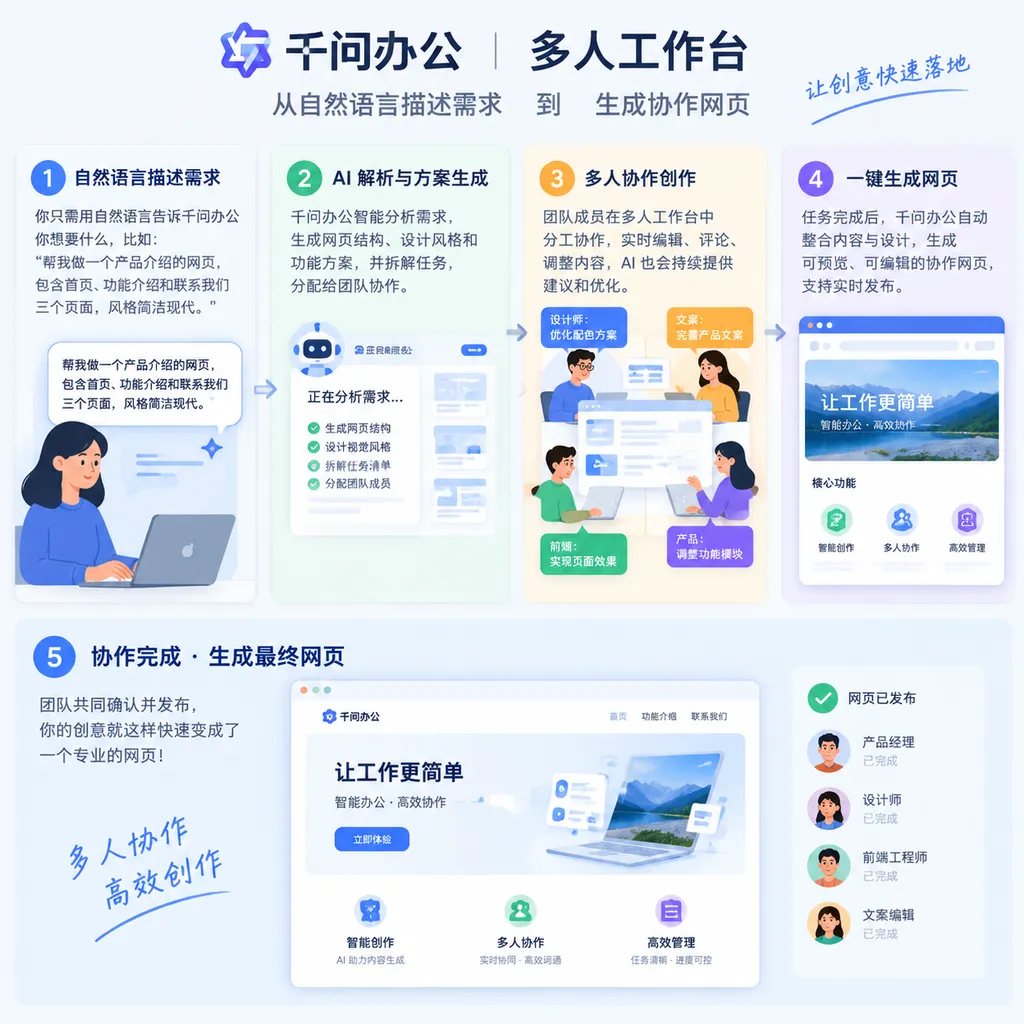
It Generates More Than a Web Page—it Generates an Entire Collaboration Workflow
From a product-mechanism perspective, the “Multi-User Workbench” includes at least four layers of capability.
The first layer is natural-language generation. Users do not need to design database fields, page structures, and approval nodes in advance. Instead, they can directly explain which roles are involved, what each role needs to do, what information needs to be collected, and what results they ultimately want to see. Qwen Office automatically breaks down the tasks and asks users to confirm key details during the generation process.
For example, to organize a market with 100 vendors, a user could describe the process as follows: the organizer reviews vendor applications; vendors submit store information and identity documents; staff follow up on booth assignments; review results need to be recorded centrally; and progress is ultimately counted by status. Based on this description, the system generates an application form, review page, status fields, and management backend, rather than merely outputting a static page.
The second layer is roles and permissions. Administrators, regular members, and external participants can see different data and perform different operations. Administrators can view all application information and modify statuses; regular members can only process tasks assigned to them; and external participants can only submit materials or view results related to themselves.
This is crucial. Many “AI-generated applications” appeared usable in the past, but once multiple people entered the system, everyone saw the same table, while permissions and data isolation had to be managed through informal human agreements. In scenarios such as home-school collaboration, influencer campaigns, and chain-store management, permissions are not an add-on feature—they are a prerequisite for the business process to function.
The third layer is a cloud database. Registration information, assignment statuses, review results, and task progress submitted by members are no longer scattered across chat histories or multiple Excel files. Instead, they are stored centrally for subsequent queries and analysis. The web page is merely the entry point; the data is the workbench’s true asset.
The fourth layer is the management backend and online publishing. Once the generated result has been reviewed and approved, it can be published with one click, allowing team members to access the workbench through a link. When the business process changes, users can continue modifying it with natural language instead of repeating the entire process of requirements gathering, development, testing, and deployment.
It can be understood as a lightweight backend system built by AI: natural language defines the business, the workbench supports collaboration, the database preserves the process, and the management backend consolidates the results.
Four Scenarios Test Whether It Can Actually Become Part of Business Workflows
At present, Qwen Office is highlighting four types of scenarios: home-school collaboration, influencer campaigns, chain stores, and 100-vendor markets. These scenarios share one characteristic: they involve relatively large numbers of participants, their processes are not particularly complex, but the cost of handing off information is high.
Home-School Collaboration: Turning Group Messages into Trackable Processes
In home-school collaboration, teachers can publish assignments, notices, and to-do items. Parents can view their children’s assignments and grades and submit leave requests. Teachers can approve requests centrally in the backend, while students and parents can only see information related to themselves.
The value of this scenario lies not in whether AI can create an attractive page, but in whether it can connect “teacher notification → parent submission → teacher approval → result feedback” into a stateful process. In reality, a large amount of home-school communication still relies on group chats. Important information can easily be buried under new messages, while subsequent statistics also depend on manual organization. A workbench with clear permissions and trackable statuses can at least reduce this type of repetitive work.
Of course, when information involving minors is involved, data security and permission configuration are more important than generation speed. Whether the product provides fine-grained data isolation, operation logs, export controls, and long-term storage policies will determine whether it can genuinely enter schools or educational institutions, rather than merely being used experimentally by individual teachers.
Influencer Campaigns: Connecting Agencies, Influencers, and Platforms
Influencer campaigns often require the simultaneous management of recruitment, information collection, qualification review, content submission, and progress tracking. Agencies, influencers, and brands care about different data. Traditional approaches typically combine spreadsheets with group chats, which can easily lead to version confusion as the number of projects increases.
The Multi-User Workbench can place influencer recruitment forms, review statuses, delivery milestones, and settlement information on a single page. Brands can view overall progress, agencies can handle reviews and follow-up, and influencers can submit only their own information and content. Compared with purchasing a complete marketing management system for a single campaign, generating a temporary workbench as needed offers a shorter deployment cycle and lower barriers to use.
However, there is also an obvious limitation: as projects grow in scale and involve complex contracts, financial management, message delivery, and third-party platform data, a generative workbench will still find it difficult to replace mature CRM or project-management systems. It is better suited to collaboration tasks with relatively standardized processes, short cycles, and a need for rapid deployment.
Chain Stores: Headquarters Need an Overview of Progress
When chain brands open stores in multiple locations simultaneously, the process often involves site selection, renovations, permits, staff recruitment, and materials preparation. Headquarters needs to know which stage each store is at, while regional managers only need to handle the tasks assigned to them.
These processes are not necessarily complex, but they can easily get out of control as the number of stores increases. The Multi-User Workbench allows headquarters to view the progress of all stores centrally and filter it by region, stage, or risk status. For small and medium-sized chain brands without mature digital systems, this “generate first, iterate later” approach is more realistic than implementing a heavyweight system all at once.
100-Vendor Markets: A Digital Tool for Temporary Projects
Markets with 100 vendors, exhibitions, campus events, and community events all face similar challenges: collecting large volumes of registration information within a short period, reviewing materials, assigning booths or tasks, and continuing follow-up after the event ends.
These needs are clearly temporary. Traditional software procurement cycles are too long, while custom development is not cost-effective. Organizations often end up relying on online forms, Excel, and multiple WeChat groups. The advantage of the Multi-User Workbench is that it can quickly generate a dedicated process and continue to be modified as event rules change.
It may not replace professional event-management platforms, but it has the potential to become “temporary digital infrastructure” for small-scale events.
Compared with Personal AI Workbenches, the Difference Lies in “Organizational State”
Many AI workbenches currently on the market primarily serve individual users: generating resumes, portfolios, personal check-in tools, information display pages, or simple single-user interactions. Their core metrics are generally page-generation speed and visual quality.
The four capabilities added by the “Multi-User Workbench” effectively change the criteria by which the product should be evaluated.
Personal tools focus on “Can I quickly create a page?” Organizational tools focus on “Can different people complete their respective tasks within the same process?” The former requires only content and interaction; the latter must also handle identity, permissions, data, status, and management.
This is also what makes Qwen Office’s latest update particularly noteworthy: it no longer treats the web page as the final product, but rather as the operating interface for a business process. What AI truly needs to generate is not buttons and cards, but the collaborative relationships between roles.
From this perspective, the “Multi-User Workbench” has similarities to traditional low-code platforms, but the interaction model is different. Low-code platforms require users to understand data tables, fields, process nodes, and components. Qwen Office is attempting to delegate these configuration tasks to an Agent, allowing users to express their business intent in natural language and then review and approve the result.
Its upper limit depends on the Agent’s ability to understand business requirements, while its lower limit depends on whether users can promptly identify errors in the generated result. For developers, this means that “generating applications with natural language” will not eliminate product design and engineering judgment. Instead, it will shift the focus of work from writing pages to defining constraints, validating permissions, designing data structures, and handling exceptional workflows.
The Real Challenge Is Not Generation, but Controlled Operation
Qwen Office has designed the generation process as “describe requirements → confirm key information → generate → review and approve → publish.” This is more reliable than generating an application directly from a single sentence, because in business systems, the most error-prone elements are often not page styles but seemingly minor rules:
- Can administrators view data from all members?
- Can regular members modify information submitted by others?
- After a review is rejected, can the submitter resubmit?
- After one task is completed, will the next person responsible receive a notification?
- Can data be restored after deletion?
- Are different stores, classes, or projects completely isolated from one another?
If these rules are not expressed accurately, an AI-generated workbench may “look complete” while being unable to support the actual business. Particularly in scenarios involving personal information, financial data, employee records, or data concerning minors, enterprises cannot lower their security and compliance requirements simply because the system was generated using natural language.
Therefore, whether Qwen Office can move from event organization and small-team trials into more serious enterprise workflows will depend on three things: whether its permission model is sufficiently granular, whether its data governance is transparent, and whether post-generation modification and rollback are reliable. For developers and IT teams, audit logs, version management, API extensibility, data export, and the ability to connect with existing systems will also determine whether the product can be used over the long term.
Alibaba Is Pushing Qwen Office into the Deep End of the B2B Market
This update is not an isolated move. On September 4, one month after Qwen Office launched, Alibaba disclosed that its user base had surpassed 30 million, with enterprise users accounting for more than half. Previously, Qwen Office had already entered workplace scenarios through its standalone client, web interface, DingTalk, and other access points, while continuing to emphasize integration with enterprise workflows.
The “Multi-User Workbench” further indicates that Qwen Office’s goal is not merely to become a personal AI assistant, but to serve as an entry point for enterprises to generate and run lightweight applications internally. The problem it aims to solve is also shifting from “Help me write a document” to “Help us organize a piece of work.”
This approach has a practical foundation. Enterprises do not lack software; what they lack are business tools that can quickly adapt to change. Standardized SaaS addresses common needs, while custom development addresses complex needs. A large number of real-world business processes lie between the two: their requirements are clear but their scale is limited; their processes change but cannot be maintained manually; purchasing a complete system is too expensive, while redeveloping one is too slow.
AI-generated workbenches fill this gap.
However, low-barrier generation will also create new management problems. An organization may quickly generate dozens of workbenches, but without unified permission, data, and application management, it could ultimately create a new set of “application silos.” From an enterprise perspective, generation speed is only the first stage. Whether these applications can be discovered, reused, audited, and maintained will be the key to the product’s commercialization.
Verdict: It Looks More Like “AI Low-Code” Than a SaaS Terminator
One point can be made clearly in evaluating Qwen Office’s “Multi-User Workbench”: it is useful for temporary collaboration and lightweight processes, but it has not yet reached the point of replacing core enterprise systems.
It is best suited to three types of needs: first, short-cycle, event-based projects involving many participants; second, small and medium-sized teams with relatively clear processes but no need to purchase heavyweight software; and third, internal management tasks that require frequent adjustments and for which traditional development cannot respond quickly enough.
It is not suitable for directly handling core financial operations, complex supply chains, or highly regulated business. Nor should it process highly sensitive data without a security assessment. Natural language makes application development faster, but it does not automatically resolve issues involving permission design, data consistency, exception handling, or organizational processes.
More accurately, the “Multi-User Workbench” is an AI low-code product aimed at business users. It reduces the distance between requirements and usable tools, compressing part of the work that previously required product managers, designers, and front-end engineers into natural-language descriptions and result review. But whether it can ultimately become a stable system will still require engineering capabilities to provide the foundation.
Starting today, users can access the “Multi-User Workbench” through the feature entry at the bottom of the Qwen Office homepage. For developers, the question worth observing is not whether it can generate a web page, but whether permissions, data, and workflows can genuinely function when 100 people enter simultaneously. If it succeeds at this step, AI-powered office software will have truly moved from “individual productivity enhancement” toward “organizational collaboration.”
Sources
- IT Home: Alibaba Cloud’s Qwen Office Launches the Industry’s First “Multi-User Workbench” — Introduces the product launch, core capabilities, and typical application scenarios.