Xiaomi MiMo-X Opens for Invited Testing

Xiaomi announced today that Xiaomi MiMo Desktop is open for a limited beta trial. Selected users can experience MiMo-X-Pro-Preview and MiMo-X-Flash-Preview for a limited time, in limited quantities, and free of charge. The two models focus on multimodal file processing, interactive output generation, and browser control, shifting the focus from chatting to directly completing desktop tasks.
Xiaomi MiMo-X-Pro / Flash Preview Open Beta: AI Begins Taking Over Desktop Workflows
Xiaomi announced today that the Xiaomi MiMo Desktop client is officially open for beta testing by invitation. Users who apply and qualify can experience two next-generation Preview models, free of charge for a limited time and in limited quantities: MiMo-X-Pro-Preview and MiMo-X-Flash-Preview.
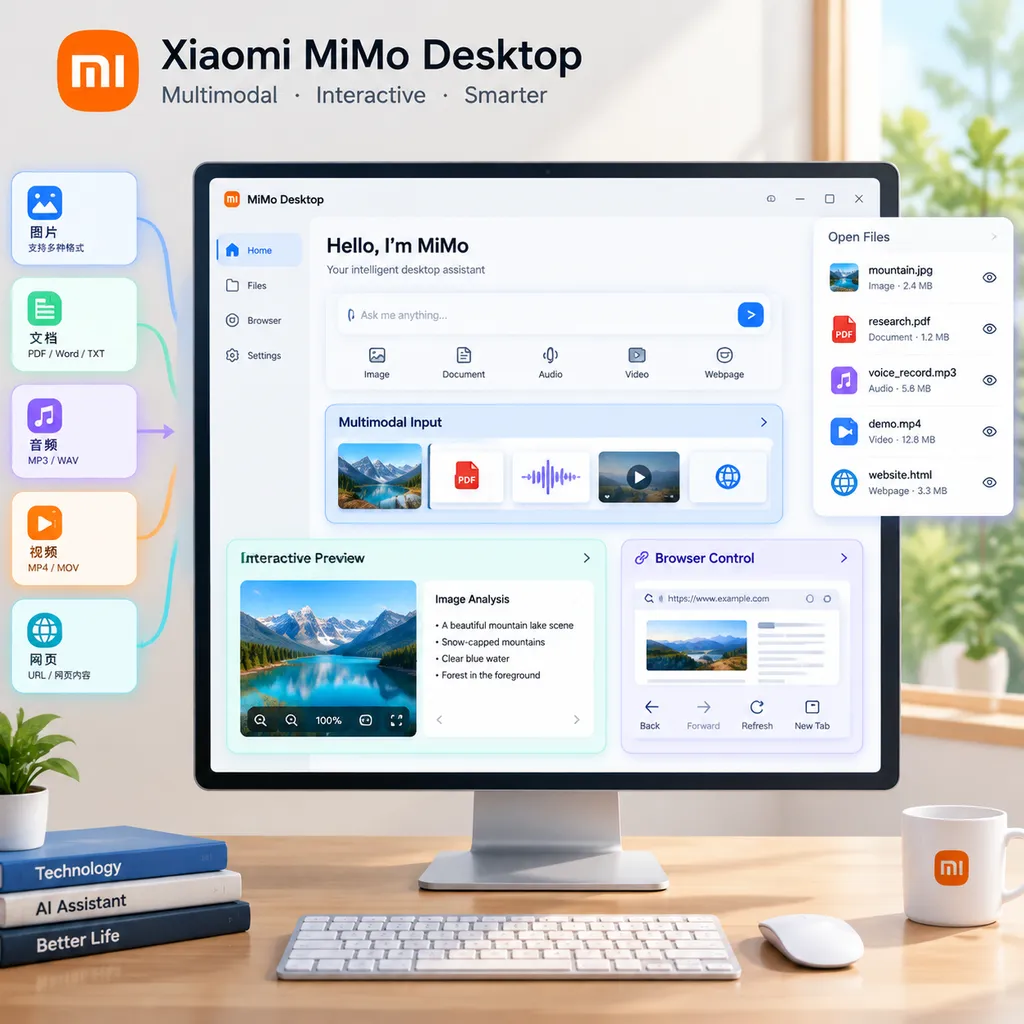
This is not simply a model upgrade. Xiaomi has placed MiMo-X inside a product that more closely resembles a “desktop workbench”: users can directly give the client spreadsheets, images, videos, PDFs, audio recordings, and compressed archives, and ask it to analyze, organize, or produce content. The models can also generate web pages and application previews that users can click and continue editing, while using a browser to read information, fill out forms, and extract materials.
In other words, MiMo Desktop is no longer trying to solve the question of “Can the model answer questions?” but rather “Can the model complete a cross-file, cross-application, multi-step task?” This is the more significant shift to watch in the current AI product competition.
From “Uploading Files” to Directly Processing Work Materials
Traditional AI products often impose an invisible barrier when processing files: users first need to organize the raw materials into formats the model can easily understand. Spreadsheets may need to be saved as CSV files, scanned PDFs require OCR, audio recordings need to be transcribed first, and files in compressed archives must be extracted and uploaded one by one. These steps are not difficult for developers, but in real-world work, it is precisely these tedious operations that consume a great deal of time.
MiMo Desktop allows users to provide these materials directly through prompts. According to information released by Xiaomi, the client can read spreadsheets, images, videos, PDFs, audio recordings, compressed archives, and other content without requiring users to organize or convert the files in advance, then produce outputs that can be edited further.
The key point here is not simply “support for more formats,” but a change in how inputs are organized. Previously, multimodal models were more like chat windows that could view images, listen to audio, and read documents. MiMo Desktop, by contrast, attempts to treat these files as part of the same task context. For example, a user could provide a sales spreadsheet, a customer interview recording, several product screenshots, and a PDF requirements document, then ask the system to produce a list of issues, a data summary, and a proposal for the next product version.
Of course, “being able to read” does not mean “being able to complete the task reliably.” Merged cells in complex spreadsheets, details in videos, conversations involving multiple people in recordings, and reference relationships between files inside a compressed archive can all affect the final result. Xiaomi has currently disclosed product capabilities and intended use cases, but the reference materials do not include detailed context limits, file-size caps, format-specific recognition accuracy, or failure-retry mechanisms for the Preview versions. For production users, these metrics matter more than “how many file types are supported.”
The Output Is Not a Screenshot, but an Operable Result
Another clear product direction of MiMo Desktop is that it does not stop at returning a block of text or a static image. Xiaomi says the client can generate complete preview interfaces containing component structures, interaction logic, state changes, and data visualizations, and display them directly within the conversation.
What users see is not a design mockup, but a result they can click, operate, and continue modifying.
This distinction is highly practical. Having a model generate a screenshot of a web page can usually answer only “What might the page look like?” Having the model generate a preview with components and states allows users to check further: Can the buttons be clicked? Do the filters work? Are empty and loading states included? Does switching between charts behave as expected? The model’s output moves one step further, from “describing a solution” to “delivering a prototype that can be inspected.”
According to Xiaomi, this capability can be used in the following scenarios:
- Lightweight game prototypes: Quickly generate pages, rules, and basic interactions to validate the gameplay before deciding whether to invest in formal development.
- Complex data web pages: Turn spreadsheet analysis results into pages with filtering, sorting, and visualization components.
- Office files: Generate or organize documents, spreadsheets, and other outputs that can be edited further.
- Dynamic interaction demos: Demonstrate interaction flows directly without first setting up a local frontend environment.
For developers, the greatest value of this capability is not replacing frontend engineering, but shortening the validation cycle. In the past, creating a demo for an internal tool often meant setting up a scaffold, installing dependencies, preparing mock data, and then spending time handling page states. Now, product managers, designers, or engineers can first ask AI to produce a version that supports the complete flow, then request changes based on the actual experience.
However, “preview” must be distinguished from “production-ready software.” A preview interface addresses requirements communication and early validation; it does not automatically mean that the code quality, maintainability, access controls, data security, or accessibility meet production standards. For development teams, the most sensible use is to treat it as a rapid prototyping layer, not as an automatic development tool that can be connected to business systems without review.
Pro and Flash: Xiaomi Also Hands Model Selection to the Agent
MiMo Desktop also attempts to address a long-standing product problem: Which model should users choose?
Xiaomi says the client can determine which model and Agent to use based on the task type, complexity, delivery requirements, and execution cost, automatically balancing quality, speed, and cost. In other words, users do not necessarily need to understand the differences between MiMo-X-Pro-Preview and MiMo-X-Flash-Preview from their names; the system will package them into the task-scheduling workflow.
This is a sign that model products are shifting from being “model-centered” to “task-centered.” Developers are familiar with making tradeoffs between different models: complex reasoning, long-document analysis, and multi-step planning require more capable models, while simple extraction, classification, and format conversion are better suited to models that are faster and cheaper. Ordinary users, however, generally do not care about these parameters. They simply want the task completed as requested.
If automatic routing can work reliably, users will no longer see “Choose Pro or Flash,” but instead ask “Why did this task take so long, and was the result good enough?” This lowers the barrier to entry and can also prevent every request from defaulting to the most expensive and slowest model.
However, automatic routing also presents obvious challenges. Task complexity cannot always be inferred from the prompt: an apparently simple request such as “Organize this batch of customer feedback” may involve dozens of files, sentiment classification, merging duplicate issues, and data visualization. The system must also be able to dynamically upgrade the model based on intermediate results during execution; otherwise, the costs saved at the beginning may be offset by rework. Xiaomi has not yet disclosed its routing strategy, model-switching conditions, or cost-control details. These aspects still need to be evaluated through actual beta testing.
The Browser Is No Longer Just a Search Box, but an Execution Environment
MiMo Desktop’s browser-control capabilities are the part of this update that most closely resembles an Agent. According to the introduction, the client can autonomously control a computer browser, read web pages, and perform interactive operations, including opening web pages, searching for information, filling out forms, and extracting materials.
This means that the browser is no longer merely a source of information in a workflow, but an environment that the model can operate. The model can first retrieve information from web pages, then bring that information back into the current task for research, analysis, organization, and content creation. For example, users can ask it to search for publicly available information on a topic, extract key details from multiple pages, organize them into a comparison table, and then generate a report.
For web-based outputs, MiMo Desktop can also use the browser within the same workflow to check key interactions and automatically validate the generated result. This step is important because generating a page and validating a page are two different things. The problems that most often occur are not static layout issues, but details such as clicks that do not change the state, links pointing to the wrong destination, forms submitting without feedback, or layouts overflowing on mobile devices. Having the Agent open a browser and perform checks itself at least provides a path toward automatically discovering these issues.
Browser control, however, is also the capability that most requires clear security boundaries. Opening web pages and reading public information carry relatively controllable risks. Filling out forms, submitting content, sending messages, or performing actions involving accounts and payments can have irreversible consequences. An ideal Agent design should manage “reading” and “execution” at different levels: low-risk operations can be completed automatically, while high-risk operations require user confirmation and clearly display the content about to be submitted, the target website, and the account being used.
From a developer’s perspective, the core competitiveness of a browser Agent is not simply whether it “knows how to click.” It also depends on whether page elements can be located reliably, how login sessions are managed, how CAPTCHAs and pop-ups are handled, whether the system can recover after an operation fails, and whether it can leave behind an auditable execution record. MiMo Desktop has currently disclosed the direction of its capabilities, but these engineering details will determine its actual usability and still need to be validated through beta testing.
Xiaomi Is Betting on “Delivery,” Not Chat
By placing multimodal files, interactive previews, model routing, and browser control inside a single desktop client, Xiaomi’s product intent is clear: move AI from the chat window into real workflows.
This route is more difficult than simply releasing a more capable chat model because it involves the entire task chain: understanding inputs, planning steps, calling tools, generating intermediate results, validating outputs, and continuing to make changes based on user feedback. If any part of the chain is unstable, the overall experience will suffer.
The value of the MiMo-X-Pro-Preview and MiMo-X-Flash-Preview beta test lies precisely in this area. The Preview phase is not only an opportunity for users to try the new models’ response quality; it is better suited to observing their performance on long-running workflows:
- Can they correctly understand the relationships between multiple types of files?
- Can they break vague requirements down into executable steps?
- Are the generated web pages and Office files genuinely convenient to continue editing?
- Can they recover from browser-operation errors instead of starting over?
- Are the differences in speed, quality, and resource consumption between Pro and Flash sufficient to support automatic routing?
- Can users understand what the Agent is doing and intervene promptly before critical actions?
If these questions are resolved, MiMo Desktop will be attractive to individual users, product teams, and developers of internal productivity tools. It is particularly well suited to scenarios where a task is not substantial enough to justify developing dedicated software, but is far more complex than a single question-and-answer exchange: competitive research, recurring data reports, requirements prototyping, information archiving, and content production.
Conversely, beta testing also means that the product is not yet a mature enterprise automation platform. File permissions, privacy handling, browser credential isolation, operation auditing, result traceability, and API availability will all determine whether it can move from “looks convenient” to “a tool teams are willing to rely on.” Public information currently confirms only the desktop client’s beta test and general feature direction. Xiaomi has not yet provided an official commercial launch date, pricing, API specifications, or complete technical documentation for the Preview models, so these capabilities should not be treated as equivalent to a stable developer service.
How Should Developers View This Update?
My assessment is that MiMo Desktop’s highlight is not the addition of two more model names, but Xiaomi’s combination of models, Agents, browsers, and editable outputs into a closed loop.
The industry already has many products capable of generating text, code, or images. What is genuinely scarce is putting those outputs back into the task environment and allowing users to continue operating, validating, and iterating on them. MiMo Desktop’s choice of a desktop client as its vehicle is also better suited than pure web chat to handling local files and cross-application tasks.
Its ceiling, however, will be determined by execution reliability rather than how many steps it can complete in a demonstration. Developers should treat the beta test as an opportunity to observe Agent workflows: focus on edge cases, long-running tasks, mixed files, access controls, and recoverability, rather than testing only one successful demo.
If you are already using different models such as OpenAI, Claude, Gemini, or DeepSeek to build applications, an aggregation gateway such as OpenAI Hub can be used to compare different models on the same tasks while reducing the maintenance cost of integrating multiple SDKs and authentication systems. However, the currently available public information on MiMo-X Preview primarily concerns the Xiaomi MiMo Desktop beta test. Whether Xiaomi will provide an independent developer API, along with specific endpoint addresses and pricing, should be determined by subsequent official announcements from Xiaomi.
What matters most right now is not whether MiMo-X can surpass its competitors on a particular leaderboard, but whether it can turn “I can build a web page for you,” “I can research this topic for you,” and “I can organize these files for you” from demo promises into stable, controllable, and reusable workflows. Competition among AI products has begun shifting from whether they answer like humans to whether they deliver like reliable colleagues.
References
- ITHome: Xiaomi MiMo Desktop Client Opens Beta Testing by Invitation: Introduces the Xiaomi MiMo Desktop beta test, along with the multimodal file processing, interactive preview, and browser-control capabilities of
MiMo-X-Pro-PreviewandMiMo-X-Flash-Preview. - OpenAI Hub: An AI API aggregation platform that can be used to integrate and compare multiple mainstream models through a unified OpenAI-compatible format; this article does not treat it as an official API source for MiMo-X Preview.