
An AI button appears on Chrome’s homepage—Google is getting anxious.

Chrome’s new tab page quietly launches two AI features — **Deep Search** and **Create Images**. Clicking either takes you directly to **AI Mode**. Google is transforming the browser’s homepage into an AI console, facing the threat from **ChatGPT** and **Perplexity** head‑on.
Chrome Homepage Sprouts AI Buttons: Deep Search and Create Images Features Revealed — Google Turns the Browser into an AI Entry Point
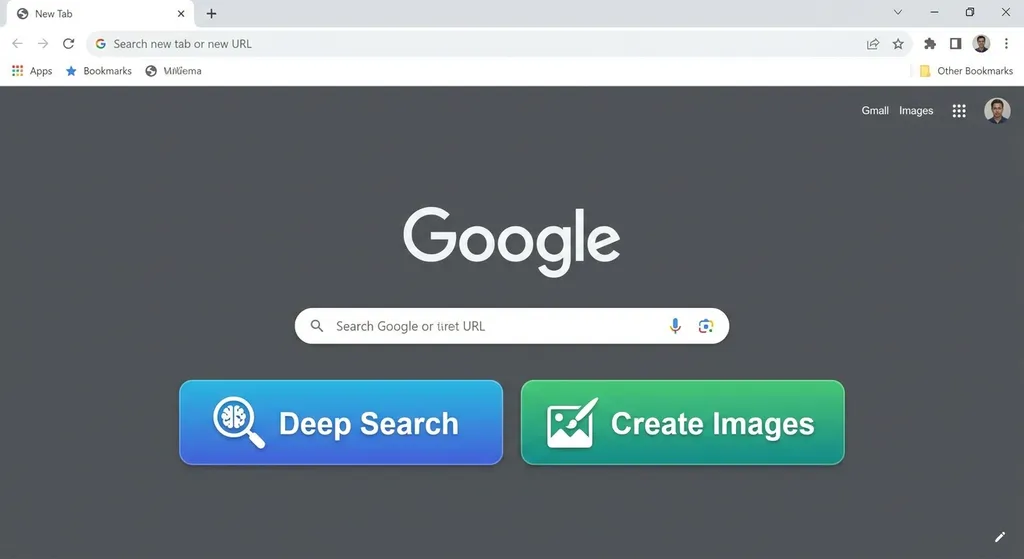
A developer discovered today that their Chrome browser's new tab page (NTP) suddenly had two eye-catching buttons — Deep Search and Create Images. Clicking either one takes the user directly to Google’s AI Mode.
No popup notification, no changelog — they just quietly appeared.
What Happened
According to community feedback, this change appeared in Chrome version 147.0.7727.102. Strangely, however, another computer using the same Google account in the same region (U.S.) did not show the buttons. This suggests Google is conducting an A/B test, rolling out the feature to user groups in stages rather than launching it globally.
The positioning of the two buttons is deliberate — embedded right next to the search box on the new tab page, the first place you look every time you open a new tab. Google’s intention is clear: bring AI capabilities to the user’s most frequent touchpoint.
Functionally speaking:
- Deep Search: Clicking it opens the AI Mode in deep search. Unlike traditional keyword matching, it’s a Gemini-powered multi-round retrieval process — AI automatically breaks down your query, cross-verifies multiple sources, and ultimately produces a cited research-style report. It resembles the “Deep Search” feature previously found on google.com/ai, but now the shortcut is moved up to the browser’s homepage.
- Create Images: Clicking this also goes to AI Mode, but directly into image generation. Users can generate pictures from text prompts, powered by Google’s image generation AI. In early Canary builds, this feature was internally codenamed Nano Banana (yes, Google engineers’ naming sense remains as quirky as ever).
More Than Two Buttons
If you think this is just “Chrome adding two shortcuts,” you’re underestimating Google’s ambition.
Let’s zoom out a bit. Over the past six months, Chrome’s new tab page has been quietly evolving:
- Search box + “+” menu: A “+” button has appeared beside the desktop new tab page search box. Clicking it allows you to add an image, upload files, start Deep Search, or create an image — all functional, not just placeholders.
- AI Mode gains contextual awareness: Users can now ask AI questions with the current page context, rather than starting from scratch every time.
- NTP as AI launcher: The appearance of Deep Search and Create Images means the new tab page has shifted from merely a "search bar + shortcut panel" to an AI command center.
Together, these steps are turning Chrome’s NTP into a lightweight AI workstation. You don’t need to open ChatGPT, go to Perplexity, or even visit google.com/ai — just open a new tab, and AI is right there.
What Google Fears
The answer is simple: its traffic gateway is being bypassed.
For two decades, Google Search has been the default entry point to the web. ChatGPT changed that. Increasingly, when users have a question, their first instinct is to open ChatGPT or Perplexity, not Google. Among developers, this shift is even more evident — for debugging, looking up APIs, or understanding technical concepts, AI conversations outperform traditional search.
What’s making Google nervous is that rivals are also seizing the browser entry point:
- Perplexity has long had a browser extension to invoke AI search on any page
- ChatGPT’s desktop app supports global shortcuts for instant access
- Comet (created by the former Opera team) builds AI directly into the browser’s core experience
- ChatGPT Atlas is also trying to become the next-generation search replacement
Google’s biggest trump card? Chrome’s market share. On desktop, Chrome commands over 65% globally. Every Chrome user opens countless new tabs daily. Putting AI on that page is like erecting a billboard at the world’s busiest intersection — one users can’t ignore.
Thus, adding Deep Search and Create Images is essentially a defensive product move. Google is leveraging Chrome’s distribution to reclaim user mindshare for its own AI.
Technical Details: Clues in Chromium’s Source Code
These features didn’t appear overnight. Code references already existed in Chrome Canary builds. Developers can manually enable them using Chrome’s experimental feature flags:
chrome://flags/#ntp-next-features
Search "NTP Next Features" in the chrome://flags page, set it to Enabled, and restart the browser — you should see the AI buttons on the new tab page.
Points to note:
- The flag isn’t available in all Chrome versions; Canary and Dev channels are most likely to support it.
- Even when enabled, server-side rollout rules determine whether the feature activates.
- Currently, it targets U.S. users; enabling the flag in other regions may not grant access to AI Mode.
From Chromium’s open-source repository, we can see that the AI components on the new tab page are developed as independent modules parallel to the existing search box and shortcut panel. This design allows progressive rollout—by region, version, or user segment.
What Deep Search Actually Does
Deep Search is worth unpacking, as it differs fundamentally from normal AI search.
Traditional search (including Google’s own AI Overview) follows a pattern: user enters keywords → search engine returns results → user filters and synthesizes. AI Overview simply adds an auto-generated summary.
Deep Search changes this logic entirely:
- Problem decomposition: The AI splits complex queries into multiple sub-questions
- Multi-round retrieval: Each sub-question triggers independent searches, possibly dozens of queries
- Cross-validation: Information from different sources is compared and verified
- Report generation: Produces a structured, cited research-style report
The process may take tens of seconds or minutes, but output quality far surpasses a single search. Google officially positions it as a “deep research” tool for topics requiring comprehensive understanding.
For developers, a typical scenario: evaluating a technical approach — comparing frameworks, community activity, known issues. Instead of manually browsing dozens of tabs, Deep Search summarizes it in one report.
Of course, its positioning overlaps heavily with Perplexity’s Deep Research and ChatGPT’s Research features. Google’s strengths lie in search index breadth and freshness; its weakness is that Gemini’s reasoning still trails OpenAI and Anthropic’s top models.
What This Means for Developers
If you build AI applications, Chrome adding AI entry points is noteworthy — though not threatening, yet.
The upside: Google is educating users. By featuring AI search and image generation on Chrome’s homepage, it’s showing billions of users how AI can be used. That kind of user education cost is something no startup can afford. As the market expands, all AI apps benefit.
The caution: If your product’s core value is “better AI search than Google,” your moat may be thinner than you think. Google has distribution (Chrome), data (search index), and compute (TPUs). Once it goes all in, simple AI search wrappers will struggle to compete.
For developers embedding AI in their apps, Deep Search currently offers no public API. However, the Gemini API already supports “Grounding with Google Search,” allowing real-time search results in AI responses. You can use Gemini’s API to create similar “AI + Search” experiences.
If you prefer not to rely on a single AI provider, aggregator APIs let you flexibly call multiple models — for example, via OpenAI Hub, you can use one key to access GPT, Claude, Gemini, DeepSeek, etc., choosing per task:
import openai

client = openai.OpenAI(
    api_key="your-openai-hub-key",
    base_url="https://api.openai-hub.net/v1"
)

# Use Gemini for search-augmented Q&A
response = client.chat.completions.create(
    model="gemini-2.5-pro",
    messages=[
        {
            "role": "system",
            "content": "You are a research assistant. Answer based on the latest information and cite your sources."
        },
        {
            "role": "user",
            "content": "Compare Chrome AI Mode and Perplexity in terms of deep search functionality."
        }
    ],
    temperature=0.3
)

print(response.choices[0].message.content)
# Or use GPT-4o to optimize image generation prompts
response = client.chat.completions.create(
    model="gpt-4o",
    messages=[
        {
            "role": "system",
            "content": "You are an expert in image generation prompts. Help the user refine their description for better results."
        },
        {
            "role": "user",
            "content": "I want to generate a cyberpunk-style city night scene with neon lights and flying cars."
        }
    ]
)

print(response.choices[0].message.content)
Timeline: From Canary to Stable
Let’s trace the feature’s evolution:
| Time | Event | |------|-------| | Oct–Nov 2025 | Nano Banana and Deep Search buttons first appear in Chrome Canary; unstable features | | Early 2026 | Functions stabilize across Dev and Beta channels; “+” menu becomes fully operable | | April 2026 | Stable channel (147.x versions) begins gradual rollout; some stable users see the AI buttons |
It took about six months from Canary to Stable — a normal cadence for Chrome features. Given AI features rely on backend services and cost controls, Google’s cautious rollout strategy makes sense.
In the coming months, these AI entry points should gradually reach global users. Whether users in China can access AI Mode depends on Google service availability — another topic entirely.
A New AI Chapter in the Browser Wars
Let’s look at the browser AI landscape today:
- Chrome: Gemini-powered, Deep Search + Image Generation; leverages massive market share
- Edge: Deep Copilot integration with the Windows ecosystem
- Arc / Comet: Browsers built from scratch for AI-native workflows — bold but niche user base
- Safari: Apple Intelligence remains weakly integrated in Safari
- Firefox: Largely absent from the AI race, focused on privacy narrative
Interestingly, Chrome and Edge strategies are almost mirror images — both embed AI into existing browsers instead of reinventing the paradigm. The upside: minimal user friction. The downside: AI remains add-on, not native.
As Arc’s team said when pivoting to Comet: “A browser shouldn’t have tabs.” Extreme, but it points to a real question — what should the core interaction of a browser be in the AI era?
Google’s answer, at least for now: the search box remains central, but its backend must evolve from keyword matching to AI dialogue. The Deep Search and Create Images buttons embody this shift.
Final Thoughts
Sometimes, a button tells you more than a product launch.
A product release is a declaration; a button going live is action. By adding AI shortcuts to the Chrome homepage, Google signals its full commitment to weaving AI into its most core product — not hidden behind flags, but shipped by default to billions.
For the broader AI industry, this signals that competition is shifting from model performance to distribution advantage. Whoever embeds AI into products users open every day will gain the upper hand in the next round.
For developers, the practical takeaway is this: don’t put all your eggs in one basket. Today Chrome pushes Gemini, tomorrow Edge pushes Copilot, and soon new AI browsers will emerge. Keep your tech stack flexible — able to quickly integrate and switch between models. That’s the best way to stay ready for change.
References
- Chrome homepage adds AI entry points today — Linux.do forum thread where users first spotted AI buttons in Chrome Stable


