
OpenAI quietly released a new image generation model — the style transfer is mind-blowing.
OpenAI suspected to be conducting grayscale tests for a new generation of image generation model. Users have found that its style imitation and character replacement capabilities have significantly improved. Community tests show stunning results, though realism and detail consistency still have room for improvement.
OpenAI is stirring things up again.
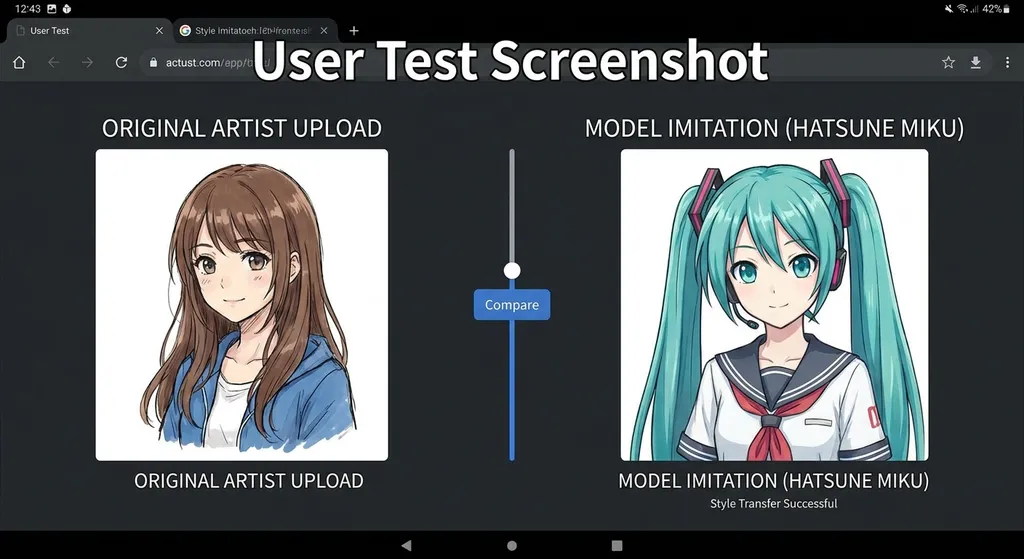
Recently, multiple developers and designers have reported in the community that ChatGPT’s image generation ability seems to have undergone a silent upgrade. One user uploaded an artist’s illustration, asking the model to mimic the art style and replace the character with Hatsune Miku—the model not only precisely replicated the original brushwork but also swapped the character seamlessly. This isn’t something the old model could pull off.
OpenAI hasn’t officially announced a new model release yet, but judging from the density and consistency of user feedback, it’s very likely performing a gray-scale test of a new image generation version. Combined with earlier reports from media outlets such as 36Kr on GPT Image 1.5, the outlines of this update have become quite clear.
Where It Shines: Style Transfer and Element Replacement Are the Core Highlights
Let’s get straight to the point: the most eye-catching improvement in this update isn’t basic text-to-image ability, but the leap in style transfer and image editing.
Previously, when using DALL·E 3 for style imitation, you had to write long prompts — "thick paint style, high saturation, rough brushstrokes, similar to [artist]" — and the model would produce something vaguely similar: three parts right in style, seven parts wrong in detail. Now things are entirely different. Users simply feed in a reference image, and the model captures the core features of the style — line thickness, color palette, light and shadow handling, even the “feel” of the brushwork — then generates new content within that stylistic frame.
What does this mean? For independent artists, it’s a tool to quickly produce concept drafts; for game dev teams, it’s an assistant that helps maintain consistent art style; for content creators, it’s a solution for unified visual style without the need for LoRA training in Stable Diffusion.
Character replacement also deserves mention. Older image editing models often broke the background, mismatched lighting, or made the new character look pasted on — with obvious layer separation. Feedback suggests that this new model’s improvement is clearly visible to the naked eye: the replaced character integrates naturally into the original scene’s lighting, with matching shadow directions and realistic cloth folds.
A Linux.do community user exclaimed: "Pretty strong — pressure’s on the G company now." Here, “G company” refers to Google. Considering Google’s Imagen series and Gemini’s built-in image capabilities have long been industry benchmarks, that’s quite a statement.
Let’s Cool Down: How Many Old Problems Got Solved?
Excitement aside, if you’ve followed the public evaluations of GPT Image 1.5 before, you’d know OpenAI’s image model has struggled with several chronic issues. Whether this update truly fixes them still requires large-scale validation.
First problem: the “AI greasiness.” Previous tests by news outlets found GPT Image 1.5 tended toward high color saturation and over-rendered “digital” gloss. In realistic scenes, this greasiness made the image instantly recognizable as AI-generated. Experienced users discovered a workaround—adding prompt phrases like “unprocessed iPhone photo” or “low saturation color profile” noticeably improved realism. But that’s basically users patching holes for the model, not intrinsic capability.
Second problem: detail collapse in complex scenes. In prior tests by Zhidx, the model was asked to generate a kitchen scene from a cat’s first-person perspective—the cat’s face turned out deformed, whiskers grew only on one side, and nose details were completely lost. In giant-effect tests, broken road lane lines and front-facing cars were common mistakes. Midjourney V6 and Google’s Nano Banana Pro have largely eliminated such issues.
Third problem: Chinese text rendering. For domestic developers, this is essential—you need Chinese fonts on posters and banners. Earlier tests showed GPT Image 1.5 handled the first few characters correctly but then produced stroke errors and garbled text. Models like Ideogram have already solved this well, so OpenAI still lags here.
Community feedback indicates that these problems are notably reduced in style transfer and character replacement tasks—mainly because these tasks emphasize stylistic consistency and natural integration over photo-realism. But if your need is commercial-grade, photo-realistic imagery, you might still want to wait and see.
Speed and Pricing: Developer Priorities
According to previously published data, GPT Image 1.5’s generation speed is up to 4× faster than the previous model. That boost matters especially for API use—if you’re generating marketing materials in bulk, cutting generation time from 30 seconds to 7–8 seconds per image is a huge usability leap.
Pricing for GPT Image 1.5 is token-based, depending on resolution and quality level:
- High quality (megapixel): about $133 / 1,000 images (≈ ¥937)
- Low quality: about $9 / 1,000 images (≈ ¥63)
That means roughly ¥0.94 per high-quality image, ¥0.063 for low-quality ones. Compared to Midjourney’s subscription model ($10/month, limited generations), OpenAI’s pay-per-use model suits low-frequency users better—but costs scale faster in high-volume cases.
For API integration, OpenAI Hub already supports the newest image generation model. It’s straightforward—same as text model invocation; one key, native access, no proxy hassle:
import requests
import base64

API_KEY = "your-openai-hub-key"
BASE_URL = "https://api.openai-hub.net/v1"

# Use Chat Completions to generate images
response = requests.post(
    f"{BASE_URL}/chat/completions",
    headers={
        "Authorization": f"Bearer {API_KEY}",
        "Content-Type": "application/json"
    },
    json={
        "model": "gpt-4o",  # Supports latest image generation capability
        "messages": [
            {
                "role": "user",
                "content": "Generate an image: A cyberpunk-style portrait of a cat wearing neon goggles, rain-soaked Tokyo street background, anime art style"
            }
        ]
    }
)

result = response.json()
print(result)
If you need style transfer—the highlight of this upgrade—you can achieve it by uploading a reference image plus a text instruction:
import requests
import base64

API_KEY = "your-openai-hub-key"
BASE_URL = "https://api.openai-hub.net/v1"

# Read reference style image and encode as base64
with open("reference_style.png", "rb") as f:
    image_base64 = base64.b64encode(f.read()).decode("utf-8")

response = requests.post(
    f"{BASE_URL}/chat/completions",
    headers={
        "Authorization": f"Bearer {API_KEY}",
        "Content-Type": "application/json"
    },
    json={
        "model": "gpt-4o",
        "messages": [
            {
                "role": "user",
                "content": [
                    {
                        "type": "text",
                        "text": "Please mimic this image’s art style and generate an illustration of Hatsune Miku standing under cherry blossoms, keeping the same brushstroke style and color palette."
                    },
                    {
                        "type": "image_url",
                        "image_url": {
                            "url": f"data:image/png;base64,{image_base64}"
                        }
                    }
                ]
            }
        ]
    }
)

result = response.json()
print(result)
The core idea here: feed in the reference image as visual context and describe your desired target content with text. The model automatically extracts the style features from the reference and applies them to the new image.
Competitive Landscape: OpenAI Is Catching Up, Not Leading
To be blunt, OpenAI’s position in the image generation race is rather awkward.
DALL·E 3 was stunning at launch, but with Midjourney V6, Stable Diffusion 3, Google’s Imagen 3, and Nano Banana Pro all advancing rapidly, OpenAI’s generation capability has fallen out of the top tier. Google’s Nano Banana Pro, in particular, has consistently led both Artistic Analysis and LMArena rankings in text-to-image and editing accuracy—far ahead in realism and detail fidelity.
But OpenAI has one unmatched strength: productization and distribution.
ChatGPT’s monthly active users count in hundreds of millions, and image generation is built directly into the chat interface—users can adopt it without learning anything new. This update even introduces a dedicated image generation section, with templates and style presets, lowering the creative barrier further. In contrast, Midjourney still runs via Discord, Stable Diffusion requires local setup or ComfyUI, and Google’s image generation is scattered across Gemini and ImageFX. On accessibility alone, OpenAI wins hands down.
The same applies to API ecosystems. OpenAI’s API format has become a de facto standard—AI frameworks like LangChain, LlamaIndex, and Vercel AI SDK adapt it first. That means zero integration cost for developers using OpenAI’s image API, while other models require extra compatibility work. This also explains the value of aggregation platforms like OpenAI Hub—one unified format, one key for all, allowing developers to seamlessly switch between models and pick whichever performs best.
So, OpenAI’s strategy is clear: The model doesn’t have to be the strongest, but the product experience and ecosystem reach must be the broadest. Get users in first, then iterate. From a business perspective, that logic holds.
What It Means for Developers
If you’re building a product that involves image generation, a few takeaways stand out:
1. Style consistency is finally usable. Previously, to achieve “batch generation with a given style,” you had to go the Stable Diffusion + LoRA route—high barrier to entry. Now, you can do it just by passing a reference image via API. Precision may still lag behind trained LoRAs, but it’s enough for MVP-stage products.
2. Image editing is now API-ified. Character replacement, object modification, background swaps—formerly the work of Photoshop or Stable Diffusion’s Inpainting pipeline—can now be done with a single API call. For teams working on e-commerce materials, social media visuals, or game assets, this simplifies workflows dramatically.
3. Don’t put all eggs in one basket. As noted, OpenAI’s image models still have realism shortcomings. If your product demands top-grade visual quality, connect multiple models and choose per scenario—use Google for realism, OpenAI for stylized art, Ideogram for text rendering. Using an aggregator like OpenAI Hub makes switching virtually seamless.
4. Watch out for copyright risk. The stronger the style-mimicking capability, the greater the copyright concern. If your product lets users upload reference art for stylistic imitation, implement proper compliance measures—clear user agreements stating responsibility for content and output. This isn’t a technical issue; it’s a legal one.
A Trend Worth Noticing
This upgrade also signals something bigger: image generation is evolving from a standalone tool into a foundational capability layer.
Two years ago, generating an AI image meant opening Midjourney or Stable Diffusion WebUI separately. A year ago, ChatGPT and Gemini integrated image generation, though still as distinct features. Today, image generation is becoming a native model skill—just as natural as text or code generation.
For developers, this means future AI applications shouldn’t treat “text” and “image” as separate modules—they’re simply different output forms of the same underlying model capability. When a user says “make me a poster,” the model should understand both the copywriting and visual intent and deliver a complete result in one go. This native multimodal fusion—that’s the real product direction.
OpenAI is clearly moving that way. Whether this update is a full release or a test version isn’t certain yet—but the direction is unmistakable.
References:
- Linux.do community discussion: GPT new image model test — Users sharing real-style imitation and character replacement tests
- Linux.do community discussion: Image generation capability comparisons — User evaluations and competitor comparisons
- 36Kr: Hands-on test of OpenAI’s latest image model — Detailed evaluation of GPT Image 1.5 versus competitors


