Ant Group Open-Sources a 6B Model That Generates UIs and Can Even Separate Layers
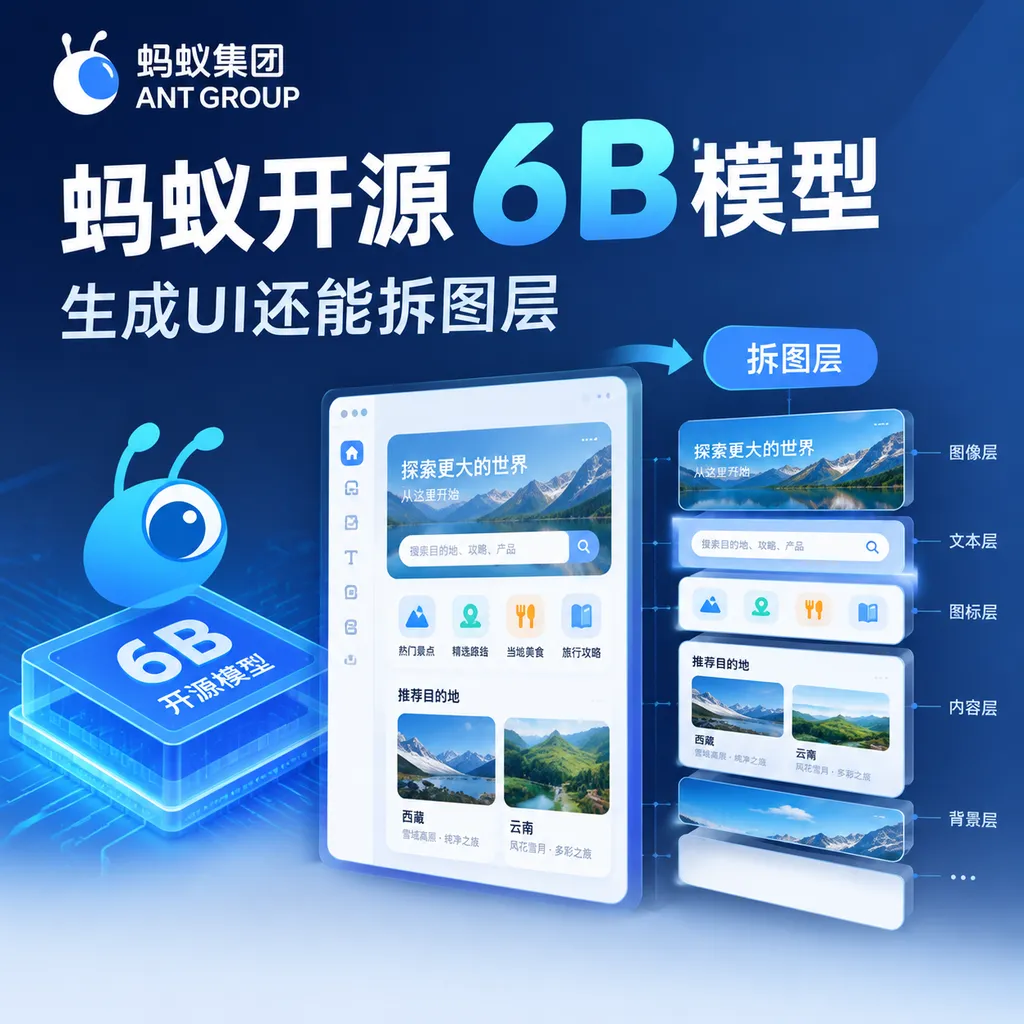
Ant Group’s Bailian team open-sourced the Ming-Image-0.1-Design series today. Its two 6B models are responsible for generating UI and visual designs from text and decomposing rendered images into editable transparent layers, respectively. The team is also releasing Design Skill and PPT Skill.
Ant Group’s Open-Source 6B Model Can Generate UIs and Split Them into Layers
On September 23, Ant Group’s Inclusion AI open-sourced the Ming-Image-0.1-Design series of models. This series no longer treats “text-to-image” as merely generating an attractive picture. Instead, it attempts to directly handle the more challenging parts of the design workflow: generating a complete UI from requirements, then breaking the flattened result into layers that can continue to be edited.
The series includes two models, each with 6B parameters:
- Ming-Image-0.1-Design: Generates UIs, dashboards, infographics, posters, and complete visual designs from text requirements;
- Ming-Image-0.1-Design-Layer: Decomposes existing concept images or designs into independently editable transparent layers.
Both models are released under the MIT License. Ant Group has also open-sourced Design Skill and PPT Skill, further advancing the models from “generating an image” toward front-end pages, presentations, and editable design assets.
This Is Not an Ordinary UI Image-Generation Model
In the past, there were generally two approaches to using large models for UI generation.
The first was to have a general-purpose vision model directly generate an interface screenshot. The advantage is speed, making it suitable for inspiration; the drawbacks are also obvious: text in buttons may not be recognized accurately, spacing between cards can easily become inconsistent, and once the navigation bar, tables, and multiple information sections become complex, the page can turn into “a poster that looks like a UI.”
The second was to have a code model generate an HTML, CSS, or React page. In theory, the result can be interactive, but the model must handle layout, copy, component structure, styling, and assets simultaneously, usually requiring multiple rounds of revisions. What developers actually receive is not a usable page, but a pile of code that still needs further adjustment.
Ming-Image-0.1-Design takes a third path: it first treats the UI as a structured visual design, then uses Skills to connect the design result to front-end implementation and office documents.
According to the official introduction, Design supports structured prompt enhancement of up to 8K tokens. The model organizes natural-language requirements into copy, modules, layout, and visual style, rather than treating the prompt as merely a string of descriptive tags. For example, users can explicitly specify that a page should include a top navigation bar, a left-side menu, three data cards, a trend chart, an alert list, a brand primary color, and button copy. The model then attempts to generate the overall design in one pass.
The key to this capability is not whether it can draw a picture, but whether the model can understand the relationships among multiple regions at the same time. A dashboard page often needs to handle more than a dozen information modules: heading levels must remain consistent, cards must maintain their spacing, numbers and units must be aligned, charts must not overlap other elements, and the primary, secondary, and warning colors must not clash. General-purpose image-generation models are often good at local details but not at this kind of global constraint management.
Ming-Image-0.1-Design’s approach is to complete the overall design in a single end-to-end generation process, keeping the color scheme, composition, and asset style as consistent as possible. Compared with repeatedly calling a general-purpose image-generation model to separately generate the background, illustrations, icons, and decorative elements, this approach can reduce conflicts in color palettes, inconsistent perspectives, and style drift among different assets.
Text Rendering and Layout Stability Are Its Real Competitive Advantages
For a UI design model, text is not decoration; it is part of the page. If titles, buttons, labels, table fields, or data metrics contain obvious garbled characters, the entire design becomes difficult to deliver to product or engineering teams.
According to the official description, Ming-Image-0.1-Design has been optimized for text rendering and layout stability involving titles, buttons, cards, and multi-region information. Its goal is not merely for text to “look like text,” but for page content to remain readable and hierarchically clear under relatively complex layout relationships.
This is also where it differs from most general-purpose text-to-image models. The latter typically prioritize aesthetics, lighting, and overall visual completeness; design-specialized models must additionally handle stricter requirements for alignment, hierarchy, and information density.
According to the UI / UX Design benchmark updated by Artificial Analysis on September 18, Ming-Image-0.1-Design achieved an Elo score of 1082, ranking first among the open-source models in that benchmark. In UI / UX scenarios, it achieved a layout win rate of 67.4%, a complex-composition win rate of 67.0%, and a text-rendering win rate of 66.7%.
It is important to note that this “first place” has a clearly defined scope: it refers to the open-weight sub-ranking for UI / UX Design on Artificial Analysis, not an overall ranking across all visual-generation tasks. In other words, Inclusion AI is not targeting the general-purpose image-generation market, but a narrower vertical scenario more closely tied to actual workflows.
The Layer Model Turns a “Finished Image” into an Intermediate Asset
If Design addresses “generating a design from requirements,” Design-Layer addresses a more difficult step in generative design: how to edit the result afterward.
One of the biggest problems with traditional text-to-image generation is that the output is usually just a single flattened image. Even if the image contains a background, people, cards, buttons, and multiple blocks of text, they are ultimately compressed into the same pixel layer. If a designer wants to move an icon a few pixels to the right or replace only the number in one card, they often have to regenerate the image or manually extract the elements.
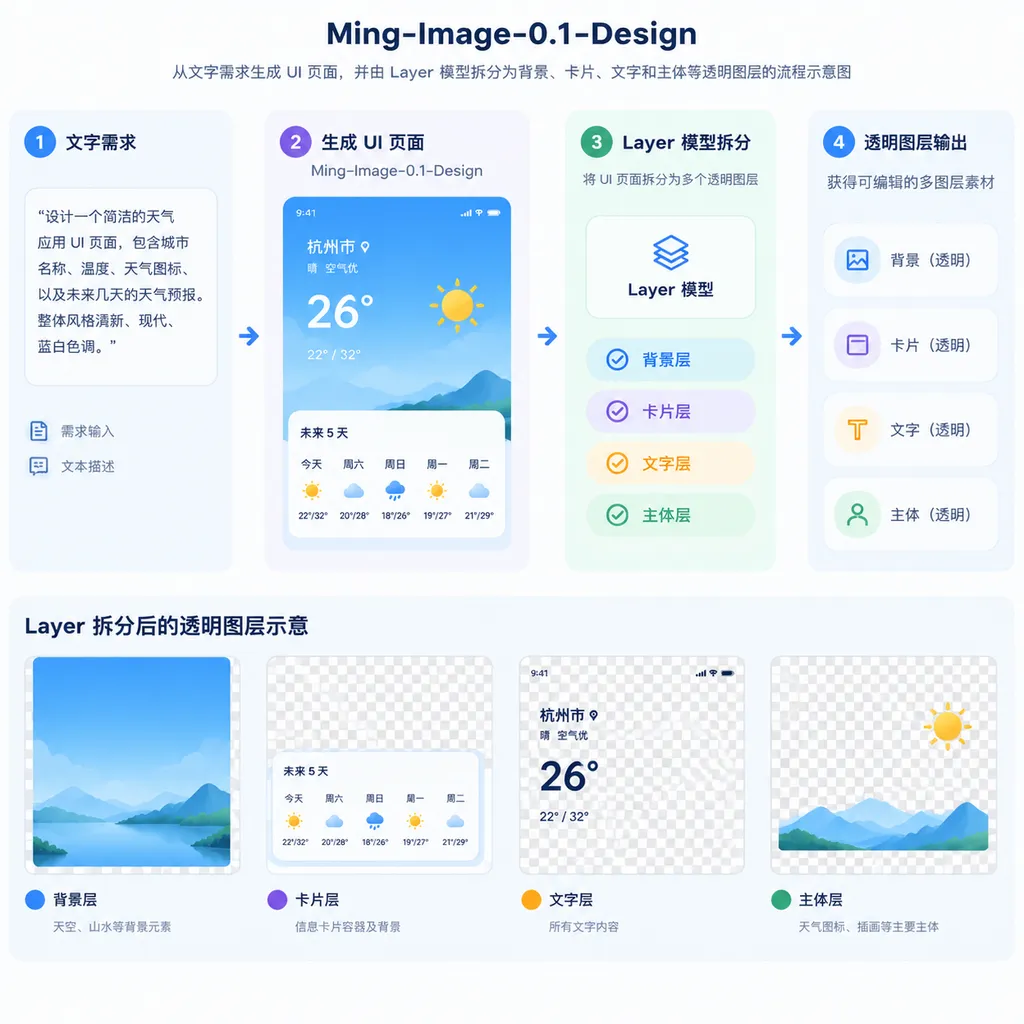
Ming-Image-0.1-Design-Layer can split a design image into multiple transparent layers. According to supplementary materials, the model can separate an image into between 2 and 9 layers at most. These layers can include elements such as text, cards, the main subject, and the background, and can be recombined into a result that closely resembles the original image.
The value of this capability is not simply that it replicates Photoshop’s layer panel, but that it gives the output of a generative model the properties of something that can “continue through production.”
For example:
- A product manager enters requirements and generates the home page of a SaaS data dashboard;
- A designer uses the Layer model to separate the page into the background, navigation, data cards, charts, and decorative elements;
- An engineer replaces only the brand logo, primary color, and a set of business data;
- The design team then exports these layers into subsequent front-end or presentation workflows.
In this process, the image generated by the model is no longer merely a one-off reference draft. It becomes more like an intermediate file that can continue to be processed.
Of course, there is no single correct answer when it comes to layer separation. Some users need only three layers—background, subject, and text—while others want every piece of text, icon, and card separated individually. The model must strike a balance between making the layers sufficiently granular and preventing them from being fragmented into a pile of difficult-to-manage components.
Complex lighting effects, special transparent materials, and large areas of occlusion can also make layer separation more difficult. Edge remnants, localized omissions, or incorrectly merged subjects are not unexpected. For designers, Layer is better viewed as an automated first-draft tool than as a production-grade PSD parser that can completely replace manual organization.
Design Skill and PPT Skill Will Determine Whether It Can Be Put into Practice
A single model is usually unlikely to transform a workflow. Its true value lies in whether it can be integrated into existing toolchains.
The Design Skill open-sourced by Inclusion AI alongside the models attempts to connect design generation, asset decomposition, and front-end coding. Ideally, developers can first describe a page in natural language, have the model generate a visual design, and then use layer separation and code generation to convert the design into a front-end page or component implementation.
This workflow still requires human review, but it changes how design and development handoffs work. In the past, designers delivered an image, and engineers had to reinterpret the layout based on that image. If the model can output more structured intermediate results, engineers receive more than just a “reference image”—they receive something closer to a page skeleton and a collection of assets.
PPT Skill targets another common scenario: restoring a flattened design image as an editable PowerPoint file. Its significance lies in the fact that marketing posters, presentation covers, and infographics are often first generated as images, but later require changes to the title, image replacement, or layout adjustments. If the model can reorganize these elements into editable objects, it can eliminate a great deal of manual rework.
Expectations should also be kept in check here. Restoring an image into a PowerPoint file is not equivalent to perfectly reproducing the original design file. Text-box boundaries, font substitutions, complex vector graphics, gradients, and shadows may all cause the final file to require manual correction. It is better suited to quickly turning a concept draft into an “editable first version” than to directly delivering a final presentation document.
Specializing Smaller Models May Be More Practical Than Simply Scaling Up Larger Ones
The most noteworthy aspect of the Ming-Image-0.1-Design series is that it uses 6B parameters to enter a field with demanding requirements for structure and stability.
This suggests that competition among open-source models is beginning to change. In the past, people were accustomed to comparing general-purpose language models by parameter count, context length, and overall benchmark rankings. In visual tasks, however, more and more teams are beginning to train specialized models around specific workflows: e-commerce product images, game assets, UI design, PPT generation, video storyboards, and even editable-asset generation.
For enterprises and developers, specialized models offer several direct advantages:
- More manageable deployment and inference costs: A 6B model is better suited to private deployment and batch calls than an ultra-large model;
- Clearer task objectives: The model does not need to perform excellently across every image style; it only needs to do UI, posters, and infographics well;
- Easier workflow integration: If the model outputs not only images but also transparent assets, layers, and structured results, there is greater room for downstream automation;
- Open-source customizability: The MIT License provides enterprises with greater flexibility for secondary development, service integration, and internal deployment.
However, 6B does not mean the model can replace larger models in every task. The official documentation explicitly states that Design is currently most stable at layout and text. When faced with complex hand movements, sequences of continuous actions, or highly refined shadows and reflections, its generation results remain insufficiently stable.
It is therefore better understood as an “efficient node in a design production line” rather than an all-purpose designer. It may be highly attractive for UI mockups, promotional posters, infographics, and product concept presentations. For complex human poses, precise commercial retouching, or high-end brand visuals, stronger models and human intervention will still be required.
What It Means for Developers
If you are working on design generation, low-code development, marketing content production, or office automation, Ming-Image-0.1-Design is worth testing in practice. However, the focus of testing should not be limited to whether the output “looks good.” You should pay closer attention to the following metrics:
- Whether multi-region pages can maintain a stable layout;
- Whether Chinese, English, numbers, and special symbols render properly;
- Whether the generated layers match the level of editing granularity you require;
- Whether the original design can still be reconstructed after the layers are recombined;
- Whether converting a design into front-end code or a PPT actually saves time in real work;
- Whether style and brand guidelines can remain consistent across batch tasks.
According to official information, Ming-Image-0.1-Design is available on OpenRouter with free API access for two weeks, allowing developers to first validate its performance through small-scale testing. For teams that need unified access to multiple models such as GPT, Claude, Gemini, and DeepSeek, these open-source vision models can also be evaluated alongside existing application orchestration workflows through an OpenAI-compatible API framework. Ultimately, however, what determines whether the model is worth integrating is the quality of its layers, its editability, and the efficiency of the subsequent workflow—not the impression created by a single demo.
Overall, the key point of Inclusion AI’s release is not merely that “a 6B model can generate UIs.” More importantly, it advances generated results from final images toward editable assets, while attempting to connect design, front-end development, and office documents through Skills.
The ceiling for this approach will depend on two questions: whether the model can further improve its stability in complex scenarios, and whether the community can build genuinely reusable toolchains around layers, front-end development, and PPT. If progress continues on both fronts, Ming-Image-0.1-Design could become a representative example of open-source vision models moving from “being able to generate” to “being able to deliver.”
References
- ITHome: Inclusion AI Open-Sources the Ming-Image-0.1-Design Series of Models — Introduces the model release, core capabilities, benchmark results, and the capability boundaries disclosed by the official team.