
Cloudflare launches Agent Memory: Giving AI agents persistent memory

Cloudflare has launched the Agent Memory hosting service, providing AI agents with persistent memory capabilities. It supports batch extraction and direct tool invocation, enabling agents to remember important information, forget useless data, and become smarter over time.
Cloudflare Launches Agent Memory: Giving AI Agents Persistent Memory
Yesterday (April 17), Cloudflare released its Agent Memory hosting service, a persistence system designed specifically for AI agents. Simply put, it allows your AI agent to remember past conversations and actions like a human—rather than starting from scratch each time.
The feature may seem inconspicuous, but it addresses one of the biggest pain points in AI agent deployment: state management. Most agent frameworks on the market are stateless, requiring the context to be reloaded with every call—wasting tokens and slowing down responses. Cloudflare has now made the memory layer part of its infrastructure, so developers no longer need to manage databases or retrieval logic themselves.
Why Agents Need Memory
Traditional LLM applications are stateless—each request is independent. But agents are different: they need to maintain context over multiple turns of conversation, and even remember user preferences and past actions across sessions.
For example, if you ask a customer service agent to check an order, and then follow up with “Can you help me return it?”, the agent needs to know which order you just looked up. Without memory, it would have to ask for the order number again—leading to a poor user experience.
More complex scenarios involve multi-step tasks. Say you have a code review agent—it needs to recall which files were reviewed, what issues were found, and which suggestions were accepted. If all that information had to be packed into the prompt each time, token use would explode, and the context window would eventually become a bottleneck.
Agent Memory solves this by persistently storing important information and retrieving it when necessary—instead of stuffing the entire history into the prompt every time.
Core Capabilities of Agent Memory
Cloudflare’s Agent Memory provides three core capabilities:
1. Persistent Storage
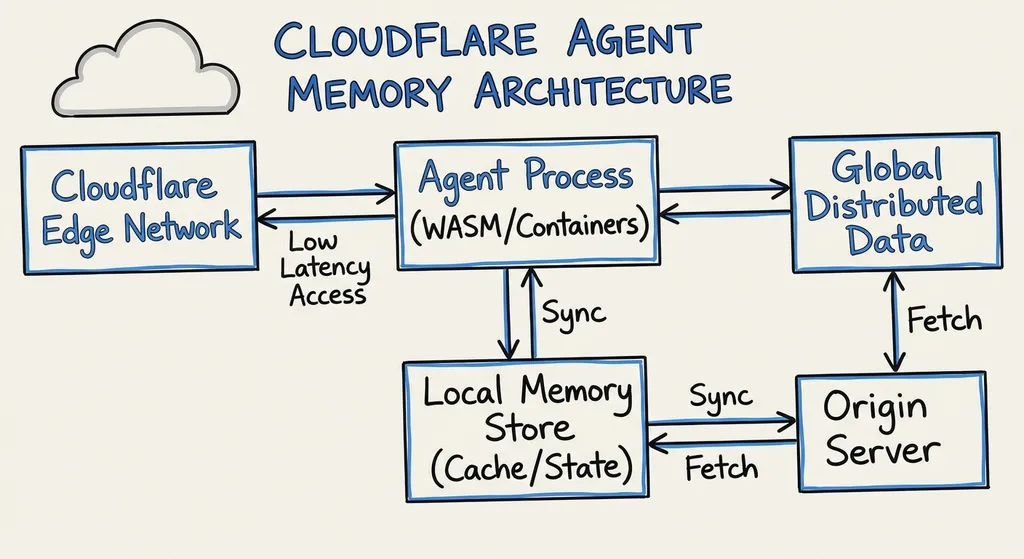
Memory data is stored in Cloudflare’s global network and supports cross-session access. Developers can create independent memory spaces for each user or session, ensuring thorough data isolation.
The data structure is flexible—supporting key-value pairs, vector embeddings, and metadata such as timestamps. You can store structured user preferences (e.g., “the user prefers TypeScript”) or unstructured conversation history (e.g., “discussed database optimization last time”).
2. Intelligent Retrieval
Agent Memory has built-in semantic retrieval, leveraging vector similarity to match related memories. This is far more powerful than simple keyword search, as it can understand user intent at a semantic level.
For instance, if a user asks, “Was the performance issue solved last time?”, Agent Memory can retrieve memories related to “slow database query” or “index optimization” even if the exact words differ.
It also supports batch retrieval—fetching multiple related memories in one API call, reducing latency and improving responsiveness, which directly impacts user experience.
3. Automatic Forgetting
This is perhaps the most interesting part of Agent Memory. It doesn’t store everything indefinitely—instead, it automatically removes expired memories based on importance and relevance.
Developers can specify a TTL (Time To Live) for each memory or manually tag certain ones as “important” or “temporary.” Based on these markers and access frequency, the system decides what to keep or decay.
This design mimics human memory—important things are reinforced, unimportant ones fade away. For agents, this helps prevent memory space from being filled with useless data and reduces noise during retrieval.
Technical Implementation Details
Agent Memory is built on Cloudflare Workers and Durable Objects—naturally providing a globally distributed, low-latency, and highly available foundation.
Data is stored at Cloudflare’s edge nodes, and retrieval requests are routed to the nearest node—latency typically under 50ms. This is critical for real-time agent interactions, where users should not feel noticeable delays.
Vector retrieval is powered by Cloudflare Vectorize and supports various embedding models (OpenAI, Cohere, or custom). Developers can choose or manage their own embedding models for generation and updates.
Data isolation is fine-grained. Each agent instance can have an independent memory space. Different users’ memories are completely separated—important for multi-tenant apps or scenarios with sensitive data.
API Example
Agent Memory offers a RESTful API compatible with the OpenAI API style. If you use OpenAI Hub, you can simply switch the base URL to call Cloudflare’s service.
Store Memory
import requests

# Using OpenAI Hub to call Cloudflare Agent Memory
base_url = "https://api.openai-hub.net/v1/cloudflare/agent-memory"
api_key = "your-openai-hub-api-key"

# Store a memory
response = requests.post(
    f"{base_url}/memories",
    headers={
        "Authorization": f"Bearer {api_key}",
        "Content-Type": "application/json"
    },
    json={
        "user_id": "user_123",
        "session_id": "session_456",
        "content": "The user prefers using TypeScript and React for frontend development",
        "metadata": {
            "category": "preference",
            "importance": "high",
            "timestamp": "2026-04-18T10:30:00Z"
        },
        "ttl": 2592000  # expires after 30 days
    }
)

print(response.json())
Retrieve Memory
# Semantic search for related memories
response = requests.post(
    f"{base_url}/memories/search",
    headers={
        "Authorization": f"Bearer {api_key}",
        "Content-Type": "application/json"
    },
    json={
        "user_id": "user_123",
        "query": "What tech stack does the user prefer?",
        "top_k": 5,  # return top 5 most relevant memories
        "filter": {
            "category": "preference"  # only search preference-type memories
        }
    }
)

memories = response.json()["memories"]
for memory in memories:
    print(f"Relevance: {memory['score']:.2f}")
    print(f"Content: {memory['content']}")
    print(f"Timestamp: {memory['metadata']['timestamp']}")
    print("---")
Batch Operations
# Store multiple memories in batch
response = requests.post(
    f"{base_url}/memories/batch",
    headers={
        "Authorization": f"Bearer {api_key}",
        "Content-Type": "application/json"
    },
    json={
        "user_id": "user_123",
        "memories": [
            {
                "content": "The user encountered database query performance issues in the project",
                "metadata": {"category": "issue", "importance": "high"}
            },
            {
                "content": "Suggested adding indexes to optimize query performance",
                "metadata": {"category": "solution", "importance": "medium"}
            },
            {
                "content": "The user adopted the index optimization solution",
                "metadata": {"category": "action", "importance": "high"}
            }
        ]
    }
)

print(f"Successfully stored {response.json()['count']} memories")
Update and Delete
# Update memory importance
response = requests.patch(
    f"{base_url}/memories/mem_789",
    headers={
        "Authorization": f"Bearer {api_key}",
        "Content-Type": "application/json"
    },
    json={
        "metadata": {
            "importance": "critical"  # elevate importance
        }
    }
)

# Delete expired memory
response = requests.delete(
    f"{base_url}/memories/mem_789",
    headers={"Authorization": f"Bearer {api_key}"}
)
Use Cases
Where is Agent Memory most suitable? Based on Cloudflare’s documentation and community feedback, key categories include:
Customer Support Agents
This is the most straightforward use case. Support agents need to remember users’ past issues, solutions, satisfaction feedback, and more. With Agent Memory, users don’t have to repeat background details every time, allowing the agent to provide more personalized service.
For example, if a user previously reported “login always times out” and comes back, the agent can ask “Was your login issue resolved last time?” instead of the robotic “How can I help you?”
Code Assistants and Dev Tools
Tasks like code review, refactoring, and bug fixing all require context. Agent Memory lets the agent recall a project’s tech stack, code style, and past feedback for more accurate suggestions.
A code review agent might remember “uses ESLint Airbnb rules,” “team dislikes the any type,” or “previously suggested splitting this function,” ensuring consistent reviews.
Personalized Recommendations and Content Generation
A content creation agent can remember the user’s writing style, topics of interest, and target audience to generate content that better fits expectations.
For instance, a marketing copy agent can recall “the user prefers concise, direct style,” “audience = developers,” and “avoid exaggerated adjectives,” maintaining tone consistency across outputs.
Multi-Step Tasks and Workflows
Complex automation tasks involve multiple steps, with each result influencing the next. Agent Memory allows progress tracking, intermediate results, and error recovery—supporting resumable workflows.
Example: A data processing agent performing “download → clean → transform → upload”. If a step fails midway, it can resume from memory instead of restarting.
Comparison with Existing Solutions
There are already memory solutions, such as LangChain’s Memory module, LlamaIndex’s Memory Store, and Alibaba Cloud Tablestore’s lightweight frameworks. So what makes Cloudflare’s Agent Memory competitive?
Managed Service vs. Self-Built
The biggest difference: Agent Memory is fully managed. No need to host your own vector DB, handle synchronization, or manage embeddings—Cloudflare does it for you.
LangChain and LlamaIndex provide flexibility, but you must choose a backend (Redis, PostgreSQL, Pinecone, etc.), configure models, and handle data migration. That’s a lot for small teams.
Agent Memory pricing is straightforward—based on storage and API calls, with no hidden costs or infrastructure upkeep.
Global Distribution vs. Single Region Deployment
Cloudflare’s global edge network is a major advantage. Data resides at edge nodes with sub-50ms retrieval latency—much faster than centralized databases.
If your agent serves global users, the experience is consistent across the US, Europe, and Asia. While Alibaba Cloud’s Tablestore supports multi-region setups, it requires manual configuration, adding complexity.
Automatic Forgetting vs. Manual Cleanup
Most existing solutions require developers to manually manage memory lifecycles—writing scripts to clear, archive, or compress old data.
Agent Memory’s built-in automatic forgetting logic means you just set TTL and importance tags—the system handles cleanup and archiving automatically. For long-running agents, this prevents memory bloat.
Of course, automation also means less granular control. If you need strict retention policies, a self-managed solution might still be necessary.
Potential Issues and Limitations
Agent Memory is still in Beta and has some limitations to note:
Data Export and Migration
Cloudflare promises data exportability, but exact formats and tools are pending. If vendor lock-in is a concern, consider waiting for the official release.
The good news: the API is standardized—migration to other vector DBs (Pinecone, Weaviate) should be possible. However, features like auto-forget and TTL may need custom implementation.
Embedding Model Selection
Agent Memory supports multiple embedding models, but vector dimensions and semantics differ. Switching models mid-project requires regenerating embeddings—potentially time-consuming.
Choose your model early (e.g., OpenAI text-embedding-3-small/large). Cloudflare has optimized support for these, with faster retrieval speeds.
Cost Management
While pricing seems reasonable, heavy usage could increase costs fast.
For example, a support agent with 1M users × 100 memories × 1KB = 100GB storage, plus millions of retrievals daily—monthly bills can grow quickly.
Plan memory granularity and retention early. Not every conversation needs storage—balance between detail, TTL, and importance to control costs.
Privacy and Compliance
Since Agent Memory stores user conversations and preferences, privacy compliance is a concern. Cloudflare promises encryption and GDPR/CCPA compatibility, but review the processing agreements carefully.
If your app handles sensitive data (healthcare, finance, legal, etc.), you may need added measures like end-to-end encryption, data masking, or access auditing—currently not fully supported.
Impact on the Agent Ecosystem
The launch of Agent Memory signals an evolution in AI infrastructure—from “model as a service” to “agent as a service.”
Over the past year, discussions have focused on agent architectures, tool use, and multimodal capabilities, but rarely on state management. Now Cloudflare has standardized the memory layer, significantly lowering development barriers.
This benefits the ecosystem: developers can focus on business logic and UX instead of database plumbing—just like AWS S3 standardized object storage, Cloudflare’s Agent Memory could standardize the memory layer.
Of course, there’s also vendor lock-in risk. If Agent Memory becomes the de facto standard, developers may grow dependent on Cloudflare’s stack. Fortunately, the company is known for openness and interoperability, hopefully continuing that tradition.
Competitively, AWS, Google Cloud, and Azure will likely respond soon. Since stateful memory is key infrastructure for AI, expect a coming wave of “Memory-as-a-Service” competition—a win for developers.
Practical Usage Tips
If you plan to use Agent Memory, here are a few tips:
1. Design Appropriate Memory Granularity
Don’t store entire dialogues as one memory. Instead, extract key facts—user preferences, task progress, critical decisions.
Example dialogue:
User: I want to build an e-commerce site with React and TypeScript
Agent: Great, I suggest Next.js—it’s SEO friendly
User: Sounds good. What about the database?
Agent: Consider PostgreSQL with Prisma ORM
User: Deal.
Should be extracted as:
- “User preference: React + TypeScript”
- “Project type: e-commerce site”
- “Tech stack: Next.js + PostgreSQL + Prisma”
Rather than storing the whole conversation. This improves retrievability and saves storage.
2. Set TTLs Appropriately
Different memory types require different retention durations:
- User preferences: long-term (90 days+)
- Task progress: mid-term (30 days)
- Temporary context: short-term (7 days)
- Session status: very short (1 day)
Regularly review access frequency and lower importance or delete rarely used memories.
3. Combine Vector Search with Structured Queries
Semantic retrieval is powerful, but not always optimal. For example, “find last login time” is best handled with metadata filters, while “has the user encountered similar issues?” works better semantically.
Store metadata fields (category, timestamp, importance, etc.) to support hybrid querying later.
4. Monitor and Optimize
Agent Memory provides usage and performance metrics—review them regularly to refine storage and retrieval strategies.
Key metrics:
- Average retrieval latency: >100ms? Optimize filters or lower
top_k. - Memory hit rate: <50%? Revisit granularity or search strategy.
- Storage growth rate: >20% per month? Tighten TTL or cleanup rules.
Conclusion
Agent Memory represents another major step in Cloudflare’s AI infrastructure strategy. It tackles two core agent challenges: state management and context retention.
Technically, it’s solid—globally distributed storage, semantic retrieval, automatic forgetting, and strict data isolation. Its OpenAI-style API reduces integration costs.
Still, as a Beta, some aspects—export, cost, privacy—need real-world validation. But the direction is right: standardizing the memory layer will greatly simplify agent development.
If you’re building agent-based apps—especially with multi-turn or personalized interactions—Agent Memory is worth exploring. It won’t solve everything, but it will spare you a lot of infrastructure work.
OpenAI Hub already supports Cloudflare Agent Memory via unified APIs. For developers in mainland China, this means no VPN, no connectivity issues, and direct use of Cloudflare’s global infrastructure.
References
- Cloudflare Now Supports Hosted Agent Memory (Beta) — Community discussion and early reviews on Linux.do
- Agent Memory Part I: Memory Forms, Functions, and Key Implementations — Zhihu deep-dive on the technical mechanisms behind agent memory systems


