Kimi lets the agent take control of the browser.

Kimi recently integrated browser control, operation recording, and web workflow reuse into its Skill system. Agents are no longer limited to reading web pages and offering suggestions; with user authorization, they can directly navigate, click, fill out forms, and extract data. The browser is evolving from an information gateway into an execution environment for Agents.
Kimi Lets Agents Take Over the Browser
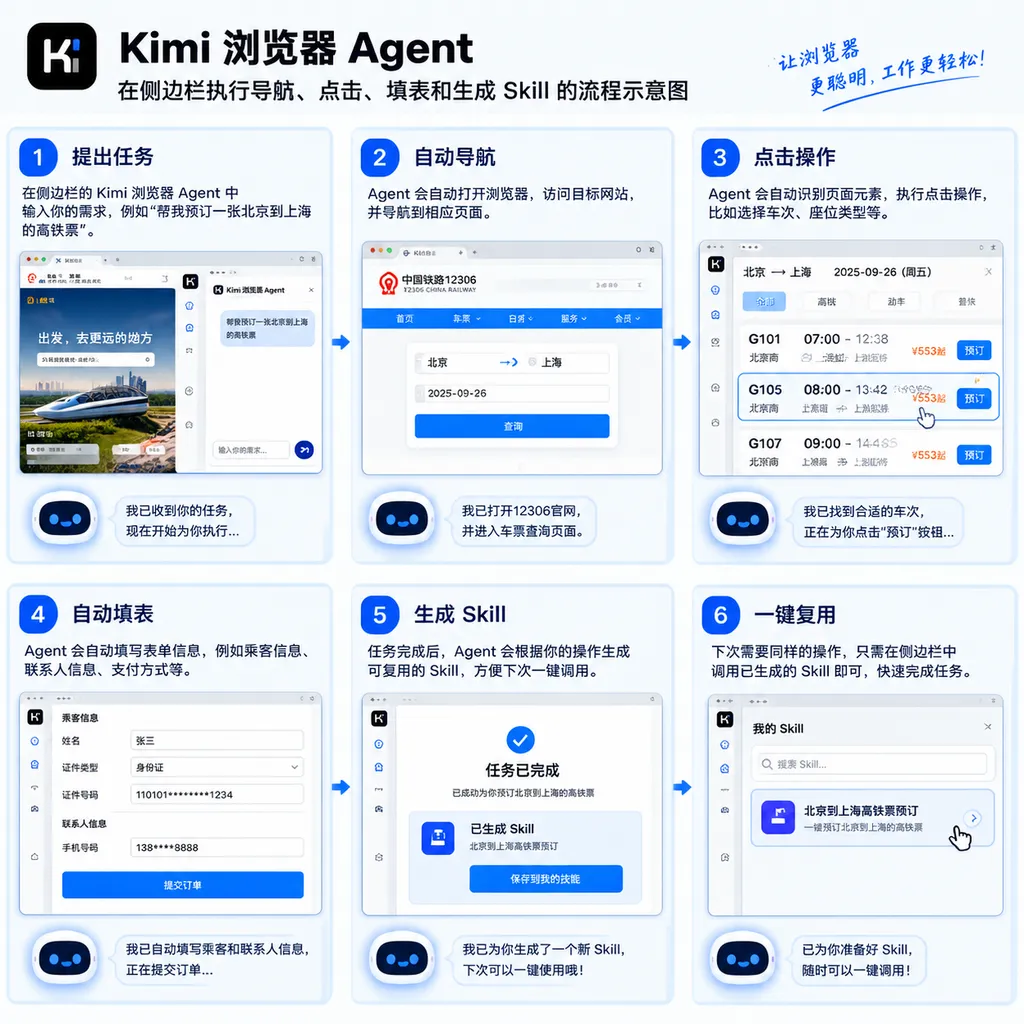
Kimi recently turned browser operations into reusable Skills: users can ask an Agent to open webpages, click elements, fill out forms, upload files, handle pop-ups, and then save the entire workflow for direct invocation later using /.
This means the boundaries of an Agent’s work have moved one step beyond “viewing webpages and summarizing content” toward “actually completing tasks on the web.” Previously, when users asked AI to search for rental properties, compare prices, or organize back-office data, they often still had to open the pages themselves, copy content, and submit forms. Now, Kimi is attempting to take over these intermediate actions as well.
For developers, this is not just another browser extension feature, but a sign that browser automation is moving from the scripting era into the Agent era: web operations are no longer driven solely by fixed selectors and predefined workflows, but are beginning to be jointly determined by natural-language goals, page state, and reusable Skills.
From “Able to Browse” to “Able to Execute”
Over the past two years, mainstream AI products have made web search a standard feature. Models can retrieve webpages, extract text, generate summaries, and navigate between multiple pages. But “reading webpages” and “operating webpages” are two different things.
The former is essentially an enhanced form of search: obtain page content, understand it, and generate a response. The latter requires dealing with a more troublesome set of real-world issues: whether the page has finished loading, whether a button is obstructed, whether form fields have changed, whether the login session remains valid, whether a pop-up appears after a click, and whether the system can recover after an operation fails.
Kimi WebBridge and its related browser capabilities target the latter problem. According to recent use cases published by Kimi, users can give the Agent a goal in the sidebar, such as:
- Search multiple rental websites for properties that meet budget and commuting requirements;
- Open flight, hotel, and travel-guide pages and compile a travel plan;
- Visit e-commerce platforms and compare prices, specifications, and reviews for the same product;
- Export data from a back-office system and organize it in a specified format;
- Search for papers, open their detail pages, and extract abstracts, methods, and conclusions.
These tasks may still look like “searching and organizing,” but the execution chain is clearly different. The Agent must open pages, identify page structures, select actions, wait for results, and then determine the next step. It is no longer merely answering “how this should be done,” but attempting to advance the task through to delivery of the result.
For developers, the key change is not whether “AI can click buttons,” but whether web operations can become composable, maintainable, and repeatedly invocable units of capability.
Turning a Single Operation into a Skill
Kimi’s core approach is to encapsulate repetitive web workflows as Skills. Users can first perform an operation manually, allowing the system to record the process, and then have the model distill those actions into a reusable Skill.
A typical workflow consists of roughly four steps:
- Enter
/in the sidebar and select “Record operations as a Skill”; - Complete a web operation as usual;
- Click stop and generate, allowing the model to organize the steps, parameters, and execution logic;
- Confirm the Skill’s name and content, then save it for repeated use.
When the same type of task arises in the future, users do not need to explain the entire workflow again. They can simply invoke the corresponding Skill. Sensitive information such as passwords and verification codes can be treated as confidential parameters and supplied by the user during actual execution.
This resembles traditional macro recording, but it is not exactly the same. A macro typically records coordinates and fixed steps verbatim, so even minor page changes can cause it to fail. An Agent Skill attempts to distill a process into “goals, steps, parameters, and decision conditions.” When the page structure changes, the model may still be able to relocate the relevant controls based on their meaning.
For example, a traditional script might say: click the third button, wait two seconds, and enter the content into the fifth input field. A Skill would be closer to: open the order export page, set the date range, export a CSV file, and confirm that the download is complete. The former depends on page position; the latter depends on task semantics.
Of course, this does not mean Skills can automatically handle every website change. Expired sessions, dynamic rendering, CAPTCHAs, A/B tests, and permission differences on real websites can still cause execution to fail. Skills reduce the cost of repeated configuration and rediscovery; they do not turn browser automation into a 100% reliable black box.
The Browser Is Becoming the Agent’s “Hands”
If a large language model is viewed as the “brain” responsible for understanding and planning, the browser is the Agent’s “hands” for interacting with the real internet. In the past, those hands had limited reach: they could mainly call search and scraping tools, and the information available to them was often restricted to static text.
Browser control capabilities are now beginning to add the other fingers:
- Navigation: Open specified pages, return to the previous page, or switch to a target website;
- Interaction: Click buttons, select dropdown options, scroll pages, and switch tabs;
- Input: Fill in text fields, upload files, and submit forms;
- Waiting: Wait for pages to load, asynchronous tasks to complete, or downloads to finish;
- Dialog handling: Confirm, cancel, or otherwise handle browser pop-ups;
- Information extraction: Read page text, tables, lists, and operation results.
None of these actions is particularly complex on its own. The difficulty lies in making them work continuously in an uncertain environment. A webpage is not an API: interface fields do not tell the Agent what to click next, and there is no guarantee that the page will look the same today as it did yesterday. The Agent must integrate visual or textual page understanding, action execution, and result verification into a single loop.
This is also the dividing line between browser Agents and conventional RPA tools. RPA is suitable for highly stable back-office workflows, offering controllability, auditability, and low execution costs. Agents are suitable for tasks with clear goals but frequently changing pages, offering the ability to handle exceptions and temporary changes. Neither will completely replace the other; they are likely to coexist in enterprise automation for a long time.
What Really Matters to Developers Is the “Skill Layer”
By incorporating browser capabilities into its Skill system, Kimi is doing more than adding a few clicking tools. More importantly, it is attempting to establish a workflow abstraction layer between the model and the web.
Within this abstraction, the model does not need to understand a website from scratch every time. On first use, the Agent can explore the page structure and operating path. Once the workflow is saved, subsequent tasks can directly invoke the existing Skill. This process is similar to a developer first writing an adapter and then integrating it as a tool into a higher-level Agent system.
Public browser automation projects are also moving in a similar direction. BrowserAct Skills, for example, emphasizes obtaining the state of the browser environment first and then generating reusable SKILL.md files and script packages based on the page and task. A Skill is not merely a prompt; it may also include operating instructions, parameter constraints, helper scripts, and exception-handling logic.
Skill = Task Goal + Execution Steps + Input Parameters + Page Evaluation + Result Verification
This formula is closer to engineering practice than simply “giving the model a prompt.” A prompt can guide the model, but a Skill must also describe when it can run, what permissions it requires, how success is determined, and which step it should fall back to after a failure.
For enterprises and developers, the future may hold more value in a collection of Skills for specific systems than in a universal Agent:
- Jira ticket creation and status synchronization;
- GitHub Issue organization and project board updates;
- CRM lead entry and customer information enrichment;
- E-commerce back-office product and inventory inspections;
- Information retrieval from financial, research, or internal knowledge bases;
- Publishing, moderation, and data collection on content platforms.
Once these Skills accumulate, the Agent is no longer merely a temporary assistant in a chat window. It becomes more like a schedulable digital operator.
“Having an Authenticated Session” Is Both a Capability and a Risk
One of the most appealing aspects of a browser Agent is precisely its ability to use the browser environment in which the user is already signed in. Users do not need to provide their account credentials to the model or configure a separate API for every website. The Agent can perform tasks in authorized tabs, which is particularly important for internal systems, enterprise back offices, and websites that require SSO authentication.
However, this also elevates the security issue from “whether the model will produce an incorrect answer” to “whether the model can perform high-risk actions on the user’s behalf.”
If a Skill has access to email, financial systems, code repositories, or customer systems, a single incorrect click could result in data leakage, mistakenly sent emails, erroneous orders, or production-environment changes. The risks of web operations do not increase linearly, because an Agent can perform dozens of actions in succession while the user often sees only the final result.
Kimi’s related capabilities currently emphasize that browser control is disabled by default. Users must explicitly enable the feature and select a target tab before the system provides the Agent with page snapshots and browser action tools. This design is necessary, but insufficient. A browser Agent suitable for production environments requires at least the following controls:
- Permissions divided by website, tab, and operation type;
- Mandatory secondary confirmation for actions such as submitting orders, sending emails, and deleting data;
- Complete logs of operation histories, page snapshots, and results;
- Support for pausing, undoing, and resuming tasks at any time;
- Redaction of sensitive fields to prevent their contents from entering unnecessary context;
- A clear distinction between permission to “read webpages” and permission to “change webpage state.”
This is also the aspect developers are most likely to underestimate when integrating browser Agents. The real challenge is not connecting a clicking interface, but establishing an execution mechanism that people can understand, intervene in, and hold accountable.
Kimi’s Path Differs from “Competing Solely on Coding”
One major focus of Agent competition this year has been coding. Models are entering terminals, editors, and code repositories to help developers write code, run tests, and fix bugs. Kimi is also strengthening Kimi Code and its local Agent capabilities, but browser Skills reveal another, broader path: extending Agents beyond development tools into every knowledge-work scenario that depends on the web.
The commercial value of this path is considerable. Many enterprise processes still run in browsers. Back-office systems, office platforms, supplier portals, and internal tools often lack complete APIs. These systems may seem outdated to software engineers, but to enterprises, they are essential infrastructure used every day.
If Agents can only call standardized APIs, the world they can cover is limited. If they can operate existing systems within permission-controlled browsers, they have the potential to take over a large amount of work that “has no API but still requires someone to click.”
However, the competition Kimi faces is also straightforward. Browser automation already includes Playwright, Selenium, Puppeteer, Computer Use, and various RPA solutions, while the open-source community is developing rapidly. Kimi’s advantage lies in integrating web browsing, conversation, Skill management, and model capabilities into a single product experience. Its weaknesses are that reliability, cross-site generalization, security auditing, and long-term maintenance still need to be proven.
Management issues will emerge quickly as the Skill library grows: which Skills come from trusted sources, which versions were recently updated, which Skills require additional permissions, and which workflows have stopped working after website redesigns. Without version control, dependency documentation, and testing mechanisms, Skills can easily turn from assets into a new maintenance burden.
How Long Until Agents Take Over Web Tasks in Everyday Work?
In the short term, browser Agents remain best suited to low-risk, verifiable, and highly repetitive workflows: information gathering, price monitoring, table extraction, back-office inspections, report downloads, and organizing data into fixed formats. These tasks share one characteristic: even if they occasionally fail, people can easily inspect and correct the results.
High-risk operations should not be completed solely through a single natural-language instruction. Tasks involving payments, contracts, permission changes, production releases, and external communications should retain human confirmation, or the Agent should first generate a proposed execution plan for the user to approve step by step.
From a product-trend perspective, the browser will not remain merely a window through which AI obtains information. It is becoming infrastructure through which Agents execute real-world tasks. By turning “operation recording” and “web workflow encapsulation” into Skills, Kimi is attempting to transform one-off automation actions into capabilities that can be invoked over the long term. This direction offers greater potential than simply adding another search button and is closer to where Agents can generate real productivity.
For developers, the important questions are not whether an Agent can demonstrate “automatic form filling” once, but whether it can continue completing tasks after pages change, whether it can clearly explain the causes of failure, and whether permissions and operation records remain under human control.
If these three issues are gradually resolved, browser Agents can evolve from demonstration features into stable workflow components. At that point, Skills may become a standard layer connecting models with real-world software systems, much like plugins and APIs today. API aggregation platforms compatible with multiple models, such as OpenAI Hub, are also better suited to hosting this type of higher-level, multi-model collaborative application. However, browser permissions, operation auditing, and execution security must still be handled by the application itself.
References
- KIMI++ GitHub Repository: Implementation references for browser extensions, sidebar Agents, MCP tools, Skill management, and browser control.
- BrowserAct Skills Resources: Open-source reference practices for browser Agent environment management, Skill generation, and web automation workflows.