Microsoft is turning Copilot into the ultimate gateway for work.

On September 25, Microsoft officially launched the new version of Copilot, consolidating chat, coding, and agent capabilities into three entry points: Home, Code, and Autopilot. It is no longer merely a question-and-answer window, but is instead designed to become a unified work interface connecting enterprise data, applications, and automated tasks.
Microsoft Turns Copilot into a Supergateway for Work
On the evening of September 25, Microsoft officially released the new version of Copilot. The new product brings chat, coding, and agent capabilities together in a single application, reorganizing users' workflows through three tabs: Home, Code, and Autopilot.
The focus of this update is not simply adding another chat model or putting another sidebar into Office. Rather, Microsoft is beginning to redefine Copilot's product form: it is evolving from an “assistant that answers questions” into a unified gateway that understands work context, creates tools, and executes tasks.
Jared Spataro, Microsoft's chief marketing officer for its AI at Work business, even compared it with Office. He said that Office once defined how people worked in the PC era, while the new Copilot aims to define how people work in the AI era.
That statement sounds ambitious, but the structure of the new Copilot is indeed no longer comparable to that of a traditional chatbot. After opening it, users are not confronted with a blank input box. Instead, they see three entry points corresponding respectively to “understanding work progress,” “creating applications,” and “delegating execution to agents.”
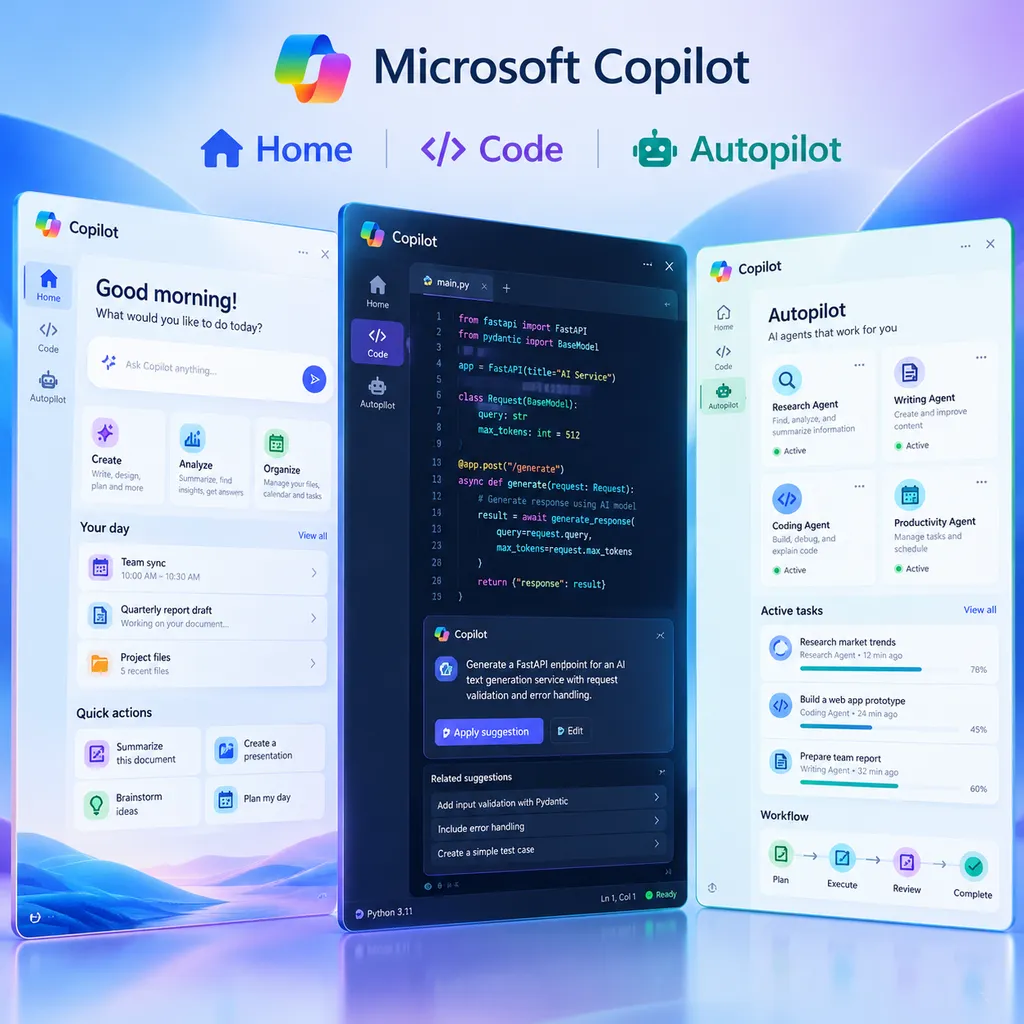
Three Tabs, Three Work States
The first tab in the new Copilot is Home, which is also the default landing page. Microsoft has placed Copilot Chat and Cowork in Home, and plans to add a Today feature later to aggregate work information such as emails, meeting requests, and Teams discussion threads in a personalized dashboard.
This means Home is not positioned as a simple chat interface, but as a work-status panel. Users can check what has happened recently, see which tasks remain unfinished, and find out what Copilot can continue helping with.
Microsoft describes Home as a way for users to quickly understand their work progress, see how far they have gotten, and resume working from where they last stopped. This approach differs significantly from traditional chat products: chat windows typically begin with “What do you want to ask right now?” while Home attempts to begin with “Where are you in your current work?”
This may be a layer that enterprise AI products genuinely need to add. Many employees do not lack a model that can answer questions. Instead, they face large volumes of emails, meetings, files, instant messages, and to-do items every day, without knowing what to handle next. If Copilot can organize information scattered across Outlook, Teams, SharePoint, and Office files, its value will go beyond saving time on a few searches. It could reduce context switching within workflows.
But this also depends on a crucial prerequisite: Microsoft must accurately determine which information is worth putting in front of users. If the dashboard merely piles emails, meetings, and notifications together again, it will become yet another information feed. Home can only evolve from a “work summary” into a true work gateway if the system can understand priorities, deadlines, participants, and task relationships.
The second tab is Code. Microsoft says Code uses the same underlying technology as GitHub Copilot. Users can create applications, trackers, dashboards, and automated workflows through natural language, then share these creations with colleagues as internal cloud applications.
For developers, the most noteworthy aspect of Code is not whether “AI can write code,” but that it pushes code generation further toward the production of internal tools.
In the past, when a business team wanted to create a simple project tracker, the process typically involved requirements gathering, front-end development, back-end APIs, database configuration, deployment, and permission setup. Now, non-specialist developers can first describe their requirements in natural language and have Copilot generate a working application prototype in a sandbox environment, then modify it based on actual usage.
This does not mean traditional development will disappear. On the contrary, the closer an application is to a real business environment, the more it requires professional engineering expertise for permissions, data models, exception handling, auditing, and maintenance. But for low-risk, internal-use tools with relatively standardized processes, Code could reduce development cycles from several weeks to a few hours or even less.
Microsoft emphasizes that applications generated by Code can be securely hosted within an enterprise tenant. This detail matters. What enterprises are truly concerned about is usually not whether AI can generate a page, but whether the resulting application will send data to an uncontrollable environment, whether it can integrate with existing identity systems, and who can access, modify, and audit these applications.
If Code can integrate with Microsoft's identity management, cloud resources, and enterprise data-permission systems, it would be more than an individual development tool. It could become a lightweight application platform for enterprises.
The third tab is Autopilot. Originally called Scout, it started as a desktop application before shifting to cloud-based operation after being renamed. Microsoft describes it as a “digital teammate,” emphasizing that it can continue executing tasks while users are offline or even taking a break.
The core change introduced by Autopilot is a shift from “waiting for user input” to “continuously executing assigned work.” It has an independent cloud computer instance, can monitor Teams channels, run scheduled tasks, and handle follow-ups.
For example, a user can ask Autopilot to monitor a Teams project channel. When specific keywords appear in customer feedback, it can first organize the relevant information, generate a summary, and then remind the project owner. It can also be instructed to check the completion status of a process every week and send outstanding items to the relevant members.
These tasks do not necessarily require the most powerful model. They do, however, require a model that can run continuously, read context, call tools, and resume work at different points in time. Autopilot's product direction has moved beyond the “question-and-answer assistant” stage and into the task-agent phase.
Microsoft's Real Advantage Is Enterprise Context, Not the Chat Window
When introducing Autopilot, Microsoft repeatedly mentioned tenants, identities, memory, computers, and workspaces. According to Microsoft, Autopilot runs in an enterprise's own tenant and uses Microsoft IQ as its foundation to understand how the organization works.
The key to this design is not how many buttons are added to the agent, but whether it can obtain enterprise context that is sufficiently accurate while remaining subject to strict controls.
A general-purpose chatbot may know information from public websites, but it does not necessarily know a company's current customer assignments, approval processes, project owners, or file permissions. Microsoft's Copilot, by contrast, can directly access the Teams, Outlook, chats, channels, and documents that employees use every day. Users can also @Autopilot just as they would @mention a colleague.
This is precisely Microsoft's advantage over many standalone AI applications. It has entry points into enterprise productivity software, as well as identity management and cloud infrastructure. For companies already using Microsoft 365, Teams, SharePoint, and Azure, Copilot does not need to establish data connections from scratch.
Of course, the deeper the data connections, the greater the risks. If a chatbot that only generates text makes a mistake, the result may simply be an inaccurate answer. But if an agent that can read emails, modify files, send messages, and advance workflows makes a mistake, it could directly affect business processes.
Therefore, Microsoft's emphasis on permissions, auditing, and governance mechanisms is not merely supplemental marketing. These are necessary conditions for Autopilot to enter core enterprise scenarios. Enterprises will care about at least the following questions:
- Which files and channels can Autopilot access, and does it strictly follow the user's existing permissions?
- Does it require human confirmation before sending emails, modifying records, or taking similar actions?
- Are every read, generation, and execution recorded in traceable logs?
- Can administrators centrally manage the models, tools, and data used by the agent?
- When a task fails or produces an incorrect result, can the enterprise pause, roll back, or assign accountability?
Judging from Microsoft's product messaging, the new Copilot is clearly designed as enterprise software rather than as a consumer AI assistant simply scaled up for corporate environments. This is also its clearest difference from many consumer-oriented AI products.
This Is Not Simply a Mix of Three Features
On the surface, Home, Code, and Autopilot correspond to chat, programming, and agents respectively, making it look as though Microsoft has placed several existing products into a single interface. More important, however, is that Microsoft is attempting to connect them into a continuous workflow.
Users can first understand project progress in Home, then create a tracker or internal application through Code, and finally have Autopilot continuously monitor the data and advance subsequent processes.
This workflow divides AI's role into three levels:
- Understanding information: Extracting context from emails, meetings, documents, and chats, answering questions, and summarizing the current state;
- Building tools: Creating applications, dashboards, or automated workflows based on requirements;
- Executing continuously: Running tasks in the cloud, monitoring changes, and taking action at the appropriate time.
Earlier versions of Copilot were closer to the first level. Code pushes its capabilities toward the second, while Autopilot attempts to complete the third. What Microsoft truly wants to sell is not a larger chat window, but a work system covering “understanding, creation, and execution.”
This also explains why Microsoft has chosen to gradually bring personal and enterprise versions of Copilot under a unified product narrative. For users, a more unified entry point makes it easier to switch between tasks within the same context. For Microsoft, a unified entry point can connect chat, productivity software, cloud services, development tools, and enterprise data to create a more complete product loop.
However, a unified entry point does not automatically mean a unified experience. Whether Home is sufficiently clear, whether applications generated by Code are reliable, and whether Autopilot can complete tasks without disturbing users all need to be tested in real enterprise scenarios. For agents in particular, the hardest question is often not “Can it complete a task once?” but whether it can run reliably for weeks at a time and respond appropriately when exceptions occur.
What This Means for Developers
For developers, the new Copilot will have an impact mainly in two areas.
First, the barrier to developing internal tools will continue to fall. In the past, developers had to spend considerable time handling forms, lists, permissions, and simple reports. In the future, they may be able to devote more attention to system boundaries, data quality, and complex business logic. Low-code tools may not replace developers, but they will change where developers spend their time.
Second, developers will need to start designing systems that can be called by agents. A back-office system designed only for human users may lack clear operational interfaces, permission boundaries, and state feedback. Once agents begin participating in workflows, systems will need to provide clearer APIs, events, approval points, and audit records.
In other words, the adoption of AI agents will in turn drive a redesign of enterprise software. Future applications will need to consider not only how users click through them, but also how agents retrieve data, submit operations, obtain authorization, and handle failures.
If Microsoft can connect these capabilities across the existing Microsoft 365, Azure, Power Platform, and GitHub ecosystems, competitors will be facing more than a single Copilot product. They will be facing an AI work layer already embedded in enterprise infrastructure.
This is why the new Copilot deserves more attention than a one-time model update. Model capabilities are certainly important, but enterprises ultimately do not purchase parameter counts from a leaderboard. They purchase a system that can enter existing workflows, follow permissions, reduce handoff costs, and continuously produce results.
Three Questions That Still Need to Be Watched
The first is availability and pricing. Microsoft's announcement focused on product positioning and capability structure, but which subscription plans will include the various features, when they will become broadly available, and how much additional cost enterprises will bear will directly affect the speed of adoption.
The second is Autopilot's reliability. An agent that can “do things on a user's behalf” can also magnify the impact of a misunderstanding. Microsoft needs to prove that Autopilot can do more than complete tasks in demonstrations, remaining controllable amid complex permissions, missing information, and changing processes.
The third is cross-platform and cross-model support. Microsoft has a large proprietary ecosystem, but the systems enterprises actually use often include Salesforce, SAP, ServiceNow, and various internal services. If Copilot can operate only within the Microsoft ecosystem, its value will be limited. If it opens up enough connectors and tool interfaces, it will introduce more complex security and governance challenges.
Therefore, the strategic direction of the new Copilot is clear, but its product value will depend on the depth of its implementation. It is no longer content to be an “AI button in productivity software.” Instead, it is attempting to become the default operating layer for enterprise work. That is an ambitious and difficult goal.
Conclusion
With the release of the new Copilot on September 25, Microsoft is essentially placing chat, code generation, and agent execution into a single work framework. Home helps users understand their work status, Code turns requirements into internal tools, and Autopilot continuously advances tasks in the cloud.
If this design matures, the way users interact with enterprise software will change. People will no longer need to open multiple applications, search for information item by item, and manually advance processes. Instead, they can first describe a goal and let Copilot complete more of the intermediate steps within the boundaries of permissions and governance.
But the outcome of this competition will not be determined by how many tabs appear in the interface. What truly matters is whether Microsoft can make Copilot sufficiently proactive without allowing it to overstep its authority; enable it to call on enterprise data without creating new information risks; and let it generate tools that can continue running reliably over the long term.
At least based on today's announcement, Microsoft has moved Copilot from a collection of features toward a product architecture for the era of AI-powered work. For developers, what deserves attention is not which new buttons have been added, but that enterprise software is gradually shifting from “people operating applications” to “people managing agents that complete work.”
Sources
- IT Home: Combining chat, programming, and agents, Microsoft officially releases the new Copilot “super app”: An introduction to the three core tabs of the new Copilot, Autopilot's positioning, and its enterprise capabilities.
- Zhihu: How should we evaluate Microsoft's merger of the personal and enterprise versions of Copilot into a unified application?: A discussion of the product significance of unifying Copilot's personal content, work data, Office applications, and agent entry points.