Kling 4.0 Makes AI Videos Longer

Kuaishou announces that Kling 4.0 will launch this October, supporting 4K, 1080p 10-bit HDR, native generation of videos up to 30 seconds long, and the ability to combine multiple images, videos, and subjects to create continuous narratives. The real upgrade is not just resolution, but that AI video is beginning to move from generating clips toward controllable production.
Kling 4.0 Makes AI Videos Longer
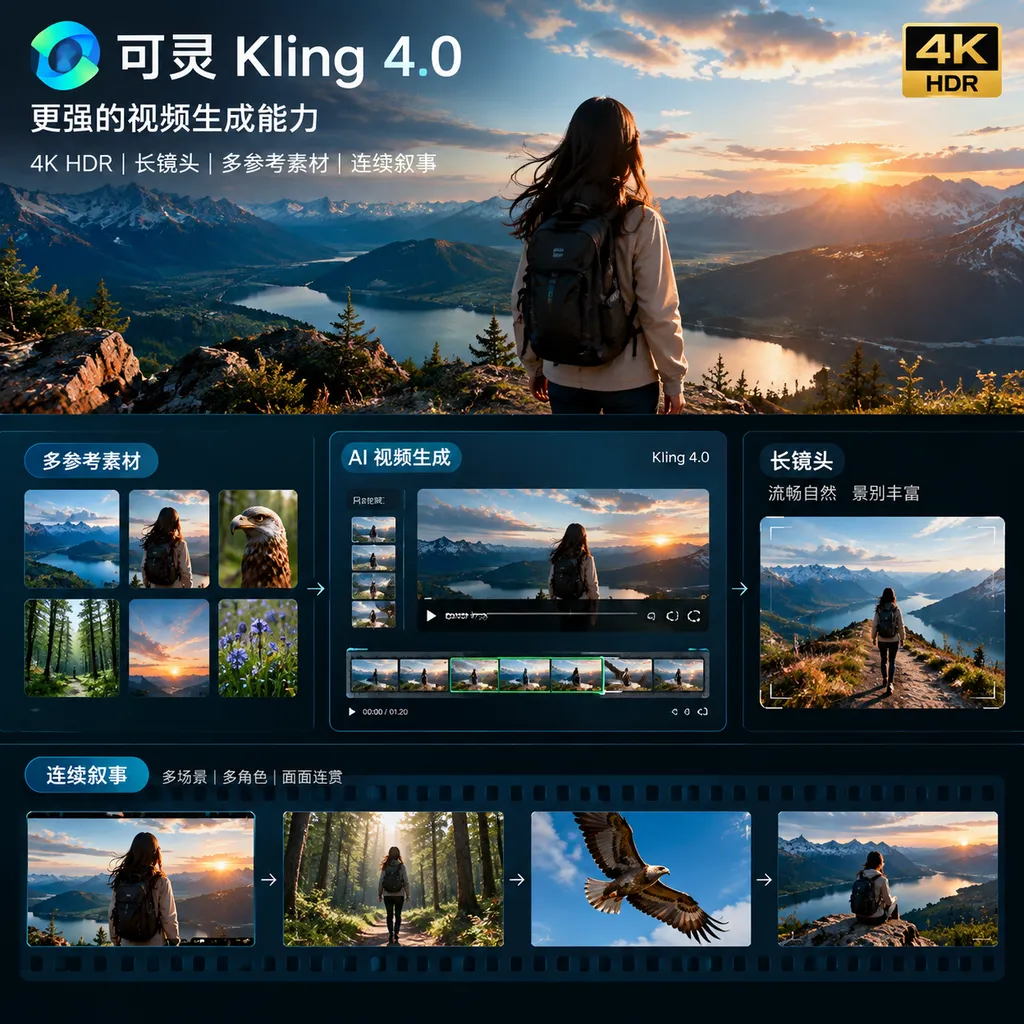
Kuaishou has scheduled the release of its next-generation video model for October this year. On September 29, Kling AI announced the core capabilities of Kling 4.0: support for 4K and 1080p 10-bit HDR output, the ability to combine up to 10 images, 5 videos, and 7 subjects in a single task, native generation of videos up to 30 seconds long, and enhanced capabilities for long takes, complex camera movements, multiple keyframes, and continuous storytelling.
Kling 4.0 Flash was made available for limited early access on September 28. It is positioned as a faster version better suited to high-frequency production. The full Kling 4.0 will officially launch in October.
The focus of this update is not simply extending video length from 15 to 30 seconds, nor rewriting “4K” in the specifications table. The real problem Kling aims to solve is this: when an AI video is no longer just a clip lasting a few seconds, but instead requires characters, actions, sound, camera work, and plot to develop continuously, can the model preserve the creator’s intent?
30 Seconds Is Not Simply Twice the Length
For some time, the mainstream workflow for AI video generation has been “short-clip stitching.” The model generates a 5- or 10-second shot, the creator selects the usable portions, and then connects them using start and end frames, extensions, editing, and frame interpolation. This workflow can produce attractive clips, but it is difficult to reliably tell a complete story.
The reason is that once a video becomes longer, the model must handle more constraints at the same time: a character’s face and clothing cannot suddenly change, actions need to have logical continuity, camera movement cannot lose its direction midway, sound and lip movements must remain synchronized, and scene lighting must stay consistent. For the model, this is not simply a matter of generating more frames. It must maintain the state of an entire world over a longer span of time.
Kling 4.0 offers native video generation of up to 30 seconds, which means the model can process a more complete chain of actions and narrative within a single generation task. For example, a person might run from a street corner toward a car parked by the roadside, open the door, get in, start the engine, and then drive out of frame. A traditional short-clip workflow would often require breaking this process into multiple shots, reprocessing the person, vehicle, and lighting each time. Native 30-second generation creates the possibility of letting the action unfold naturally along a single timeline.
The key word here is “native.” It does not mean every generation will directly produce a deliverable 30-second final video, nor does it mean every detail in a long video will remain stable. For developers and professional creators, the value of native duration lies in reducing the cost of connecting separate clips: less reconfiguration and more control over the overall shot.
Kling also emphasizes long takes and continuous storytelling. The former focuses on continuity between camera movement and subject movement, while the latter focuses on whether a story can develop from beginning to end. The two may appear similar, but they are actually separate problems: the camera may move continuously while the character’s behavior lacks coherence; the character’s actions may remain consistent while the camera suddenly zooms, drifts, or switches viewpoints midway. Kling 4.0 needs to handle both layers of consistency at once.
4K HDR First and Foremost Leaves Room for Post-Production
Kling 4.0 supports 4K and 1080p 10-bit HDR output. For ordinary users, this means clearer images and richer colors. For video production teams, the more important benefits are high dynamic range and greater flexibility for post-production adjustments.
An 8-bit video typically provides only 256 discrete levels per color channel, while 10-bit can provide 1,024. The difference may not be obvious in simple scenes, but it becomes more pronounced in backlighting, night scenes, neon lights, metallic reflections, and large areas of gradients. If the sky, walls, mist, and shadows do not have enough tonal gradation, banding can appear during color grading. Insufficient highlight retention can also cause lights to turn into solid white patches.
Kling’s official description is “backlighting without blown highlights, night scenes without muddiness, and neon without excessive glow.” This language is closer to professional production needs than to simply pursuing sharper images on a screen. The significance of 10-bit HDR is that it leaves room for adjustment during post-production, making it especially suitable for advertisements, product videos, short films, and series content that requires a consistent color style.
However, 4K output does not mean that every 4K detail is completely reliable. The bottlenecks of generative video may still appear in textures, text, fingers, fast motion, and complex relationships between objects. Once resolution increases, errors also become easier to see. In other words, 4K makes good visuals more valuable, but it also magnifies bad details.
Kling 4.0 also supports a 21:9 ultra-wide aspect ratio. This is better suited to cinematic title sequences, brand advertisements, automotive and digital product showcases, and gives video teams a composition space closer to traditional film and television production. For short-video platforms, however, 9:16 remains the more frequently delivered format. The truly useful capability is not any particular aspect ratio, but whether the model can rearrange subject placement and camera relationships for different formats instead of simply cropping the image.
Multi-Asset Input Addresses the Problem of Controllability
Kling 4.0 supports up to 10 images, 5 videos, and 7 subjects in a single task. Officially, this is described as support for up to 15 multimodal reference items. This upgrade deserves more attention than simply “supporting more reference images.”
AI video creation has always involved a contradiction: the simpler the input, the faster the generation, but the less controllable the result; the more complex the input, the more clearly creators can express their requirements, but the more likely the model is to encounter conflicts among the assets. When character reference images, action videos, scene images, product assets, and audio requirements enter the same task, the model must determine what each asset is intended to constrain.
Ideally, different reference assets should each serve a distinct role:
- Images define character appearance, clothing, product form, and scene style;
- Videos define the rhythm of movement, camera motion, and performance style;
- Subject inputs specify which people, objects, or brand elements must be preserved;
- Text prompts define narrative relationships, environmental changes, and creative objectives.
If the model can correctly assign these pieces of information, creators no longer need to pack every requirement into a single complex prompt. The prompt shifts from “describing everything” to “coordinating the assets.” This is especially important for commercial videos, because advertisers usually already have specific product images, model footage, reference videos, and brand-visual guidelines. What they lack is not inspiration, but a stable way to organize these elements into a video.
However, multiple references also introduce new operational challenges. The more assets there are, the more likely priority conflicts become. What happens when the person in the character image does not look like the person in the video, or when the product reference image and the scene video have inconsistent lighting? Which source does the model follow? Public information does not yet fully explain whether Kling 4.0 offers sufficiently clear reference weighting, subject locking, and conflict-resolution mechanisms. For professional users, these capabilities may matter more than the input limits themselves.
The Boundary Between Generation and Editing Is Becoming Less Distinct
Kling 4.0 also supports adding, modifying, and removing subjects and backgrounds in an original video, as well as adjusting style, weather, color, material, shot scale, and viewpoint. This direction is important because real production workflows rarely consist of “generate once and deliver immediately.”
A more common scenario is to start with a basically usable video and then modify several parts of it. For example, changing daytime into dusk, replacing an ordinary jacket with branded clothing, removing vehicles from the background, moving a product from a tabletop into a person’s hand, or transforming an indoor shot into a rainy street scene.
If these modifications require regenerating the entire video, the cost can be high, and parts that were already satisfactory may be damaged. An ideal editing model should function like an image restoration tool for video: the user specifies only what should change, while the remaining subjects, actions, and camera work stay as intact as possible.
By combining text, images, subjects, and other inputs in video editing, Kling is signaling that video models are moving from “text-to-video” toward “editable video assets.” For developers, this will affect product design. Future AI video tools may not simply consist of an input box and a generation button. They may also need timelines, subject tracks, keyframes, region editing, version comparison, and rollback operations.
Multiple Keyframes Give Long Videos Structure
Kling 4.0 supports up to 10 multiple-keyframe inputs. The value of keyframes is that they provide the model with narrative nodes rather than merely specifying a beginning and an end.
For example, a clothing advertisement could use keyframes to define a person standing indoors, walking to a staircase, entering the street, approaching the camera, and ending in a freeze-frame pose. The model does not need to invent the entire video from nothing; it needs to fill in the actions, camera movements, and transitions between these nodes.
This still cannot be equated with frame-by-frame control in traditional animation. A generative model may alter the movement path between keyframes or insert unexpected actions in the middle. However, compared with a single starting frame or a text prompt, multiple keyframes provide stronger structural constraints. They are especially suitable for product showcases, dance, fashion shows, and short films with clearly defined narrative beats.
From a creative perspective, multiple keyframes transform “writing prompts” into “designing a temporal structure.” This is easier for film and television professionals to understand: you are not merely telling the model what to shoot; you are also arranging several scenes it must reach.
Audio and Lip Sync Determine Whether a Video Feels Finished
Kling 4.0 also emphasizes high-quality audio, two-channel stereo, and coordination among sound, dialogue, lip movements, and performance. In the past, AI videos often came close to being usable visually, but the synthetic nature became obvious as soon as someone spoke: the mouth movements did not match the pronunciation, the sound lacked a sense of space, the character’s facial movements were stiff while speaking, and the ambient sound had no relationship to the image.
Audio is not an auxiliary layer of video. For interviews, narrative content, advertising voiceovers, and character dialogue, sound directly determines whether the audience believes in the scene. Two-channel stereo at least suggests that the model is beginning to consider differences in the sound field and spatial positioning, rather than outputting a monotonous background audio track.
However, the capabilities announced so far remain directional. More specific details about audio formats, sampling rates, language coverage, duration limits, and whether audio can be edited independently have not yet been disclosed. When evaluating the system, developers need to distinguish between “has sound” and “audio suitable for production.” The former is a demonstration capability; the latter also involves mixing, dialogue replacement, copyright, and delivery specifications.
Kling 4.0 Flash May Be More Important Than the Flagship Version
Kling 4.0 Flash has already been made available for limited early access. Kuaishou has not positioned it simply as a lower-spec version, instead emphasizing cost-effectiveness and generation speed.
This is a pragmatic form of product segmentation. The cost of video generation comes not only from a single output, but also from numerous failed attempts. An advertising team may need to generate dozens of versions, a short-video team may test different openings, shots, and product combinations every day, and developers may need to repeatedly call the model within an application. The highest image quality of a flagship model is important, but if wait times are long and invocation costs are high, it will be difficult to support batch production.
In an actual workflow, the Flash version may handle creative selection, storyboard previews, and low-cost batch testing, while the full version handles final shots and high-spec delivery. Similar to draft mode and high-resolution upscaling in image generation, this division of labor is more reasonable than sending every task to the flagship model.
Of course, the specific differences between Flash and the full version in image quality, duration, audio, reference assets, and editing capabilities will not be clear until the official launch. In particular, it is not yet possible to conclude from the announcement alone whether native 30-second generation will also be available in Flash.
Kling 4.0’s Competition Is Not Just About Model Parameters
The release of Kling 4.0 comes as competition among AI video models accelerates. The industry has already moved from “who can generate video” to “who can reliably complete video production.” The persuasive power of a single impressive sample is declining, while consistency across continuous generations, editability, speed, and price are becoming more important.
Based on the publicly announced capabilities, Kling 4.0’s competitive focus is concentrated in four areas:
- Longer native duration: 30 seconds makes it easier to complete full actions and short narratives within a single task.
- Higher professional specifications: 10-bit HDR and 4K output target post-production rather than merely social-media previews.
- More references and control: Images, videos, subjects, and keyframes enter the task together in an attempt to reduce randomness.
- Expansion from generation to editing: Users can make localized changes to existing videos, reducing the number of times they need to start over.
This approach is more practical than simply pursuing higher resolution. The greatest pain points for video creators are often not insufficient image clarity, but a character changing faces at the eighth second, a product changing shape at the twelfth second, or camera movement suddenly losing control, leaving them with no choice but to split a video that should have lasted 30 seconds into many unrelated clips.
Kling’s weaknesses are also clear: the public information currently comes mainly from official announcements. Actual generation stability, failure rates, inference speed, pricing, commercial licensing, API availability, and limitations on different combinations of inputs have not yet been fully disclosed. In particular, “up to 10 images, 5 videos, and 7 subjects” is an input limit. It does not mean that the model can understand these assets with equal accuracy in every scenario.
Therefore, whether Kling 4.0 is genuinely ahead cannot be determined solely by looking at launch-event samples. A more effective testing method would be to design a set of continuous tasks: maintaining the same character across multiple shots, preserving the structure of the same product under different lighting conditions, keeping the subject positioned correctly during complex camera movements, maintaining dialogue and lip-sync throughout, and making localized edits to an original video without damaging other content. Only when these scenarios are stable will 30 seconds represent production capability rather than a marketing specification.
What It Means for Developers
If Kling 4.0’s publicly announced capabilities are largely delivered after the official launch, the product design of AI video applications will undergo several changes.
First, generation tasks will evolve from a single prompt into structured inputs. Applications will need to manage the relationships among images, videos, subjects, keyframes, audio, and text, while making clear to users what role each asset plays in the task.
Second, video generation will become more like an asynchronous workflow. A 30-second 4K HDR task is not well suited to a simple synchronous request. Developers will need to consider task queues, progress callbacks, failure retries, asset storage, result expiration, and concurrency control.
Third, editing capabilities will create a need for version management. After users modify the weather or a subject, they should be able to compare different versions while preserving the original video and editing history. Commercial teams will also need to record asset sources and licensing status.
Fourth, cost control will become a core part of the user experience. A product aimed at content teams cannot merely display the best generation results. It must also allow users to quickly filter low-cost versions and reserve limited high-spec quotas for final shots. The value of Kling 4.0 Flash may be most evident here.
For developers in China, whether the model can be accessed through a stable domestic network, whether it provides interfaces compatible with mainstream formats, and whether it supports clear task-status queries will also affect implementation efficiency. The value of aggregation platforms such as OpenAI Hub lies in allowing developers to manage multiple models through a unified calling method. If Kling 4.0 is integrated in the future, it would be suitable to test it horizontally within video generation, asset editing, and multi-model workflows, rather than judging its performance from a single sample.
Conclusion: Longer Videos Are Only the Beginning
Kling 4.0 is currently an announcement, not a complete product specification. Its most noteworthy aspect is that Kuaishou has shifted the focus of its upgrades from single-frame image quality to control over a longer period of time: more stable motion, richer references, clearer keyframes, more complete sound, and the ability to edit existing videos.
Native 30-second generation will bring AI video closer to a complete shot, but it will not automatically solve the problems of directing, editing, and production. Whether the model can work reliably under complex constraints, allow creators to modify a local area without affecting the entire video, and produce content in batches at a reasonable cost will determine whether it can enter production environments.
After the official launch in October, the real question will not be whether Kling can generate another attractive sample, but whether it can turn “occasional brilliance” into “continuous deliverability.” That is where Kling 4.0 can distinguish itself from the previous generation and from other video models.
References
- ITHome: Kuaishou’s Kling AI Kling 4.0 to Launch in October, Supporting 4K HDR and 30-Second Video Generation: Reports official information about Kling 4.0’s release date, 4K HDR, multi-asset references, 30-second video generation, and other capabilities.