ChatGPT Plugins Start Working Proactively

OpenAI upgrades ChatGPT plugin extensions, adding an interactive sidebar panel, a file viewer, and MCP event automation. Plugins are no longer merely tools invoked temporarily during chats; they are beginning to evolve into persistent ChatGPT applications and background workflows.
ChatGPT Plugins Start Working Proactively
On September 29 local time, OpenAI held DevDay 2026 in San Francisco and announced upgrades to ChatGPT plugin extensions. It is worth noting that the September 29 event in San Francisco took place in the early hours of September 30 Beijing time. As a result, some Chinese-language reports list the date as September 30; these do not refer to two separate launches.
The most noteworthy part of this update is not that the plugin directory received a new ranking algorithm, but that the role of plugins within ChatGPT has changed. Previously, they were more like a collection of tools waiting to be called by the model. Now, they are beginning to have dedicated entry points, persistent interfaces, and automation capabilities triggered by external events.
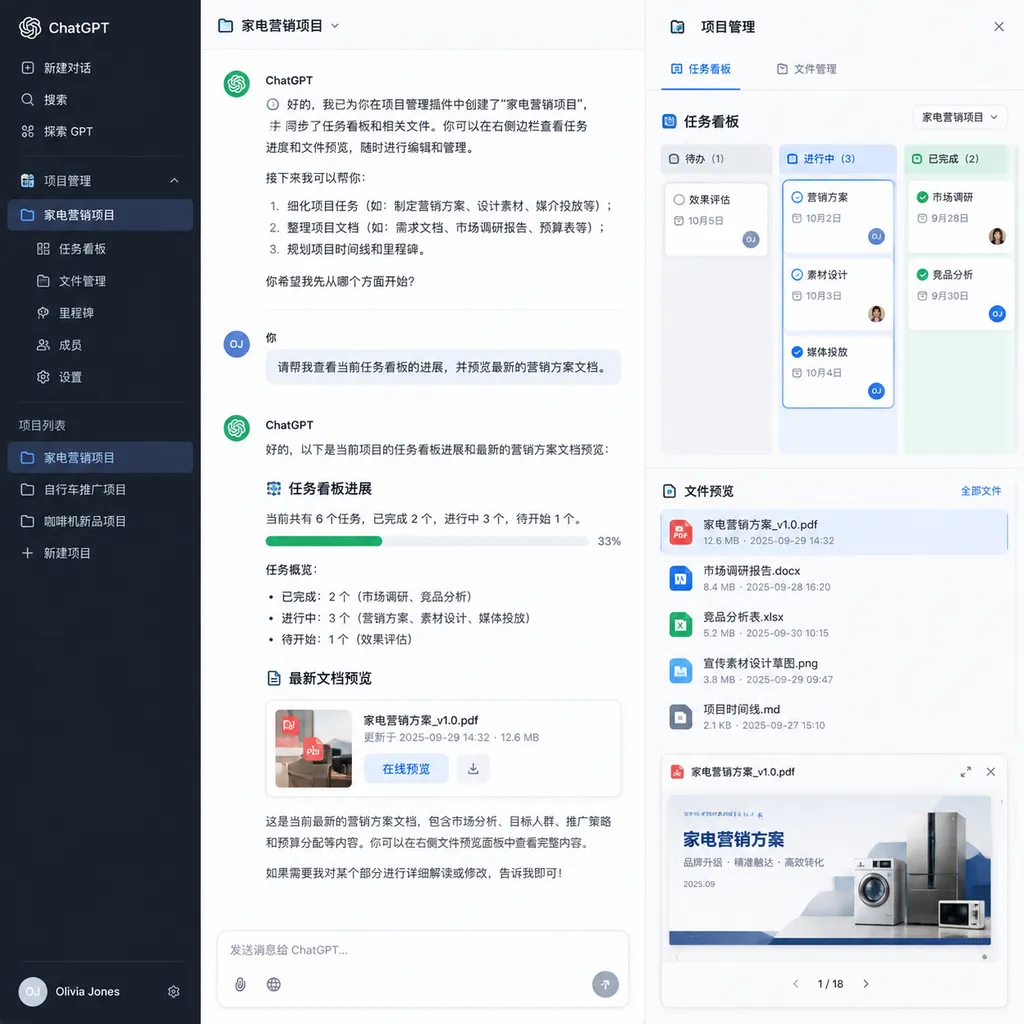
Developers can give plugins dedicated entry points in the ChatGPT sidebar, provide interactive panels that let users converse and perform actions side by side, and create viewers for specific file types. At the same time, OpenAI is adding support for the proposed MCP Events specification, allowing automated workflows to start proactively when changes occur in connected applications rather than waiting for the user to enter a prompt. (openai.com)
In one sentence: ChatGPT plugins are evolving from “APIs the model can call” into “applications with interfaces that can listen for events and run continuously.”
The Sidebar Is Not a Minor Redesign—It Is a Bid to Become the Application Gateway
Previously, external capabilities in ChatGPT were primarily organized around conversations: the user made a request, the model determined whether it needed to call a tool, and then organized the result into a natural-language response.
This model works well for checking the weather, searching a knowledge base, or retrieving an order status, but it is poorly suited to complex work. For example, if you ask ChatGPT to help manage a product iteration, you may need more than an answer to “Which tasks are delayed this week?” You may also need to filter by assignee, change priorities, review design files, compare version histories, and update the project board after confirmation.
If every operation is compressed into a question-and-answer exchange, it may not be any more efficient than opening Linear, Jira, or Notion directly.
The answer offered by the new plugin extensions is to give plugins sidebar entry points and interactive application panels. Outside the chat itself, users can open a plugin interface to inspect structured information, edit content, confirm actions, or browse files, and then ask ChatGPT to continue working with the current context. OpenAI’s developer documentation shows that these interfaces can be returned as UI resources by an MCP service, run within an isolated frame inside ChatGPT, and communicate with the host through the MCP Apps bridge. (developers.openai.com)
This means plugins no longer have to cram all their information into chat bubbles.
Consider a code review plugin. In the past, it might have returned a long pull request summary and a list of risks. Now, it can display a file tree, line-by-line diffs, test results, and items awaiting confirmation in a panel. After selecting two issues in the panel, the user can tell ChatGPT, “Fix only these two issues and add regression tests,” and the context will carry over naturally.
This is a more sensible product model for conversational AI: language expresses intent, while the interface carries state.
A pure chat interface is not suitable for every task. Tables, multiple selections, timelines, file directories, image annotations, and complex configurations inherently require a graphical interface. In the past, many AI products emphasized “conversation” by repackaging mature GUIs as inefficient text interactions. With this update, OpenAI is effectively acknowledging that the chat box can be an entry point, but it cannot be the entire application.
MCP Events Turn Plugins from “Called” into “Triggered”
More important than the sidebar is the addition of MCP event automation.
Traditional MCP tool calls generally follow a request-response model:
- The user makes a request to the model;
- The model decides which MCP tool to call;
- The tool performs a query or operation;
- The model reads the result and responds to the user.
This process assumes that someone must initiate the request.
MCP Events adds another path: when a specified event occurs in an external system, the event can directly wake an automated task. One example OpenAI provides is monitoring a project board for new tasks. When a new task appears, ChatGPT can read related documents, understand the task’s context, and draft an execution plan—even if the user is offline. (openai.com)
At first glance, this is not fundamentally different from webhooks, message queues, or automation platforms such as Zapier. The real difference is that what follows the event trigger is not a fixed script, but an agent capable of reading unstructured materials, calling multiple tools, and generating intermediate artifacts.
For example, after a bug is marked P0, traditional automation could send a Slack notification and create an on-call task. With a ChatGPT plugin integrated, the workflow could continue by:
- Reading the issue description, logs, and the most recent deployment record;
- Locating potentially relevant modules in the code repository;
- Summarizing similar incidents that have occurred in the past;
- Drafting troubleshooting steps and a rollback plan;
- Waiting for confirmation from the on-call engineer before performing controlled actions.
The first half is event-driven, while the second half consists of model reasoning and tool orchestration. The combination of the two is what this update is really intended to advance.
However, OpenAI describes this publicly as a “proposed MCP Events specification.” Those words should not be overlooked: they indicate that the event protocol is still evolving, and developers should not treat the current implementation as a frozen, stable standard. Event types, subscription methods, retry semantics, permission models, and compatibility across different hosts may all continue to change.
This Is Not a Smarter Plugin, but a More Complete Runtime
Viewed only as a feature list, the update includes sidebar entry points, interactive panels, file viewers, event automation, plugin creation tools, submission feedback, and improvements to directory ranking and recommendations. It may seem somewhat fragmented.
Taken together, however, OpenAI is filling in the critical components required by an application platform:
| Platform capability | Corresponding update | Problem addressed | |---|---|---| | Application entry point | Dedicated sidebar entry point | Users do not need to rediscover the plugin from a blank conversation every time | | Interactive interface | Interactive panels and file viewers | Complex tasks are no longer limited to text-based Q&A | | Background triggers | MCP event automation | Workflows can start even when the user is offline | | Development tools | Plugin Creator | Lowers the barrier to building and packaging plugins | | Distribution mechanism | Plugin directory, ranking, and recommendations | Gives plugins channels for discovery and installation | | Permission controls | Per-item connections and approvals | Prevents plugins from receiving full data access by default | | Team deployment | Integrating plugins into self-built sites | Allows enterprise members to use applications under their own identities and permissions |
OpenAI also allows developers to integrate supported ChatGPT plugins into sites they build themselves. Workspace members can sign in to the same application using their own accounts and access data they are individually authorized to view. Shared information on the site can also be kept up to date through automated workflows. These capabilities are available for Business, Enterprise, Healthcare, and Education plans. (openai.com)
This step is critical. The hardest parts of enterprise AI applications are often not model capabilities, but identity, permissions, and data boundaries. With the same “query customer information” tool, a salesperson may be able to see only the customers they manage, a regional manager may see the entire region, and a contractor may be limited to anonymized fields. If a plugin bypasses the source system’s permissions, the more powerful it becomes, the greater the risk.
Allowing team members to connect to applications under their own identities at least avoids, at the product-design level, the crude approach of having every request share a single super-administrator token.
What Developers Really Need to Handle Is State, Idempotency, and Permissions
Event triggers make it easy to build an impressive demo: a task is created on a board, ChatGPT automatically reads the documentation, and a plan appears a few seconds later.
But in production, that is where the trouble begins.
1. Will the Same Event Run Twice?
Event systems commonly use at-least-once delivery rather than guaranteeing exactly-once delivery. Network timeouts, failed acknowledgments, or consumer restarts can all cause an event to be sent more than once.
If the task only generates a summary, a duplicate run merely wastes tokens. If it creates tickets, sends emails, modifies inventory, or commits code, duplicate execution can cause real incidents.
Plugins therefore need, at a minimum, to record event IDs, execution states, and output results, and to assign idempotency keys to operations with side effects. The fact that the model “appears to understand the context” is not a reason to skip the fundamentals of distributed systems.
2. Context May Have Changed After the Event Occurred
A task may have been P1 when it was created, but while the agent is reading the relevant materials, the assignee may upgrade it to P0 or close it entirely.
A plugin cannot rely solely on the event snapshot it originally received. Before carrying out a critical action, it should reread the current state and check the version number or last-updated timestamp. In other words, an LLM may understand ambiguous information, but it cannot replace concurrency control.
3. Automation Permissions Must Not Be Treated as Equivalent to Tool Permissions
The risks involved when a user manually clicks “Delete record” are completely different from those involved when a background event automatically deletes a record.
A sensible permission system should distinguish between:
- Read-only queries;
- Generating drafts;
- Modifying low-risk fields;
- Sending content to external systems;
- Performing irreversible operations.
High-risk steps should still require human confirmation or be restricted to specific workspaces, time windows, and resource scopes. OpenAI emphasizes that users can choose plugins themselves and approve access permissions individually. This is a necessary foundation, but it cannot replace internal enterprise auditing and policy controls. (openai.com)
4. The Panel Must Not Become Another Difficult-to-Maintain Front End
Interactive panels can improve the user experience, but they also increase development costs. Teams must now maintain not only MCP tool definitions, but also component state, error recovery, host communication, file authorization, and compatibility with ChatGPT-specific capabilities.
OpenAI recommends that new UIs prioritize the open MCP Apps fields and bridging methods, using the ChatGPT extensions provided through window.openai only when the shared specification cannot cover the requirement. This is the right tradeoff: if developers lock their applications into proprietary host interfaces from day one, the so-called open ecosystem will quickly become another walled garden. (developers.openai.com)
Ranking and Recommendations Will Determine Whether the Plugin Ecosystem Can Survive
OpenAI is also adjusting plugin-directory ranking and recommendations within conversations to help users discover relevant plugins. It has also redesigned the submission process to provide clearer feedback.
This aspect may not be as eye-catching as MCP Events, but it could have a more direct impact on whether the ecosystem succeeds or fails.
The common problem with plugin platforms is not a lack of developers, but that users cannot find plugins, install them without using them, or concentrate all traffic among a few leading plugins. ChatGPT is also more unusual than a browser or mobile operating system: users may not open an app store first. They typically describe what they need directly and expect the system to match them with the appropriate tool.
Plugin distribution therefore has at least two layers:
- Directory distribution: users actively browse, search for, and install plugins;
- Intent distribution: ChatGPT recommends or calls suitable plugins based on the current task.
The second layer is more efficient, but also more controversial. If the recommendation mechanism is opaque, developers will struggle to determine whether their plugins are not being called because the tool descriptions are poorly written, the success rate is too low, or the ranking system favors other products. OpenAI needs to provide not only better algorithms, but also observable data such as reasons for failed calls, matched queries, user rejection rates, and task completion rates.
Otherwise, plugin development will become another form of SEO, with everyone guessing what kinds of names and descriptions the model prefers.
Where Is It Stronger Than Zapier or Slack Apps?
In terms of its capabilities, the new version of ChatGPT plugins is entering three mature markets at once:
- Competing with Slack and Teams apps as a gateway to work;
- Competing with Zapier, Make, and n8n in event automation;
- Competing with browser extensions and vertical SaaS products in interactive interfaces.
Its advantage is that the model naturally sits at the center of the workflow. It can understand documents, emails, code, and natural-language instructions without requiring developers to write a complete set of rules for every type of input in advance.
Its disadvantages are equally clear: large-model outputs are not fully deterministic, costs and latency are higher than those of ordinary rules engines, and complex tasks also face issues involving permissions, hallucinations, and context contamination.
It is therefore best suited not to replacing every form of automation, but to handling the “gray steps” that traditional rules-based systems struggle with: reading materials, summarizing differences, generating drafts, proposing solutions, and determining whether an issue needs to be escalated to a human.
Actions with high requirements for determinism and accountability—such as transferring funds, deleting production resources, or automatically approving contracts—should still be handled by explicit program logic and human approval.
OpenAI Wants to Turn ChatGPT into an Operating System for AI Applications
From the plugin directory and MCP tools to interactive UIs and event-driven automation, OpenAI is expanding ChatGPT from a model product into an application runtime environment.
This direction is unsurprising. If OpenAI relies solely on chat subscriptions and model APIs, users can migrate to other models at any time. But if numerous team workflows, permission connections, plugin interfaces, and automated tasks all run inside ChatGPT, migration no longer means simply replacing a model name.
For developers, this presents both opportunities and risks.
The opportunity is that ChatGPT can directly provide identity, distribution, conversational context, and model orchestration, so teams do not have to build an AI application shell from scratch. The risk is that the platform controls the recommendation gateway, permission interfaces, runtime environment, and user relationships. The more successful a plugin becomes, the more deeply it may depend on the host platform.
At this stage, the more pragmatic approach is to keep core business capabilities in independent MCP services and backend systems, treating the ChatGPT sidebar as one host interface rather than the only client. The UI should prioritize the open MCP Apps specification, while critical workflows should retain standard APIs or other entry points. This way, even if recommendation rules, product names, or platform policies change, the core capabilities can still be migrated.
Verdict: The Direction Is Right, but the Real Challenges Are Just Beginning
This upgrade is not simply a collection of new plugin features. The sidebar addresses complex interactions, MCP Events enables proactive triggers, site integration supports team deployment, and the directory and recommendation system handles distribution. With these pieces combined, ChatGPT finally begins to resemble a genuine plugin application platform.
The direction is right, and it is far more valuable than continuing to cram buttons into the chat box.
But do not be misled by conference demos. The difficult part of production-grade event automation has never been whether a model can be triggered. It is how to ensure that, once triggered, it does not run twice, exceed its permissions, become impossible to reverse, or evade traceability—and who is responsible when the model makes the wrong decision.
If OpenAI can get the event specification, permission system, audit logs, and cross-host compatibility right, ChatGPT plugins could become one of the most important distribution channels for enterprise agents. Otherwise, they may remain a plugin framework with a more attractive interface and more proactive automation, but one that still leaves developers to fill in every engineering pitfall themselves.
This update deserves developers’ attention. What deserves even more attention, however, is whether OpenAI can turn a “demo that runs” into a “system that is safe to deploy.”
References
- IT Home: OpenAI Upgrades ChatGPT Plugin Extensions, Improves Ranking and Recommendations, and Adds Support for MCP Event Automation — A summary of the DevDay 2026 announcements concerning plugin extensions, sidebar panels, site integration, and MCP event automation.