Dot Exposure: One Cloud Host per Agent

OpenAI unveiled its always-on agent Dot at DevDay. Its cloud runtime has appeared on Geekbench: each instance gets 9 AMD EPYC CPU cores, nearly 10 GB of memory, and 32 GB of storage, with a complete Linux software stack preinstalled.
OpenAI Dot Exposed: One Cloud Computer for Every Agent
OpenAI’s newly released Dot is not merely a better conversational assistant. Its selling point is that it gives every agent a cloud computer that stays online over the long term.
On September 30, OpenAI announced its around-the-clock agent product, Dot, at its DevDay event. Shortly afterward, a Dot runtime instance appeared on the Geekbench benchmarking platform. The test information showed that one Dot virtual machine instance was allocated 9 CPU cores, 9.73 GB of memory, and 32 GB of storage. It used an AMD EPYC 9V74 processor and achieved a Geekbench 7 multicore score of 9,435.
This configuration makes Dot’s product direction easy to see: it is not simply returning a piece of text inside a chat window. It is designed as a cloud-based work node that can run continuously, open browsers, install software, process files, and execute tasks across multiple applications.
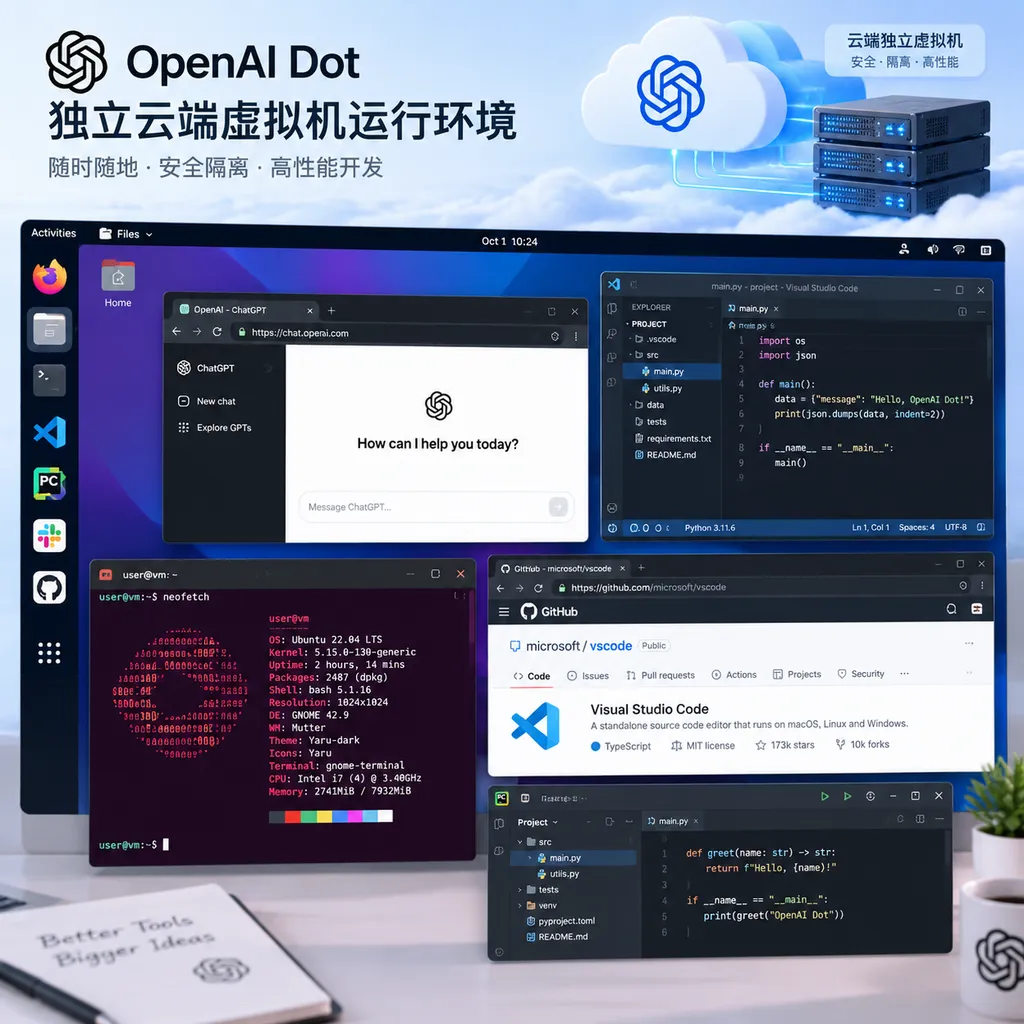
A Virtual Machine, Not a Chat Window
The basic operating model of AI assistants over the past several generations has been: the user issues an instruction, the model calls one or more tools, and then returns the result. Once the task ends, the runtime environment is typically destroyed as well, making it difficult to retain files, processes, browser states, and temporary credentials over the long term.
Dot takes a different architectural approach. Each Dot runs inside an independent cloud virtual machine with its own file system, browser, terminal, and software environment. Users can think of it as a remote computer assigned to an AI, except that the computer is operated by the agent.
This means Dot can continuously retain the context of a particular task. For example, if a developer asks it to track issues in a project, the agent does not need to reread the background every time. If a content team asks it to organize interview materials, it can retain downloaded files and generated intermediate results. If a product team asks it to test a web application, it can repeatedly perform operations in its own browser and terminal.
From an engineering perspective, independent virtual machines also solve a frequently underestimated problem: the boundaries of tool execution.
If an agent runs directly in the host environment, browsers, credentials, files, and system permissions can easily become mixed together. Once the model makes a mistake, the impact could expand from a single task to the entire machine. Placing each Dot in a separate virtual machine is equivalent to putting the task inside a relatively enclosed sandbox. It still has sufficient computing privileges to complete its work, but by default it will not directly touch the user’s local device.
Of course, virtual machine isolation does not mean absolute security. The actual risks also depend on network access policies, credential injection methods, the strength of host isolation, and whether the agent can move sensitive information out of the environment. OpenAI currently emphasizes that credentials stored in Dot remain hidden from the AI model, while enterprises can also assign dedicated identities and permissions to specialized Dots. This is considerably more mature than putting an API key directly into a prompt or allowing the model to read plaintext configuration files, but permission auditing and controls on outbound data remain essential aspects that enterprises must verify during deployment.
The Specifications Are Not Luxurious, but They Are Sufficient for Complex Tasks
The hardware information disclosed by Geekbench is quite specific:
- AMD EPYC 9V74 server processor
- 9 CPU cores allocated to each Dot instance
- Single-core score of 1,667
- Multicore score of 9,435
- 9.73 GB of memory
- 32 GB of storage
- Ubuntu 24.04.3, with some instances apparently running Debian Linux
The AMD EPYC 9V74 belongs to the Zen 4 architecture. It has a base clock speed of approximately 2.6 GHz and a maximum boost clock speed of up to 3.7 GHz. It is important to note that Geekbench scores only indicate the CPU performance of the virtual machine under a particular configuration. They cannot be directly equated with Dot’s actual speed on every task. Agent tasks are often affected by model inference latency, network requests, third-party application response times, and tool-call queues. CPU benchmark results are only one variable among many.
However, judging from the scale of its resources, Dot is not intended merely for simple web-based question answering.
Nine virtual CPU cores are enough to support a browser, terminal processes, file-processing scripts, and some graphical applications running at the same time. Nearly 10 GB of memory also means it can handle code repositories, spreadsheets, images, and documents of a certain scale without triggering memory pressure as soon as a browser is opened, as would happen in a lightweight sandbox.
The 32 GB of storage is a more realistic limitation. This capacity is basically sufficient for office automation, web testing, code modification, document processing, and organizing small- to medium-sized media collections. However, if users ask Dot to process video materials for a long period, install large development dependencies, or maintain copies of multiple projects, storage capacity will quickly become a bottleneck.
This is the most noteworthy aspect of Dot’s configuration: OpenAI has clearly prioritized parallel execution and task responsiveness, but it has not packaged Dot as a cloud computer with unlimited capacity. What users can ultimately accomplish will still depend on file lifecycle management, cache cleanup, and access to external storage.
Preinstalled Software Matters More Than the Hardware
Dot’s competitiveness is not only about how many virtual CPUs it has. More importantly, OpenAI appears to be directly providing a Linux workstation designed for agents.
The currently revealed preinstalled software includes:
- Creative tools: Blender, GIMP, Inkscape
- Video tools: Kdenlive
- Game development: Godot
- Engineering design: FreeCAD, OpenCAD, KiCAD
- Scientific computing and visualization: QGIS, ParaView, 3D Slicer
- Basic environment: Chromium browser, terminal, file manager
The message conveyed by this software list is clear: Dot is intended to handle more than email, calendars, and spreadsheets. It also targets tasks that require a real desktop environment.
For example, users can ask the agent to open KiCAD and inspect a circuit design file, modify a simple model in FreeCAD, and then report the results through screenshots or exported files. They can also ask it to launch Godot, modify game logic, run a test scene, and organize the resulting error logs. For content creators, Blender, GIMP, and Kdenlive provide the basic conditions for an agent to work with images, 3D files, and video projects.
In the past, these tasks typically required a combination of remote desktops, automation scripts, container environments, and human confirmation. Dot brings them into a continuously online instance, reducing the cost of preparing the environment.
However, preinstalled software does not mean the model has mastered every application. Whether AI can reliably operate complex graphical interfaces depends on visual understanding, mouse and keyboard control, file-format handling, and error recovery. Compared with calling an API with clearly defined parameters, operating desktop software is more like having a remote engineer work at a computer: the upper limit of what can be done is higher, but the process is also less predictable.
4,000 Applications, with Permission Management as the Real Challenge
OpenAI says Dot is based on the GPT-6 Astra model and can connect to more than 4,000 applications through plugins. Users can interact with it through the ChatGPT web, desktop, and mobile clients, as well as initiate tasks through Slack and Teams.
This makes Dot look more like a permanent work interface than a standalone AI product. Users do not need to open a dedicated automation platform. They can simply send a message through a familiar communication tool, and Dot can turn the request into a sequence of actions: researching information, reading files, calling applications, generating results, and then sending back progress updates.
However, the number of connected applications has never been a core measure of agent capability. What actually determines whether enterprises will be willing to use an agent are questions such as:
- Does Dot know which data it is accessing?
- Can each action be authorized and revoked independently?
- When high-risk operations such as making payments, sending emails, or deleting files are involved, is human confirmation mandatory?
- Can enterprise administrators view complete operation logs?
- Do third-party plugins receive the minimum required permissions, or long-term access to the entire account?
- If a task fails, can Dot roll back the actions it has already performed?
OpenAI has already mentioned that Dot supports configurable autonomous-action rules and allows users to require authorization before specific operations. Enterprises can also create dedicated Dots with exclusive identities and permissions. These mechanisms are more important than simply increasing the number of plugins, because once an agent can run over the long term, permission management becomes an infrastructure issue rather than merely a product feature.
For developers, Dot’s greatest value may not be helping write a piece of code. It may be its ability to place code development, the runtime environment, browser testing, and team communication into the same continuously existing work unit. At the same time, this means developers need to manage it like an automated employee: assign an identity, limit its scope, establish approval points, and continuously inspect its logs.
Compared with Meta Muse, Dot Focuses More on Execution, while Muse Focuses More on Storage
Meta’s Muse is also pursuing a similar cloud virtual machine approach. Public information shows that a single Muse virtual machine is configured with 2 vCPUs, 8 GB of memory, and 100 GB of storage. Dot, by comparison, is allocated 9 cores and 9.73 GB of memory, but only 32 GB of storage.
The difference can be summarized as follows: Dot places greater emphasis on computing and parallel execution, while Muse places greater emphasis on persistent storage.
For tasks that require browsing the web, running scripts, and opening multiple tools simultaneously, Dot’s CPU resources are clearly more generous. In particular, compiling, batch file processing, web automation, and development environment operations are less likely to encounter noticeable slowdowns with 9 cores than with 2 vCPUs.
Muse’s 100 GB of storage is better suited to retaining media, project files, and task history over the long term. If an agent needs to maintain large numbers of videos, design files, or code repositories, storage capacity may determine the user experience sooner than CPU benchmark scores.
This is not simply a question of which hardware is better. It reflects two different product directions: Dot is more like a cloud workstation that can keep working, while Muse is more like an agent container with a larger personal storage area. Which one ultimately has the advantage will depend on their task scheduling, network performance, file synchronization, permission controls, and pricing strategies, rather than on a comparison of specifications alone.
Dot Is Not Yet a Fully Mature Digital Employee
OpenAI is currently rolling Dot out gradually to ChatGPT Pro and Business Premium users. Enterprise users need an administrator to enable it before trying the beta. At present, each user appears to be limited to creating a single Dot. OpenAI plans to support deploying multiple agents simultaneously in the future and to improve the runtime speed and task-processing scale of each instance.
This indicates that Dot is still in the product-validation stage. What tasks a single Dot can handle mainly depends on three factors: whether the model is stable enough, whether the toolchain is open enough, and whether the platform can keep the cost of long-running operations within a reasonable range.
Being online around the clock sounds attractive, but it also introduces a new cost structure. Traditional chat products are mainly billed according to model usage, while a persistent agent continuously consumes virtual machines, storage, browser sessions, and network resources. If users run multiple Dots simultaneously, the platform must manage instance sleeping, task queues, resource reclamation, and priority scheduling. Future pricing will likely be determined not only by model tokens, but also by runtime duration and virtual machine specifications.
In addition, Dot’s public demonstrations have already shown instances of tasks getting stuck. This is a reminder that developers should not interpret one successful demonstration as evidence of stable production capability. Being able to understand a goal does not mean being able to break it down into reliable steps. Being able to call an application does not mean being able to handle every exception. Before agents truly enter production environments, they must have clear failure boundaries: when to stop, when to retry, and when to request human intervention.
The domain-name issue also added a somewhat awkward episode to the launch. The OpenAI-related Dot domains are not held by OpenAI and currently point to the Grok download page operated by Elon Musk’s xAI. This does not affect the product’s operation, but for an AI assistant attempting to build long-term brand recognition, consistency among its entry points, name, and product ownership remains important.
What This Launch Means for Developers
The most noteworthy change represented by Dot is that competition among AI agents is beginning to shift from model capabilities to runtime environments.
In the past, people compared whose model was smarter, whose context window was longer, and whose API was cheaper. Going forward, they will also compare who can provide a more stable execution node, who can allow agents to retain state over the long term, and who can securely place browsers, terminals, desktop software, and enterprise applications within the same permission system.
Developers should pay particular attention to several areas:
- Whether agents have genuinely reusable work environments: Can files, dependencies, and browser states be retained after a task ends?
- Whether tool calls support fine-grained approval: Especially for sending data externally, modifying online resources, and performing actions involving money.
- Whether instances can collaborate: In the future, can multiple Dots separately handle research, coding, testing, and reporting?
- Whether standardized interfaces are available: If Dot can only be controlled through a chat window, it will be difficult for developers to embed it into existing systems.
- Whether operating costs are predictable: The billing model for persistent virtual machines will directly affect whether enterprises are willing to deploy them at scale.
- Whether the model and environment are decoupled: Can users change models, replace tools, or migrate existing agents to other cloud runtimes?
Aggregator platforms such as OpenAI Hub, which are compatible with the OpenAI format, address developers’ needs to access multiple models and migrate calling interfaces. Dot addresses what happens after a model receives a computing environment: how it can continue executing tasks. The two are not products at the same layer, but from a developer’s perspective, future applications will likely need both model routing and a persistent agent runtime. The former selects the appropriate model, while the latter is responsible for actually completing the task.
Conclusion: The Cloud Computer Is Dot’s Core Product
Dot’s core value does not lie in whether it can chat like a human. It lies in whether OpenAI is willing to provide every agent with a cloud workspace that persists over time, offers controllable permissions, and comes equipped with a full set of tools.
Based on the configuration currently revealed, 9 CPU cores, nearly 10 GB of memory, and preinstalled Linux software are sufficient to support a substantial range of development, office, design, and automation tasks. The 32 GB of storage, however, indicates that Dot is more of an execution node than a cloud drive with unlimited capacity. Compared with Meta Muse, Dot allocates more resources to immediate computation and parallel use of multiple tools, giving its product direction a clear focus.
Whether Dot can become a true digital employee will depend on whether it can reliably handle long-running tasks, manage permissions correctly, and stop promptly when it fails. For developers, the most important question today is not what it can say, but how many things it can continuously and reliably do inside that virtual machine.
This may be the dividing line between agent products that are merely chatbots and those that become software infrastructure.