VS Code 1.140 Brings Agents to Remote Hosts
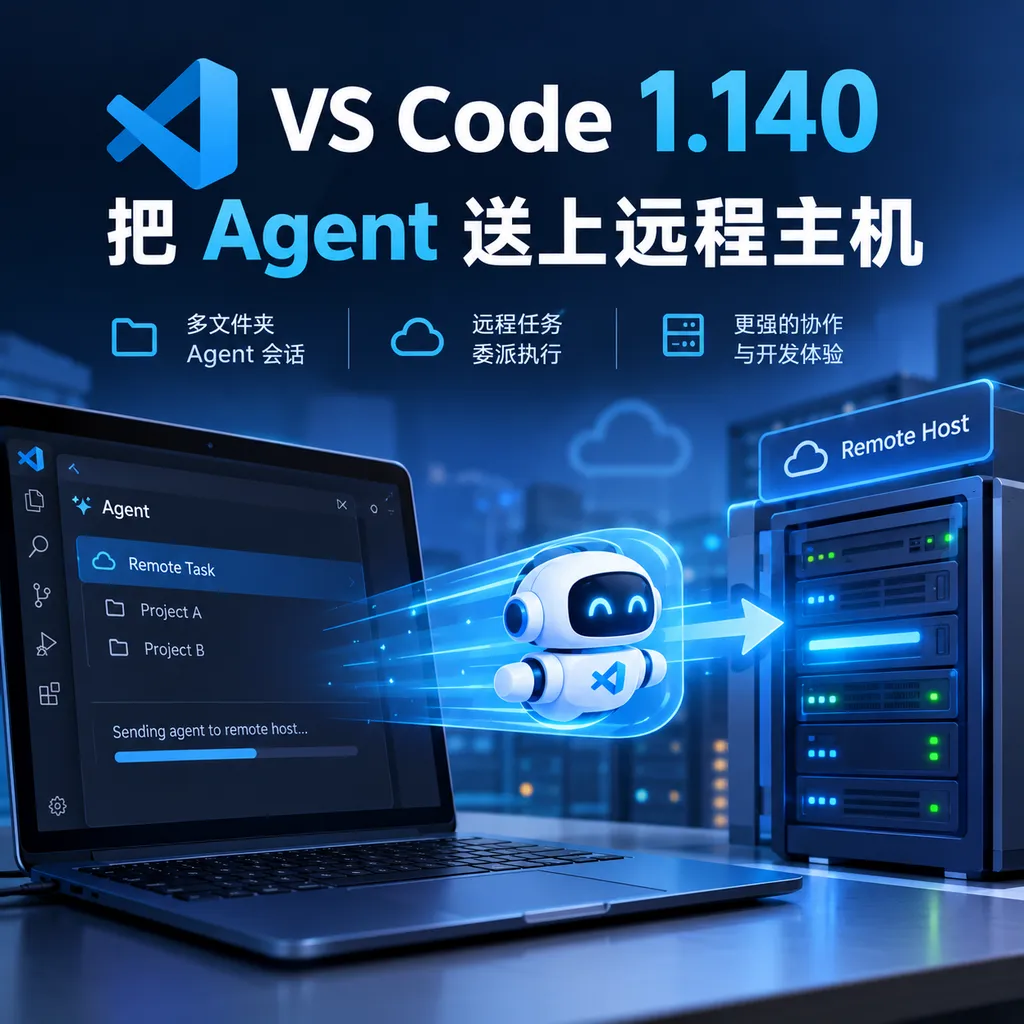
Microsoft released the stable version of VS Code 1.140 on September 30, with a focus on upgrading Copilot Agent workflows: support for multi-folder sessions, remote task delegation, and collaborative model orchestration. VS Code is evolving from a code editor into an entry point for Agent orchestration.
VS Code 1.140 Sends Agents to Remote Hosts
Microsoft released the stable version of Visual Studio Code 1.140 on September 30. Rather than focusing on minor editor tweaks, this update continues to reshape the development workflow around GitHub Copilot Agent: a single Agent session can manage multiple code repositories simultaneously, while tasks can be delegated to more suitable remote hosts. Microsoft has also begun testing the automatic orchestration of different models and workflows.
This signals a shift in VS Code’s role. It is no longer merely a local tool for “opening files, writing code, and running the debugger.” Instead, it is evolving into an Agent workbench for developers: developers specify goals, and the Agent breaks down tasks, selects environments, invokes tools, and ultimately brings back the changes and Pull Request status.
Multi-Folder Sessions Solve Cross-Project Context Mix-Ups
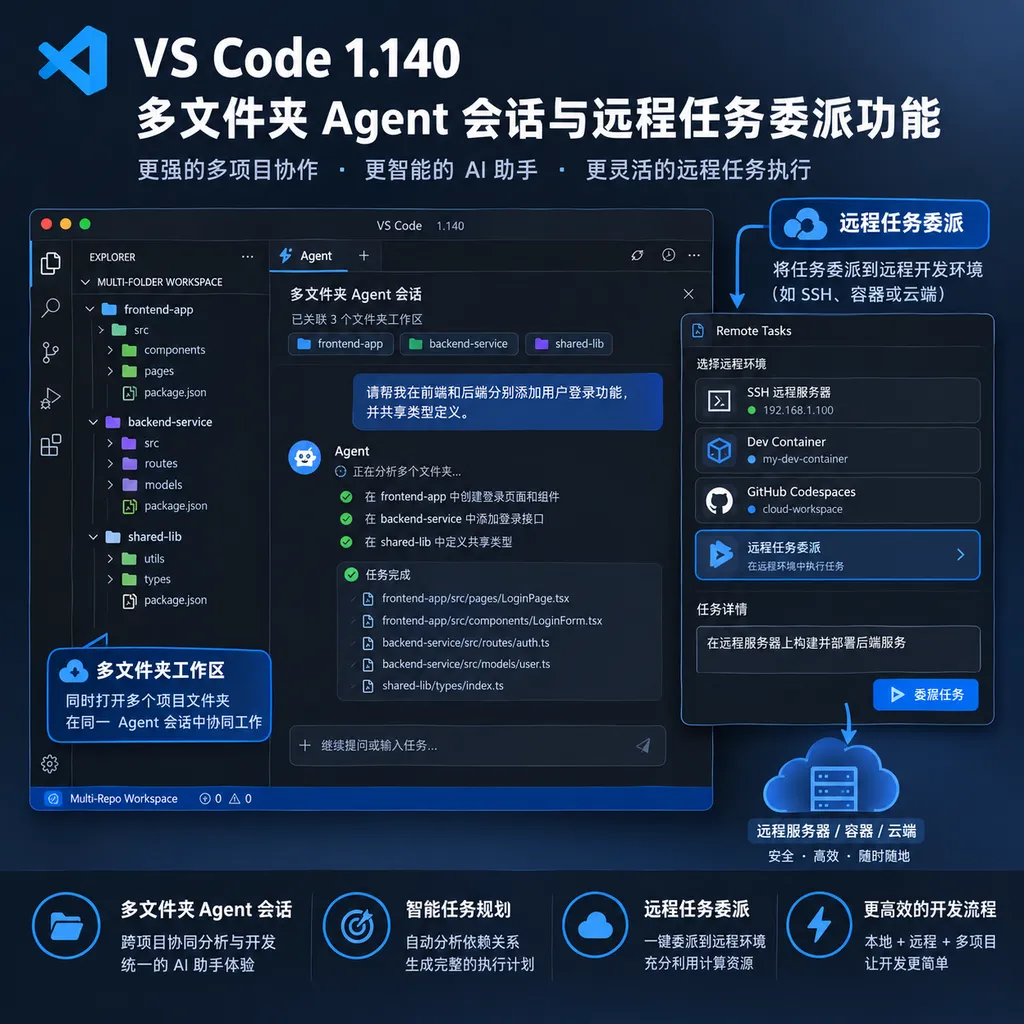
Version 1.140 first introduces an experimental feature: multi-folder sessions.
Simply put, different chats within the same Agent session can now be associated with different code repositories or Git worktrees. Each chat has its own independent working context, including terminals, tasks, code changes, Pull Requests, and merge status.
This may look like a simple session-management change, but it addresses a very real problem in Agent-assisted development: context leakage between tasks.
Previously, when developers handled multiple tasks in the same workspace, the Agent could easily mix them up. For example, Chat A might be fixing an authentication issue in the main repository, while Chat B is upgrading dependencies in another worktree. If the two tasks share a terminal, current directory, or parts of their context, the Agent might modify files on the wrong branch or apply one project’s test commands to another. For a conventional chatbot, this would merely result in an “inaccurate answer.” For an Agent capable of directly modifying code and executing commands, the consequences could include committing incorrect code, overwriting uncommitted changes, or even creating the wrong Pull Request.
The core value of multi-folder sessions is that they further transform “chat context” into a “task boundary.” Different sessions are not only separated in the interface; their underlying code directories, command environments, and change states are isolated as well. Developers can advance work across multiple repositories in parallel within a single VS Code window, while the Agent still knows which project it is currently responsible for.
This feature is particularly useful for teams that maintain multiple services. One session can handle component upgrades in the frontend repository, another can fix tests for a backend API, and a third can experiment with a higher-risk refactoring approach in an isolated worktree. This is much closer to real-world software engineering collaboration than cramming every issue into a single, ever-growing chat window.
However, this capability remains experimental. Isolating directories and sessions does not eliminate every Agent-related risk. Cross-repository dependencies, shared databases, common deployment environments, and context manually copied by developers between sessions still require human management. The feature reduces the likelihood of mistakes, but it does not replace code review or access controls.
Copilot Harness: Extracting Agent Behavior from VS Code
This update also enhances the Copilot harness. According to Microsoft, it is powered by the Copilot SDK and runs in a dedicated agent host process based on the Agent Host Protocol (AHP).
The key point is not the addition of a new interface, but the unification of how Agents operate. Previously, although VS Code, the Copilot app, and Copilot CLI could all perform Agent tasks, their behavior in terms of tool invocation, context handling, and task lifecycles was not necessarily identical. Microsoft is now attempting to centralize the runtime logic behind these products through an independent Agent host process.
This can be understood as adding a “runtime” layer for the Agent. The editor, desktop app, and command line are merely different entry points; the underlying host process is what actually receives tasks, connects to tools, reads context, and executes workflows.
This architecture offers two direct benefits.
First, Agent capabilities can be reused more easily across products. Developers can start a task in VS Code and continue it in Copilot CLI without having to adapt to a completely different set of Agent behaviors. Second, Microsoft can more easily manage security policies, tool permissions, and task states consistently. For enterprise customers, this matters more than simply adding another chat button, because production environments are concerned with what an Agent can do, where it can do it, who approves it, and how its activities are tracked.
Of course, a unified runtime also introduces new complexity. The Agent is no longer merely a built-in editor feature; developers need to understand the relationships among sessions, host processes, tool authorization, and remote execution. For individual developers, these changes may remain hidden behind the interface for now. Enterprise teams, however, may need to reassess Copilot’s permission boundaries and auditing mechanisms.
Remote Task Delegation: Agents Start Choosing Their Own Machines
Another major feature in version 1.140 is remote task delegation.
The new Agent can discover available remote hosts, select a more suitable machine based on its operating system, memory, CPU, and current load, and then create a remote session to execute the task.
In traditional remote development, developers would first decide which server to connect to and then let the Agent work within that predetermined environment. The process is now reversed: the developer specifies a goal, the Agent determines what environment the task requires, and then assigns it to a suitable remote host.
This is not simply a matter of replacing a local computer with an SSH terminal. It is closer to a scheduling layer designed specifically for development tasks.
For example, modifying a few frontend files and running a small number of unit tests might be handled locally. When a task requires a full build of a large project, browser testing, or processing large amounts of data, the Agent can select a remote host with more memory and CPU resources. If a task depends on a Linux toolchain while the local development environment runs Windows, a remote session can also reduce problems caused by environmental inconsistencies.
For development teams, the value of this capability is primarily evident in three scenarios:
- Large project builds: Move compilation, indexing, and testing tasks to high-performance hosts, preventing local machines from being tied up for extended periods.
- Heterogeneous environment development: Allow Agents that require Linux, a specific SDK, or a specialized toolchain to execute directly in the target environment.
- Parallel Agent tasks: Assign different remote hosts to separate sessions, preventing multiple tasks from competing for the resources of a single development machine.
However, making remote delegation work in practice requires more than host discovery and resource matching. Enterprises must also address credential management, network access, file synchronization, key isolation, cost controls, and command auditing. The fact that an Agent can select a host based on its workload does not mean it automatically knows which hosts may access a production database, nor does it mean the Agent should have the necessary permissions.
This feature is therefore better viewed as an entry point for remote Agent infrastructure rather than a complete enterprise scheduling system. If Microsoft wants it to become part of the core development workflow for large teams, it will need to provide more granular organizational policies, resource quotas, and operational auditing.
HydraFusion: Models Critique One Another to Balance Quality and Cost
On the model-orchestration front, Microsoft has introduced HydraFusion as a research preview.
Its direction is clear: instead of requiring developers to manually select a model for each task, the system automatically chooses models and workflows based on the task type. It also allows models to critique and revise results, seeking a balance among speed, cost, and code quality.
This is a reasonable approach. Real-world development tasks are rarely governed by the simple rule that “the larger the model, the better.” A low-latency model may be sufficient for completing a function. Analyzing architecture across multiple files requires stronger reasoning capabilities. Security issues are best reviewed independently by another model. Assigning every task to the most expensive and slowest model makes costs difficult to control, while relying exclusively on the fastest model can produce inconsistent code quality.
HydraFusion attempts to automate this decision-making process. One possible workflow might involve a fast model generating an initial modification plan, followed by a more capable model checking dependencies and edge cases, and finally a dedicated review stage identifying issues and triggering revisions. From the developer’s perspective, the result may still appear as a single task output, but behind the scenes the process has shifted from a single-model response to multi-model collaboration.
The hardest part of model orchestration is not connecting multiple models, but determining when doing so is worthwhile. Every additional critique, revision, or validation step introduces latency and invocation costs. If the task is simply renaming a variable, multiple rounds of collaboration are wasteful. If the task involves database migrations, access controls, or concurrency logic, an additional independent review may be highly valuable.
HydraFusion should therefore be evaluated not only on whether the resulting code runs, but also on whether it can make consistently sound cost decisions across different types of tasks. Microsoft currently describes it as a research preview, indicating that the automatic orchestration mechanism is still being validated. Developers should watch whether it provides transparent visibility into model selection, task decomposition, and invocation costs. Otherwise, “automation” may become an opaque black box that is difficult to explain.
From 1.139 to 1.140, VS Code’s Update Cadence Has Changed
This update is not an isolated event. VS Code 1.139, released on September 23, had already begun focusing on remote development and large-scale Agent session management. Its changes included allowing Agents to run inside Dev Containers for remote projects hosted through SSH, Tunnels, and WSL, as well as improving initial loading performance for large numbers of sessions.
Version 1.139 was more about building out the infrastructure: making remote environments easier for Agents to use and ensuring that session lists remained usable as they grew. Version 1.140 builds further on that foundation by connecting multiple projects, remote hosts, and model workflows.
This sequence of updates shows that Microsoft’s focus has shifted from “enabling Copilot to write code” to “enabling Copilot to manage a collection of continuously running development tasks.” This is also the dividing line between Agent products and traditional code-completion tools.
For traditional completion tools, the fundamental unit is a line of code or a function. For Agents, the fundamental unit is a task: understanding requirements, locating files, modifying code, running tests, handling failures, committing changes, and even creating a Pull Request. Once the task becomes the fundamental unit, workspace isolation, remote resources, model collaboration, and state management are no longer secondary features—they become central to the product.
How Developers Should View It Now
For individual developers, the feature most worth watching in version 1.140 is multi-folder sessions. It can reduce context confusion when working on multiple projects in parallel, making it particularly useful for developers who simultaneously maintain frontend and backend repositories, multiple microservices, or several experimental worktrees.
For teams, remote task delegation and the Copilot harness are more significant. They point toward Agent use at scale: allowing multiple tasks to run in different environments while maintaining consistent Agent behavior across the editor, command line, and other Copilot products.
However, this update also reminds developers that productionizing Agents is not merely a matter of switching to a more capable model. The real experience is determined by the following questions:
- Does the Agent clearly understand which repository and branch it is operating on?
- Is the task running with the correct dependencies and operating system environment?
- Are credentials and sensitive data on remote hosts properly isolated?
- Why did the model choose a particular workflow, and can invocation costs be tracked?
- Are there clear points for human confirmation between modification, testing, committing, and merging?
VS Code 1.140 has begun addressing these questions one by one, but it has not resolved all of them. HydraFusion and remote host selection, in particular, still require developers to retain sufficient visibility and control.
Teams that need direct domestic access to multiple models can also combine VS Code’s Agent workflows with a unified model access layer. For example, they could use OpenAI Hub with an OpenAI-compatible API to bring models such as GPT, Claude, Gemini, and DeepSeek into the same invocation and permission-management framework. The value of doing so lies not simply in “switching models,” but in allowing model selection, cost controls, and failover to be managed independently of any specific editor.
Conclusion: VS Code Is Competing to Become the Agent Control Console
The core change in VS Code 1.140 is not the addition of a few Copilot options, but the expansion of the Agent’s operating scope from the current workspace to multiple repositories, multiple remote hosts, and multiple models.
This direction gives Microsoft a clear advantage. VS Code already has a vast developer user base, while Copilot has access to code context and enterprise development scenarios. If Microsoft can truly integrate session isolation, remote scheduling, model orchestration, and permission auditing, VS Code could become the default interface through which developers manage teams of Agents.
However, it also faces a practical challenge: the more autonomously an Agent can operate, the more developers need to know exactly where it is executing, which models it is using, which files it has changed, and how much it has cost. The next phase of competition among development tools will not be limited to “whose model is smarter,” but will also involve “who can make the automation process sufficiently controllable.”
VS Code 1.140 has put these questions on the table. What remains to be seen is whether these capabilities can progress from research previews and experimental features into infrastructure that development teams trust enough to rely on every day.
References
- ITHome: Microsoft Updates VS Code to Version 1.140 with Multi-Folder Sessions, Remote AI Agent Task Delegation, and More — The primary source for this article’s coverage of VS Code 1.140 feature updates, the Copilot harness, HydraFusion, and remote task delegation.
- ITHome: Microsoft Updates VS Code to Version 1.139, Accelerating Initial Loading for Large-Scale Agent Sessions — Provides background on the preceding VS Code 1.139 updates involving remote Agents, Dev Containers, and large-scale session management.
- VS Code Chinese Community: Agent Mode Is Now Available to All Users with MCP Support — Provides background on VS Code Agent mode and its tool-extension capabilities.