Apple Tightens Full-Disk Permissions in macOS

Apple has announced that it will enhance the “Full Disk Access” controls in macOS 27 and other operating systems, requiring users to take more explicit actions to grant this high-risk permission. The immediate context for the change is that AI agents are evolving from chat tools into desktop software capable of reading data, operating applications, and performing tasks on users’ behalf.
Apple Begins Redefining High-Privilege Applications on Mac
Apple is tightening macOS's "Full Disk Access" (FDA) controls. On October 2, Apple published a notice on its developer website stating that new controls would be added to this permission in the future, requiring users to complete more explicit actions before granting it to an application.
This is not an ordinary renaming of a privacy setting, nor is it simply a matter of hiding a switch more deeply. Apple's real concern is that when the entity with access to an entire disk's data changes from traditional backup software to an AI agent, what the application can do has fundamentally changed.
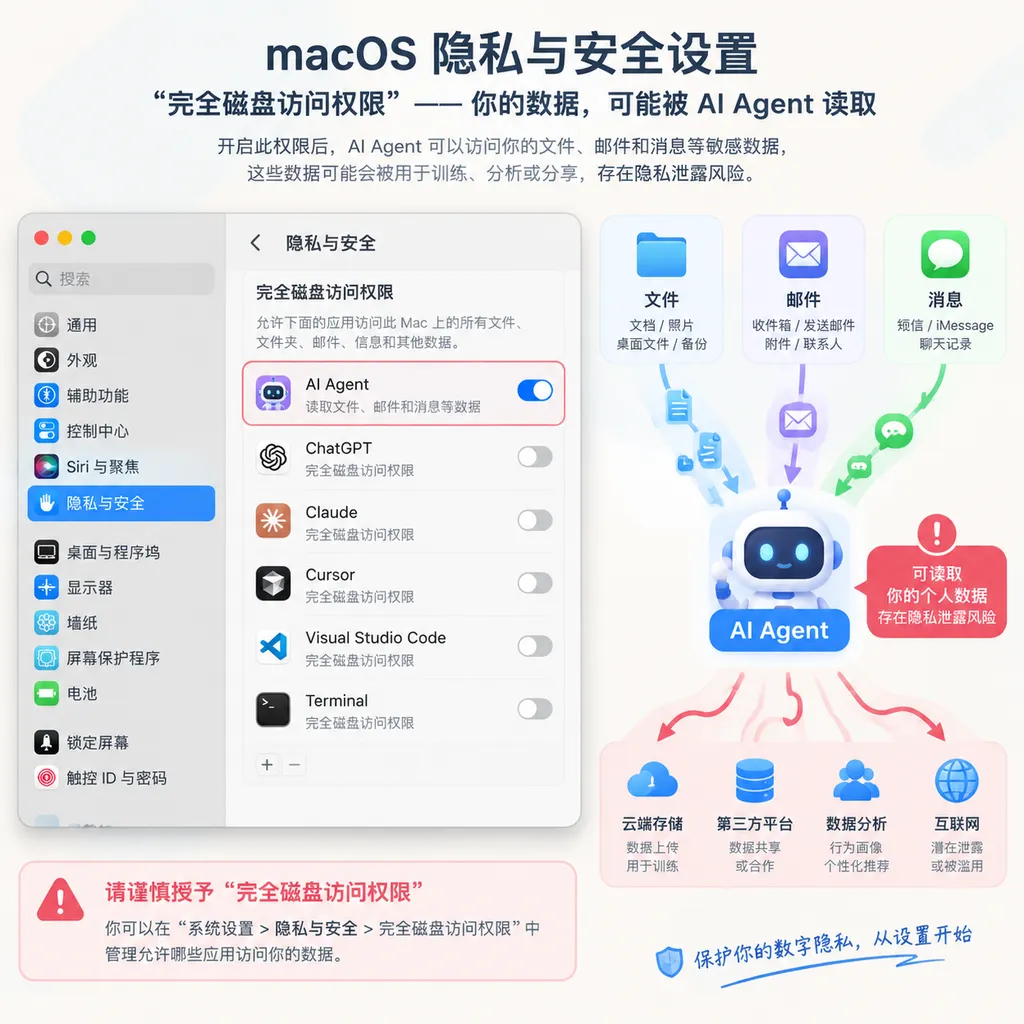
In the past, granting an application FDA primarily meant that "it can read protected files on the system." Now, granting the same permission to an agent capable of autonomous planning and execution means that, after understanding file contents, it may continue taking actions, including retrieving emails, reading messages, calling other applications, organizing data, and even sending sensitive information to remote services. The permission itself has not changed, but the entity using it has become more proactive and less predictable.
FDA Was Originally Intended for Backup Software
Apple emphasized in its announcement that "Full Disk Access" was originally intended primarily to support backup software. macOS's privacy protections restrict applications from accessing other applications' data directories, users' personal files, and certain system-level data, while complete backups typically need to cross these boundaries.
As a result, FDA is significantly more powerful than ordinary "Files and Folders" authorization. Once a user grants the permission, an application can, to a considerable extent, bypass the system's normal controls over protected data. The scope of access may include:
- User files and data managed by other applications;
- Email content and attachments in Mail;
- Message histories in Messages;
- Browsing history and other data saved by browsers such as Safari;
- Time Machine backup contents;
- Some user- and system-managed settings.
This does not mean that the application automatically gains root privileges on macOS, nor does it mean that it can bypass every system security boundary. But from a user-privacy perspective, FDA is already one of the application-level permissions on macOS that deserves the greatest caution. For ordinary tools, it is difficult for users to determine accurately at the time of authorization what the application will read, when it will read it, and whether it will upload the data afterward.
Apple specifically noted this time that some developers are using the permission in ways that could endanger user safety. More troublingly, when an application involves communications content, the risk does not belong solely to the person who installed the application. Users' emails and chat histories may also contain the personal information of colleagues, customers, family members, or other contacts.
AI Agents Turn "Can Read" into "Can Act"
Traditional software generally operates according to fixed logic. Backup tools scan files, compress data, and write it to backup media; search tools build indexes; antivirus software checks files. They may of course abuse their permissions, but their behavioral boundaries are usually easier to describe through product functionality and code paths.
The problem with AI agents is that they do not execute a single fixed instruction. They break goals into tasks, read context, choose tools, and then decide what to do next based on the results. They are more like operators that can understand the desktop environment than simple API callers.
For example, if a user says, "Find all materials related to Project X from last month and organize them into a summary," an agent with desktop-operation capabilities might need to:
- Scan local files and download directories;
- Read emails and chat histories to determine which content is related to the project;
- Open documents or spreadsheets and extract information;
- Call a model to summarize the content;
- Create a new file and perhaps even send the result to a designated contact.
If it has only "Files and Folders" permission, the scope of impact can still be controlled locally. But if it also has FDA, access to email data, and automated-operation capabilities, a single authorization may allow it to reach a substantial portion of the user's digital life.
The risks do not come only from malicious behavior by the agent itself. Prompt injection, malicious documents, and hidden instructions on web pages can all cause an agent to deviate from the user's original intent. A task that appears to involve merely "summarizing meeting materials" could, because the materials contain embedded attack instructions, prompt the agent to search local credentials, read communications, or upload files.
The core change is this: traditional permission models focus on "what an application can access," while the AI era must additionally consider "what an application will do on the user's behalf." Once file-reading permissions are combined with autonomous action capabilities, the risk is no longer merely a static access-control issue. It becomes a dynamic problem of decision-making and execution.
Apple's Direction Is to Raise the Confirmation Cost
Apple has not yet disclosed the specific form of the new mechanism, nor has it clearly stated when the change will launch, whether it will apply only to macOS 27, or whether it will cover applications that have already obtained FDA. The principle Apple has provided is relatively clear: users who genuinely want to grant this level of permission must complete the authorization through very explicit actions and understand the relevant consequences beforehand.
This means the authorization process may change in several ways:
- Stronger risk warnings that clearly list the content an application can access;
- More deliberate user actions to reduce the possibility of accidental or coerced authorization;
- Additional confirmation when the permission is requested for the first time, re-enabled, or when the application changes;
- More granular authorization policies for different types of applications;
- Status checks or reconfirmation mechanisms for applications that already have the permission.
These are reasonable inferences based on the direction of Apple's announcement, not product details confirmed by Apple. At this stage, no specific interface change should be treated as official release information.
Apple's challenge is also very real: if the permission is restricted too tightly, backup, endpoint security, enterprise management, and data migration tools may not work properly; if Apple continues using the old authorization model, an AI agent could gain data and operational capabilities far beyond the user's understanding through a single, relatively broad authorization.
Apple is therefore not trying to prohibit users from giving FDA to AI applications. Rather, it is trying to turn authorization from "flip a switch in Settings" into an explicit, informed security decision by the user. The distinction may seem small, but it will directly affect the conversion rates and product design of AI applications.
For AI Application Developers, the Trouble Is Just Beginning
The easiest mistake when building a desktop agent on macOS is to treat system permissions as part of the product's capabilities: the more data the agent can obtain, the smarter it will be; the more applications it can control, the more complete the automation will be.
The signal Apple is sending this time is that future designs may find it increasingly difficult to rely on broad system authorization. Developers need to reconsider the boundaries of an agent's capabilities and distinguish between "the data required to complete a task" and "the data it can theoretically access."
More robust implementation approaches include:
- Requesting access to specific folders or data sources wherever possible instead of directly requesting FDA;
- Splitting reading, analysis, writing, and sending operations into separate confirmation stages;
- Providing itemized explanations for access to email, messages, and browsing history;
- Using local processing or minimizing uploads by default to reduce the chances of sensitive data leaving the device;
- Requiring user confirmation for irreversible operations such as sending external messages, deleting files, or changing system settings;
- Maintaining auditable operation logs so users know what the agent has viewed, changed, and sent;
- Treating model output as untrusted input and avoiding direct execution of instructions found in web pages, documents, or emails as user commands.
Enterprise developers must also consider device management and centralized policies. Organizations can use mobile device management and privacy preference policies to control some system permissions, but enterprise approval does not mean that individual employees understand an agent's actual behavior. An application approved by IT can still cause unauthorized access if its model calls, plugin system, or data flows have not been adequately audited.
From this perspective, Apple's adjustment may affect product managers and security teams more than ordinary users. In the future, "supporting Mac" will no longer mean merely adapting menus, windows, and keyboard shortcuts. It will also require answering a more specific question: after the user grants authorization, can this agent turn the local computer into a data source that it can explore and act on autonomously?
This Is Not a Problem Unique to Apple
Microsoft, Google, and various desktop AI products are facing similar contradictions. For an agent to be genuinely useful, it must see more context; but the more context it sees, the more likely it is to encounter passwords, contracts, financial records, customer data, and private communications.
If every task requires users to select files one by one, the agent becomes a less efficient search box. If the agent is allowed to read the user's entire home directory at once, the product experience may be smooth, but security responsibility will quickly become concentrated in the application developer and model service provider.
Existing permission models are often organized by device resources: files, camera, microphone, contacts, and location. The risks posed by AI agents, however, frequently cross these categories. An agent may first find a file in an email, then access a web page through a browser, and finally call Contacts to send the result externally. Each step may have legitimate permission when considered individually, but together they form a complete data-exfiltration chain.
Therefore, the value of Apple's announcement lies not in whether a settings page gains another confirmation button, but in its acknowledgment of a fact: security boundaries for agents cannot be defined solely through traditional application permissions. The system must also understand an application's degree of autonomy, data flows, and operational consequences, and give users a sufficiently clear understanding of these factors.
For Users, Do Not Rush to Give Agents Full Disk Access
Before Apple announces the specific mechanism, users do not need to reject desktop automation entirely simply because it involves the words "AI agent." But they should treat FDA as a high-risk permission.
Users can first check which applications currently have Full Disk Access in System Settings and remove entries they no longer use or whose purpose they cannot explain. For newly installed AI tools, if they immediately request access to the entire disk while their functionality is limited to chat, writing, or code completion, that is generally not a good sign.
A more reasonable way to evaluate the request is to determine whether the application genuinely needs to read data across applications. Backup tools, endpoint security software, and enterprise management tools may have clear reasons; a tool that only processes files the user actively drags into it generally should not require full-disk access by default.
It is also important to note that disabling the permission cannot reclaim data the application has already read or uploaded. For AI tools that have previously obtained high-level permissions, users should also check the application's cloud history, upload records, and logged-in devices, rather than merely switching off the permission in macOS Settings.
Apple Is Taking the First Step
Apple has not announced a ban on AI agents using FDA, nor has it provided a specific mandatory isolation mechanism. This indicates that, for now, it prefers to reduce the risk of mistaken authorization by raising the authorization threshold and strengthening informed consent.
But more prominent pop-ups alone will be insufficient to solve the entire problem. Users may know that an application "can access files, emails, and messages," yet still be unable to determine when the agent will access them, whether the model will retain the content, whether plugins will send the results to third parties, or whether a single prompt injection can change its behavior.
A permission system truly suited to agents may ultimately need to evolve from "an application has a particular permission" to "an application has limited permission for a particular task, period of time, type of data, and kind of operation." This means temporary authorization, granular scopes, revocable sessions, operation previews, and comprehensive auditing may all become foundational infrastructure for desktop AI.
For Apple, tightening FDA is a pragmatic but incomplete move. At least it brings the issue to the system level: as AI software increasingly resembles a digital employee capable of using a computer on the user's behalf, giving it a key that can open nearly every drawer clearly can no longer be treated as ordinary application authorization.
What is worth watching next is not only which buttons macOS 27 ultimately adds, but also whether Apple will introduce more granular permission categories for agents and require developers to clearly disclose data-reading, model-processing, and external-transfer pathways. For teams building desktop AI, designing around least privilege and auditable operations today may be more realistic than waiting for a system update and attempting to fix the problem afterward.
Sources
- ITHome: Apple Tightens Full Disk Access Permissions in macOS 27 and Later to Reduce the Risk of AI Agent Control: Coverage of the permission-adjustment notice published by Apple's developer website on October 2, as well as the scope of FDA access to files, email, messages, and browsing history.
This article was compiled based on Apple's developer announcement and public reporting. Apple has not yet disclosed the specific form, launch date, or full scope of the new controls. All descriptions of possible changes in this article are analysis based on the direction of the announcement.