
Google launches A2UI 0.9: AI Agents can finally design interfaces
Google released the A2UI 0.9 standard, allowing AI Agents to generate interactive interfaces through JSON descriptions. It addresses the dynamic and security issues of Agent UIs and supports mainstream frameworks such as React and Flutter.
Google Launches A2UI 0.9: AI Agents Can Finally “Draw” Interfaces
Yesterday (April 18), Google released A2UI 0.9 — a generative UI standard designed specifically for AI Agents. In simple terms, it allows AI to go beyond text output and directly draw interactive interfaces. Everything from forms and buttons to data visualization components can now be described in structured JSON and rendered by the frontend.
The significance here: previously, AI Agents could only output plain text, or developers had to manually write lots of UI code to adapt the Agent’s output. With a unified standard, Agents and frontends now share a “common language,” resulting in much higher development efficiency.
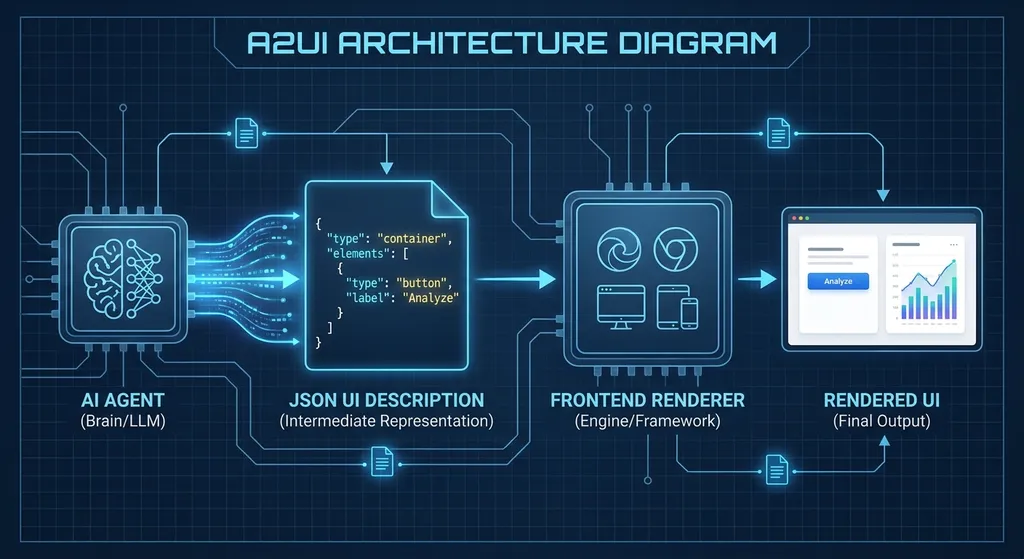
Declarative UI: Agents Say “What They Want,” Not “How to Do It”
The core idea of A2UI is declarative design. The Agent doesn’t need to handle the render logic—it only needs to describe, via JSON, something like “I need a form with two input boxes and a submit button.” The frontend renderer then generates the corresponding UI components.
This design has two major benefits:
-
Security: The Agent produces data structures, not executable code. The frontend renderer can strictly validate and sandbox them to prevent XSS or code injection risks. This is particularly important for enterprise applications—you definitely don’t want an Agent injecting arbitrary JavaScript into your page.
-
Cross-framework compatibility: The same JSON description can be rendered in React, Flutter, or Angular. Google has released an official React renderer and updated the Flutter, Lit, and Angular adapters. For multi-platform applications, this means a single Agent logic can run across web, mobile, and desktop.
For example, if an Agent wants to generate a flight search result card, its A2UI JSON might look like this:
{
  "type": "card",
  "children": [
    {
      "type": "text",
      "content": "CA1234 Beijing → Shanghai",
      "style": "heading"
    },
    {
      "type": "row",
      "children": [
        {"type": "text", "content": "Departure: 08:30"},
        {"type": "text", "content": "Arrival: 11:00"}
      ]
    },
    {
      "type": "button",
      "label": "Book",
      "action": "book_flight",
      "params": {"flight_id": "CA1234"}
    }
  ]
}
The frontend renderer takes this JSON and renders it as a card component. When the user clicks the “Book” button, the book_flight action is triggered, and the Agent continues processing. The entire flow requires zero UI code on the Agent side.
What’s New in Version 0.9
A2UI had internal test builds last year, but 0.9 is the first publicly released stable version. The main updates include:
1. Shared Web Core Library and Official React Renderer
Google provides a standard web core library (@a2ui/core) encapsulating JSON parsing, component mapping, event handling, etc. The React renderer (@a2ui/react) is the official reference implementation—ready to use out of the box.
Developers can integrate it with minimal setup:
npm install @a2ui/core @a2ui/react
Then use it in React like this:
import { A2UIRenderer } from '@a2ui/react';

function AgentChat() {
  const [uiSpec, setUiSpec] = useState(null);

  // JSON returned by the Agent
  useEffect(() => {
    fetchAgentResponse().then(data => setUiSpec(data.ui));
  }, []);

  return <A2UIRenderer spec={uiSpec} onAction={handleAction} />;
}
2. Agent SDK: Python First
Google has also released an Agent SDK, currently supporting Python (via pip). The SDK provides convenient methods for generating A2UI JSON, so Agent developers don’t have to write JSON manually:
from a2ui import Card, Text, Button

card = Card([
    Text("CA1234 Beijing → Shanghai", style="heading"),
    Button("Book", action="book_flight", params={"flight_id": "CA1234"})
])

ui_json = card.to_json()
Google says Go and Kotlin SDKs will follow, covering more backend stacks.
3. Client-side Custom Functions
A2UI 0.9 allows the frontend to register custom functions that Agents can reference in their UI descriptions. For example, if the frontend registers a formatCurrency function, the Agent can use it like this:
{
  "type": "text",
  "content": {"function": "formatCurrency", "args": [12345.67]}
}
When rendering, the frontend executes formatCurrency(12345.67) and returns ¥12,345.67. This lets Agents reuse frontend logic instead of duplicating formatting and calculation code in the backend.
4. Client–Server Data Synchronization
This is a practical feature. If the Agent-generated UI includes forms or editable components, A2UI can automatically sync user changes back to the Agent. The Agent can then dynamically update the UI in real time—forming a continuous interactive loop.
For example, if the user selects “Economy Class” on a form, the Agent can immediately recalculate the price and update the displayed amount—no need to submit or refresh.
5. Improved Error Handling
In older builds, if the Agent generated invalid JSON, the frontend renderer might crash or show a blank page. In version 0.9, error handling is greatly improved:
- Shows friendly error prompts on JSON validation failure instead of a white screen
- Supports partial rendering: even if one component fails, others still display
- Provides detailed error logs for easier debugging
The Ecosystem Is Already Moving
According to Google, the A2UI ecosystem is expanding quickly, with several integration projects now available:
- AG2: the upgraded version of Microsoft’s open-source AutoGen framework supporting multi-Agent collaboration. AG2 now natively supports A2UI, enabling Agents to generate UI components directly.
- A2A 1.0: the Agent-to-Agent communication protocol allowing different Agents to exchange UI descriptions—for instance, one Agent handles data queries while another generates visualization charts.
- json-render: a lightweight JSON-driven UI rendering library that now supports the A2UI format.
These integrations show that A2UI isn’t just a Google-only standard but is moving toward an open ecosystem. Developers will be able to switch between frameworks and UI libraries freely, without vendor lock-in.
How It Compares to Existing Solutions
Generative UI isn’t a new concept. Other approaches have tackled similar problems:
- Vercel’s AI SDK UI: built for the Next.js ecosystem, allowing Agents to generate UI through React Server Components—but it’s tightly coupled with React.
- LangChain + Streamlit: Agents written in Python using Streamlit for quick UI builds—simpler but less flexible for complex scenarios.
- Custom JSON Schemas: many teams define their own JSON formats for UI, but they’re all different—hard to reuse, inconsistent tooling, and no standard renderer.
A2UI’s advantages are:
- Cross-framework: not tied to any specific frontend technology
- Standardized: clear specs and reference implementations
- Secure: sandboxed and permission-aware by design
- Complete toolchain: SDKs, renderers, logging, and debugging tools included
Of course, A2UI isn’t perfect. The 0.9 component library is still basic, covering only common forms, cards, and lists. Complex visualizations (e.g., custom charts) and rich text editors still require custom extensions. Google says it plans to expand the component library and open it up for community contributions.
What This Means for Developers
If you’re developing AI-Agent-based products, A2UI is worth watching. Here are a few common use cases:
1. Internal Enterprise Tools
Many companies use Agents for internal data queries, report generation, or ticket processing. Previously these Agents could only output text or static tables—poor UX. With A2UI, Agents can generate interactive tables with filters, sorting, and pagination, and even embed action buttons (e.g., “Approve,” “Reject”).
2. Customer Support & Sales Assistants
A support Agent can dynamically generate FAQ cards, product lists, or order details pages. A sales Agent can generate quotations, contract previews, and guided signing flows. All these UIs are generated in real time instead of being pre-programmed.
3. Developer Tools
AI-assisted coding is on the rise. A2UI can enable Agents to generate things like code diff previews, test result panels, and performance charts. Users can click “Apply Change” or “View Details” directly within the UI instead of copying long text outputs.
4. Multimodal Interaction
A2UI supports not only conventional click and input actions but also leaves room for voice and gesture interaction extensions. In the future, Agents might dynamically adjust layouts via voice commands or generate 3D interfaces in AR/VR environments.
Want to Try It?
Google has open-sourced the A2UI core libraries and renderers on GitHub (google/a2ui). Documentation is still in progress, but the basic Quick Start and API Reference are already available.
If your Agent backend uses the OpenAI-style API (e.g., via OpenAI Hub calling various models), you can integrate A2UI like this:
import openai
from a2ui import Card, Text, Button

# Configure OpenAI Hub
openai.api_base = "https://api.openai-hub.net/v1"
openai.api_key = "your-openai-hub-key"

def generate_ui_with_agent(user_query):
    # Call model to generate a response
    response = openai.ChatCompletion.create(
        model="gpt-4",
        messages=[
            {"role": "system", "content": "You are a flight search assistant; return results in A2UI format"},
            {"role": "user", "content":


